Given here two methods to know that How to URLs Redirect in PrestaShop. First method is through editing htaccess file and other through using module. For more details, visit us: http://www.fmemodules.com/en/82-url-redirects.html
Hey, what’s up?
I’mAlastair Brian,
www.fmemodules.com
Today I am going to discuss that how
you can redirect URLs in
PrestaShop by editing htacess file
or by using module?
3.
www.fmemodules.com
What is URLRedirection?
According to Wikipedia
URL Redirections is“ World
Wide Web technique for making
a web page available under more
than one URL address”.
4.
www.fmemodules.com
Why to doURL Redirections?
If your website has broken URLs
or 404 errors, then it is
necessary for you to divert the
traffic and search engine from
these URLs to any other page of
your website.
HOW TO:
www.fmemodules.com
Redirect URLsin PrestaShop?
Editing the htaccess file is
somehow difficult for merchants,
however dev. can get benefit from
this Guide.
9.
HOW TO:
www.fmemodules.com
Redirect URLsin PrestaShop?
For those who are not dev. can
simply install a URL redirects
Module that enables the
merchants to redirect URLs to
any other CMS page using type
301, 302 or 303.
Step 2
www.fmemodules.com
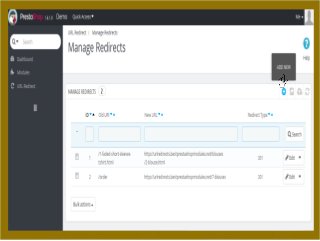
• Goto URL Redirect and click
manage redirects. From the
opened page you can search and
view redirected URLs with new
and old links. Click add new
button to connect URLs.
16.
www.fmemodules.com
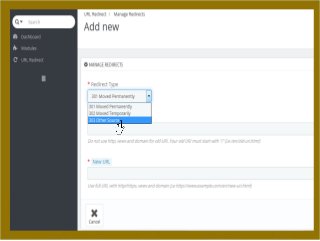
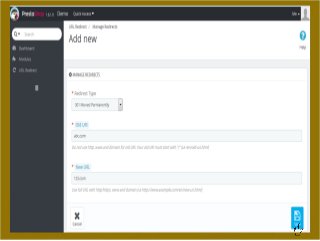
• From theOpened page,
choose redirect type 301,
302 or 303 accordingly from
drop-down list.
Step 3:
18.
www.fmemodules.com
Step 4:
• Nowinsert old URL in Old URL
field section and new URL in New
URL field section to create
redirections and save it. Do it as
given with the box instruction.
ALL IS DONE
Thank You
FOR EVENMORE
PRESENTATIONS,
EXCLUSIVE TIPS AND
UPDATES, THEN BE SURE
TO VISIT OUR OFFICIAL
WEBSITE AT
http://www.fmemodules.com/
www.fmemodules.com