Never miss your favorite
Twitch stream using Courier
Proprietary and confidential 2021
Presentation Name
2
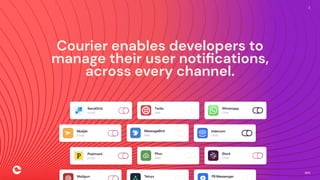
Courier enables developers to
manage their user notifications,
across every channel.
Proprietary and confidential 2021
Presentation Name
3
The Courier approach
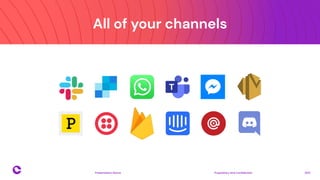
All of your channels
Proprietary and confidential 2021
Presentation Name
4
Proprietary and confidential 2021
Presentation Name
5
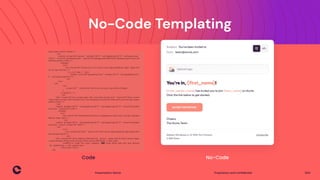
No-Code Templating
No-Code
Code
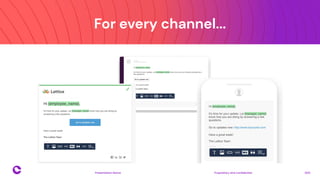
For every channel...
Proprietary and confidential 2021
Presentation Name
6
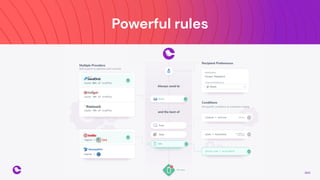
Powerful rules
Proprietary and confidential 2021
Presentation Name
7
Proprietary and confidential 2021
Presentation Name
8
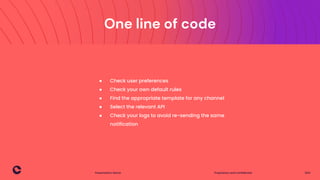
One line of code
● Check user preferences
● Check your own default rules
● Find the appropriate template for any channel
● Select the relevant API
● Check your logs to avoid re-sending the same
notification
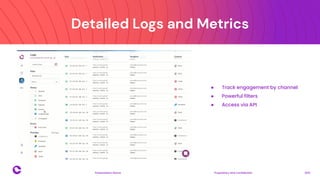
Detailed Logs and Metrics
Proprietary and confidential 2021
Presentation Name
9
● Track engagement by channel
● Powerful filters
● Access via API
Proprietary and confidential 2021
Presentation Name
10
Sending notifications
based on Twitch Events
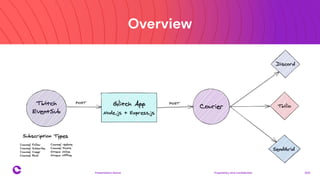
Overview
Proprietary and confidential 2021
Presentation Name
11
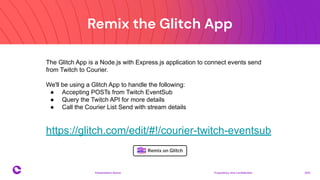
Remix the Glitch App
Proprietary and confidential 2021
Presentation Name
12
https://glitch.com/edit/#!/courier-twitch-eventsub
The Glitch App is a Node.js with Express.js application to connect events send
from Twitch to Courier.
We'll be using a Glitch App to handle the following:
● Accepting POSTs from Twitch EventSub
● Query the Twitch API for more details
● Call the Courier List Send with stream details
Twitch Application
Proprietary and confidential 2021
Presentation Name
13
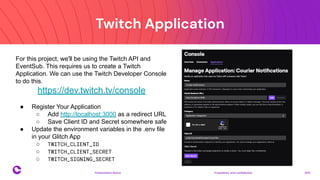
For this project, we'll be using the Twitch API and
EventSub. This requires us to create a Twitch
Application. We can use the Twitch Developer Console
to do this.
https://dev.twitch.tv/console
● Register Your Application
○ Add http://localhost:3000 as a redirect URL
○ Save Client ID and Secret somewhere safe
● Update the environment variables in the .env file
in your Glitch App
○ TWITCH_CLIENT_ID
○ TWITCH_CLIENT_SECRET
○ TWITCH_SIGNING_SECRET
Sign up for Courier
Proprietary and confidential 2021
Presentation Name
14
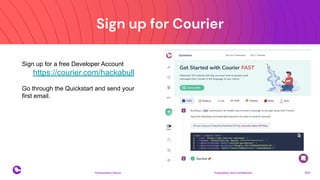
Sign up for a free Developer Account
https://courier.com/hackabull
Go through the Quickstart and send your
first email.
Setup Discord
Proprietary and confidential 2021
Presentation Name
15
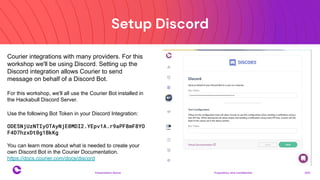
Courier integrations with many providers. For this
workshop we'll be using Discord. Setting up the
Discord integration allows Courier to send
message on behalf of a Discord Bot.
For this workshop, we'll all use the Courier Bot installed in
the Hackabull Discord Server.
Use the following Bot Token in your Discord Integration:
ODE5NjUzNTIyOTAyNjE0MDI2.YEpv1A.r9aPF8mF8YO
F4D7hzxDt0g1BkKg
You can learn more about what is needed to create your
own Discord Bot in the Courier Documentation.
https://docs.courier.com/docs/discord
Create a Courier Notification
Proprietary and confidential 2021
Presentation Name
16
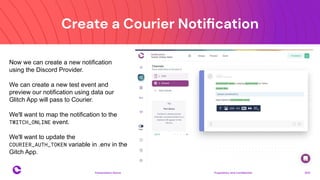
Now we can create a new notification
using the Discord Provider.
We can create a new test event and
preview our notification using data our
Glitch App will pass to Courier.
We'll want to map the notification to the
TWITCH_ONLINE event.
We'll want to update the
COURIER_AUTH_TOKEN variable in .env in the
Gitch App.
Setup your List
Proprietary and confidential 2021
Presentation Name
17
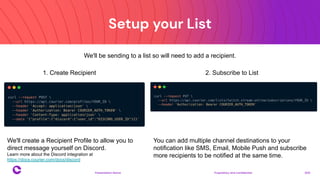
1. Create Recipient 2. Subscribe to List
We'll create a Recipient Profile to allow you to
direct message yourself on Discord.
Learn more about the Discord integration at
https://docs.courier.com/docs/discord
You can add multiple channel destinations to your
notification like SMS, Email, Mobile Push and subscribe
more recipients to be notified at the same time.
We'll be sending to a list so will need to add a recipient.
Test using Twitch CLI
Proprietary and confidential 2021
Presentation Name
18
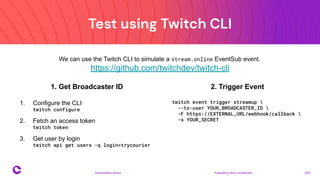
We can use the Twitch CLI to simulate a stream.online EventSub event.
https://github.com/twitchdev/twitch-cli
1. Get Broadcaster ID
1. Configure the CLI
twitch configure
2. Fetch an access token
twitch token
3. Get user by login
twitch api get users -q login=trycourier
2. Trigger Event
twitch event trigger streamup 
--to-user YOUR_BROADCASTER_ID 
-F https://EXTERNAL_URL/webhook/callback 
-s YOUR_SECRET
Create the EventSub subscription
Proprietary and confidential 2021
Presentation Name
19
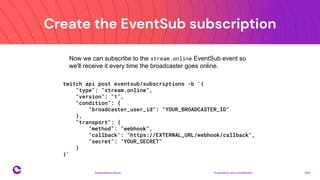
Now we can subscribe to the stream.online EventSub event so
we'll receive it every time the broadcaster goes online.
twitch api post eventsub/subscriptions -b '{
"type": "stream.online",
"version": "1",
"condition": {
"broadcaster_user_id": "YOUR_BROADCASTER_ID"
},
"transport": {
"method": "webhook",
"callback": "https://EXTERNAL_URL/webhook/callback",
"secret": "YOUR_SECRET"
}
}'
Resources
Proprietary and confidential 2021
Presentation Name
20
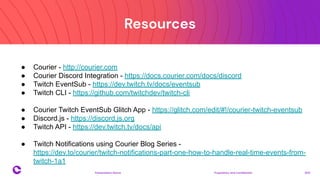
● Courier - http://courier.com
● Courier Discord Integration - https://docs.courier.com/docs/discord
● Twitch EventSub - https://dev.twitch.tv/docs/eventsub
● Twitch CLI - https://github.com/twitchdev/twitch-cli
● Courier Twitch EventSub Glitch App - https://glitch.com/edit/#!/courier-twitch-eventsub
● Discord.js - https://discord.js.org
● Twitch API - https://dev.twitch.tv/docs/api
● Twitch Notifications using Courier Blog Series -
https://dev.to/courier/twitch-notifications-part-one-how-to-handle-real-time-events-from-
twitch-1a1
Proprietary and confidential 2021
Presentation Name
21
Thank you
Slide Title
Proprietary and confidential 2021
Presentation Name
22
26
Proprietary and confidential 2021
Presentation Name
27
Proprietary and confidential 2021
Presentation Name
28
Proprietary and confidential 2021
Presentation Name
29
Proprietary and confidential 2021
Presentation Name
30
Proprietary and confidential 2021
Presentation Name
31

How To Send Twitch Notifications Using Courier

  • 1.
    Never miss yourfavorite Twitch stream using Courier
  • 2.
    Proprietary and confidential2021 Presentation Name 2 Courier enables developers to manage their user notifications, across every channel.
  • 3.
    Proprietary and confidential2021 Presentation Name 3 The Courier approach
  • 4.
    All of yourchannels Proprietary and confidential 2021 Presentation Name 4
  • 5.
    Proprietary and confidential2021 Presentation Name 5 No-Code Templating No-Code Code
  • 6.
    For every channel... Proprietaryand confidential 2021 Presentation Name 6
  • 7.
    Powerful rules Proprietary andconfidential 2021 Presentation Name 7
  • 8.
    Proprietary and confidential2021 Presentation Name 8 One line of code ● Check user preferences ● Check your own default rules ● Find the appropriate template for any channel ● Select the relevant API ● Check your logs to avoid re-sending the same notification
  • 9.
    Detailed Logs andMetrics Proprietary and confidential 2021 Presentation Name 9 ● Track engagement by channel ● Powerful filters ● Access via API
  • 10.
    Proprietary and confidential2021 Presentation Name 10 Sending notifications based on Twitch Events
  • 11.
    Overview Proprietary and confidential2021 Presentation Name 11
  • 12.
    Remix the GlitchApp Proprietary and confidential 2021 Presentation Name 12 https://glitch.com/edit/#!/courier-twitch-eventsub The Glitch App is a Node.js with Express.js application to connect events send from Twitch to Courier. We'll be using a Glitch App to handle the following: ● Accepting POSTs from Twitch EventSub ● Query the Twitch API for more details ● Call the Courier List Send with stream details
  • 13.
    Twitch Application Proprietary andconfidential 2021 Presentation Name 13 For this project, we'll be using the Twitch API and EventSub. This requires us to create a Twitch Application. We can use the Twitch Developer Console to do this. https://dev.twitch.tv/console ● Register Your Application ○ Add http://localhost:3000 as a redirect URL ○ Save Client ID and Secret somewhere safe ● Update the environment variables in the .env file in your Glitch App ○ TWITCH_CLIENT_ID ○ TWITCH_CLIENT_SECRET ○ TWITCH_SIGNING_SECRET
  • 14.
    Sign up forCourier Proprietary and confidential 2021 Presentation Name 14 Sign up for a free Developer Account https://courier.com/hackabull Go through the Quickstart and send your first email.
  • 15.
    Setup Discord Proprietary andconfidential 2021 Presentation Name 15 Courier integrations with many providers. For this workshop we'll be using Discord. Setting up the Discord integration allows Courier to send message on behalf of a Discord Bot. For this workshop, we'll all use the Courier Bot installed in the Hackabull Discord Server. Use the following Bot Token in your Discord Integration: ODE5NjUzNTIyOTAyNjE0MDI2.YEpv1A.r9aPF8mF8YO F4D7hzxDt0g1BkKg You can learn more about what is needed to create your own Discord Bot in the Courier Documentation. https://docs.courier.com/docs/discord
  • 16.
    Create a CourierNotification Proprietary and confidential 2021 Presentation Name 16 Now we can create a new notification using the Discord Provider. We can create a new test event and preview our notification using data our Glitch App will pass to Courier. We'll want to map the notification to the TWITCH_ONLINE event. We'll want to update the COURIER_AUTH_TOKEN variable in .env in the Gitch App.
  • 17.
    Setup your List Proprietaryand confidential 2021 Presentation Name 17 1. Create Recipient 2. Subscribe to List We'll create a Recipient Profile to allow you to direct message yourself on Discord. Learn more about the Discord integration at https://docs.courier.com/docs/discord You can add multiple channel destinations to your notification like SMS, Email, Mobile Push and subscribe more recipients to be notified at the same time. We'll be sending to a list so will need to add a recipient.
  • 18.
    Test using TwitchCLI Proprietary and confidential 2021 Presentation Name 18 We can use the Twitch CLI to simulate a stream.online EventSub event. https://github.com/twitchdev/twitch-cli 1. Get Broadcaster ID 1. Configure the CLI twitch configure 2. Fetch an access token twitch token 3. Get user by login twitch api get users -q login=trycourier 2. Trigger Event twitch event trigger streamup --to-user YOUR_BROADCASTER_ID -F https://EXTERNAL_URL/webhook/callback -s YOUR_SECRET
  • 19.
    Create the EventSubsubscription Proprietary and confidential 2021 Presentation Name 19 Now we can subscribe to the stream.online EventSub event so we'll receive it every time the broadcaster goes online. twitch api post eventsub/subscriptions -b '{ "type": "stream.online", "version": "1", "condition": { "broadcaster_user_id": "YOUR_BROADCASTER_ID" }, "transport": { "method": "webhook", "callback": "https://EXTERNAL_URL/webhook/callback", "secret": "YOUR_SECRET" } }'
  • 20.
    Resources Proprietary and confidential2021 Presentation Name 20 ● Courier - http://courier.com ● Courier Discord Integration - https://docs.courier.com/docs/discord ● Twitch EventSub - https://dev.twitch.tv/docs/eventsub ● Twitch CLI - https://github.com/twitchdev/twitch-cli ● Courier Twitch EventSub Glitch App - https://glitch.com/edit/#!/courier-twitch-eventsub ● Discord.js - https://discord.js.org ● Twitch API - https://dev.twitch.tv/docs/api ● Twitch Notifications using Courier Blog Series - https://dev.to/courier/twitch-notifications-part-one-how-to-handle-real-time-events-from- twitch-1a1
  • 21.
    Proprietary and confidential2021 Presentation Name 21 Thank you
  • 22.
    Slide Title Proprietary andconfidential 2021 Presentation Name 22
  • 26.
  • 27.
    Proprietary and confidential2021 Presentation Name 27
  • 28.
    Proprietary and confidential2021 Presentation Name 28
  • 29.
    Proprietary and confidential2021 Presentation Name 29
  • 30.
    Proprietary and confidential2021 Presentation Name 30
  • 31.
    Proprietary and confidential2021 Presentation Name 31