Teaching programming –
what’s in a teacher’s toolkit?
Sue Sentance
Raspberry Pi Foundation
16th September 2018
@suesentance
Short version of this talk
My passion is about finding out how to get better at teaching
programming to novices, particularly children
There are lots of reasons why we don’t always do it well
There are some underlying principles that can help, drawing on
both research and decades of other peoples’ experiences
Even if you don’t teach programming, hopefully this will help
you reflect on how you teach yourself …
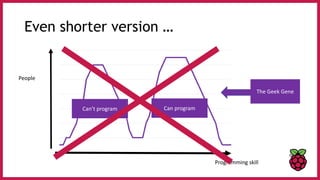
Even shorter version …
Programming skill
People
Can’t program Can program
The Geek Gene
Question:
How did you learn to program?
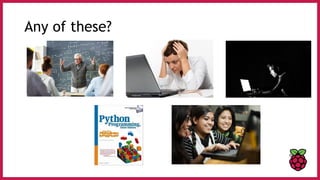
Any of these?
Why programming can be difficult
?
1.You need a mental model of how the computer works when your program executes. If this
is not right you can have ALL sorts of problems. Difficult for teachers to detect this.
“The computer is magic/is not logical” is one extreme of a mental model.
Why programming can be difficult
?
2.There are (at least) three levels of abstraction when programming – the problem to be
solved, how that translates into “code-speak” , and then the “coding”. Switching between
them is not always explicit.
Why programming can be difficult
?
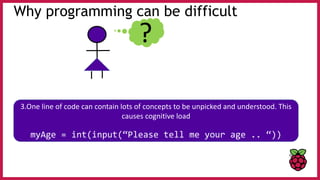
3.One line of code can contain lots of concepts to be unpicked and understood. This
causes cognitive load
myAge = int(input(“Please tell me your age .. “))
Why programming can be difficult
?
4.We start writing programs before we are able to read any code and understand (or trace)
it. We ask students to copy code when they have no idea how it might work.
Why programming can be difficult
?
5.Programs don’t work first time. To cope with this you need confidence to try again,
emotional resilience, and some belief in yourself that it is worth keeping going.
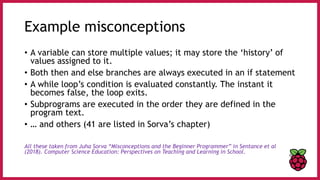
Example misconceptions
• A variable can store multiple values; it may store the ‘history’ of
values assigned to it.
• Both then and else branches are always executed in an if statement
• A while loop’s condition is evaluated constantly. The instant it
becomes false, the loop exits.
• Subprograms are executed in the order they are defined in the
program text.
• … and others (41 are listed in Sorva’s chapter)
All these taken from Juha Sorva “Misconceptions and the Beginner Programmer” in Sentance et al
(2018). Computer Science Education: Perspectives on Teaching and Learning in School.
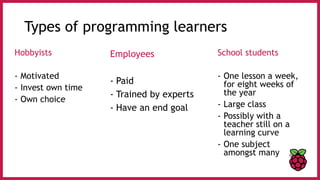
Types of programming learners
Hobbyists
- Motivated
- Invest own time
- Own choice
School students
- One lesson a week,
for eight weeks of
the year
- Large class
- Possibly with a
teacher still on a
learning curve
- One subject
amongst many
Employees
- Paid
- Trained by experts
- Have an end goal
In the national curriculum (not in Wales!)
7-11: use sequence, selection,
and repetition in programs; work
with variables and various forms
of input and output
11-14: use 2 or more programming languages, at
least one of which is textual… make appropriate use
of data structures [e.g. lists, tables or arrays]. Design
and develop modular programs that use procedures
or functions.
Photo removed Photo removed
Some myths
1. Programming is only for geeks, or the child version of geek in
school
2. Programming is only for you if you are good at Maths
3. If you build the right tool to support programming it will all
be OK
Teachers are key …
Every teacher already has a toolkit of strategies
for teaching anything
What particular ones can help with programming?
The teacher’s toolkit
• Pair programming
• Use-modify-create
• PRIMM
• Peer instruction
• Worked examples
• Parson’s problems
• …. and more ….
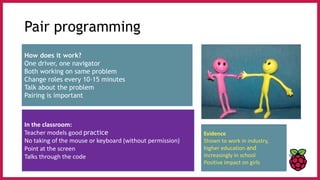
Pair programming
How does it work?
One driver, one navigator
Both working on same problem
Change roles every 10-15 minutes
Talk about the problem
Pairing is important
In the classroom:
Teacher models good practice
No taking of the mouse or keyboard (without permission)
Point at the screen
Talks through the code
Evidence
Shown to work in industry,
higher education and
increasingly in school
Positive impact on girls
The teacher’s toolkit
• Pair programming
• Use-modify-create
• PRIMM
• Peer instruction
• Worked examples (plus with sub-goals)
• Parson’s Problems
• …. and more ….
Use-modify-create
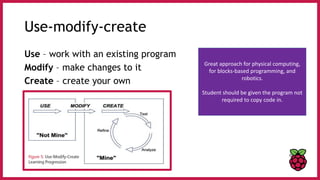
Use – work with an existing program
Modify – make changes to it
Create – create your own
Great approach for physical computing,
for blocks-based programming, and
robotics.
Student should be given the program not
required to copy code in.
The teacher’s toolkit
• Pair programming
• Use-modify-create
• PRIMM
• Peer instruction
• Worked examples (plus with sub-goals)
• Parson’s Problems
• …. and more ….
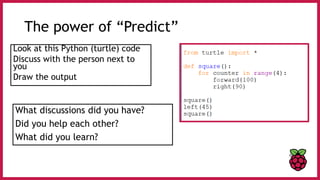
The power of “Predict”
Look at this Python (turtle) code
Discuss with the person next to
you
Draw the output
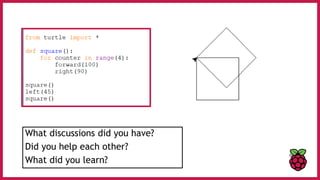
What discussions did you have?
Did you help each other?
What did you learn?
What discussions did you have?
Did you help each other?
What did you learn?
PRIMM
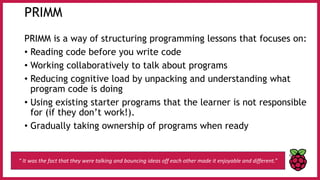
PRIMM is a way of structuring programming lessons that focuses on:
• Reading code before you write code
• Working collaboratively to talk about programs
• Reducing cognitive load by unpacking and understanding what
program code is doing
• Using existing starter programs that the learner is not responsible
for (if they don’t work!).
• Gradually taking ownership of programs when ready
“ It was the fact that they were talking and bouncing ideas off each other made it enjoyable and different.”
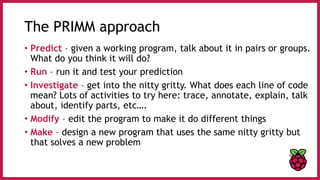
The PRIMM approach
• Predict – given a working program, talk about it in pairs or groups.
What do you think it will do?
• Run – run it and test your prediction
• Investigate – get into the nitty gritty. What does each line of code
mean? Lots of activities to try here: trace, annotate, explain, talk
about, identify parts, etc….
• Modify – edit the program to make it do different things
• Make – design a new program that uses the same nitty gritty but
that solves a new problem
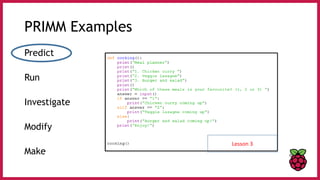
PRIMM Examples
Predict
Run
Investigate
Modify
Make
Lesson 3
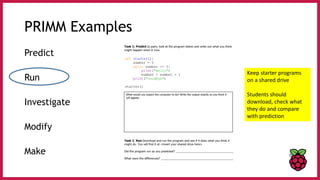
PRIMM Examples
Predict
Run
Investigate
Modify
Make
Keep starter programs
on a shared drive
Students should
download, check what
they do and compare
with prediction
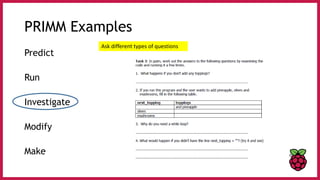
PRIMM Examples
Predict
Run
Investigate
Modify
Make
Ask different types of questions
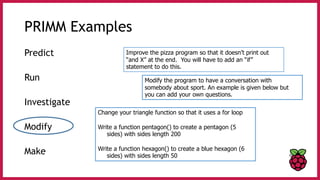
PRIMM Examples
Predict
Run
Investigate
Modify
Make
Improve the pizza program so that it doesn’t print out
“and X” at the end. You will have to add an “if”
statement to do this.
Modify the program to have a conversation with
somebody about sport. An example is given below but
you can add your own questions.
Change your triangle function so that it uses a for loop
Write a function pentagon() to create a pentagon (5
sides) with sides length 200
Write a function hexagon() to create a blue hexagon (6
sides) with sides length 50
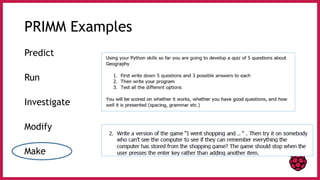
PRIMM Examples
Predict
Run
Investigate
Modify
Make
The teacher’s toolkit
• Pair programming
• Use-modify-create
• PRIMM
• Peer instruction
• Worked examples (plus with sub-goals)
• Parson’s Problems
• …. and more ….
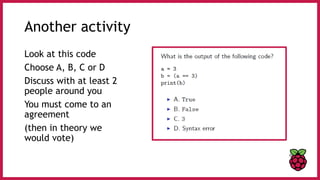
Another activity
Look at this code
Choose A, B, C or D
Discuss with at least 2
people around you
You must come to an
agreement
(then in theory we
would vote)
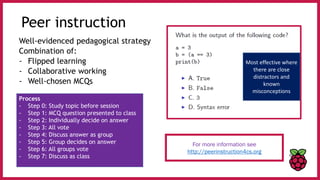
Peer instruction
Well-evidenced pedagogical strategy
Combination of:
- Flipped learning
- Collaborative working
- Well-chosen MCQs
For more information see
http://peerinstruction4cs.org
Process
- Step 0: Study topic before session
- Step 1: MCQ question presented to class
- Step 2: Individually decide on answer
- Step 3: All vote
- Step 4: Discuss answer as group
- Step 5: Group decides on answer
- Step 6: All groups vote
- Step 7: Discuss as class
Most effective where
there are close
distractors and
known
misconceptions
The teacher’s toolkit
• Pair programming
• Use-modify-create
• PRIMM
• Peer instruction
• Worked examples (plus with sub-goals)
• Parson’s Problems
• …. and more ….
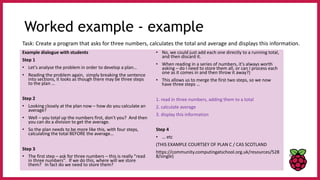
Worked examples
• A worked example is a problem where the teacher works
through the solution step by step
• Reduces cognitive load – breaking down of information
• A good example of cognitive apprenticeship – experts
supporting novices
• Tools exist for worked examples (but teachers are better!)
• A sophisticated version is called “sub-goal labelling” where the
individual steps are clearly labelled as goals.
Worked example - example
Example dialogue with students
Step 1
• Let's analyse the problem in order to develop a plan…
• Reading the problem again, simply breaking the sentence
into sections, it looks as though there may be three steps
to the plan …
Step 2
• Looking closely at the plan now – how do you calculate an
average?
• Well – you total up the numbers first, don't you? And then
you can do a division to get the average.
• So the plan needs to be more like this, with four steps,
calculating the total BEFORE the average…
Step 3
• The first step – ask for three numbers – this is really "read
in three numbers". If we do this, where will we store
them? In fact do we need to store them?
• No, we could just add each one directly to a running total,
and then discard it.
• When reading in a series of numbers, it's always worth
asking – do I need to store them all, or can I process each
one as it comes in and then throw it away?)
• This allows us to merge the first two steps, so we now
have three steps …
1. read in three numbers, adding them to a total
2. calculate average
3. display this information
Step 4
• … etc
(THIS EXAMPLE COURTSEY OF PLAN C / CAS SCOTLAND
https://community.computingatschool.org.uk/resources/528
8/single)
Task: Create a program that asks for three numbers, calculates the total and average and displays this information.
The teacher’s toolkit
• Pair programming
• Use-modify-create
• PRIMM
• Peer instruction
• Worked examples (plus with sub-goals)
• Parson’s Problems
• …. and more ….
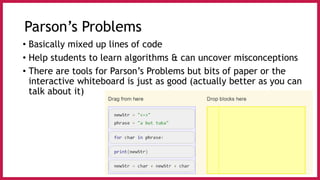
Parson’s Problems
• Basically mixed up lines of code
• Help students to learn algorithms & can uncover misconceptions
• There are tools for Parson’s Problems but bits of paper or the
interactive whiteboard is just as good (actually better as you can
talk about it)
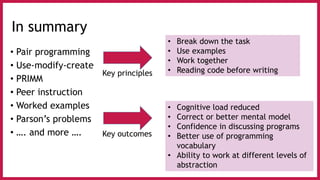
In summary
• Pair programming
• Use-modify-create
• PRIMM
• Peer instruction
• Worked examples
• Parson’s problems
• …. and more ….
Key principles
• Break down the task
• Use examples
• Work together
• Reading code before writing
Key outcomes
• Cognitive load reduced
• Correct or better mental model
• Confidence in discussing programs
• Better use of programming
vocabulary
• Ability to work at different levels of
abstraction
Final word …
• Whatever subject we are teaching we have a toolkit of strategies
to help us that we accumulate through experience and from trying
things out in the classroom.
• Wonderful tools are being developed to help learners learn
programming, and great resources.
• These can be part of a teacher’s toolkit too but the key to our
students learning programming lies in the teacher
Any questions?
@suesentance
sue@raspberrypi.org
Join CAS

Teacher toolkit Pycon UK Sept 2018

  • 1.
    Teaching programming – what’sin a teacher’s toolkit? Sue Sentance Raspberry Pi Foundation 16th September 2018 @suesentance
  • 2.
    Short version ofthis talk My passion is about finding out how to get better at teaching programming to novices, particularly children There are lots of reasons why we don’t always do it well There are some underlying principles that can help, drawing on both research and decades of other peoples’ experiences Even if you don’t teach programming, hopefully this will help you reflect on how you teach yourself …
  • 3.
    Even shorter version… Programming skill People Can’t program Can program The Geek Gene
  • 4.
    Question: How did youlearn to program?
  • 5.
  • 6.
    Why programming canbe difficult ? 1.You need a mental model of how the computer works when your program executes. If this is not right you can have ALL sorts of problems. Difficult for teachers to detect this. “The computer is magic/is not logical” is one extreme of a mental model.
  • 7.
    Why programming canbe difficult ? 2.There are (at least) three levels of abstraction when programming – the problem to be solved, how that translates into “code-speak” , and then the “coding”. Switching between them is not always explicit.
  • 8.
    Why programming canbe difficult ? 3.One line of code can contain lots of concepts to be unpicked and understood. This causes cognitive load myAge = int(input(“Please tell me your age .. “))
  • 9.
    Why programming canbe difficult ? 4.We start writing programs before we are able to read any code and understand (or trace) it. We ask students to copy code when they have no idea how it might work.
  • 10.
    Why programming canbe difficult ? 5.Programs don’t work first time. To cope with this you need confidence to try again, emotional resilience, and some belief in yourself that it is worth keeping going.
  • 11.
    Example misconceptions • Avariable can store multiple values; it may store the ‘history’ of values assigned to it. • Both then and else branches are always executed in an if statement • A while loop’s condition is evaluated constantly. The instant it becomes false, the loop exits. • Subprograms are executed in the order they are defined in the program text. • … and others (41 are listed in Sorva’s chapter) All these taken from Juha Sorva “Misconceptions and the Beginner Programmer” in Sentance et al (2018). Computer Science Education: Perspectives on Teaching and Learning in School.
  • 12.
    Types of programminglearners Hobbyists - Motivated - Invest own time - Own choice School students - One lesson a week, for eight weeks of the year - Large class - Possibly with a teacher still on a learning curve - One subject amongst many Employees - Paid - Trained by experts - Have an end goal
  • 13.
    In the nationalcurriculum (not in Wales!) 7-11: use sequence, selection, and repetition in programs; work with variables and various forms of input and output 11-14: use 2 or more programming languages, at least one of which is textual… make appropriate use of data structures [e.g. lists, tables or arrays]. Design and develop modular programs that use procedures or functions. Photo removed Photo removed
  • 14.
    Some myths 1. Programmingis only for geeks, or the child version of geek in school 2. Programming is only for you if you are good at Maths 3. If you build the right tool to support programming it will all be OK Teachers are key … Every teacher already has a toolkit of strategies for teaching anything What particular ones can help with programming?
  • 15.
    The teacher’s toolkit •Pair programming • Use-modify-create • PRIMM • Peer instruction • Worked examples • Parson’s problems • …. and more ….
  • 16.
    Pair programming How doesit work? One driver, one navigator Both working on same problem Change roles every 10-15 minutes Talk about the problem Pairing is important In the classroom: Teacher models good practice No taking of the mouse or keyboard (without permission) Point at the screen Talks through the code Evidence Shown to work in industry, higher education and increasingly in school Positive impact on girls
  • 17.
    The teacher’s toolkit •Pair programming • Use-modify-create • PRIMM • Peer instruction • Worked examples (plus with sub-goals) • Parson’s Problems • …. and more ….
  • 18.
    Use-modify-create Use – workwith an existing program Modify – make changes to it Create – create your own Great approach for physical computing, for blocks-based programming, and robotics. Student should be given the program not required to copy code in.
  • 19.
    The teacher’s toolkit •Pair programming • Use-modify-create • PRIMM • Peer instruction • Worked examples (plus with sub-goals) • Parson’s Problems • …. and more ….
  • 20.
    The power of“Predict” Look at this Python (turtle) code Discuss with the person next to you Draw the output What discussions did you have? Did you help each other? What did you learn?
  • 21.
    What discussions didyou have? Did you help each other? What did you learn?
  • 22.
    PRIMM PRIMM is away of structuring programming lessons that focuses on: • Reading code before you write code • Working collaboratively to talk about programs • Reducing cognitive load by unpacking and understanding what program code is doing • Using existing starter programs that the learner is not responsible for (if they don’t work!). • Gradually taking ownership of programs when ready “ It was the fact that they were talking and bouncing ideas off each other made it enjoyable and different.”
  • 23.
    The PRIMM approach •Predict – given a working program, talk about it in pairs or groups. What do you think it will do? • Run – run it and test your prediction • Investigate – get into the nitty gritty. What does each line of code mean? Lots of activities to try here: trace, annotate, explain, talk about, identify parts, etc…. • Modify – edit the program to make it do different things • Make – design a new program that uses the same nitty gritty but that solves a new problem
  • 24.
  • 25.
    PRIMM Examples Predict Run Investigate Modify Make Keep starterprograms on a shared drive Students should download, check what they do and compare with prediction
  • 26.
  • 27.
    PRIMM Examples Predict Run Investigate Modify Make Improve thepizza program so that it doesn’t print out “and X” at the end. You will have to add an “if” statement to do this. Modify the program to have a conversation with somebody about sport. An example is given below but you can add your own questions. Change your triangle function so that it uses a for loop Write a function pentagon() to create a pentagon (5 sides) with sides length 200 Write a function hexagon() to create a blue hexagon (6 sides) with sides length 50
  • 28.
  • 29.
    The teacher’s toolkit •Pair programming • Use-modify-create • PRIMM • Peer instruction • Worked examples (plus with sub-goals) • Parson’s Problems • …. and more ….
  • 30.
    Another activity Look atthis code Choose A, B, C or D Discuss with at least 2 people around you You must come to an agreement (then in theory we would vote)
  • 31.
    Peer instruction Well-evidenced pedagogicalstrategy Combination of: - Flipped learning - Collaborative working - Well-chosen MCQs For more information see http://peerinstruction4cs.org Process - Step 0: Study topic before session - Step 1: MCQ question presented to class - Step 2: Individually decide on answer - Step 3: All vote - Step 4: Discuss answer as group - Step 5: Group decides on answer - Step 6: All groups vote - Step 7: Discuss as class Most effective where there are close distractors and known misconceptions
  • 32.
    The teacher’s toolkit •Pair programming • Use-modify-create • PRIMM • Peer instruction • Worked examples (plus with sub-goals) • Parson’s Problems • …. and more ….
  • 33.
    Worked examples • Aworked example is a problem where the teacher works through the solution step by step • Reduces cognitive load – breaking down of information • A good example of cognitive apprenticeship – experts supporting novices • Tools exist for worked examples (but teachers are better!) • A sophisticated version is called “sub-goal labelling” where the individual steps are clearly labelled as goals.
  • 34.
    Worked example -example Example dialogue with students Step 1 • Let's analyse the problem in order to develop a plan… • Reading the problem again, simply breaking the sentence into sections, it looks as though there may be three steps to the plan … Step 2 • Looking closely at the plan now – how do you calculate an average? • Well – you total up the numbers first, don't you? And then you can do a division to get the average. • So the plan needs to be more like this, with four steps, calculating the total BEFORE the average… Step 3 • The first step – ask for three numbers – this is really "read in three numbers". If we do this, where will we store them? In fact do we need to store them? • No, we could just add each one directly to a running total, and then discard it. • When reading in a series of numbers, it's always worth asking – do I need to store them all, or can I process each one as it comes in and then throw it away?) • This allows us to merge the first two steps, so we now have three steps … 1. read in three numbers, adding them to a total 2. calculate average 3. display this information Step 4 • … etc (THIS EXAMPLE COURTSEY OF PLAN C / CAS SCOTLAND https://community.computingatschool.org.uk/resources/528 8/single) Task: Create a program that asks for three numbers, calculates the total and average and displays this information.
  • 35.
    The teacher’s toolkit •Pair programming • Use-modify-create • PRIMM • Peer instruction • Worked examples (plus with sub-goals) • Parson’s Problems • …. and more ….
  • 36.
    Parson’s Problems • Basicallymixed up lines of code • Help students to learn algorithms & can uncover misconceptions • There are tools for Parson’s Problems but bits of paper or the interactive whiteboard is just as good (actually better as you can talk about it)
  • 37.
    In summary • Pairprogramming • Use-modify-create • PRIMM • Peer instruction • Worked examples • Parson’s problems • …. and more …. Key principles • Break down the task • Use examples • Work together • Reading code before writing Key outcomes • Cognitive load reduced • Correct or better mental model • Confidence in discussing programs • Better use of programming vocabulary • Ability to work at different levels of abstraction
  • 38.
    Final word … •Whatever subject we are teaching we have a toolkit of strategies to help us that we accumulate through experience and from trying things out in the classroom. • Wonderful tools are being developed to help learners learn programming, and great resources. • These can be part of a teacher’s toolkit too but the key to our students learning programming lies in the teacher Any questions? @suesentance sue@raspberrypi.org Join CAS