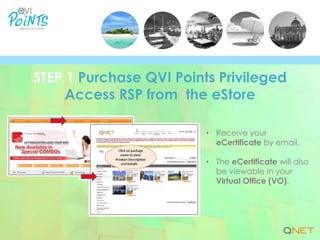


• Receive your
eCertificate by email.
• The eCertificate will also
be viewable in your
Virtual Office (VO).
STEP 1 Purchase QVI Points Privileged
Access RSP from the eStore
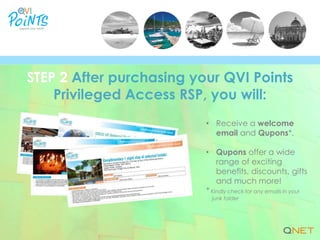
• Receive a welcome
email and Qupons*.
• Qupons offer a wide
range of exciting
benefits, discounts, gifts
and much more!
* Kindly check for any emails in your
junk folder
STEP 2 After purchasing your QVI Points
Privileged Access RSP, you will:
• Log in with your
Customer ID and
Password.
• Search for your
preferred holiday
destinations, cruises,
tours and activities.
• Book, redeem and get
instant confirmations!
STEP 3 Book your holiday at
www.qvipoints.com
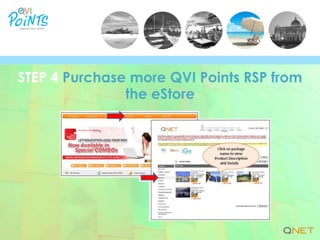
STEP 4 Purchase more QVI Points RSP from
the eStore
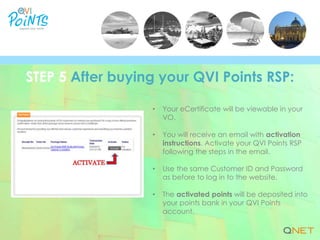
• Your eCertificate will be viewable in your
VO.
• You will receive an email with activation
instructions. Activate your QVI Points RSP
following the steps in the email.
• Use the same Customer ID and Password
as before to log in to the website.
• The activated points will be deposited into
your points bank in your QVI Points
account.
STEP 5 After buying your QVI Points RSP:
| www.qnet.net

QVI Points: A 5-Step User Guide

  • 2.
    • Receive your eCertificateby email. • The eCertificate will also be viewable in your Virtual Office (VO). STEP 1 Purchase QVI Points Privileged Access RSP from the eStore
  • 3.
    • Receive awelcome email and Qupons*. • Qupons offer a wide range of exciting benefits, discounts, gifts and much more! * Kindly check for any emails in your junk folder STEP 2 After purchasing your QVI Points Privileged Access RSP, you will:
  • 4.
    • Log inwith your Customer ID and Password. • Search for your preferred holiday destinations, cruises, tours and activities. • Book, redeem and get instant confirmations! STEP 3 Book your holiday at www.qvipoints.com
  • 5.
    STEP 4 Purchasemore QVI Points RSP from the eStore
  • 6.
    • Your eCertificatewill be viewable in your VO. • You will receive an email with activation instructions. Activate your QVI Points RSP following the steps in the email. • Use the same Customer ID and Password as before to log in to the website. • The activated points will be deposited into your points bank in your QVI Points account. STEP 5 After buying your QVI Points RSP:
  • 7.