Malte Timmermann –Head of Development OX Documents
January 2015
OX Document Converter Explained
From a technical point of view
2.
OX Document Converter
Features
2OX Document Converter Explained
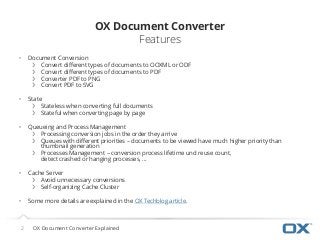
• Document Conversion
❯ Convert different types of documents to OOXML or ODF
❯ Convert different types of documents to PDF
❯ Converter PDF to PNG
❯ Convert PDF to SVG
• State
❯ Stateless when converting full documents
❯ Stateful when converting page by page
• Queueing and Process Management
❯ Processing conversion jobs in the order they arrive
❯ Queues with different priorities – documents to be viewed have much higher priority than
thumbnail generation
❯ Processes Management – conversion process lifetime und reuse count,
detect crashed or hanging processes, …
• Cache Server
❯ Avoid unnecessary conversions
❯ Self-organizing Cache Cluster
• Some more details are explained in the OX Techblog article.
3.
Architecture Overview
3 OXDocument Converter Explained
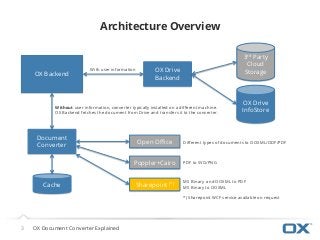
OX Backend
Document
Converter
Open Office
OX Drive
InfoStore
3rd Party
Cloud
StorageOX Drive
Backend
With user information
Without user information, converter typically installed on a different machine.
OX Backend fetches the document from Drive and transfers it to the converter.
Different types of documents to OOXML/ODF/PDF
Poppler+Cairo PDF to SVG/PNG
Sharepoint (*) MS Binary and OOXML to PDF
MS Binary to OOXML
*) Sharepoint WCF service available on request
Cache