Chapter 4
Introduction to PHP
Lectured by:
Nguyễn Hữu Hiếu
Trường Đại Học Bách Khoa TP.HCM
Khoa Khoa Học và Kỹ Thuật Máy Tính
© 2022
Lập Trình Web
2
PHP
n PHP is a server scripting language, and is a powerful tool
for making dynamic and interactive Web pages quickly
n PHP (recursive acronym for PHP: Hypertext Preprocessor)
n PHP is a widely-used, and free.
n PHP runs over different operating systems such as
Windows, Linux, Mac Os and Unix.
n PHP scripts are executed on the server, and the plain
HTML result is sent back to the browser.
Trường Đại Học Bách Khoa TP.HCM
Khoa Khoa Học và Kỹ Thuật Máy Tính
© 2022
Lập Trình Web
3
About the PHP Language
• Syntax is inspired by C
• Curly braces, semicolons, no signficant whitespace
• Syntax inspired by perl
• Dollar signs to start variable names, associative arrays
• Extends HTML to add segments of PHP within an HTML
file.
Trường Đại Học Bách Khoa TP.HCM
Khoa Khoa Học và Kỹ Thuật Máy Tính
© 2022
Lập Trình Web
4
What Can PHP Do?
n PHP can generate dynamic page content
n PHP can create, open, read, write, delete, and close files
on the server.
n PHP can collect form data.
n PHP can send and receive cookies.
n PHP can add, delete, modify data in your database.
n PHP can restrict users to access some pages on your
website.
n PHP can encrypt data.
Trường Đại Học Bách Khoa TP.HCM
Khoa Khoa Học và Kỹ Thuật Máy Tính
© 2022
Lập Trình Web
5
Introduction
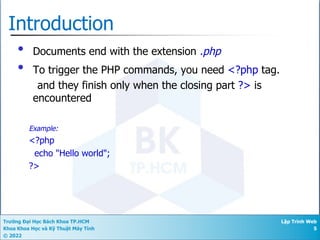
• Documents end with the extension .php
• To trigger the PHP commands, you need <?php tag.
and they finish only when the closing part ?> is
encountered
Example:
<?php
echo "Hello world";
?>
Trường Đại Học Bách Khoa TP.HCM
Khoa Khoa Học và Kỹ Thuật Máy Tính
© 2022
Lập Trình Web
6
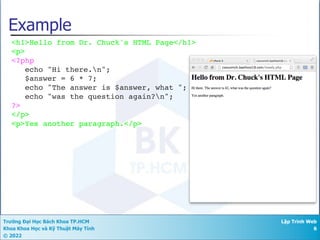
<h1>Hello from Dr. Chuck's HTML Page</h1>
<p>
<?php
echo "Hi there.n";
$answer = 6 * 7;
echo "The answer is $answer, what ";
echo "was the question again?n";
?>
</p>
<p>Yes another paragraph.</p>
Example
Trường Đại Học Bách Khoa TP.HCM
Khoa Khoa Học và Kỹ Thuật Máy Tính
© 2022
Lập Trình Web
7
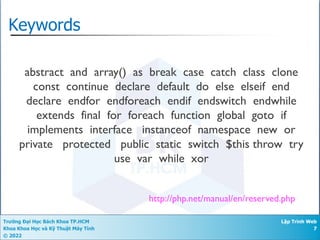
Keywords
http://php.net/manual/en/reserved.php
abstract and array() as break case catch class clone
const continue declare default do else elseif end
declare endfor endforeach endif endswitch endwhile
extends final for foreach function global goto if
implements interface instanceof namespace new or
private protected public static switch $this throw try
use var while xor
Trường Đại Học Bách Khoa TP.HCM
Khoa Khoa Học và Kỹ Thuật Máy Tính
© 2022
Lập Trình Web
8
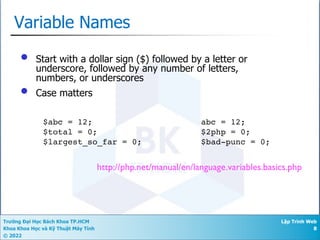
Variable Names
• Start with a dollar sign ($) followed by a letter or
underscore, followed by any number of letters,
numbers, or underscores
• Case matters
http://php.net/manual/en/language.variables.basics.php
$abc = 12;
$total = 0;
$largest_so_far = 0;
abc = 12;
$2php = 0;
$bad-punc = 0;
Trường Đại Học Bách Khoa TP.HCM
Khoa Khoa Học và Kỹ Thuật Máy Tính
© 2022
Lập Trình Web
9
Variable naming rules
• Variable names must start with a letter of the alphabet or
the _ (underscore) character.
• Variable names can contain only the characters a-z, A-Z,
0-9, and _ (underscore).
• Variable names may not contain spaces. If a variable
must comprise more than one word, the words should be
separated with the _ (underscore) character (e.g.,
$user_name).
• Variable names are case-sensitive. The variable
$High_Score is not the same as the variable $high_score.
Trường Đại Học Bách Khoa TP.HCM
Khoa Khoa Học và Kỹ Thuật Máy Tính
© 2022
Lập Trình Web
10
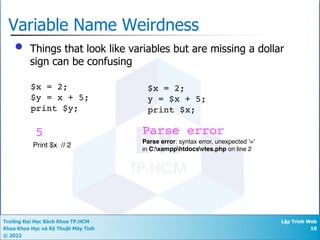
Variable Name Weirdness
• Things that look like variables but are missing a dollar
sign can be confusing
$x = 2;
$y = x + 5;
print $y;
$x = 2;
y = $x + 5;
print $x;
5 Parse error
Parse error: syntax error, unexpected '='
in C:xampphtdocsvtes.php on line 2
Print $x // 2
Trường Đại Học Bách Khoa TP.HCM
Khoa Khoa Học và Kỹ Thuật Máy Tính
© 2022
Lập Trình Web
11
Expressions
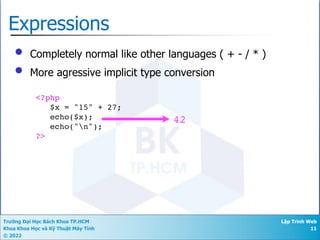
• Completely normal like other languages ( + - / * )
• More agressive implicit type conversion
<?php
$x = "15" + 27;
echo($x);
echo("n");
?>
42
Trường Đại Học Bách Khoa TP.HCM
Khoa Khoa Học và Kỹ Thuật Máy Tính
© 2022
Lập Trình Web
12
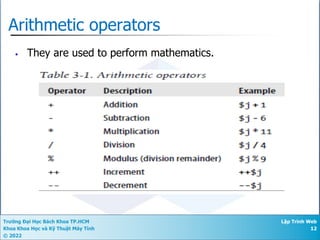
Arithmetic operators
• They are used to perform mathematics.
Trường Đại Học Bách Khoa TP.HCM
Khoa Khoa Học và Kỹ Thuật Máy Tính
© 2022
Lập Trình Web
13
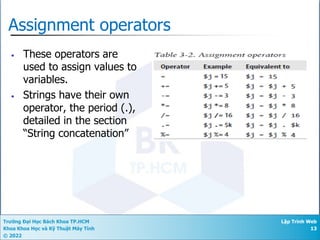
Assignment operators
• These operators are
used to assign values to
variables.
• Strings have their own
operator, the period (.),
detailed in the section
“String concatenation”
Trường Đại Học Bách Khoa TP.HCM
Khoa Khoa Học và Kỹ Thuật Máy Tính
© 2022
Lập Trình Web
14
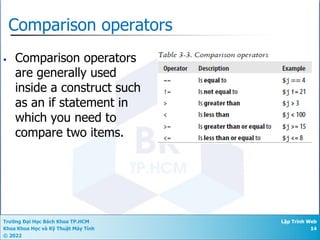
Comparison operators
• Comparison operators
are generally used
inside a construct such
as an if statement in
which you need to
compare two items.
Trường Đại Học Bách Khoa TP.HCM
Khoa Khoa Học và Kỹ Thuật Máy Tính
© 2022
Lập Trình Web
15
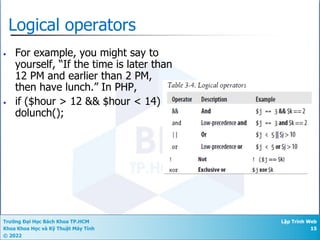
Logical operators
• For example, you might say to
yourself, “If the time is later than
12 PM and earlier than 2 PM,
then have lunch.” In PHP,
• if ($hour > 12 && $hour < 14)
dolunch();
Trường Đại Học Bách Khoa TP.HCM
Khoa Khoa Học và Kỹ Thuật Máy Tính
© 2022
Lập Trình Web
16
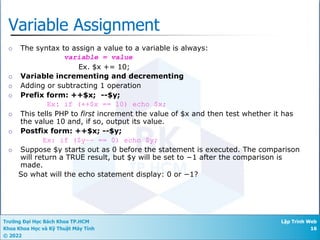
Variable Assignment
¡ The syntax to assign a value to a variable is always:
variable = value
Ex. $x += 10;
¡ Variable incrementing and decrementing
¡ Adding or subtracting 1 operation
¡ Prefix form: ++$x; --$y;
Ex: if (++$x == 10) echo $x;
¡ This tells PHP to first increment the value of $x and then test whether it has
the value 10 and, if so, output its value.
¡ Postfix form: ++$x; --$y;
Ex: if ($y−− == 0) echo $y;
¡ Suppose $y starts out as 0 before the statement is executed. The comparison
will return a TRUE result, but $y will be set to −1 after the comparison is
made.
So what will the echo statement display: 0 or −1?
Trường Đại Học Bách Khoa TP.HCM
Khoa Khoa Học và Kỹ Thuật Máy Tính
© 2022
Lập Trình Web
17
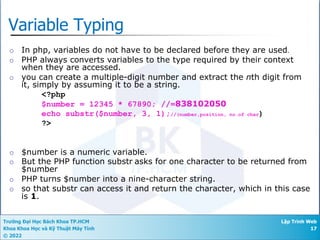
Variable Typing
¡ In php, variables do not have to be declared before they are used.
¡ PHP always converts variables to the type required by their context
when they are accessed.
¡ you can create a multiple-digit number and extract the nth digit from
it, simply by assuming it to be a string.
<?php
$number = 12345 * 67890; //=838102050
echo substr($number, 3, 1);//(number,position, no.of char)
?>
¡ $number is a numeric variable.
¡ But the PHP function substr asks for one character to be returned from
$number
¡ PHP turns $number into a nine-character string.
¡ so that substr can access it and return the character, which in this case
is 1.
Trường Đại Học Bách Khoa TP.HCM
Khoa Khoa Học và Kỹ Thuật Máy Tính
© 2022
Lập Trình Web
18
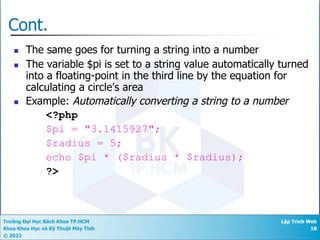
Cont.
n The same goes for turning a string into a number
n The variable $pi is set to a string value automatically turned
into a floating-point in the third line by the equation for
calculating a circle’s area
n Example: Automatically converting a string to a number
<?php
$pi = "3.1415927";
$radius = 5;
echo $pi * ($radius * $radius);
?>
Trường Đại Học Bách Khoa TP.HCM
Khoa Khoa Học và Kỹ Thuật Máy Tính
© 2022
Lập Trình Web
19
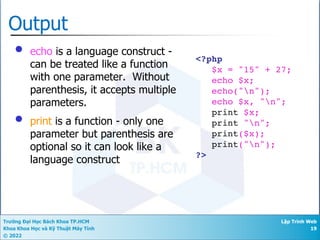
Output
• echo is a language construct -
can be treated like a function
with one parameter. Without
parenthesis, it accepts multiple
parameters.
• print is a function - only one
parameter but parenthesis are
optional so it can look like a
language construct
<?php
$x = "15" + 27;
echo $x;
echo("n");
echo $x, "n";
print $x;
print "n";
print($x);
print("n");
?>
Trường Đại Học Bách Khoa TP.HCM
Khoa Khoa Học và Kỹ Thuật Máy Tính
© 2022
Lập Trình Web
20
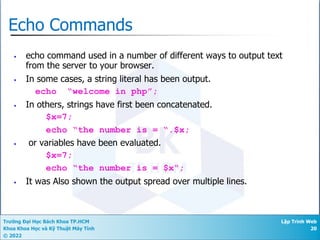
Echo Commands
• echo command used in a number of different ways to output text
from the server to your browser.
• In some cases, a string literal has been output.
echo “welcome in php”;
• In others, strings have first been concatenated.
$x=7;
echo “the number is = “.$x;
• or variables have been evaluated.
$x=7;
echo “the number is = $x“;
• It was Also shown the output spread over multiple lines.
Trường Đại Học Bách Khoa TP.HCM
Khoa Khoa Học và Kỹ Thuật Máy Tính
© 2022
Lập Trình Web
21
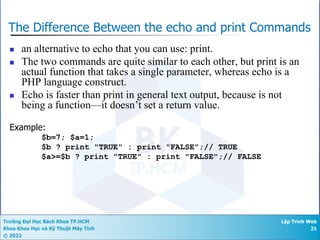
The Difference Between the echo and print Commands
n an alternative to echo that you can use: print.
n The two commands are quite similar to each other, but print is an
actual function that takes a single parameter, whereas echo is a
PHP language construct.
n Echo is faster than print in general text output, because is not
being a function—it doesn’t set a return value.
Example:
$b=7; $a=1;
$b ? print "TRUE" : print "FALSE";// TRUE
$a>=$b ? print "TRUE" : print "FALSE";// FALSE
Trường Đại Học Bách Khoa TP.HCM
Khoa Khoa Học và Kỹ Thuật Máy Tính
© 2022
Lập Trình Web
22
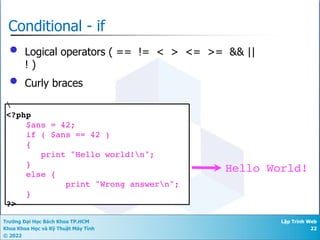
Conditional - if
• Logical operators ( == != < > <= >= && ||
! )
• Curly braces

<?php
$ans = 42;
if ( $ans == 42 )
{
print "Hello world!n";
}
else {
print "Wrong answern";
}
?>
Hello World!
Trường Đại Học Bách Khoa TP.HCM
Khoa Khoa Học và Kỹ Thuật Máy Tính
© 2022
Lập Trình Web
23
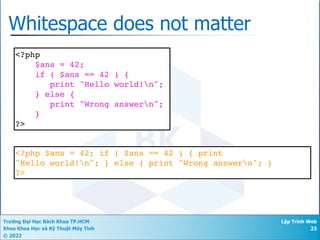
Whitespace does not matter
<?php
$ans = 42;
if ( $ans == 42 ) {
print "Hello world!n";
} else {
print "Wrong answern";
}
?>
<?php $ans = 42; if ( $ans == 42 ) { print
"Hello world!n"; } else { print "Wrong answern"; }
?>
Trường Đại Học Bách Khoa TP.HCM
Khoa Khoa Học và Kỹ Thuật Máy Tính
© 2022
Lập Trình Web
24
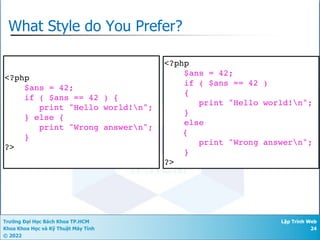
What Style do You Prefer?
<?php
$ans = 42;
if ( $ans == 42 )
{
print "Hello world!n";
}
else
{
print "Wrong answern";
}
?>
<?php
$ans = 42;
if ( $ans == 42 ) {
print "Hello world!n";
} else {
print "Wrong answern";
}
?>
Aesthetics
Trường Đại Học Bách Khoa TP.HCM
Khoa Khoa Học và Kỹ Thuật Máy Tính
© 2022
Lập Trình Web
25
Associative Arrays
• Like Python Dictonaries+Lists - but more powerful
• Can be key => value or simply indexed by numbers
• Ignore two-dimensional arrays for now...
Trường Đại Học Bách Khoa TP.HCM
Khoa Khoa Học và Kỹ Thuật Máy Tính
© 2022
Lập Trình Web
26
Integer Indices
<?php
$stuff = array("Hi", "There");
echo $stuff[1], "n";
?>
There
Trường Đại Học Bách Khoa TP.HCM
Khoa Khoa Học và Kỹ Thuật Máy Tính
© 2022
Lập Trình Web
27
Integer Indices
<?php
$stuff = array();
$stuff[] = "Hello";
$stuff[] = "World";
echo $stuff[1], "n";
?> World
Trường Đại Học Bách Khoa TP.HCM
Khoa Khoa Học và Kỹ Thuật Máy Tính
© 2022
Lập Trình Web
28
Integer Indices
<?php
$stuff = array();
$stuff[2] = "Hello";
$stuff[9] = "World";
echo $stuff[9], "n";
?> World
Trường Đại Học Bách Khoa TP.HCM
Khoa Khoa Học và Kỹ Thuật Máy Tính
© 2022
Lập Trình Web
29
Key / Value
<?php
$stuff = array("name" => "Chuck",
"course" => "SI664");
echo $stuff["course"], "n";
?>
SI664
Trường Đại Học Bách Khoa TP.HCM
Khoa Khoa Học và Kỹ Thuật Máy Tính
© 2022
Lập Trình Web
30
Dumping an Array
• The function print_r() dumps out PHP data - it is
used mostly for debugging
<?php
$stuff = array("name" => "Chuck",
"course" => "SI664");
print_r($stuff);
?>
Array
(
[name] => Chuck
[course] => SI664
)
Trường Đại Học Bách Khoa TP.HCM
Khoa Khoa Học và Kỹ Thuật Máy Tính
© 2022
Lập Trình Web
31
Dumping an Array
• The function print_r() dumps out PHP data - it is
used mostly for debugging
<?php
$stuff = array();
$stuff[2] = "Hello";
$stuff[9] = "World";
print_r($stuff);
?> Array
(
[2] => Hello
[9] => World
)
Trường Đại Học Bách Khoa TP.HCM
Khoa Khoa Học và Kỹ Thuật Máy Tính
© 2022
Lập Trình Web
32
var_dump .vs. print_r
<?php
$stuff = array("name" => "Chuck",
"course" => "SI664");
var_dump($stuff);
?>
array(2) {
["name"]=>
string(5) "Chuck"
["course"]=>
string(5) "SI664"
}
http://stackoverflow.com/questions/3406171/php-var-dump-vs-print-r
Trường Đại Học Bách Khoa TP.HCM
Khoa Khoa Học và Kỹ Thuật Máy Tính
© 2022
Lập Trình Web
33
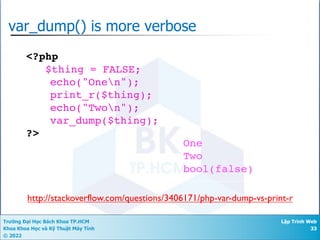
var_dump() is more verbose
<?php
$thing = FALSE;
echo("Onen");
print_r($thing);
echo("Twon");
var_dump($thing);
?>
One
Two
bool(false)
http://stackoverflow.com/questions/3406171/php-var-dump-vs-print-r
Trường Đại Học Bách Khoa TP.HCM
Khoa Khoa Học và Kỹ Thuật Máy Tính
© 2022
Lập Trình Web
34
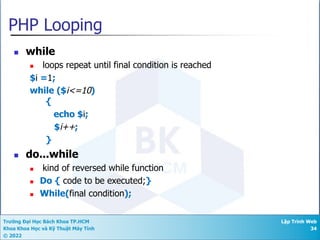
PHP Looping
n while
n loops repeat until final condition is reached
$i =1;
while ($i<=10)
{
echo $i;
$i++;
}
n do...while
n kind of reversed while function
n Do { code to be executed;}
n While(final condition);
Trường Đại Học Bách Khoa TP.HCM
Khoa Khoa Học và Kỹ Thuật Máy Tính
© 2022
Lập Trình Web
35
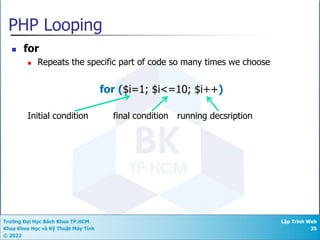
PHP Looping
n for
n Repeats the specific part of code so many times we choose
for ($i=1; $i<=10; $i++)
Initial condition final condition running decsription
Trường Đại Học Bách Khoa TP.HCM
Khoa Khoa Học và Kỹ Thuật Máy Tính
© 2022
Lập Trình Web
36
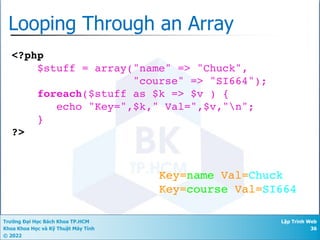
Looping Through an Array
<?php
$stuff = array("name" => "Chuck",
"course" => "SI664");
foreach($stuff as $k => $v ) {
echo "Key=",$k," Val=",$v,"n";
}
?>
Key=name Val=Chuck
Key=course Val=SI664
Trường Đại Học Bách Khoa TP.HCM
Khoa Khoa Học và Kỹ Thuật Máy Tính
© 2022
Lập Trình Web
37
Variable Name Weirdness
• Things that look like variables but are missing a
dollar sign as an array index are unpredictable....
$x = 5;
$y = array("x" => "Hello");
print $y[“x”];
Hello
$x = 5;
$y = array(
"x" => "Hello",
5 => "newwwww”
);
print $y[“5”];
newwwww
Trường Đại Học Bách Khoa TP.HCM
Khoa Khoa Học và Kỹ Thuật Máy Tính
© 2022
Lập Trình Web
38
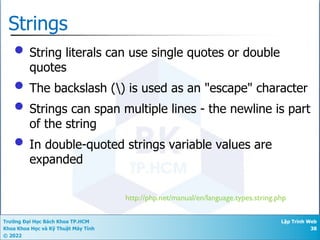
Strings
• String literals can use single quotes or double
quotes
• The backslash () is used as an "escape" character
• Strings can span multiple lines - the newline is part
of the string
• In double-quoted strings variable values are
expanded
http://php.net/manual/en/language.types.string.php
Trường Đại Học Bách Khoa TP.HCM
Khoa Khoa Học và Kỹ Thuật Máy Tính
© 2022
Lập Trình Web
39
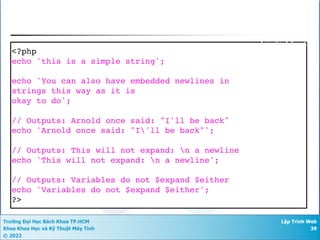
<?php
echo 'this is a simple string';
echo 'You can also have embedded newlines in
strings this way as it is
okay to do';
// Outputs: Arnold once said: "I'll be back"
echo 'Arnold once said: "I'll be back"';
// Outputs: This will not expand: n a newline
echo 'This will not expand: n a newline';
// Outputs: Variables do not $expand $either
echo 'Variables do not $expand $either';
?>
Single Quote
Trường Đại Học Bách Khoa TP.HCM
Khoa Khoa Học và Kỹ Thuật Máy Tính
© 2022
Lập Trình Web
40
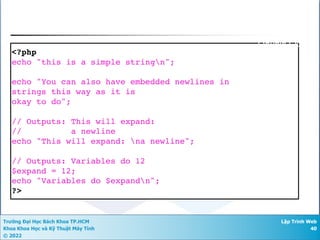
<?php
echo "this is a simple stringn";
echo "You can also have embedded newlines in
strings this way as it is
okay to do";
// Outputs: This will expand:
// a newline
echo "This will expand: na newline";
// Outputs: Variables do 12
$expand = 12;
echo "Variables do $expandn";
?>
Double Quote
Trường Đại Học Bách Khoa TP.HCM
Khoa Khoa Học và Kỹ Thuật Máy Tính
© 2022
Lập Trình Web
41
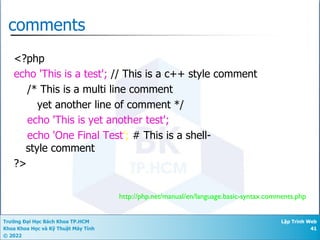
http://php.net/manual/en/language.basic-syntax.comments.php
comments
<?php
echo 'This is a test'; // This is a c++ style comment
/* This is a multi line comment
yet another line of comment */
echo 'This is yet another test';
echo 'One Final Test'; # This is a shell-
style comment
?>
Trường Đại Học Bách Khoa TP.HCM
Khoa Khoa Học và Kỹ Thuật Máy Tính
© 2022
Lập Trình Web
42
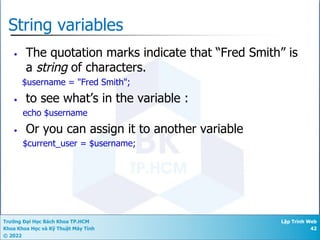
String variables
• The quotation marks indicate that “Fred Smith” is
a string of characters.
$username = "Fred Smith";
• to see what’s in the variable :
echo $username
• Or you can assign it to another variable
$current_user = $username;
Trường Đại Học Bách Khoa TP.HCM
Khoa Khoa Học và Kỹ Thuật Máy Tính
© 2022
Lập Trình Web
43
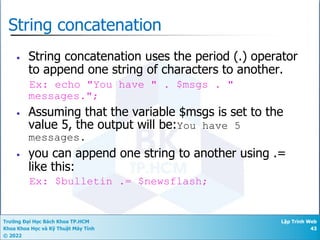
String concatenation
• String concatenation uses the period (.) operator
to append one string of characters to another.
Ex: echo "You have " . $msgs . "
messages.";
• Assuming that the variable $msgs is set to the
value 5, the output will be:You have 5
messages.
• you can append one string to another using .=
like this:
Ex: $bulletin .= $newsflash;
Trường Đại Học Bách Khoa TP.HCM
Khoa Khoa Học và Kỹ Thuật Máy Tính
© 2022
Lập Trình Web
44
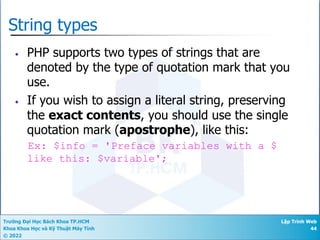
String types
• PHP supports two types of strings that are
denoted by the type of quotation mark that you
use.
• If you wish to assign a literal string, preserving
the exact contents, you should use the single
quotation mark (apostrophe), like this:
Ex: $info = 'Preface variables with a $
like this: $variable';
Trường Đại Học Bách Khoa TP.HCM
Khoa Khoa Học và Kỹ Thuật Máy Tính
© 2022
Lập Trình Web
45
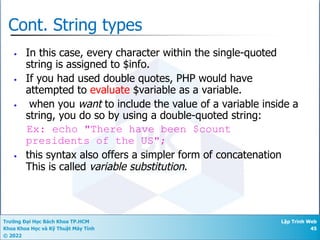
Cont. String types
• In this case, every character within the single-quoted
string is assigned to $info.
• If you had used double quotes, PHP would have
attempted to evaluate $variable as a variable.
• when you want to include the value of a variable inside a
string, you do so by using a double-quoted string:
Ex: echo "There have been $count
presidents of the US";
• this syntax also offers a simpler form of concatenation
This is called variable substitution.
Trường Đại Học Bách Khoa TP.HCM
Khoa Khoa Học và Kỹ Thuật Máy Tính
© 2022
Lập Trình Web
46
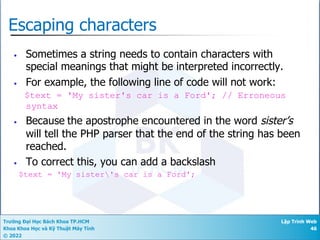
Escaping characters
• Sometimes a string needs to contain characters with
special meanings that might be interpreted incorrectly.
• For example, the following line of code will not work:
$text = 'My sister's car is a Ford'; // Erroneous
syntax
• Because the apostrophe encountered in the word sister’s
will tell the PHP parser that the end of the string has been
reached.
• To correct this, you can add a backslash
$text = 'My sister's car is a Ford';
Trường Đại Học Bách Khoa TP.HCM
Khoa Khoa Học và Kỹ Thuật Máy Tính
© 2022
Lập Trình Web
47
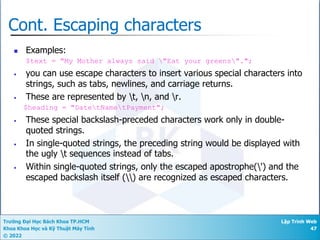
Cont. Escaping characters
n Examples:
$text = "My Mother always said "Eat your greens".";
• you can use escape characters to insert various special characters into
strings, such as tabs, newlines, and carriage returns.
• These are represented by t, n, and r.
$heading = "DatetNametPayment";
• These special backslash-preceded characters work only in double-
quoted strings.
• In single-quoted strings, the preceding string would be displayed with
the ugly t sequences instead of tabs.
• Within single-quoted strings, only the escaped apostrophe(') and the
escaped backslash itself () are recognized as escaped characters.
Trường Đại Học Bách Khoa TP.HCM
Khoa Khoa Học và Kỹ Thuật Máy Tính
© 2022
Lập Trình Web
48
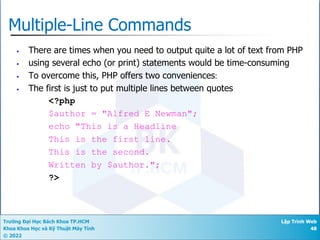
Multiple-Line Commands
• There are times when you need to output quite a lot of text from PHP
• using several echo (or print) statements would be time-consuming
• To overcome this, PHP offers two conveniences:
• The first is just to put multiple lines between quotes
<?php
$author = "Alfred E Newman";
echo "This is a Headline
This is the first line.
This is the second.
Written by $author.";
?>
Trường Đại Học Bách Khoa TP.HCM
Khoa Khoa Học và Kỹ Thuật Máy Tính
© 2022
Lập Trình Web
49
Cont.
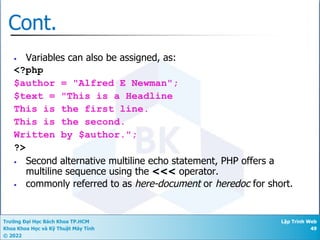
• Variables can also be assigned, as:
<?php
$author = "Alfred E Newman";
$text = "This is a Headline
This is the first line.
This is the second.
Written by $author.";
?>
• Second alternative multiline echo statement, PHP offers a
multiline sequence using the <<< operator.
• commonly referred to as here-document or heredoc for short.
Trường Đại Học Bách Khoa TP.HCM
Khoa Khoa Học và Kỹ Thuật Máy Tính
© 2022
Lập Trình Web
50
Cont.
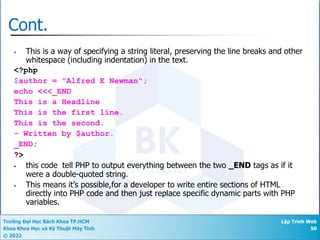
• This is a way of specifying a string literal, preserving the line breaks and other
whitespace (including indentation) in the text.
<?php
$author = "Alfred E Newman";
echo <<<_END
This is a Headline
This is the first line.
This is the second.
- Written by $author.
_END;
?>
• this code tell PHP to output everything between the two _END tags as if it
were a double-quoted string.
• This means it’s possible,for a developer to write entire sections of HTML
directly into PHP code and then just replace specific dynamic parts with PHP
variables.
Trường Đại Học Bách Khoa TP.HCM
Khoa Khoa Học và Kỹ Thuật Máy Tính
© 2022
Lập Trình Web
51
Cont. _END
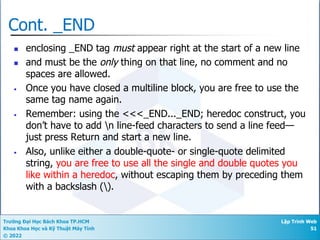
n enclosing _END tag must appear right at the start of a new line
n and must be the only thing on that line, no comment and no
spaces are allowed.
• Once you have closed a multiline block, you are free to use the
same tag name again.
• Remember: using the <<<_END..._END; heredoc construct, you
don’t have to add n line-feed characters to send a line feed—
just press Return and start a new line.
• Also, unlike either a double-quote- or single-quote delimited
string, you are free to use all the single and double quotes you
like within a heredoc, without escaping them by preceding them
with a backslash ().
Trường Đại Học Bách Khoa TP.HCM
Khoa Khoa Học và Kỹ Thuật Máy Tính
© 2022
Lập Trình Web
52
Cont.
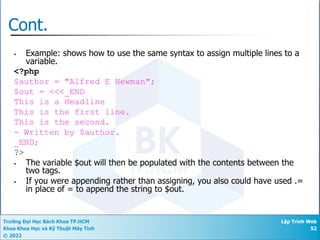
• Example: shows how to use the same syntax to assign multiple lines to a
variable.
<?php
$author = "Alfred E Newman";
$out = <<<_END
This is a Headline
This is the first line.
This is the second.
- Written by $author.
_END;
?>
• The variable $out will then be populated with the contents between the
two tags.
• If you were appending rather than assigning, you also could have used .=
in place of = to append the string to $out.
Trường Đại Học Bách Khoa TP.HCM
Khoa Khoa Học và Kỹ Thuật Máy Tính
© 2022
Lập Trình Web
53
PHP Functions
n All function starts with function($parameter)
n Requirements for naming functions are same as these for
variables
n The { mark opens the function code, while } mark
closes it
n It can have either defined or no parameter
n More than 700 built-in functions available
Trường Đại Học Bách Khoa TP.HCM
Khoa Khoa Học và Kỹ Thuật Máy Tính
© 2022
Lập Trình Web
54
PHP Forms and User Input
n Used to gain information from users by means of HTML
n Information is worked up by PHP
<html>
<body>
<form action="welcome.php" method="post">
Name: <input type="text" name="name" />
Age: <input type="text" name="age" />
<input type="submit" />
</form>
</body>
</html>
Trường Đại Học Bách Khoa TP.HCM
Khoa Khoa Học và Kỹ Thuật Máy Tính
© 2022
Lập Trình Web
55
The $_GET Variable
n Used to collect values from a form
n Displays variable names and values are in the URL
n http://www.w3schools.com/welcome.php?name=jo&age=39
n Can send limited amount of information (max. 100
characters)
<html>
<body>
Welcome <?php echo $_GET["name"]; ?> <br />
You are <?php echo $_GET["age"]; ?> years old
</body>
</html>
Trường Đại Học Bách Khoa TP.HCM
Khoa Khoa Học và Kỹ Thuật Máy Tính
© 2022
Lập Trình Web
56
The $_POST variable
n Used to collect values from a form
n Information from a form is invisible
n http://www.w3schools.com/welcome.php
n No limits on the amount of information to be send
<html>
<body>
Welcome <?php echo $_POST["name"]; ?><br />
You are <?php echo $_POST["age"]; ?> years old.
</body>
</html>
Trường Đại Học Bách Khoa TP.HCM
Khoa Khoa Học và Kỹ Thuật Máy Tính
© 2022
Lập Trình Web
57
Summary
• This is a sprint through the language features of
PHP
• $_REQUEST
Trường Đại Học Bách Khoa TP.HCM
Khoa Khoa Học và Kỹ Thuật Máy Tính
© 2022
Lập Trình Web
58
Tài Liệu Tham Khảo
n [1] Stepp,Miller,Kirst. Web Programming Step by Step.( 1st
Edition, 2009) Companion Website:
http://www.webstepbook.com/
n [2] W3Schools,
http://www.w3schools.com/html/default.asp

Chapter 4 - Introduction to PHP.pdf

  • 1.
    Chapter 4 Introduction toPHP Lectured by: Nguyễn Hữu Hiếu
  • 2.
    Trường Đại HọcBách Khoa TP.HCM Khoa Khoa Học và Kỹ Thuật Máy Tính © 2022 Lập Trình Web 2 PHP n PHP is a server scripting language, and is a powerful tool for making dynamic and interactive Web pages quickly n PHP (recursive acronym for PHP: Hypertext Preprocessor) n PHP is a widely-used, and free. n PHP runs over different operating systems such as Windows, Linux, Mac Os and Unix. n PHP scripts are executed on the server, and the plain HTML result is sent back to the browser.
  • 3.
    Trường Đại HọcBách Khoa TP.HCM Khoa Khoa Học và Kỹ Thuật Máy Tính © 2022 Lập Trình Web 3 About the PHP Language • Syntax is inspired by C • Curly braces, semicolons, no signficant whitespace • Syntax inspired by perl • Dollar signs to start variable names, associative arrays • Extends HTML to add segments of PHP within an HTML file.
  • 4.
    Trường Đại HọcBách Khoa TP.HCM Khoa Khoa Học và Kỹ Thuật Máy Tính © 2022 Lập Trình Web 4 What Can PHP Do? n PHP can generate dynamic page content n PHP can create, open, read, write, delete, and close files on the server. n PHP can collect form data. n PHP can send and receive cookies. n PHP can add, delete, modify data in your database. n PHP can restrict users to access some pages on your website. n PHP can encrypt data.
  • 5.
    Trường Đại HọcBách Khoa TP.HCM Khoa Khoa Học và Kỹ Thuật Máy Tính © 2022 Lập Trình Web 5 Introduction • Documents end with the extension .php • To trigger the PHP commands, you need <?php tag. and they finish only when the closing part ?> is encountered Example: <?php echo "Hello world"; ?>
  • 6.
    Trường Đại HọcBách Khoa TP.HCM Khoa Khoa Học và Kỹ Thuật Máy Tính © 2022 Lập Trình Web 6 <h1>Hello from Dr. Chuck's HTML Page</h1> <p> <?php echo "Hi there.n"; $answer = 6 * 7; echo "The answer is $answer, what "; echo "was the question again?n"; ?> </p> <p>Yes another paragraph.</p> Example
  • 7.
    Trường Đại HọcBách Khoa TP.HCM Khoa Khoa Học và Kỹ Thuật Máy Tính © 2022 Lập Trình Web 7 Keywords http://php.net/manual/en/reserved.php abstract and array() as break case catch class clone const continue declare default do else elseif end declare endfor endforeach endif endswitch endwhile extends final for foreach function global goto if implements interface instanceof namespace new or private protected public static switch $this throw try use var while xor
  • 8.
    Trường Đại HọcBách Khoa TP.HCM Khoa Khoa Học và Kỹ Thuật Máy Tính © 2022 Lập Trình Web 8 Variable Names • Start with a dollar sign ($) followed by a letter or underscore, followed by any number of letters, numbers, or underscores • Case matters http://php.net/manual/en/language.variables.basics.php $abc = 12; $total = 0; $largest_so_far = 0; abc = 12; $2php = 0; $bad-punc = 0;
  • 9.
    Trường Đại HọcBách Khoa TP.HCM Khoa Khoa Học và Kỹ Thuật Máy Tính © 2022 Lập Trình Web 9 Variable naming rules • Variable names must start with a letter of the alphabet or the _ (underscore) character. • Variable names can contain only the characters a-z, A-Z, 0-9, and _ (underscore). • Variable names may not contain spaces. If a variable must comprise more than one word, the words should be separated with the _ (underscore) character (e.g., $user_name). • Variable names are case-sensitive. The variable $High_Score is not the same as the variable $high_score.
  • 10.
    Trường Đại HọcBách Khoa TP.HCM Khoa Khoa Học và Kỹ Thuật Máy Tính © 2022 Lập Trình Web 10 Variable Name Weirdness • Things that look like variables but are missing a dollar sign can be confusing $x = 2; $y = x + 5; print $y; $x = 2; y = $x + 5; print $x; 5 Parse error Parse error: syntax error, unexpected '=' in C:xampphtdocsvtes.php on line 2 Print $x // 2
  • 11.
    Trường Đại HọcBách Khoa TP.HCM Khoa Khoa Học và Kỹ Thuật Máy Tính © 2022 Lập Trình Web 11 Expressions • Completely normal like other languages ( + - / * ) • More agressive implicit type conversion <?php $x = "15" + 27; echo($x); echo("n"); ?> 42
  • 12.
    Trường Đại HọcBách Khoa TP.HCM Khoa Khoa Học và Kỹ Thuật Máy Tính © 2022 Lập Trình Web 12 Arithmetic operators • They are used to perform mathematics.
  • 13.
    Trường Đại HọcBách Khoa TP.HCM Khoa Khoa Học và Kỹ Thuật Máy Tính © 2022 Lập Trình Web 13 Assignment operators • These operators are used to assign values to variables. • Strings have their own operator, the period (.), detailed in the section “String concatenation”
  • 14.
    Trường Đại HọcBách Khoa TP.HCM Khoa Khoa Học và Kỹ Thuật Máy Tính © 2022 Lập Trình Web 14 Comparison operators • Comparison operators are generally used inside a construct such as an if statement in which you need to compare two items.
  • 15.
    Trường Đại HọcBách Khoa TP.HCM Khoa Khoa Học và Kỹ Thuật Máy Tính © 2022 Lập Trình Web 15 Logical operators • For example, you might say to yourself, “If the time is later than 12 PM and earlier than 2 PM, then have lunch.” In PHP, • if ($hour > 12 && $hour < 14) dolunch();
  • 16.
    Trường Đại HọcBách Khoa TP.HCM Khoa Khoa Học và Kỹ Thuật Máy Tính © 2022 Lập Trình Web 16 Variable Assignment ¡ The syntax to assign a value to a variable is always: variable = value Ex. $x += 10; ¡ Variable incrementing and decrementing ¡ Adding or subtracting 1 operation ¡ Prefix form: ++$x; --$y; Ex: if (++$x == 10) echo $x; ¡ This tells PHP to first increment the value of $x and then test whether it has the value 10 and, if so, output its value. ¡ Postfix form: ++$x; --$y; Ex: if ($y−− == 0) echo $y; ¡ Suppose $y starts out as 0 before the statement is executed. The comparison will return a TRUE result, but $y will be set to −1 after the comparison is made. So what will the echo statement display: 0 or −1?
  • 17.
    Trường Đại HọcBách Khoa TP.HCM Khoa Khoa Học và Kỹ Thuật Máy Tính © 2022 Lập Trình Web 17 Variable Typing ¡ In php, variables do not have to be declared before they are used. ¡ PHP always converts variables to the type required by their context when they are accessed. ¡ you can create a multiple-digit number and extract the nth digit from it, simply by assuming it to be a string. <?php $number = 12345 * 67890; //=838102050 echo substr($number, 3, 1);//(number,position, no.of char) ?> ¡ $number is a numeric variable. ¡ But the PHP function substr asks for one character to be returned from $number ¡ PHP turns $number into a nine-character string. ¡ so that substr can access it and return the character, which in this case is 1.
  • 18.
    Trường Đại HọcBách Khoa TP.HCM Khoa Khoa Học và Kỹ Thuật Máy Tính © 2022 Lập Trình Web 18 Cont. n The same goes for turning a string into a number n The variable $pi is set to a string value automatically turned into a floating-point in the third line by the equation for calculating a circle’s area n Example: Automatically converting a string to a number <?php $pi = "3.1415927"; $radius = 5; echo $pi * ($radius * $radius); ?>
  • 19.
    Trường Đại HọcBách Khoa TP.HCM Khoa Khoa Học và Kỹ Thuật Máy Tính © 2022 Lập Trình Web 19 Output • echo is a language construct - can be treated like a function with one parameter. Without parenthesis, it accepts multiple parameters. • print is a function - only one parameter but parenthesis are optional so it can look like a language construct <?php $x = "15" + 27; echo $x; echo("n"); echo $x, "n"; print $x; print "n"; print($x); print("n"); ?>
  • 20.
    Trường Đại HọcBách Khoa TP.HCM Khoa Khoa Học và Kỹ Thuật Máy Tính © 2022 Lập Trình Web 20 Echo Commands • echo command used in a number of different ways to output text from the server to your browser. • In some cases, a string literal has been output. echo “welcome in php”; • In others, strings have first been concatenated. $x=7; echo “the number is = “.$x; • or variables have been evaluated. $x=7; echo “the number is = $x“; • It was Also shown the output spread over multiple lines.
  • 21.
    Trường Đại HọcBách Khoa TP.HCM Khoa Khoa Học và Kỹ Thuật Máy Tính © 2022 Lập Trình Web 21 The Difference Between the echo and print Commands n an alternative to echo that you can use: print. n The two commands are quite similar to each other, but print is an actual function that takes a single parameter, whereas echo is a PHP language construct. n Echo is faster than print in general text output, because is not being a function—it doesn’t set a return value. Example: $b=7; $a=1; $b ? print "TRUE" : print "FALSE";// TRUE $a>=$b ? print "TRUE" : print "FALSE";// FALSE
  • 22.
    Trường Đại HọcBách Khoa TP.HCM Khoa Khoa Học và Kỹ Thuật Máy Tính © 2022 Lập Trình Web 22 Conditional - if • Logical operators ( == != < > <= >= && || ! ) • Curly braces <?php $ans = 42; if ( $ans == 42 ) { print "Hello world!n"; } else { print "Wrong answern"; } ?> Hello World!
  • 23.
    Trường Đại HọcBách Khoa TP.HCM Khoa Khoa Học và Kỹ Thuật Máy Tính © 2022 Lập Trình Web 23 Whitespace does not matter <?php $ans = 42; if ( $ans == 42 ) { print "Hello world!n"; } else { print "Wrong answern"; } ?> <?php $ans = 42; if ( $ans == 42 ) { print "Hello world!n"; } else { print "Wrong answern"; } ?>
  • 24.
    Trường Đại HọcBách Khoa TP.HCM Khoa Khoa Học và Kỹ Thuật Máy Tính © 2022 Lập Trình Web 24 What Style do You Prefer? <?php $ans = 42; if ( $ans == 42 ) { print "Hello world!n"; } else { print "Wrong answern"; } ?> <?php $ans = 42; if ( $ans == 42 ) { print "Hello world!n"; } else { print "Wrong answern"; } ?> Aesthetics
  • 25.
    Trường Đại HọcBách Khoa TP.HCM Khoa Khoa Học và Kỹ Thuật Máy Tính © 2022 Lập Trình Web 25 Associative Arrays • Like Python Dictonaries+Lists - but more powerful • Can be key => value or simply indexed by numbers • Ignore two-dimensional arrays for now...
  • 26.
    Trường Đại HọcBách Khoa TP.HCM Khoa Khoa Học và Kỹ Thuật Máy Tính © 2022 Lập Trình Web 26 Integer Indices <?php $stuff = array("Hi", "There"); echo $stuff[1], "n"; ?> There
  • 27.
    Trường Đại HọcBách Khoa TP.HCM Khoa Khoa Học và Kỹ Thuật Máy Tính © 2022 Lập Trình Web 27 Integer Indices <?php $stuff = array(); $stuff[] = "Hello"; $stuff[] = "World"; echo $stuff[1], "n"; ?> World
  • 28.
    Trường Đại HọcBách Khoa TP.HCM Khoa Khoa Học và Kỹ Thuật Máy Tính © 2022 Lập Trình Web 28 Integer Indices <?php $stuff = array(); $stuff[2] = "Hello"; $stuff[9] = "World"; echo $stuff[9], "n"; ?> World
  • 29.
    Trường Đại HọcBách Khoa TP.HCM Khoa Khoa Học và Kỹ Thuật Máy Tính © 2022 Lập Trình Web 29 Key / Value <?php $stuff = array("name" => "Chuck", "course" => "SI664"); echo $stuff["course"], "n"; ?> SI664
  • 30.
    Trường Đại HọcBách Khoa TP.HCM Khoa Khoa Học và Kỹ Thuật Máy Tính © 2022 Lập Trình Web 30 Dumping an Array • The function print_r() dumps out PHP data - it is used mostly for debugging <?php $stuff = array("name" => "Chuck", "course" => "SI664"); print_r($stuff); ?> Array ( [name] => Chuck [course] => SI664 )
  • 31.
    Trường Đại HọcBách Khoa TP.HCM Khoa Khoa Học và Kỹ Thuật Máy Tính © 2022 Lập Trình Web 31 Dumping an Array • The function print_r() dumps out PHP data - it is used mostly for debugging <?php $stuff = array(); $stuff[2] = "Hello"; $stuff[9] = "World"; print_r($stuff); ?> Array ( [2] => Hello [9] => World )
  • 32.
    Trường Đại HọcBách Khoa TP.HCM Khoa Khoa Học và Kỹ Thuật Máy Tính © 2022 Lập Trình Web 32 var_dump .vs. print_r <?php $stuff = array("name" => "Chuck", "course" => "SI664"); var_dump($stuff); ?> array(2) { ["name"]=> string(5) "Chuck" ["course"]=> string(5) "SI664" } http://stackoverflow.com/questions/3406171/php-var-dump-vs-print-r
  • 33.
    Trường Đại HọcBách Khoa TP.HCM Khoa Khoa Học và Kỹ Thuật Máy Tính © 2022 Lập Trình Web 33 var_dump() is more verbose <?php $thing = FALSE; echo("Onen"); print_r($thing); echo("Twon"); var_dump($thing); ?> One Two bool(false) http://stackoverflow.com/questions/3406171/php-var-dump-vs-print-r
  • 34.
    Trường Đại HọcBách Khoa TP.HCM Khoa Khoa Học và Kỹ Thuật Máy Tính © 2022 Lập Trình Web 34 PHP Looping n while n loops repeat until final condition is reached $i =1; while ($i<=10) { echo $i; $i++; } n do...while n kind of reversed while function n Do { code to be executed;} n While(final condition);
  • 35.
    Trường Đại HọcBách Khoa TP.HCM Khoa Khoa Học và Kỹ Thuật Máy Tính © 2022 Lập Trình Web 35 PHP Looping n for n Repeats the specific part of code so many times we choose for ($i=1; $i<=10; $i++) Initial condition final condition running decsription
  • 36.
    Trường Đại HọcBách Khoa TP.HCM Khoa Khoa Học và Kỹ Thuật Máy Tính © 2022 Lập Trình Web 36 Looping Through an Array <?php $stuff = array("name" => "Chuck", "course" => "SI664"); foreach($stuff as $k => $v ) { echo "Key=",$k," Val=",$v,"n"; } ?> Key=name Val=Chuck Key=course Val=SI664
  • 37.
    Trường Đại HọcBách Khoa TP.HCM Khoa Khoa Học và Kỹ Thuật Máy Tính © 2022 Lập Trình Web 37 Variable Name Weirdness • Things that look like variables but are missing a dollar sign as an array index are unpredictable.... $x = 5; $y = array("x" => "Hello"); print $y[“x”]; Hello $x = 5; $y = array( "x" => "Hello", 5 => "newwwww” ); print $y[“5”]; newwwww
  • 38.
    Trường Đại HọcBách Khoa TP.HCM Khoa Khoa Học và Kỹ Thuật Máy Tính © 2022 Lập Trình Web 38 Strings • String literals can use single quotes or double quotes • The backslash () is used as an "escape" character • Strings can span multiple lines - the newline is part of the string • In double-quoted strings variable values are expanded http://php.net/manual/en/language.types.string.php
  • 39.
    Trường Đại HọcBách Khoa TP.HCM Khoa Khoa Học và Kỹ Thuật Máy Tính © 2022 Lập Trình Web 39 <?php echo 'this is a simple string'; echo 'You can also have embedded newlines in strings this way as it is okay to do'; // Outputs: Arnold once said: "I'll be back" echo 'Arnold once said: "I'll be back"'; // Outputs: This will not expand: n a newline echo 'This will not expand: n a newline'; // Outputs: Variables do not $expand $either echo 'Variables do not $expand $either'; ?> Single Quote
  • 40.
    Trường Đại HọcBách Khoa TP.HCM Khoa Khoa Học và Kỹ Thuật Máy Tính © 2022 Lập Trình Web 40 <?php echo "this is a simple stringn"; echo "You can also have embedded newlines in strings this way as it is okay to do"; // Outputs: This will expand: // a newline echo "This will expand: na newline"; // Outputs: Variables do 12 $expand = 12; echo "Variables do $expandn"; ?> Double Quote
  • 41.
    Trường Đại HọcBách Khoa TP.HCM Khoa Khoa Học và Kỹ Thuật Máy Tính © 2022 Lập Trình Web 41 http://php.net/manual/en/language.basic-syntax.comments.php comments <?php echo 'This is a test'; // This is a c++ style comment /* This is a multi line comment yet another line of comment */ echo 'This is yet another test'; echo 'One Final Test'; # This is a shell- style comment ?>
  • 42.
    Trường Đại HọcBách Khoa TP.HCM Khoa Khoa Học và Kỹ Thuật Máy Tính © 2022 Lập Trình Web 42 String variables • The quotation marks indicate that “Fred Smith” is a string of characters. $username = "Fred Smith"; • to see what’s in the variable : echo $username • Or you can assign it to another variable $current_user = $username;
  • 43.
    Trường Đại HọcBách Khoa TP.HCM Khoa Khoa Học và Kỹ Thuật Máy Tính © 2022 Lập Trình Web 43 String concatenation • String concatenation uses the period (.) operator to append one string of characters to another. Ex: echo "You have " . $msgs . " messages."; • Assuming that the variable $msgs is set to the value 5, the output will be:You have 5 messages. • you can append one string to another using .= like this: Ex: $bulletin .= $newsflash;
  • 44.
    Trường Đại HọcBách Khoa TP.HCM Khoa Khoa Học và Kỹ Thuật Máy Tính © 2022 Lập Trình Web 44 String types • PHP supports two types of strings that are denoted by the type of quotation mark that you use. • If you wish to assign a literal string, preserving the exact contents, you should use the single quotation mark (apostrophe), like this: Ex: $info = 'Preface variables with a $ like this: $variable';
  • 45.
    Trường Đại HọcBách Khoa TP.HCM Khoa Khoa Học và Kỹ Thuật Máy Tính © 2022 Lập Trình Web 45 Cont. String types • In this case, every character within the single-quoted string is assigned to $info. • If you had used double quotes, PHP would have attempted to evaluate $variable as a variable. • when you want to include the value of a variable inside a string, you do so by using a double-quoted string: Ex: echo "There have been $count presidents of the US"; • this syntax also offers a simpler form of concatenation This is called variable substitution.
  • 46.
    Trường Đại HọcBách Khoa TP.HCM Khoa Khoa Học và Kỹ Thuật Máy Tính © 2022 Lập Trình Web 46 Escaping characters • Sometimes a string needs to contain characters with special meanings that might be interpreted incorrectly. • For example, the following line of code will not work: $text = 'My sister's car is a Ford'; // Erroneous syntax • Because the apostrophe encountered in the word sister’s will tell the PHP parser that the end of the string has been reached. • To correct this, you can add a backslash $text = 'My sister's car is a Ford';
  • 47.
    Trường Đại HọcBách Khoa TP.HCM Khoa Khoa Học và Kỹ Thuật Máy Tính © 2022 Lập Trình Web 47 Cont. Escaping characters n Examples: $text = "My Mother always said "Eat your greens"."; • you can use escape characters to insert various special characters into strings, such as tabs, newlines, and carriage returns. • These are represented by t, n, and r. $heading = "DatetNametPayment"; • These special backslash-preceded characters work only in double- quoted strings. • In single-quoted strings, the preceding string would be displayed with the ugly t sequences instead of tabs. • Within single-quoted strings, only the escaped apostrophe(') and the escaped backslash itself () are recognized as escaped characters.
  • 48.
    Trường Đại HọcBách Khoa TP.HCM Khoa Khoa Học và Kỹ Thuật Máy Tính © 2022 Lập Trình Web 48 Multiple-Line Commands • There are times when you need to output quite a lot of text from PHP • using several echo (or print) statements would be time-consuming • To overcome this, PHP offers two conveniences: • The first is just to put multiple lines between quotes <?php $author = "Alfred E Newman"; echo "This is a Headline This is the first line. This is the second. Written by $author."; ?>
  • 49.
    Trường Đại HọcBách Khoa TP.HCM Khoa Khoa Học và Kỹ Thuật Máy Tính © 2022 Lập Trình Web 49 Cont. • Variables can also be assigned, as: <?php $author = "Alfred E Newman"; $text = "This is a Headline This is the first line. This is the second. Written by $author."; ?> • Second alternative multiline echo statement, PHP offers a multiline sequence using the <<< operator. • commonly referred to as here-document or heredoc for short.
  • 50.
    Trường Đại HọcBách Khoa TP.HCM Khoa Khoa Học và Kỹ Thuật Máy Tính © 2022 Lập Trình Web 50 Cont. • This is a way of specifying a string literal, preserving the line breaks and other whitespace (including indentation) in the text. <?php $author = "Alfred E Newman"; echo <<<_END This is a Headline This is the first line. This is the second. - Written by $author. _END; ?> • this code tell PHP to output everything between the two _END tags as if it were a double-quoted string. • This means it’s possible,for a developer to write entire sections of HTML directly into PHP code and then just replace specific dynamic parts with PHP variables.
  • 51.
    Trường Đại HọcBách Khoa TP.HCM Khoa Khoa Học và Kỹ Thuật Máy Tính © 2022 Lập Trình Web 51 Cont. _END n enclosing _END tag must appear right at the start of a new line n and must be the only thing on that line, no comment and no spaces are allowed. • Once you have closed a multiline block, you are free to use the same tag name again. • Remember: using the <<<_END..._END; heredoc construct, you don’t have to add n line-feed characters to send a line feed— just press Return and start a new line. • Also, unlike either a double-quote- or single-quote delimited string, you are free to use all the single and double quotes you like within a heredoc, without escaping them by preceding them with a backslash ().
  • 52.
    Trường Đại HọcBách Khoa TP.HCM Khoa Khoa Học và Kỹ Thuật Máy Tính © 2022 Lập Trình Web 52 Cont. • Example: shows how to use the same syntax to assign multiple lines to a variable. <?php $author = "Alfred E Newman"; $out = <<<_END This is a Headline This is the first line. This is the second. - Written by $author. _END; ?> • The variable $out will then be populated with the contents between the two tags. • If you were appending rather than assigning, you also could have used .= in place of = to append the string to $out.
  • 53.
    Trường Đại HọcBách Khoa TP.HCM Khoa Khoa Học và Kỹ Thuật Máy Tính © 2022 Lập Trình Web 53 PHP Functions n All function starts with function($parameter) n Requirements for naming functions are same as these for variables n The { mark opens the function code, while } mark closes it n It can have either defined or no parameter n More than 700 built-in functions available
  • 54.
    Trường Đại HọcBách Khoa TP.HCM Khoa Khoa Học và Kỹ Thuật Máy Tính © 2022 Lập Trình Web 54 PHP Forms and User Input n Used to gain information from users by means of HTML n Information is worked up by PHP <html> <body> <form action="welcome.php" method="post"> Name: <input type="text" name="name" /> Age: <input type="text" name="age" /> <input type="submit" /> </form> </body> </html>
  • 55.
    Trường Đại HọcBách Khoa TP.HCM Khoa Khoa Học và Kỹ Thuật Máy Tính © 2022 Lập Trình Web 55 The $_GET Variable n Used to collect values from a form n Displays variable names and values are in the URL n http://www.w3schools.com/welcome.php?name=jo&age=39 n Can send limited amount of information (max. 100 characters) <html> <body> Welcome <?php echo $_GET["name"]; ?> <br /> You are <?php echo $_GET["age"]; ?> years old </body> </html>
  • 56.
    Trường Đại HọcBách Khoa TP.HCM Khoa Khoa Học và Kỹ Thuật Máy Tính © 2022 Lập Trình Web 56 The $_POST variable n Used to collect values from a form n Information from a form is invisible n http://www.w3schools.com/welcome.php n No limits on the amount of information to be send <html> <body> Welcome <?php echo $_POST["name"]; ?><br /> You are <?php echo $_POST["age"]; ?> years old. </body> </html>
  • 57.
    Trường Đại HọcBách Khoa TP.HCM Khoa Khoa Học và Kỹ Thuật Máy Tính © 2022 Lập Trình Web 57 Summary • This is a sprint through the language features of PHP • $_REQUEST
  • 58.
    Trường Đại HọcBách Khoa TP.HCM Khoa Khoa Học và Kỹ Thuật Máy Tính © 2022 Lập Trình Web 58 Tài Liệu Tham Khảo n [1] Stepp,Miller,Kirst. Web Programming Step by Step.( 1st Edition, 2009) Companion Website: http://www.webstepbook.com/ n [2] W3Schools, http://www.w3schools.com/html/default.asp