ObjectivesMake informed decisionsabout the maintenance that must be performed within SQL Server.Enhance Proactive Administration by receiving Notifications for Job Failures and Alerts.Ensure consistency across your environment by performing routine system maintenance.
3.
AgendaConfiguring Database MailCreatingAlertsCreating An Administrative DatabaseConfiguring Maintenance JobsMaintenance Considerations When Upgrading a Database
Creating Alerts (Cont)NonFatal ErrorsSELECT * FROM sys.messagesWHERE language_id = 1033 ANDis_event_logged = 1 AND severity < 19
8.
Why Do YouNeed An Administrative Database?Provide central location for Administrative Tables, Functions, and ProceduresTrack Database Sizes for Capacity PlanningStore DMV OutputHolds the Nums or TallyTablehttp://www.sqlservercentral.com/articles/TSQL/62867/
9.
What Maintenance JobsShould You Be Running?Cycle the Error LogMake sure to increase the number of log files first.sp_cycle_errorlogCleanup the Backup HistoryBe careful if you havea lot of history.sp_delete_backuphistoryCleanup Mail Historysysmail_delete_mailitems_spsysmail_delete_log_sp
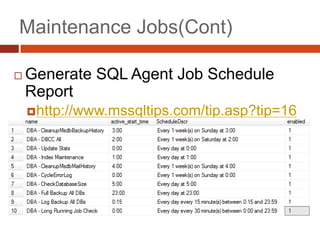
Maintenance Jobs (Cont)CollectDatabase SizesCheck for long running jobshttp://code.msdn.microsoft.com/SQLExamples/Wiki/View.aspx?title=AgentLongRunning&referringTitle=HomeCheck Database IntegrityDBCC CHECKDBBackupsScript Restore to file using backup history tableshttp://www.mssqltips.com/tip.asp?tip=1611Make sure each job has an output file
Maintenance Considerations WhenUpgrading a DatabaseChange Database Compatibility LevelALTER DATABASE [DatabaseName] SET COMPATIBILITY_LEVEL = 100Check the integrity of the objects in your databaseDBCC CHECKDB ([DatabaseName]) WITH DATA_PURITYCorrect Row and Page CountsDBCC UPDATEUSAGE ([DatabaseName]) Set the page verification method to CHECKSUMALTER DATABASE [DatabaseName] SET PAGE_VERIFY CHECKSUM WITH NO_WAITUpdate Statistics With Full Scansp_msforeachtable 'UPDATE STATISTICS ? WITH FULLSCAN'
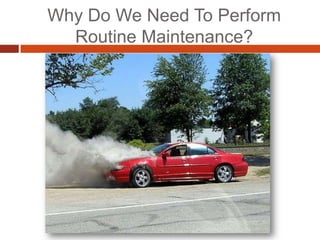
#3 What works for one server may not be the best for another. You should be aware of the system maintenance that needs to be performed and how the decisions you make will impact your SQL Server.
#14 --The ALTER DATABASE statement replaces the sp_dbcmptlevel procedureALTER DATABASE [DatabaseName] SET COMPATIBILITY_LEVEL = 100--Adding the DATA_PURITY option causes the CHECKDB command to look for --column values that are invalid or out of range. Any database that was --created in SQL Server 2005 or later will include the DATA_PURITY check by default, --but if the database is being upgraded from an earlier version, you must run the --command with the DATA_PURITY option at least once and fix any issues. DBCC CHECKDB ([DatabaseName]) WITH DATA_PURITY--The DBCC UPDATEUSAGE command corrects inaccurate row and page counts for tables and indexes.DBCC UPDATEUSAGE ([DatabaseName])--When the CHECKSUM option is enabled, a checksum of the whole page is computed and stored in --the page header when the page is written to disk. When the page is read from disk, the --checksum is recalculated and compared with the value in the header.ALTER DATABASE [DatabaseName] SET PAGE_VERIFY CHECKSUM WITH NO_WAIT--Updating the statistics after the upgrade allows the database engine to take advantage of --the enhancements made in SQL Server 2008 to optimize query performance. The statistics --that reside in the database were created with an earlier version of SQL Server. --By recreating them with SQL Server 2008; you are allowing SQL Server to create more --intelligent statistics to work with. sp_msforeachtable 'UPDATE STATISTICS ? WITH FULLSCAN'




![Maintenance Considerations When Upgrading a DatabaseChange Database Compatibility LevelALTER DATABASE [DatabaseName] SET COMPATIBILITY_LEVEL = 100Check the integrity of the objects in your databaseDBCC CHECKDB ([DatabaseName]) WITH DATA_PURITYCorrect Row and Page CountsDBCC UPDATEUSAGE ([DatabaseName]) Set the page verification method to CHECKSUMALTER DATABASE [DatabaseName] SET PAGE_VERIFY CHECKSUM WITH NO_WAITUpdate Statistics With Full Scansp_msforeachtable 'UPDATE STATISTICS ? WITH FULLSCAN'](https://image.slidesharecdn.com/automatingroutinemaintenance-100716111811-phpapp02/85/Automating-routine-maintenance-13-320.jpg)


