Configuring WebSphere Application Server with
UrbanCode Deploy
May 17th, 2016
James Carmichael
carmich@us.ibm.com
Agenda
• Discuss the WebSphere Application Server – Configure plug-in’s
approach to configuration management
• Review sample application/processes
• Simplifying Configuration Data
• Tokens & Snippets
• Live Compare
• WebSphere Migration Support
• Demo featuring dynamic clusters
• Key Takeaways
• Resources
• Questions
1
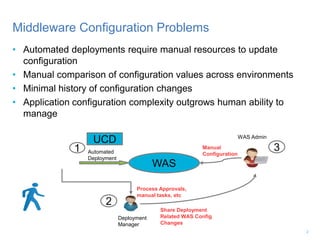
• Automated deployments require manual resources to update
configuration
• Manual comparison of configuration values across environments
• Minimal history of configuration changes
• Application configuration complexity outgrows human ability to
manage
Middleware Configuration Problems
UCD
WAS
Deployment
Manager
WAS Admin
Process Approvals,
manual tasks, etc
Share Deployment
Related WAS Config
Changes
Manual
Configuration
1
2
3Automated
Deployment
2
UCD
WAS –
Deploy &
Configure
Plugins
WAS
Discover WebSphere Topology
and Capture Configuration
Automated Deployment
Automated
Configuration
Deployment
1
2
3
4
Middleware Configuration Solutions featuring IBM
UrbanCode Deploy with WebSphere
Deployment
Manager
Make Deployment
Related WAS
Config Changes
 Enables configuration management automation in concert
with application deployments
• Pulls and compares configurations directly from WAS
• Allows for better tracking of configurations deployed in your
SDLC
3
Artifact
Library
Application
EAR
WAR
DB
WAS
Config
Template
Exemplar
WAS Cell
Plugin
Import
configuration
WAS Configuration Template Creation
+ Template
Assembled
PROD
QA
DEV
Deploy and promote application and
configuration across environments
IBM UrbanCode Deploy – WAS Configure Plugin –
High Level Flow
1
2
3
4
4
WebSphere Configure Plugin – Discover
Steps are provided to pull configuration data from WAS, parse it to cell,
node, server, and cluster components, and templatize the configuration
data so it may be applied to multiple environments
5
Deployment
Manager
Node
Node
Node
Node
Node
Node
Node
Node
Node
Cell
Cell
Server
Server
Server
Server
Server
Server
Artifact Library
WebSphere Configure Plugin – Apply
Applying the configuration uses the data from the UCD repository to
update the configuration data on the target middleware environment
6
Deployment
Manager
Node
Node
Node
Node
Node
Node
Node
Node
Node
Cell
Cell
Server
Server
Server
Server
Server
Server
Artifact Library
WebSphere Configuration Plugin – Compare
• Compare will compare the data from the UCD repository with the live
middleware environment
7
Deployment
Manager
Node
Node
Node
Node
Node
Node
Node
Node
Node
Cell
Cell
Server
Server
Server
Server
Server
Server
?
=
Artifact Library
Sample Application/Processes
Getting started with configuration data
Examples are Provided
• Example Application
– Included with the plug-in
– Applies changes and manages live compare
• Example Generic Processes
– Several example generic processes are included with the plug-in
– Additional example generic processes are available on the plug-in site
– Example processes walk through discovery/extract/templatize/component
creation
9
Simplifying Configuration Data
Getting what you want without the extras
Simplifying Discovered Configuration Data
• The example processes assume Discovery is run at the Cell level
– This discovers everything, resulting in large amounts of config data
– In large environments, it may take hours to run
• It is possible to run Discovery at a Node, Server, or Cluster scope
– Results in less configuration data
– Executes much more quickly
11
Simplifying Discovered Configuration Data
• Users may also specify which config objects they wish to discover
• Returns the specified objects and their children
• May specify multiple config objects
• Example:
– Specify JDBCProvider as the config type to discover
– Run Discovery at the Server scope
– Result: Only the config data for that server’s JDBC Providers is
returned
12
Simplifying Discovered Configuration Data
• A configuration file may be split into multiple files
• Configuration files are merged before Apply is executed
13
Tokens & Snippets
Giving you flexibility in managing configuration data
Adding Tokens to Configuration Data
• Properties in your configuration data may be replaced by tokens
• Tokens are then replaced with the corresponding UCD property
values as a process is executed
15
Snippets
• Configuration data may be broken down into smaller pieces called
snippets
• May represent a configuration object that may be applied
independently (example: a JDBC Provider to be added to a node)
• May be a piece of configuration data extracted for easier management
(JVM settings extracted to their own file but applied as part of a
server’s overall configuration)
16
Applying Snippets/Tokenized Values
• Processes may be created to replace tokenized values on the fly
– “Modify JVM heapsize values on an application server”
– Value(s) are not saved in config data but is applied to new server
WebSphere
17
Live Compare
Config Drift Detection
Live Compare
• In IBM’s ideal world, WAS configuration changes would only be made
through IBM UrbanCode Deploy
• In the real world, users may make WAS configuration changes without
going through UrbanCode Deploy
• Steps are provided to detect changes between your configuration data
and what is live in WAS
• Processes may be built to perform certain actions if changes are
detected (email someone, re-apply configuration changes, etc.)
19
WebSphere Migration Support
Are you moving your configuration data from WebSphere 7 to
WebSphere 8.5.x?
WebSphere Migration
• Capture configuration data from your WebSphere 7 instance
• Deploy configuration data to WebSphere 8.5.x instance
• Recent customer engagement promoted configuration for a single cell
instance that contained 7 nodes, 87 dynamic clusters and
91applications
– Moved from WebSphere 7.0.0.39 to WebSphere 8.5.5.9
– Applications redeployed using the WebSphere Application Server – Deploy plugin
– Can use their captured configuration data as the basis for managing their WebSphere
configuration devops needs going forward
21
Demo
Promoting Dynamic Cluster Configuration from DEV to QA
Demo
• Topology discovery
• Example process for WAS ND with dynamic cluster
• Show how configuration data is stored in UCD (could also use
alternative source controls like Git, Rational Team Concert, etc)
• Add components to resource tree
• Show example application and its processes
• Compare configuration data versions
• Promote across environments featuring Dynamic Clusters
• Rollback
23
Resources
Prerequisites
• Urban Code Deploy 6.2 or later (6.2.0.2 or later strongly encouraged)
• WebSphere Application Server – Configure plug-in (Recommend the
latest version)
• WebSphere Application Server – Deployment version 92 or later
• If using Dynamic Clusters, WebSphere 8.5.5.7 or later
25
WebSphere Application Server – Configure Plug-in
• YouTube videos on the plug-in page
• Documentation link leads to:
– Example processes and their documentation
– Troubleshooting guide
– Several usage documents
• Plug-in page: https://developer.ibm.com/urbancode/plugin/websphere-
application-server-configure/
26
UrbanCode Deploy WebSphere-Related Plugins
• WebSphere Application Server – Configure
– Focus of today’s presentation
– Used to manage WebSphere Application Server configuration data
• WebSphere Application Server – Deployment
– Application oriented (install application binaries, deployment mappings)
– Performs frequently used administrative tasks for WebSphere Application
Server including start server, stop server, start cluster, stop cluster, etc.
• WebSphere Application Server – Install
– Includes a sample UCD application that automates a standard installation of
WebSphere Application Server Network Deployment.
– The sample application is meant to be used as a guide for creating your own
installation process.
27
Key Takeaways
Key Takeaways
• Takes advantage of many UrbanCode Deploy features
– Versioning of configuration data
– Tracking changes to configuration
– Knowing in which environments your configuration data has been applied
• Plugin has many samples to help you get started
• Additional collateral on plugin download site
• Template creation allows for easy promotion across environments
• Compare “golden” configuration with live WebSphere instance to detect
configuration drift
• WebSphere Migration Support from WAS 7 to WAS 8.5.x
• Promote WebSphere configuration data from on-premise environment to a
cloud environment
29
Questions?
Thank you!

Deploying to and Configuring WebSphere Application Server with UrbanCode Deploy

  • 1.
    Configuring WebSphere ApplicationServer with UrbanCode Deploy May 17th, 2016 James Carmichael carmich@us.ibm.com
  • 2.
    Agenda • Discuss theWebSphere Application Server – Configure plug-in’s approach to configuration management • Review sample application/processes • Simplifying Configuration Data • Tokens & Snippets • Live Compare • WebSphere Migration Support • Demo featuring dynamic clusters • Key Takeaways • Resources • Questions 1
  • 3.
    • Automated deploymentsrequire manual resources to update configuration • Manual comparison of configuration values across environments • Minimal history of configuration changes • Application configuration complexity outgrows human ability to manage Middleware Configuration Problems UCD WAS Deployment Manager WAS Admin Process Approvals, manual tasks, etc Share Deployment Related WAS Config Changes Manual Configuration 1 2 3Automated Deployment 2
  • 4.
    UCD WAS – Deploy & Configure Plugins WAS DiscoverWebSphere Topology and Capture Configuration Automated Deployment Automated Configuration Deployment 1 2 3 4 Middleware Configuration Solutions featuring IBM UrbanCode Deploy with WebSphere Deployment Manager Make Deployment Related WAS Config Changes  Enables configuration management automation in concert with application deployments • Pulls and compares configurations directly from WAS • Allows for better tracking of configurations deployed in your SDLC 3
  • 5.
    Artifact Library Application EAR WAR DB WAS Config Template Exemplar WAS Cell Plugin Import configuration WAS ConfigurationTemplate Creation + Template Assembled PROD QA DEV Deploy and promote application and configuration across environments IBM UrbanCode Deploy – WAS Configure Plugin – High Level Flow 1 2 3 4 4
  • 6.
    WebSphere Configure Plugin– Discover Steps are provided to pull configuration data from WAS, parse it to cell, node, server, and cluster components, and templatize the configuration data so it may be applied to multiple environments 5 Deployment Manager Node Node Node Node Node Node Node Node Node Cell Cell Server Server Server Server Server Server Artifact Library
  • 7.
    WebSphere Configure Plugin– Apply Applying the configuration uses the data from the UCD repository to update the configuration data on the target middleware environment 6 Deployment Manager Node Node Node Node Node Node Node Node Node Cell Cell Server Server Server Server Server Server Artifact Library
  • 8.
    WebSphere Configuration Plugin– Compare • Compare will compare the data from the UCD repository with the live middleware environment 7 Deployment Manager Node Node Node Node Node Node Node Node Node Cell Cell Server Server Server Server Server Server ? = Artifact Library
  • 9.
  • 10.
    Examples are Provided •Example Application – Included with the plug-in – Applies changes and manages live compare • Example Generic Processes – Several example generic processes are included with the plug-in – Additional example generic processes are available on the plug-in site – Example processes walk through discovery/extract/templatize/component creation 9
  • 11.
    Simplifying Configuration Data Gettingwhat you want without the extras
  • 12.
    Simplifying Discovered ConfigurationData • The example processes assume Discovery is run at the Cell level – This discovers everything, resulting in large amounts of config data – In large environments, it may take hours to run • It is possible to run Discovery at a Node, Server, or Cluster scope – Results in less configuration data – Executes much more quickly 11
  • 13.
    Simplifying Discovered ConfigurationData • Users may also specify which config objects they wish to discover • Returns the specified objects and their children • May specify multiple config objects • Example: – Specify JDBCProvider as the config type to discover – Run Discovery at the Server scope – Result: Only the config data for that server’s JDBC Providers is returned 12
  • 14.
    Simplifying Discovered ConfigurationData • A configuration file may be split into multiple files • Configuration files are merged before Apply is executed 13
  • 15.
    Tokens & Snippets Givingyou flexibility in managing configuration data
  • 16.
    Adding Tokens toConfiguration Data • Properties in your configuration data may be replaced by tokens • Tokens are then replaced with the corresponding UCD property values as a process is executed 15
  • 17.
    Snippets • Configuration datamay be broken down into smaller pieces called snippets • May represent a configuration object that may be applied independently (example: a JDBC Provider to be added to a node) • May be a piece of configuration data extracted for easier management (JVM settings extracted to their own file but applied as part of a server’s overall configuration) 16
  • 18.
    Applying Snippets/Tokenized Values •Processes may be created to replace tokenized values on the fly – “Modify JVM heapsize values on an application server” – Value(s) are not saved in config data but is applied to new server WebSphere 17
  • 19.
  • 20.
    Live Compare • InIBM’s ideal world, WAS configuration changes would only be made through IBM UrbanCode Deploy • In the real world, users may make WAS configuration changes without going through UrbanCode Deploy • Steps are provided to detect changes between your configuration data and what is live in WAS • Processes may be built to perform certain actions if changes are detected (email someone, re-apply configuration changes, etc.) 19
  • 21.
    WebSphere Migration Support Areyou moving your configuration data from WebSphere 7 to WebSphere 8.5.x?
  • 22.
    WebSphere Migration • Captureconfiguration data from your WebSphere 7 instance • Deploy configuration data to WebSphere 8.5.x instance • Recent customer engagement promoted configuration for a single cell instance that contained 7 nodes, 87 dynamic clusters and 91applications – Moved from WebSphere 7.0.0.39 to WebSphere 8.5.5.9 – Applications redeployed using the WebSphere Application Server – Deploy plugin – Can use their captured configuration data as the basis for managing their WebSphere configuration devops needs going forward 21
  • 23.
    Demo Promoting Dynamic ClusterConfiguration from DEV to QA
  • 24.
    Demo • Topology discovery •Example process for WAS ND with dynamic cluster • Show how configuration data is stored in UCD (could also use alternative source controls like Git, Rational Team Concert, etc) • Add components to resource tree • Show example application and its processes • Compare configuration data versions • Promote across environments featuring Dynamic Clusters • Rollback 23
  • 25.
  • 26.
    Prerequisites • Urban CodeDeploy 6.2 or later (6.2.0.2 or later strongly encouraged) • WebSphere Application Server – Configure plug-in (Recommend the latest version) • WebSphere Application Server – Deployment version 92 or later • If using Dynamic Clusters, WebSphere 8.5.5.7 or later 25
  • 27.
    WebSphere Application Server– Configure Plug-in • YouTube videos on the plug-in page • Documentation link leads to: – Example processes and their documentation – Troubleshooting guide – Several usage documents • Plug-in page: https://developer.ibm.com/urbancode/plugin/websphere- application-server-configure/ 26
  • 28.
    UrbanCode Deploy WebSphere-RelatedPlugins • WebSphere Application Server – Configure – Focus of today’s presentation – Used to manage WebSphere Application Server configuration data • WebSphere Application Server – Deployment – Application oriented (install application binaries, deployment mappings) – Performs frequently used administrative tasks for WebSphere Application Server including start server, stop server, start cluster, stop cluster, etc. • WebSphere Application Server – Install – Includes a sample UCD application that automates a standard installation of WebSphere Application Server Network Deployment. – The sample application is meant to be used as a guide for creating your own installation process. 27
  • 29.
  • 30.
    Key Takeaways • Takesadvantage of many UrbanCode Deploy features – Versioning of configuration data – Tracking changes to configuration – Knowing in which environments your configuration data has been applied • Plugin has many samples to help you get started • Additional collateral on plugin download site • Template creation allows for easy promotion across environments • Compare “golden” configuration with live WebSphere instance to detect configuration drift • WebSphere Migration Support from WAS 7 to WAS 8.5.x • Promote WebSphere configuration data from on-premise environment to a cloud environment 29
  • 31.