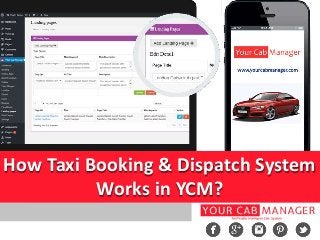
How Taxi Booking & Dispatch System
Works in YCM?
Every business owners wants to have their own mobile application to get more
customers. Today, there are lots of companies in market who makes a complete taxi
booking software and mobile application for taxi business, but all taxi dispatch system
& taxi mobile application’s features aren’t same as another company. It’s quite different.
Your Cab Manager, venture of Gusani Infotech is a leading taxi website design and
development company offering taxi booking software for our clients in United
Kingdom.
Here we represent how complete taxi booking & dispatch works in YCM.
Let’s see how it works!
Here we have explained step by step process of taxi booking system that make easy to
understand how taxi booking system works.
Steps by step Process:
• Driver Registration and Approval
• Make a Booking from Web/Mobile App
• Admin Confirm and Assign Booking
• Driver App Steps
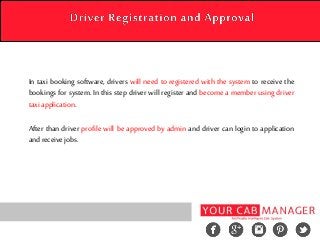
In taxi booking software, drivers will need to registered with the system to receive the
bookings for system. In this step driver will register and become a member using driver
taxi application.
After than driver profile will be approved by admin and driver can login to application
and receive jobs.
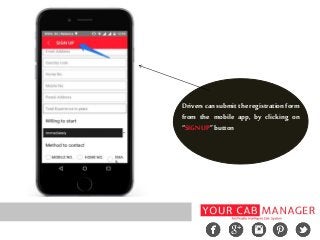
Drivers can submit the registrationform
from the mobile app, by clicking on
“SIGNUP”button
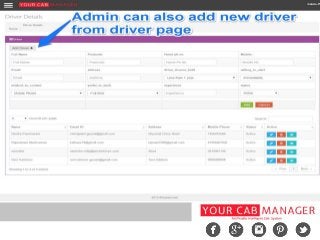
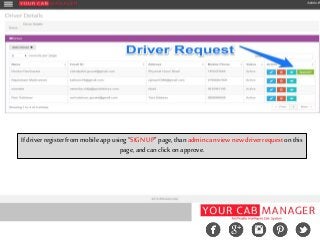
If driver register frommobile appusing “SIGN UP” page,thanadmincanview new driver requeston this
page,andcanclick onapprove.
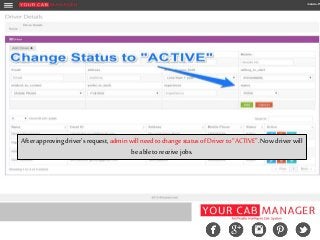
Afterapprovingdriver's request,adminwill need tochangestatusofDriver to“ACTIVE”.Nowdriver will
beable toreceive jobs.
Other side, passenger will be able to book their taxi using web or mobile taxi application. In this
stepcomplete processdonebypassengersisdescribed.
Passenger will select their pick-up and drop-off location, date of journey, vehicle as per their
requirementsatthisstepusing passengertaxiapplication.
Afterselecting allthisthings, passengerwill confirmtheirbooking.
All theselection can bedonebythepassengeron thefirstscreen ofthemobile application.
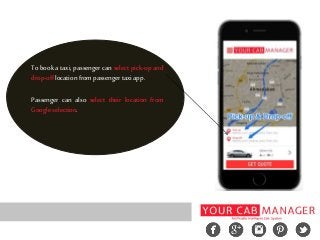
To book a taxi, passenger can select pick-up and
drop-offlocationfrompassengertaxiapp.
Passenger can also select their location from
Google selection.
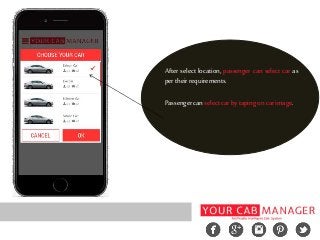
After select location, passenger can select car as
pertheirrequirements.
Passengercanselectcarbytapingoncarimage.
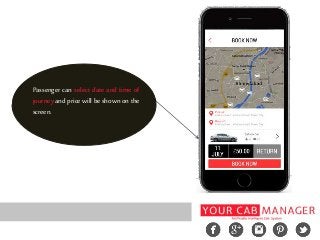
Passenger can select date and time of
journey and price will be shown on the
screen.
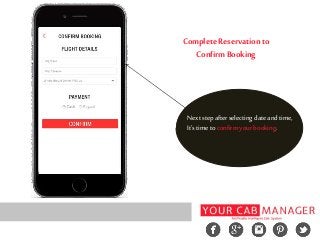
Complete Reservation to
Confirm Booking
Next step after selecting date and time,
It’stimetoconfirmyourbooking.
Next step is assign booking to drivers by admin. At this stage, admin can view all
bookings from “BOOKING” menu. Admin will be edit bookings to confirm booking.
After confirm booking, admin will be able to assign job to drivers.
The steps are shown in the following slides.
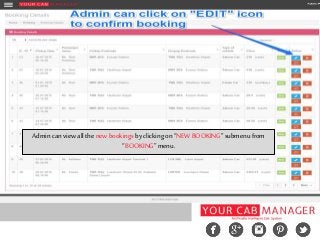
Admin canview all thenew bookingsbyclicking on“NEWBOOKING”submenufrom
“BOOKING”menu.
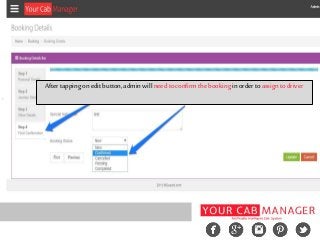
Aftertappingonedit button,adminwill need toconfirmthebookingin ordertoassign todriver
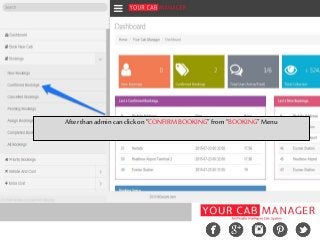
Afterthanadmin canclick on“CONFIRM BOOKING”from“BOOKING”Menu
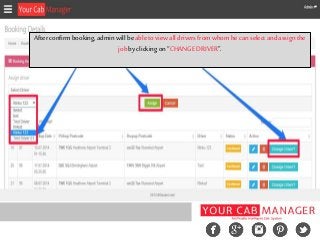
Afterconfirmbooking,adminwill be abletoview all drivers fromwhomhe can select andassign the
jobbyclicking on “CHANGEDRIVER”.
Last step is “Driver app steps”. After assigning jobs by admin, driver can view all jobs that
are assign to him. He can accept or reject the jobs.
All the information regarding jobs are described here.
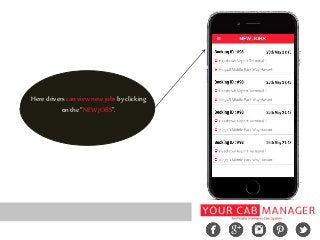
Here driverscanview new jobsby clicking
onthe “NEWJOBS”.
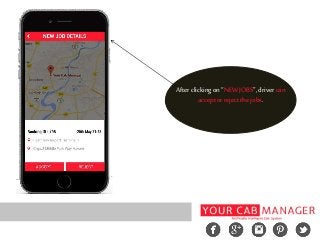
Afterclicking on“NEWJOBS”,drivercan
acceptorreject thejobs.
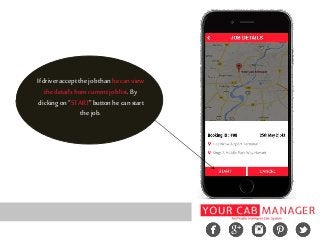
If driver acceptthe jobthanhe canview
the detailsfromcurrentjoblist.By
clicking on“START”buttonhe canstart
the job.
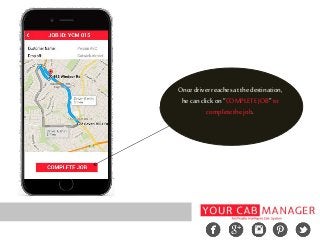
Oncedriver reachesatthedestination,
he canclick on“COMPLETEJOB”to
completethe job.
Above we described visual representation of taxi booking software step by step.
Now you are completely aware of our taxi booking software and how it works. If
any doubts, please contact us.
Do you want to design your complete taxi booking system for your taxi business
with us? If yes than feel free to call us on +91 8153939409 or +44 020 3290 5996
ordrop us line at: sales@yourcabmanager.com
Thank You ...
Reach us at...
Email: sales@yourcabmanager.com
Skype: yourcabmanager
Call: [UK]+4402032905996
[India]+918153939409

How Taxi Booking and Dispatch System works in YCM?

  • 1.
    How Taxi Booking& Dispatch System Works in YCM?
  • 2.
    Every business ownerswants to have their own mobile application to get more customers. Today, there are lots of companies in market who makes a complete taxi booking software and mobile application for taxi business, but all taxi dispatch system & taxi mobile application’s features aren’t same as another company. It’s quite different.
  • 3.
    Your Cab Manager,venture of Gusani Infotech is a leading taxi website design and development company offering taxi booking software for our clients in United Kingdom. Here we represent how complete taxi booking & dispatch works in YCM. Let’s see how it works!
  • 4.
    Here we haveexplained step by step process of taxi booking system that make easy to understand how taxi booking system works. Steps by step Process: • Driver Registration and Approval • Make a Booking from Web/Mobile App • Admin Confirm and Assign Booking • Driver App Steps
  • 5.
    In taxi bookingsoftware, drivers will need to registered with the system to receive the bookings for system. In this step driver will register and become a member using driver taxi application. After than driver profile will be approved by admin and driver can login to application and receive jobs.
  • 6.
    Drivers can submitthe registrationform from the mobile app, by clicking on “SIGNUP”button
  • 8.
    If driver registerfrommobile appusing “SIGN UP” page,thanadmincanview new driver requeston this page,andcanclick onapprove.
  • 9.
    Afterapprovingdriver's request,adminwill needtochangestatusofDriver to“ACTIVE”.Nowdriver will beable toreceive jobs.
  • 10.
    Other side, passengerwill be able to book their taxi using web or mobile taxi application. In this stepcomplete processdonebypassengersisdescribed. Passenger will select their pick-up and drop-off location, date of journey, vehicle as per their requirementsatthisstepusing passengertaxiapplication. Afterselecting allthisthings, passengerwill confirmtheirbooking. All theselection can bedonebythepassengeron thefirstscreen ofthemobile application.
  • 11.
    To book ataxi, passenger can select pick-up and drop-offlocationfrompassengertaxiapp. Passenger can also select their location from Google selection.
  • 12.
    After select location,passenger can select car as pertheirrequirements. Passengercanselectcarbytapingoncarimage.
  • 13.
    Passenger can selectdate and time of journey and price will be shown on the screen.
  • 14.
    Complete Reservation to ConfirmBooking Next step after selecting date and time, It’stimetoconfirmyourbooking.
  • 15.
    Next step isassign booking to drivers by admin. At this stage, admin can view all bookings from “BOOKING” menu. Admin will be edit bookings to confirm booking. After confirm booking, admin will be able to assign job to drivers. The steps are shown in the following slides.
  • 16.
    Admin canview allthenew bookingsbyclicking on“NEWBOOKING”submenufrom “BOOKING”menu.
  • 17.
    Aftertappingonedit button,adminwill needtoconfirmthebookingin ordertoassign todriver
  • 18.
    Afterthanadmin canclick on“CONFIRMBOOKING”from“BOOKING”Menu
  • 19.
    Afterconfirmbooking,adminwill be abletoviewall drivers fromwhomhe can select andassign the jobbyclicking on “CHANGEDRIVER”.
  • 20.
    Last step is“Driver app steps”. After assigning jobs by admin, driver can view all jobs that are assign to him. He can accept or reject the jobs. All the information regarding jobs are described here.
  • 21.
    Here driverscanview newjobsby clicking onthe “NEWJOBS”.
  • 22.
  • 23.
    If driver acceptthejobthanhe canview the detailsfromcurrentjoblist.By clicking on“START”buttonhe canstart the job.
  • 24.
    Oncedriver reachesatthedestination, he canclickon“COMPLETEJOB”to completethe job.
  • 25.
    Above we describedvisual representation of taxi booking software step by step. Now you are completely aware of our taxi booking software and how it works. If any doubts, please contact us. Do you want to design your complete taxi booking system for your taxi business with us? If yes than feel free to call us on +91 8153939409 or +44 020 3290 5996 ordrop us line at: sales@yourcabmanager.com
  • 26.
    Thank You ... Reachus at... Email: sales@yourcabmanager.com Skype: yourcabmanager Call: [UK]+4402032905996 [India]+918153939409