Bài tập thực hành JavaScript
1. Bài Tập 1:
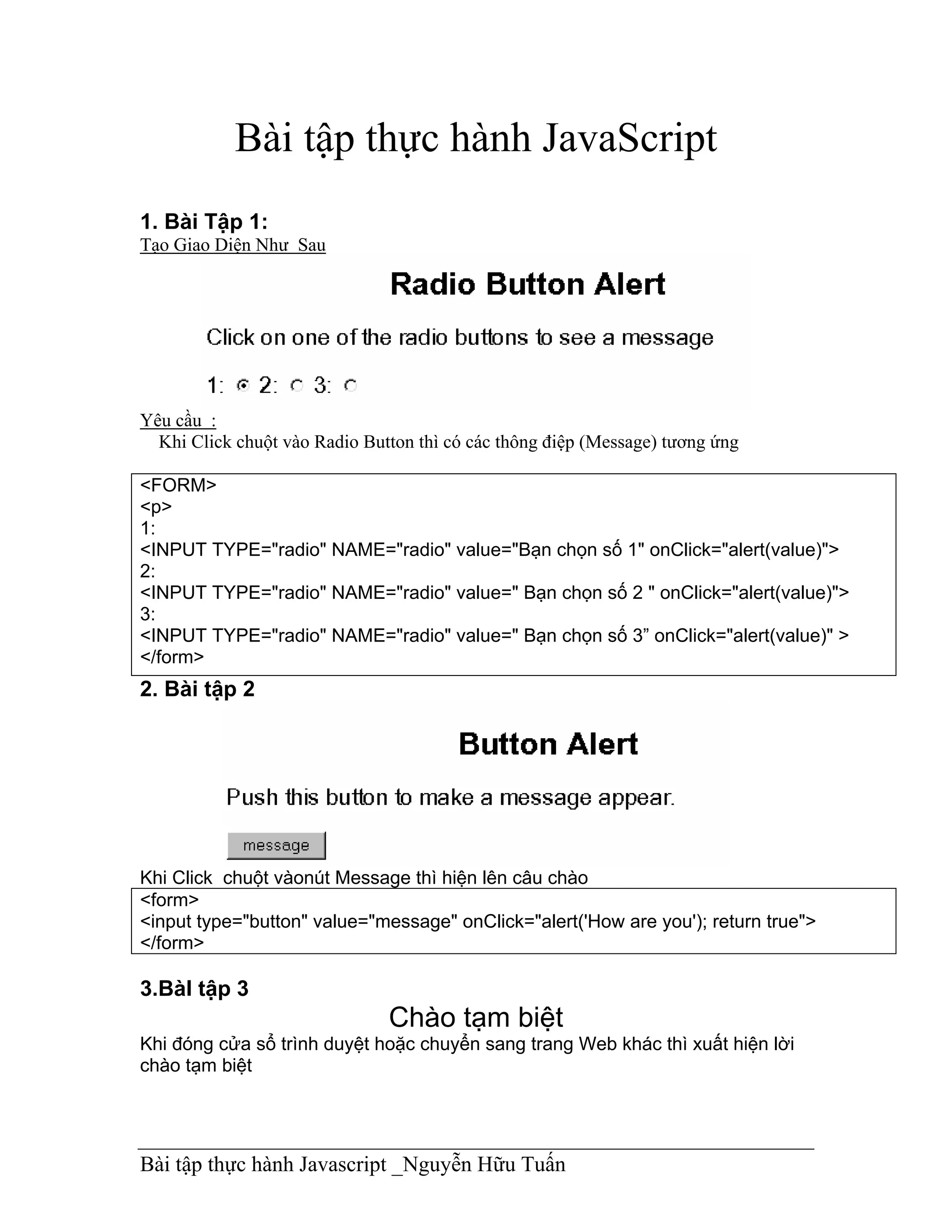
Tạo Giao Diện Như Sau


Yêu cầu :
  Khi Click chuột vào Radio Button thì có các thông điệp (Message) tương ứng

<FORM>
<p>
1:
<INPUT TYPE="radio" NAME="radio" value="Bạn chọn số 1" onClick="alert(value)">
2:
<INPUT TYPE="radio" NAME="radio" value=" Bạn chọn số 2 " onClick="alert(value)">
3:
<INPUT TYPE="radio" NAME="radio" value=" Bạn chọn số 3” onClick="alert(value)" >
</form>
2. Bài tập 2


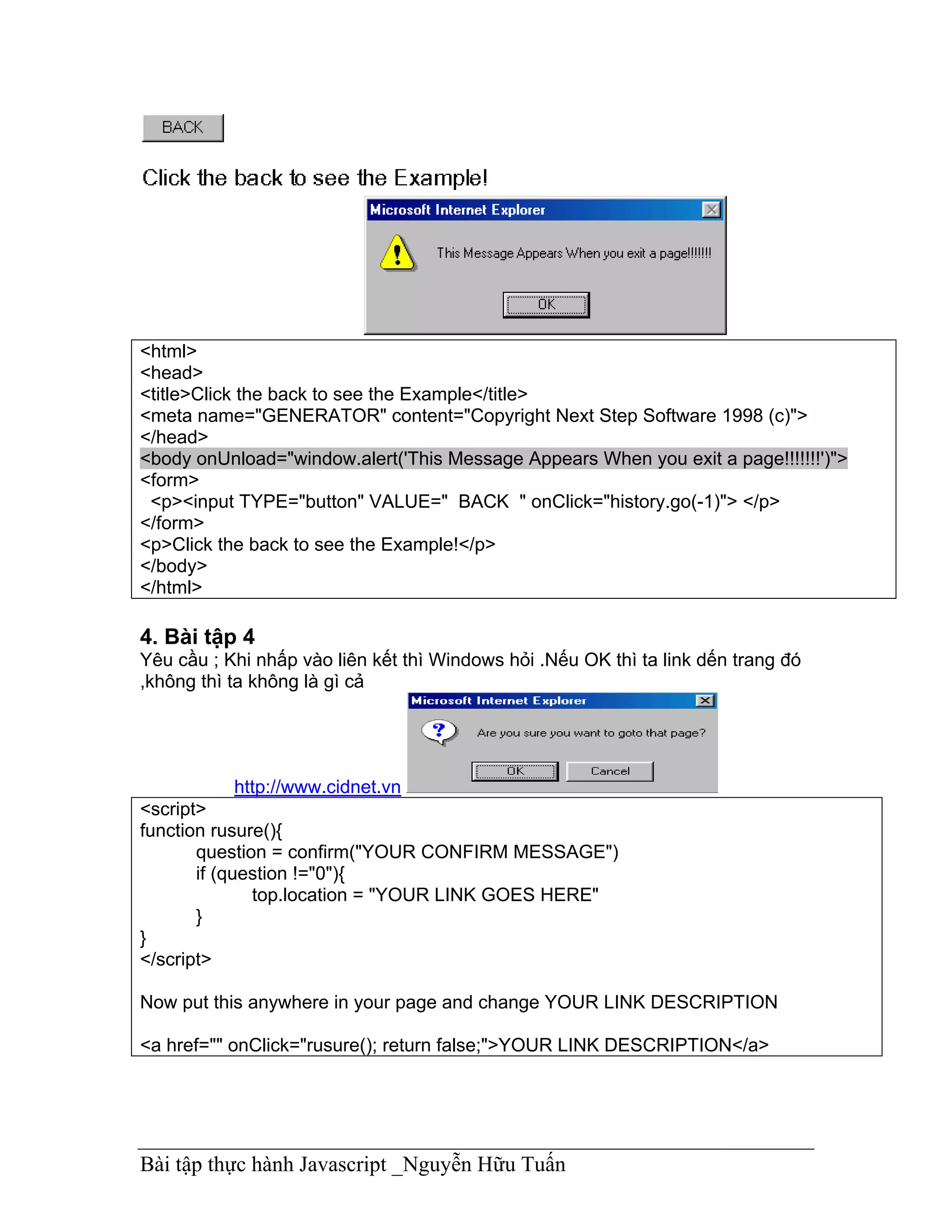
Khi Click chuột vàonút Message thì hiện lên câu chào
<form>
<input type="button" value="message" onClick="alert('How are you'); return true">
</form>

3.BàI tập 3
                               Chào tạm biệt
Khi đóng cửa sổ trình duyệt hoặc chuyển sang trang Web khác thì xuất hiện lời
chào tạm biệt


Bài tập thực hành Javascript _Nguyễn Hữu Tuấn
<html>
<head>
<title>Click the back to see the Example</title>
<meta name="GENERATOR" content="Copyright Next Step Software 1998 (c)">
</head>
<body onUnload="window.alert('This Message Appears When you exit a page!!!!!!!')">
<form>
 <p><input TYPE="button" VALUE=" BACK " onClick="history.go(-1)"> </p>
</form>
<p>Click the back to see the Example!</p>
</body>
</html>

4. Bài tập 4
Yêu cầu ; Khi nhấp vào liên kết thì Windows hỏi .Nếu OK thì ta link dến trang đó
,không thì ta không là gì cả


           http://www.cidnet.vn
<script>
function rusure(){
       question = confirm("YOUR CONFIRM MESSAGE")
       if (question !="0"){
              top.location = "YOUR LINK GOES HERE"
       }
}
</script>

Now put this anywhere in your page and change YOUR LINK DESCRIPTION

<a href="" onClick="rusure(); return false;">YOUR LINK DESCRIPTION</a>


Bài tập thực hành Javascript _Nguyễn Hữu Tuấn
5.Bài tập 5
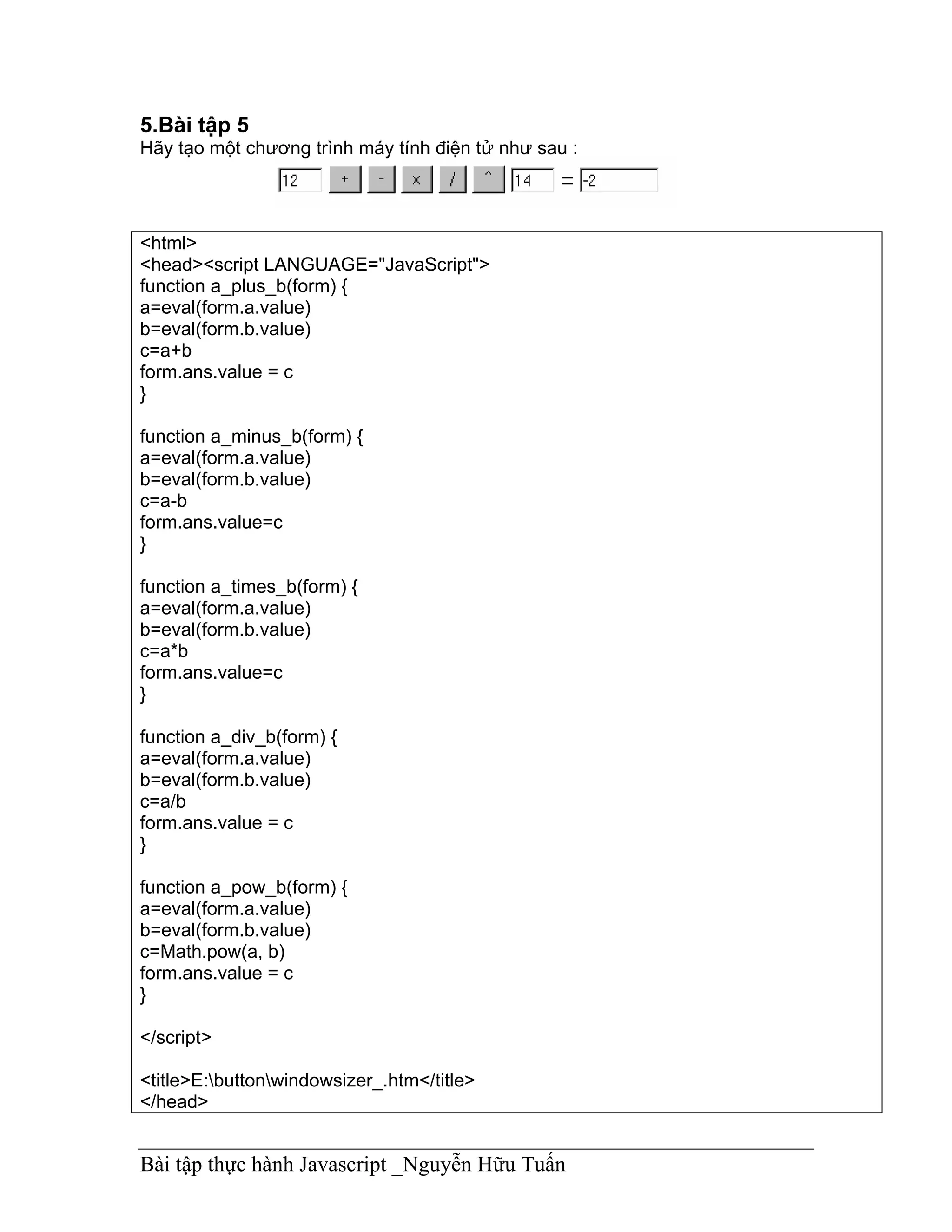
Hãy tạo một chương trình máy tính điện tử như sau :


<html>
<head><script LANGUAGE="JavaScript">
function a_plus_b(form) {
a=eval(form.a.value)
b=eval(form.b.value)
c=a+b
form.ans.value = c
}

function a_minus_b(form) {
a=eval(form.a.value)
b=eval(form.b.value)
c=a-b
form.ans.value=c
}

function a_times_b(form) {
a=eval(form.a.value)
b=eval(form.b.value)
c=a*b
form.ans.value=c
}

function a_div_b(form) {
a=eval(form.a.value)
b=eval(form.b.value)
c=a/b
form.ans.value = c
}

function a_pow_b(form) {
a=eval(form.a.value)
b=eval(form.b.value)
c=Math.pow(a, b)
form.ans.value = c
}

</script>

<title>E:buttonwindowsizer_.htm</title>
</head>


Bài tập thực hành Javascript _Nguyễn Hữu Tuấn
<body>

<form name="formx">
 <p><input type="text" size="4" value="12" name="a"> <input type="button" value=" + "
 onClick="a_plus_b(this.form)"> <input type="button" value=" - "
 onClick="a_minus_b(this.form)"> <input type="button" value=" x "
 onClick="a_times_b(this.form)"> <input type="button" value=" / "
 onClick="a_div_b(this.form)"> <input type="button" value=" ^ "
 onClick="a_pow_b(this.form)"> <input type="number" size="4" value="3" name="b"> =
<input
 type "number" value="0" name="ans" size="9"> </p>
</form>
</body>
</html>
6.bàI tập 6:
Tạo một chương trình mô tả Lịch để bàn như sau :


<html>

<head>
<title>Next Step Software - Java Script Number - 14</title>
<meta name="GENERATOR" content="(c) 1998 Copyright Next Step Software">
</head>

<body>
<script LANGUAGE="JavaScript">
<!-- Begin
monthnames = new Array("January","Februrary","March","April","May","June",
"July","August","September","October","November","Decemeber");
var linkcount=0;
function addlink(month, day, href) {
var entry = new Array(3);
entry[0] = month;
entry[1] = day;
entry[2] = href;
this[linkcount++] = entry;
}
Array.prototype.addlink = addlink;


Bài tập thực hành Javascript _Nguyễn Hữu Tuấn
linkdays = new Array();
monthdays = new Array(12);
monthdays[0]=31;
monthdays[1]=28;
monthdays[2]=31;
monthdays[3]=30;
monthdays[4]=31;
monthdays[5]=30;
monthdays[6]=31;
monthdays[7]=31;
monthdays[8]=30;
monthdays[9]=31;
monthdays[10]=30;
monthdays[11]=31;
todayDate=new Date();
thisday=todayDate.getDay();
thismonth=todayDate.getMonth();
thisdate=todayDate.getDate();
thisyear=todayDate.getYear();
thisyear = thisyear % 100;
thisyear = ((thisyear < 50) ? (2000 + thisyear) : (1900 + thisyear));
if (((thisyear % 4 == 0)
&& !(thisyear % 100 == 0))
||(thisyear % 400 == 0)) monthdays[1]++;
startspaces=thisdate;
while (startspaces > 7) startspaces-=7;
startspaces = thisday - startspaces + 1;
if (startspaces < 0) startspaces+=7;
document.write("<table border=2 bgcolor=white ");
document.write("bordercolor=black><font color=black>");
document.write("<tr><td colspan=7><center><strong>"
+ monthnames[thismonth] + " " + thisyear
+ "</strong></center></font></td></tr>");
document.write("<tr>");
document.write("<td align=center>Su</td>");
document.write("<td align=center>M</td>");
document.write("<td align=center>Tu</td>");
document.write("<td align=center>W</td>");
document.write("<td align=center>Th</td>");
document.write("<td align=center>F</td>");
document.write("<td align=center>Sa</td>");
document.write("</tr>");
document.write("<tr>");
for (s=0;s<startspaces;s++) {
document.write("<td> </td>");
}


Bài tập thực hành Javascript _Nguyễn Hữu Tuấn
count=1;
while (count <= monthdays[thismonth]) {
for (b = startspaces;b<7;b++) {
linktrue=false;
document.write("<td>");
for (c=0;c<linkdays.length;c++) {
if (linkdays[c] != null) {
if ((linkdays[c][0]==thismonth + 1) && (linkdays[c][1]==count)) {
document.write("<a href="" + linkdays[c][2] + "">");
linktrue=true;
      }
   }
}
if (count==thisdate) {
document.write("<font color='FF0000'><strong>");
}
if (count <= monthdays[thismonth]) {
document.write(count);
}
else {
document.write(" ");
}
if (count==thisdate) {
document.write("</strong></font>");
}
if (linktrue)
document.write("</a>");
document.write("</td>");
count++;
}
document.write("</tr>");
document.write("<tr>");
startspaces=0;
}
document.write("</table></p>");
// End -->
</script>
</body>
</html>
7.Bài tập 7
Gửi thư


Bài tập thực hành Javascript _Nguyễn Hữu Tuấn
Khi Click vào link hoặc button thì cho phép ta nhập vào địa chỉ người nhận và
subject.

<HEAD>

<SCRIPT LANGUAGE="JavaScript">
<!-- Begin
function mailsome1(){
who=prompt("Enter recipient's email address: ","antispammer@earthling.net");
what=prompt("Enter the subject: ","none");
if (confirm("Are you sure you want to mail "+who+" with the subject of "+what+"?")==true){
parent.location.href='mailto:'+who+'?subject='+what+'';
   }
}
// End -->
</SCRIPT>

<BODY>
<CENTER>
<a href='javascript:mailsome1()'>E-Mail Someone!</a>
<FORM>
<input type=button value="E-Mail Someone!" onClick="mailsome1()">
</FORM>
</CENTER>
8.Bài tập 8
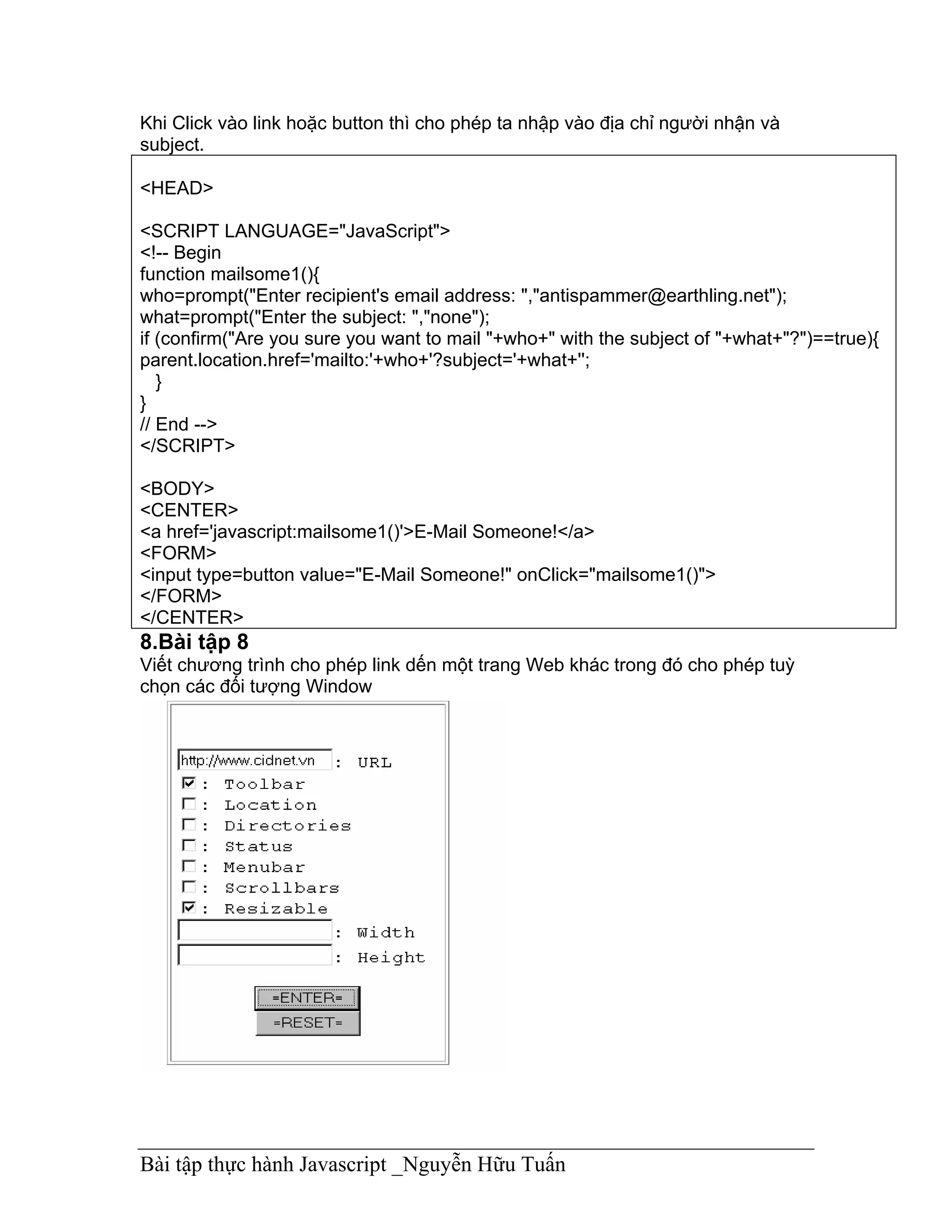
Viết chương trình cho phép link dến một trang Web khác trong đó cho phép tuỳ
chọn các đối tượng Window


Bài tập thực hành Javascript _Nguyễn Hữu Tuấn
<HEAD>
<SCRIPT LANGUAGE="JavaScript">
<!-- Begin
function customize(form) {
var address = document.form1.url.value;
var op_tool = (document.form1.tool.checked== true) ? 1 : 0;
var op_loc_box = (document.form1.loc_box.checked == true) ? 1 : 0;
var op_dir = (document.form1.dir.checked == true) ? 1 : 0;
var op_stat = (document.form1.stat.checked == true) ? 1 : 0;
var op_menu = (document.form1.menu.checked == true) ? 1 : 0;
var op_scroll = (document.form1.scroll.checked == true) ? 1 : 0;
var op_resize = (document.form1.resize.checked == true) ? 1 : 0;
var op_wid = document.form1.wid.value;
var op_heigh = document.form1.heigh.value;
var option = "toolbar="+ op_tool +",location="+ op_loc_box +",directories="
+ op_dir +",status="+ op_stat +",menubar="+ op_menu +",scrollbars="
+ op_scroll +",resizable=" + op_resize +",width=" + op_wid +",height="+ op_heigh;
var win3 = window.open("", "what_I_want", option);
var win4 = window.open(address, "what_I_want");
}
function clear(form) {
document.form1.wid.value="";
document.form1.heigh.value="";
}
// End -->
</SCRIPT>
<BODY>
<CENTER>
<h4>Please choose from the following selections to customize your window</h4>
<br>
<TABLE cellpadding=5 border><TR><TD><PRE>
<FORM name=form1 ACTION="javascript:" METHOD="POST">
<INPUT TYPE="text" NAME="url" value="http://www.geocities.com" >: URL
<INPUT TYPE="checkbox" NAME="tool">: Toolbar
<INPUT TYPE="checkbox" NAME="loc_box">: Location
<INPUT TYPE="checkbox" NAME="dir">: Directories
<INPUT TYPE="checkbox" NAME="stat">: Status
<INPUT TYPE="checkbox" NAME="menu">: Menubar
<INPUT TYPE="checkbox" NAME="scroll">: Scrollbars
<INPUT TYPE="checkbox" NAME="resize">: Resizable
<INPUT TYPE="text" NAME="wid" value= >: Width
<INPUT TYPE="text" NAME="heigh" value=>: Height
<BR><CENTER>
<INPUT TYPE="button" VALUE="=ENTER=" OnClick="customize(this.form)">
<INPUT TYPE="reset" VALUE="=RESET=" onClick="clear(this.form)">


Bài tập thực hành Javascript _Nguyễn Hữu Tuấn
</PRE></TD></TR></TABLE>
</FORM>
</CENTER>

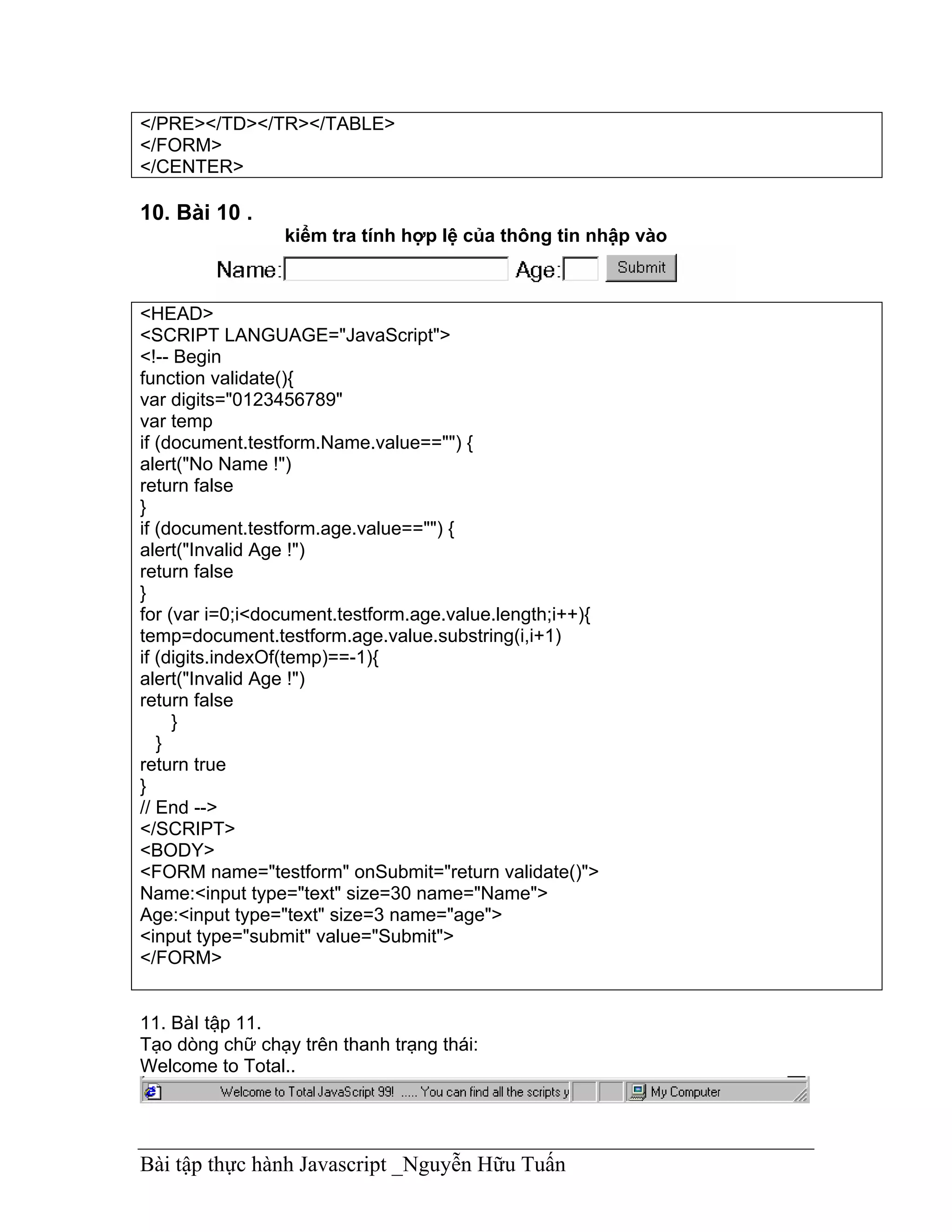
10. Bài 10 .
                 kiểm tra tính hợp lệ của thông tin nhập vào


<HEAD>
<SCRIPT LANGUAGE="JavaScript">
<!-- Begin
function validate(){
var digits="0123456789"
var temp
if (document.testform.Name.value=="") {
alert("No Name !")
return false
}
if (document.testform.age.value=="") {
alert("Invalid Age !")
return false
}
for (var i=0;i<document.testform.age.value.length;i++){
temp=document.testform.age.value.substring(i,i+1)
if (digits.indexOf(temp)==-1){
alert("Invalid Age !")
return false
     }
   }
return true
}
// End -->
</SCRIPT>
<BODY>
<FORM name="testform" onSubmit="return validate()">
Name:<input type="text" size=30 name="Name">
Age:<input type="text" size=3 name="age">
<input type="submit" value="Submit">
</FORM>


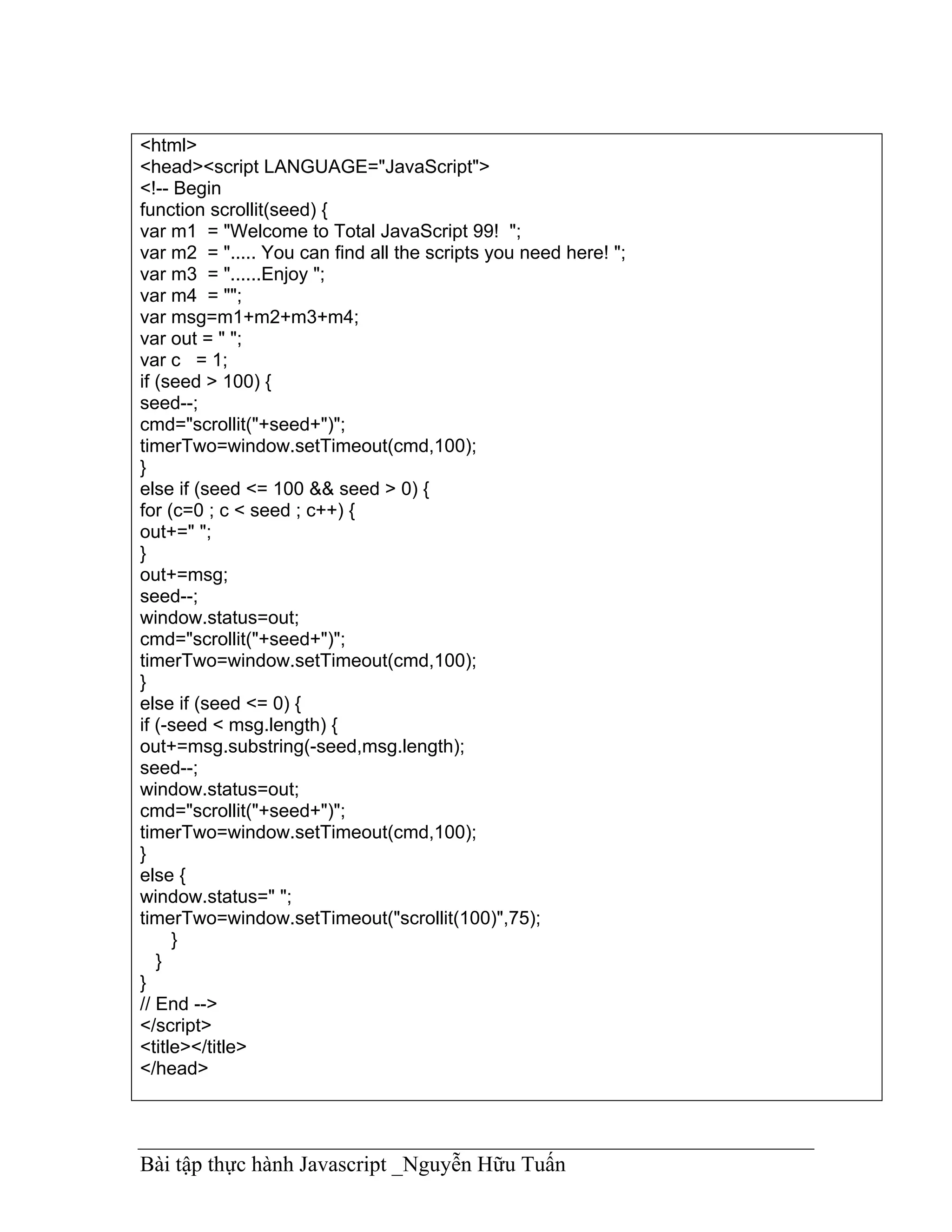
11. BàI tập 11.
Tạo dòng chữ chạy trên thanh trạng thái:
Welcome to Total..


Bài tập thực hành Javascript _Nguyễn Hữu Tuấn
<html>
<head><script LANGUAGE="JavaScript">
<!-- Begin
function scrollit(seed) {
var m1 = "Welcome to Total JavaScript 99! ";
var m2 = "..... You can find all the scripts you need here! ";
var m3 = "......Enjoy ";
var m4 = "";
var msg=m1+m2+m3+m4;
var out = " ";
var c = 1;
if (seed > 100) {
seed--;
cmd="scrollit("+seed+")";
timerTwo=window.setTimeout(cmd,100);
}
else if (seed <= 100 && seed > 0) {
for (c=0 ; c < seed ; c++) {
out+=" ";
}
out+=msg;
seed--;
window.status=out;
cmd="scrollit("+seed+")";
timerTwo=window.setTimeout(cmd,100);
}
else if (seed <= 0) {
if (-seed < msg.length) {
out+=msg.substring(-seed,msg.length);
seed--;
window.status=out;
cmd="scrollit("+seed+")";
timerTwo=window.setTimeout(cmd,100);
}
else {
window.status=" ";
timerTwo=window.setTimeout("scrollit(100)",75);
     }
   }
}
// End -->
</script>
<title></title>
</head>


Bài tập thực hành Javascript _Nguyễn Hữu Tuấn
<body onLoad="scrollit(100)">
</body>
</html>
12. BàI tập 12
Tạo dòng chữ chạy trong TextBox

<script language="JavaScript">
   <!-- begin
   var max=0;
   function textlist()
   {
   max=textlist.arguments.length;
   for (i=0; i<max; i++)
   this[i]=textlist.arguments[i];
   }
   tl=new textlist
   (
    "This is a message",
    "Another one",
    "And this will be the third",
    "And the fourth is the last !"


    );
    var x=0; pos=0;
    var l=tl[0].length;
    function textticker()
    {
      document.tickform.tickfield.value=tl[x].substring(0,pos)+"_";
      if(pos++==l) { pos=0; setTimeout("textticker()",1000); x++;
      if(x==max) x=0; l=tl[x].length; } else
      setTimeout("textticker()",50);
    }
    // end -->
    </script>

<html>

<head>
<title>E:javascriptsscrollsclassic_.htm</title>
</head>

<body onLoad="textticker()">


Bài tập thực hành Javascript _Nguyễn Hữu Tuấn
<form name="tickform">
 <p><input type="text" name="tickfield" size="40"></p>
</form>
</body>
</html>
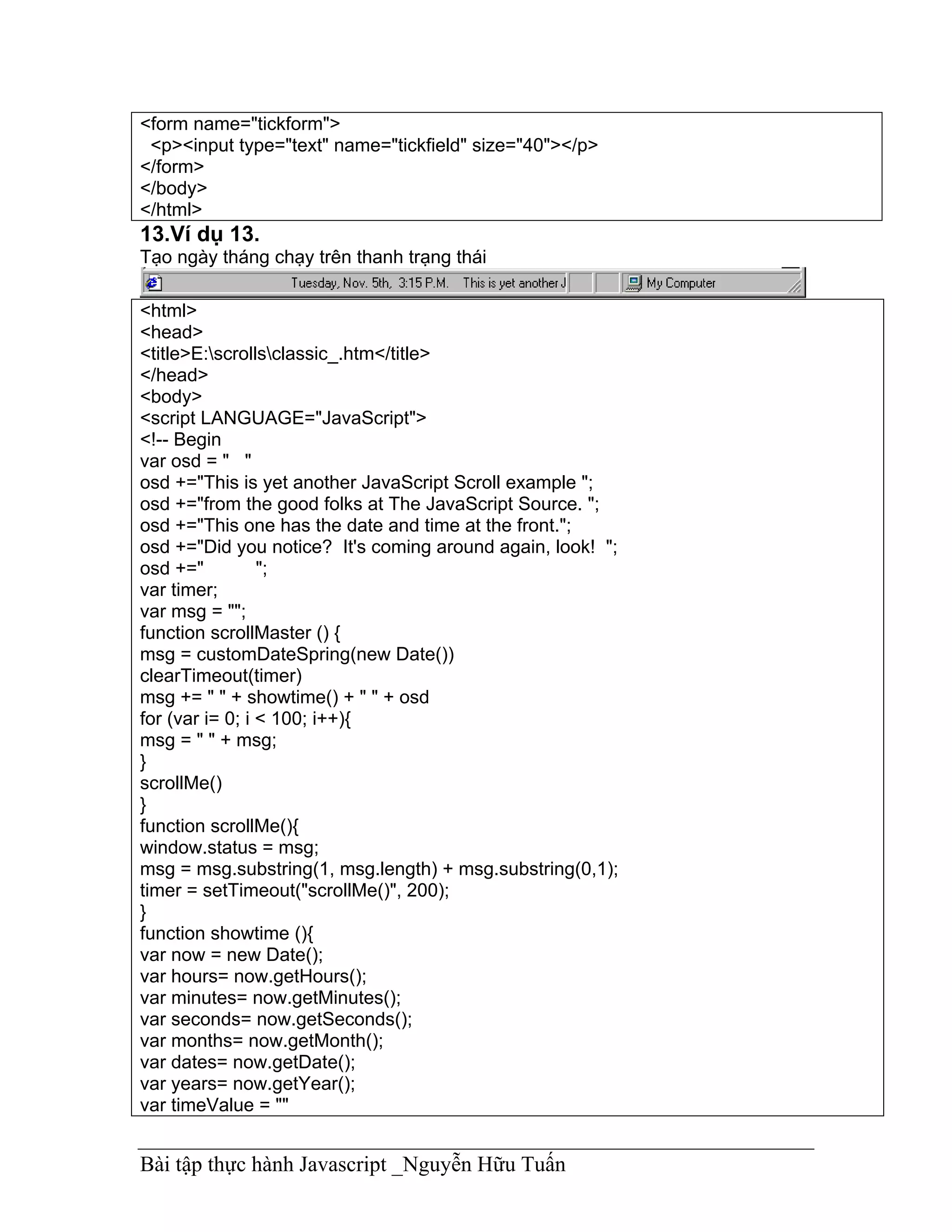
13.Ví dụ 13.
Tạo ngày tháng chạy trên thanh trạng thái

<html>
<head>
<title>E:scrollsclassic_.htm</title>
</head>
<body>
<script LANGUAGE="JavaScript">
<!-- Begin
var osd = " "
osd +="This is yet another JavaScript Scroll example ";
osd +="from the good folks at The JavaScript Source. ";
osd +="This one has the date and time at the front.";
osd +="Did you notice? It's coming around again, look! ";
osd +="          ";
var timer;
var msg = "";
function scrollMaster () {
msg = customDateSpring(new Date())
clearTimeout(timer)
msg += " " + showtime() + " " + osd
for (var i= 0; i < 100; i++){
msg = " " + msg;
}
scrollMe()
}
function scrollMe(){
window.status = msg;
msg = msg.substring(1, msg.length) + msg.substring(0,1);
timer = setTimeout("scrollMe()", 200);
}
function showtime (){
var now = new Date();
var hours= now.getHours();
var minutes= now.getMinutes();
var seconds= now.getSeconds();
var months= now.getMonth();
var dates= now.getDate();
var years= now.getYear();
var timeValue = ""


Bài tập thực hành Javascript _Nguyễn Hữu Tuấn
timeValue += ((months >9) ? "" : " ")
timeValue += ((dates >9) ? "" : " ")
timeValue = ( months +1)
timeValue +="/"+ dates
timeValue +="/"+ years
var ap="A.M."
if (hours == 12) {
ap = "P.M."
}
if (hours == 0) {
hours = 12
}
if(hours >= 13){
hours -= 12;
ap="P.M."
}
var timeValue2 = " " + hours
timeValue2 += ((minutes < 10) ? ":0":":") + minutes + " " + ap
return timeValue2;
}
function MakeArray(n) {
this.length = n
return this
}
monthNames = new MakeArray(12)
monthNames[1] = "Janurary"
monthNames[2] = "February"
monthNames[3] = "March"
monthNames[4] = "April"
monthNames[5] = "May"
monthNames[6] = "June"
monthNames[7] = "July"
monthNames[8] = "August"
monthNames[9] = "Sept."
monthNames[10] = "Oct."
monthNames[11] = "Nov."
monthNames[12] = "Dec."
daysNames = new MakeArray(7)
daysNames[1] = "Sunday"
daysNames[2] = "Monday"
daysNames[3] = "Tuesday"
daysNames[4] = "Wednesday"
daysNames[5] = "Thursday"
daysNames[6] = "Friday"
daysNames[7] = "Saturday"
function customDateSpring(oneDate) {


Bài tập thực hành Javascript _Nguyễn Hữu Tuấn
var theDay = daysNames[oneDate.getDay() +1]
var theDate =oneDate.getDate()
var theMonth = monthNames[oneDate.getMonth() +1]
var dayth="th"
if ((theDate == 1) || (theDate == 21) || (theDate == 31)) {
dayth="st";
}
if ((theDate == 2) || (theDate ==22)) {
dayth="nd";
}
if ((theDate== 3) || (theDate == 23)) {
dayth="rd";
}
return theDay + ", " + theMonth + " " + theDate + dayth + ","
}
scrollMaster();
// End -->
</script>
</body>
</html>


14. Ví dụ 14.
Tạo dòng chữ bay vào thanh trạng tháI từng chữ cái một
<html>
<head><script LANGUAGE="JavaScript">
<!-- Begin
function scroll(jumpSpaces,position) {
var msg = "Another JavaScript Example! Do you like it?"
var out = ""
if (killScroll) {return false}
for (var i=0; i<position; i++){


Bài tập thực hành Javascript _Nguyễn Hữu Tuấn
out += msg.charAt(i)}
for (i=1;i<jumpSpaces;i++) {
out += " "}
out += msg.charAt(position)
window.status = out
if (jumpSpaces <= 1) {
position++
if (msg.charAt(position) == ' ') {
position++ }
jumpSpaces = 100-position
}
else if (jumpSpaces > 3) {
jumpSpaces *= .75}
else {
jumpSpaces--}
if (position != msg.length) {
var cmd = "scroll(" + jumpSpaces + "," + position + ")";
scrollID = window.setTimeout(cmd,5);
}
else {
scrolling = false
return false}
return true;
}
function startScroller() {
if (scrolling)
if (!confirm('Re-initialize snapIn?'))
return false
killScroll = true
scrolling = true
var killID = window.setTimeout('killScroll=false',6)
scrollID = window.setTimeout('scroll(100,0)',10)
return true
}
var scrollID = Object
var scrolling = false
var killScroll = false
// End -->
</script>

<title></title>
</head>
<!-- STEP TWO: Add the onLoad event handler to the BODY tag -->

<body onLoad="startScroller()">
</body>


Bài tập thực hành Javascript _Nguyễn Hữu Tuấn
</html>


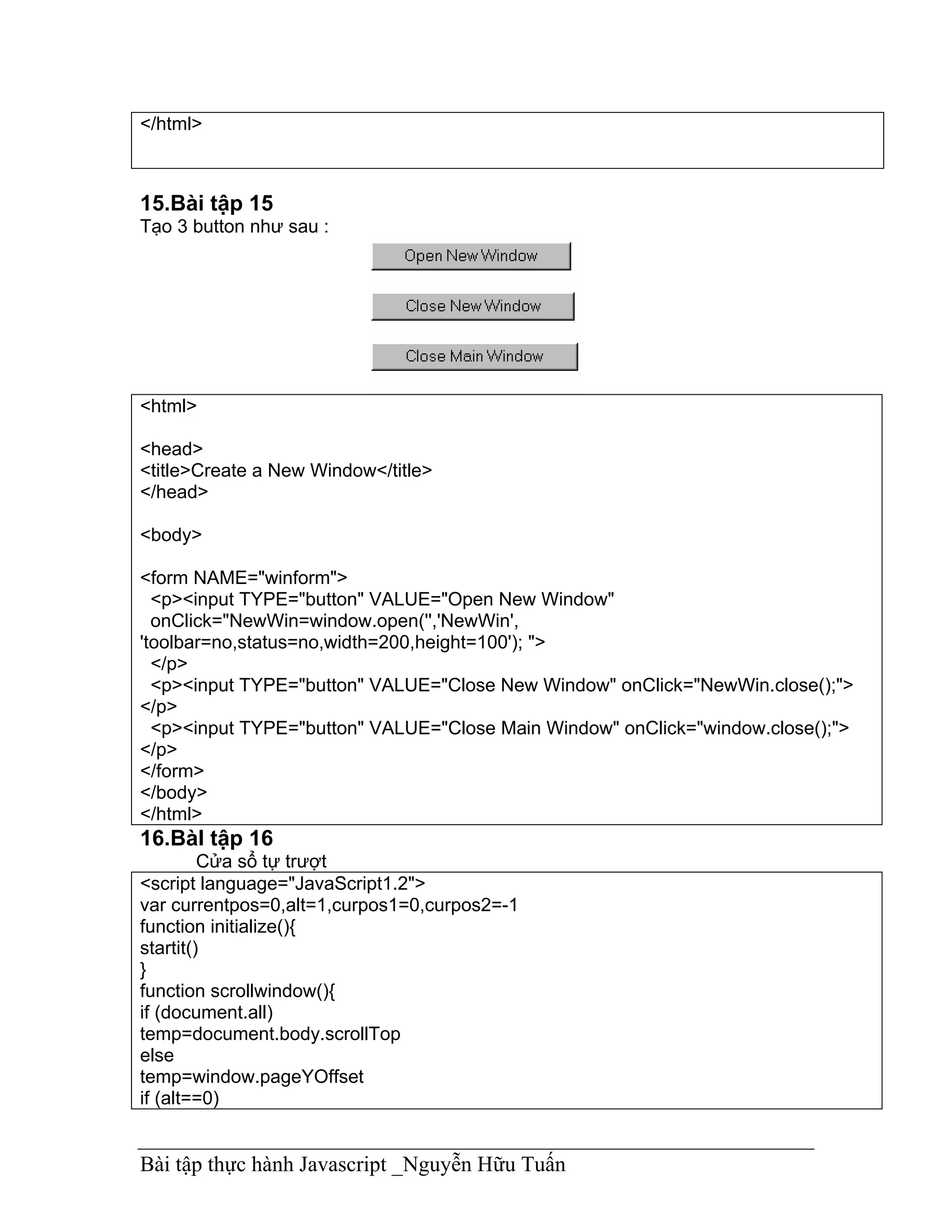
15.Bài tập 15
Tạo 3 button như sau :


<html>

<head>
<title>Create a New Window</title>
</head>

<body>

<form NAME="winform">
  <p><input TYPE="button" VALUE="Open New Window"
  onClick="NewWin=window.open('','NewWin',
'toolbar=no,status=no,width=200,height=100'); ">
  </p>
  <p><input TYPE="button" VALUE="Close New Window" onClick="NewWin.close();">
</p>
  <p><input TYPE="button" VALUE="Close Main Window" onClick="window.close();">
</p>
</form>
</body>
</html>
16.BàI tập 16
         Cửa sổ tự trượt
<script language="JavaScript1.2">
var currentpos=0,alt=1,curpos1=0,curpos2=-1
function initialize(){
startit()
}
function scrollwindow(){
if (document.all)
temp=document.body.scrollTop
else
temp=window.pageYOffset
if (alt==0)


Bài tập thực hành Javascript _Nguyễn Hữu Tuấn
alt=1
else
alt=0
if (alt==0)
curpos1=temp
else
curpos2=temp
if (curpos1!=curpos2){
if (document.all)
currentpos=document.body.scrollTop+1
else
currentpos=window.pageYOffset+1
window.scroll(0,currentpos)
}
else{
currentpos=0
window.scroll(0,currentpos)
}
}
function startit(){
setInterval("scrollwindow()",10)
}
window.onload=initialize
</script>
17. Bài tập 17
Tạo Combo box có fulldown menu
<html>
<head><script LANGUAGE="JavaScript">
<!-- Begin
function formHandler(){
var URL = document.form.site.options[document.form.site.selectedIndex].value;
window.location.href = URL;
// End -->
}
</script>

<title>E:buttonpushme_.htm</title>
</head>
<!-- STEP ONE: Paste this code into the BODY of your HTML document -->

<body>

<form name="form">
 <p><select NAME="site" SIZE="1" onChange="formHandler()">
  <option VALUE>Go to.... </option>
  <option VALUE="http://www.metacrawler.com">Metacrawler </option>


Bài tập thực hành Javascript _Nguyễn Hữu Tuấn
<option VALUE="http://www.altavista.digital.com">Altavista </option>
   <option VALUE="http://www.webcrawler.com">Webcrawler </option>
   <option VALUE="http://www.lycos.com">Lycos </option>
   <option VALUE="http://www.javascriptsource.com">The JavaScript Source </option>
 </select></p>
</form>
</body>
</html>
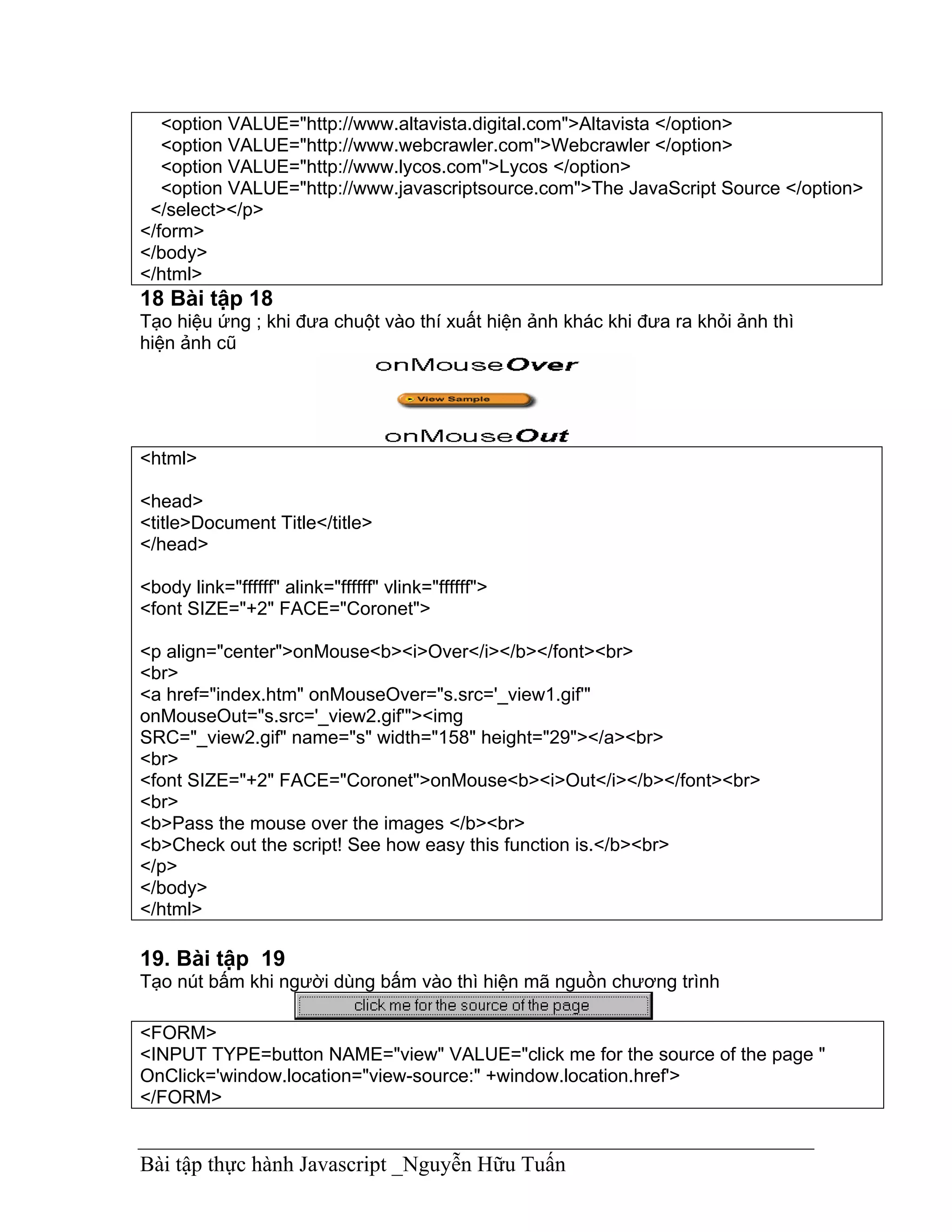
18 Bài tập 18
Tạo hiệu ứng ; khi đưa chuột vào thí xuất hiện ảnh khác khi đưa ra khỏi ảnh thì
hiện ảnh cũ


<html>

<head>
<title>Document Title</title>
</head>

<body link="ffffff" alink="ffffff" vlink="ffffff">
<font SIZE="+2" FACE="Coronet">

<p align="center">onMouse<b><i>Over</i></b></font><br>
<br>
<a href="index.htm" onMouseOver="s.src='_view1.gif'"
onMouseOut="s.src='_view2.gif'"><img
SRC="_view2.gif" name="s" width="158" height="29"></a><br>
<br>
<font SIZE="+2" FACE="Coronet">onMouse<b><i>Out</i></b></font><br>
<br>
<b>Pass the mouse over the images </b><br>
<b>Check out the script! See how easy this function is.</b><br>
</p>
</body>
</html>

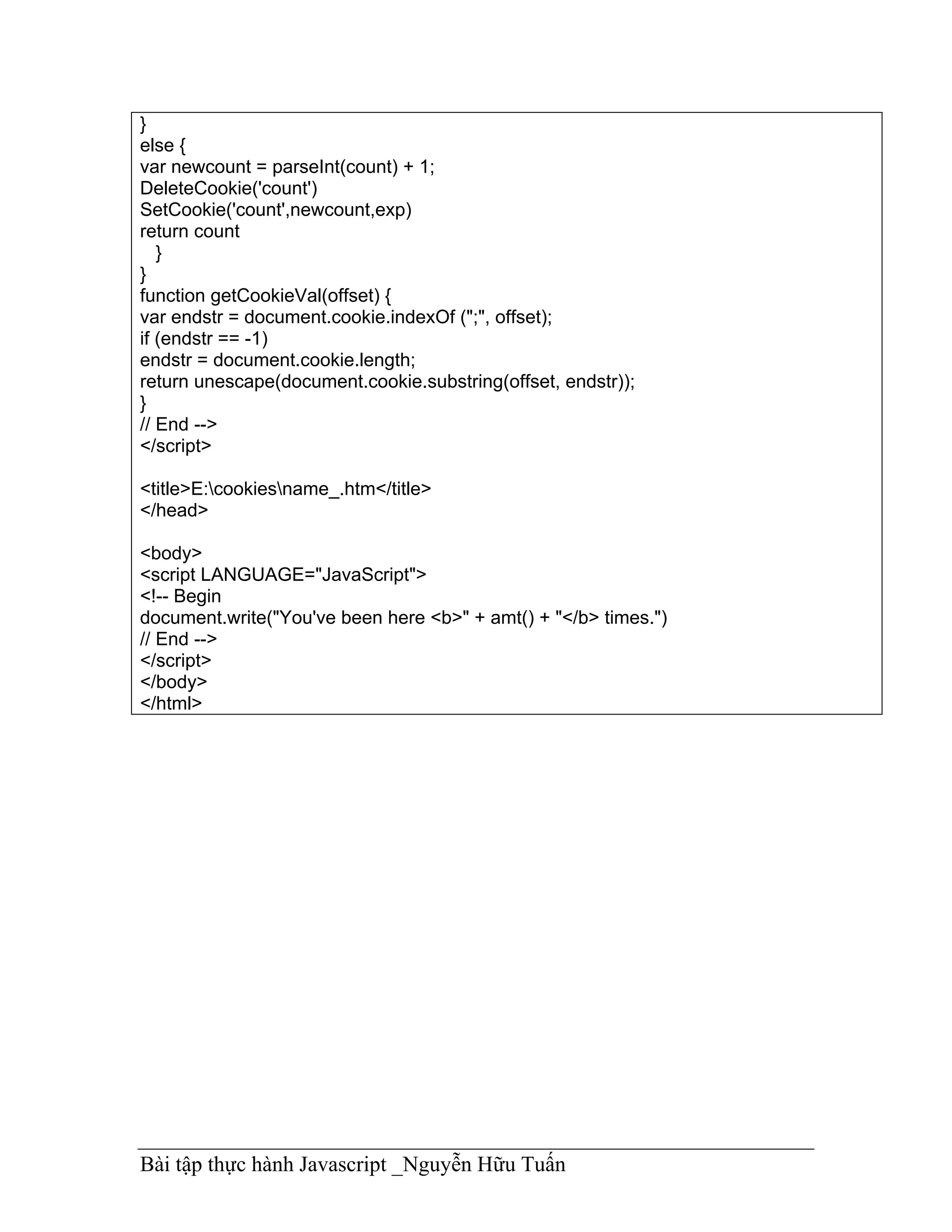
19. Bài tập 19
Tạo nút bấm khi người dùng bấm vào thì hiện mã nguồn chương trình

<FORM>
<INPUT TYPE=button NAME="view" VALUE="click me for the source of the page "
OnClick='window.location="view-source:" +window.location.href'>
</FORM>


Bài tập thực hành Javascript _Nguyễn Hữu Tuấn
20.Bài tập 20
Sử dụng Cookies để đếm số lần truy cập trang Web
<html>
<head><script LANGUAGE="JavaScript">
<!-- Begin
function GetCookie (name) {
var arg = name + "=";
var alen = arg.length;
var clen = document.cookie.length;
var i = 0;
while (i < clen) {
var j = i + alen;
if (document.cookie.substring(i, j) == arg)
return getCookieVal (j);
i = document.cookie.indexOf(" ", i) + 1;
if (i == 0) break;
}
return null;
}
function SetCookie (name, value) {
var argv = SetCookie.arguments;
var argc = SetCookie.arguments.length;
var expires = (argc > 2) ? argv[2] : null;
var path = (argc > 3) ? argv[3] : null;
var domain = (argc > 4) ? argv[4] : null;
var secure = (argc > 5) ? argv[5] : false;
document.cookie = name + "=" + escape (value) +
((expires == null) ? "" : ("; expires=" + expires.toGMTString())) +
((path == null) ? "" : ("; path=" + path)) +
((domain == null) ? "" : ("; domain=" + domain)) +
((secure == true) ? "; secure" : "");
}
function DeleteCookie (name) {
var exp = new Date();
exp.setTime (exp.getTime() - 1);
var cval = GetCookie (name);
document.cookie = name + "=" + cval + "; expires=" + exp.toGMTString();
}
var expDays = 30;
var exp = new Date();
exp.setTime(exp.getTime() + (expDays*24*60*60*1000));
function amt(){
var count = GetCookie('count')
if(count == null) {
SetCookie('count','1')
return 1


Bài tập thực hành Javascript _Nguyễn Hữu Tuấn
}
else {
var newcount = parseInt(count) + 1;
DeleteCookie('count')
SetCookie('count',newcount,exp)
return count
   }
}
function getCookieVal(offset) {
var endstr = document.cookie.indexOf (";", offset);
if (endstr == -1)
endstr = document.cookie.length;
return unescape(document.cookie.substring(offset, endstr));
}
// End -->
</script>

<title>E:cookiesname_.htm</title>
</head>

<body>
<script LANGUAGE="JavaScript">
<!-- Begin
document.write("You've been here <b>" + amt() + "</b> times.")
// End -->
</script>
</body>
</html>


Bài tập thực hành Javascript _Nguyễn Hữu Tuấn

Bai tap thuc hanh javascript

  • 1.
    Bài tập thựchành JavaScript 1. Bài Tập 1: Tạo Giao Diện Như Sau Yêu cầu : Khi Click chuột vào Radio Button thì có các thông điệp (Message) tương ứng <FORM> <p> 1: <INPUT TYPE="radio" NAME="radio" value="Bạn chọn số 1" onClick="alert(value)"> 2: <INPUT TYPE="radio" NAME="radio" value=" Bạn chọn số 2 " onClick="alert(value)"> 3: <INPUT TYPE="radio" NAME="radio" value=" Bạn chọn số 3” onClick="alert(value)" > </form> 2. Bài tập 2 Khi Click chuột vàonút Message thì hiện lên câu chào <form> <input type="button" value="message" onClick="alert('How are you'); return true"> </form> 3.BàI tập 3 Chào tạm biệt Khi đóng cửa sổ trình duyệt hoặc chuyển sang trang Web khác thì xuất hiện lời chào tạm biệt Bài tập thực hành Javascript _Nguyễn Hữu Tuấn
  • 2.
    <html> <head> <title>Click the backto see the Example</title> <meta name="GENERATOR" content="Copyright Next Step Software 1998 (c)"> </head> <body onUnload="window.alert('This Message Appears When you exit a page!!!!!!!')"> <form> <p><input TYPE="button" VALUE=" BACK " onClick="history.go(-1)"> </p> </form> <p>Click the back to see the Example!</p> </body> </html> 4. Bài tập 4 Yêu cầu ; Khi nhấp vào liên kết thì Windows hỏi .Nếu OK thì ta link dến trang đó ,không thì ta không là gì cả http://www.cidnet.vn <script> function rusure(){ question = confirm("YOUR CONFIRM MESSAGE") if (question !="0"){ top.location = "YOUR LINK GOES HERE" } } </script> Now put this anywhere in your page and change YOUR LINK DESCRIPTION <a href="" onClick="rusure(); return false;">YOUR LINK DESCRIPTION</a> Bài tập thực hành Javascript _Nguyễn Hữu Tuấn
  • 3.
    5.Bài tập 5 Hãytạo một chương trình máy tính điện tử như sau : <html> <head><script LANGUAGE="JavaScript"> function a_plus_b(form) { a=eval(form.a.value) b=eval(form.b.value) c=a+b form.ans.value = c } function a_minus_b(form) { a=eval(form.a.value) b=eval(form.b.value) c=a-b form.ans.value=c } function a_times_b(form) { a=eval(form.a.value) b=eval(form.b.value) c=a*b form.ans.value=c } function a_div_b(form) { a=eval(form.a.value) b=eval(form.b.value) c=a/b form.ans.value = c } function a_pow_b(form) { a=eval(form.a.value) b=eval(form.b.value) c=Math.pow(a, b) form.ans.value = c } </script> <title>E:buttonwindowsizer_.htm</title> </head> Bài tập thực hành Javascript _Nguyễn Hữu Tuấn
  • 4.
    <body> <form name="formx"> <p><inputtype="text" size="4" value="12" name="a"> <input type="button" value=" + " onClick="a_plus_b(this.form)"> <input type="button" value=" - " onClick="a_minus_b(this.form)"> <input type="button" value=" x " onClick="a_times_b(this.form)"> <input type="button" value=" / " onClick="a_div_b(this.form)"> <input type="button" value=" ^ " onClick="a_pow_b(this.form)"> <input type="number" size="4" value="3" name="b"> = <input type "number" value="0" name="ans" size="9"> </p> </form> </body> </html> 6.bàI tập 6: Tạo một chương trình mô tả Lịch để bàn như sau : <html> <head> <title>Next Step Software - Java Script Number - 14</title> <meta name="GENERATOR" content="(c) 1998 Copyright Next Step Software"> </head> <body> <script LANGUAGE="JavaScript"> <!-- Begin monthnames = new Array("January","Februrary","March","April","May","June", "July","August","September","October","November","Decemeber"); var linkcount=0; function addlink(month, day, href) { var entry = new Array(3); entry[0] = month; entry[1] = day; entry[2] = href; this[linkcount++] = entry; } Array.prototype.addlink = addlink; Bài tập thực hành Javascript _Nguyễn Hữu Tuấn
  • 5.
    linkdays = newArray(); monthdays = new Array(12); monthdays[0]=31; monthdays[1]=28; monthdays[2]=31; monthdays[3]=30; monthdays[4]=31; monthdays[5]=30; monthdays[6]=31; monthdays[7]=31; monthdays[8]=30; monthdays[9]=31; monthdays[10]=30; monthdays[11]=31; todayDate=new Date(); thisday=todayDate.getDay(); thismonth=todayDate.getMonth(); thisdate=todayDate.getDate(); thisyear=todayDate.getYear(); thisyear = thisyear % 100; thisyear = ((thisyear < 50) ? (2000 + thisyear) : (1900 + thisyear)); if (((thisyear % 4 == 0) && !(thisyear % 100 == 0)) ||(thisyear % 400 == 0)) monthdays[1]++; startspaces=thisdate; while (startspaces > 7) startspaces-=7; startspaces = thisday - startspaces + 1; if (startspaces < 0) startspaces+=7; document.write("<table border=2 bgcolor=white "); document.write("bordercolor=black><font color=black>"); document.write("<tr><td colspan=7><center><strong>" + monthnames[thismonth] + " " + thisyear + "</strong></center></font></td></tr>"); document.write("<tr>"); document.write("<td align=center>Su</td>"); document.write("<td align=center>M</td>"); document.write("<td align=center>Tu</td>"); document.write("<td align=center>W</td>"); document.write("<td align=center>Th</td>"); document.write("<td align=center>F</td>"); document.write("<td align=center>Sa</td>"); document.write("</tr>"); document.write("<tr>"); for (s=0;s<startspaces;s++) { document.write("<td> </td>"); } Bài tập thực hành Javascript _Nguyễn Hữu Tuấn
  • 6.
    count=1; while (count <=monthdays[thismonth]) { for (b = startspaces;b<7;b++) { linktrue=false; document.write("<td>"); for (c=0;c<linkdays.length;c++) { if (linkdays[c] != null) { if ((linkdays[c][0]==thismonth + 1) && (linkdays[c][1]==count)) { document.write("<a href="" + linkdays[c][2] + "">"); linktrue=true; } } } if (count==thisdate) { document.write("<font color='FF0000'><strong>"); } if (count <= monthdays[thismonth]) { document.write(count); } else { document.write(" "); } if (count==thisdate) { document.write("</strong></font>"); } if (linktrue) document.write("</a>"); document.write("</td>"); count++; } document.write("</tr>"); document.write("<tr>"); startspaces=0; } document.write("</table></p>"); // End --> </script> </body> </html> 7.Bài tập 7 Gửi thư Bài tập thực hành Javascript _Nguyễn Hữu Tuấn
  • 7.
    Khi Click vàolink hoặc button thì cho phép ta nhập vào địa chỉ người nhận và subject. <HEAD> <SCRIPT LANGUAGE="JavaScript"> <!-- Begin function mailsome1(){ who=prompt("Enter recipient's email address: ","antispammer@earthling.net"); what=prompt("Enter the subject: ","none"); if (confirm("Are you sure you want to mail "+who+" with the subject of "+what+"?")==true){ parent.location.href='mailto:'+who+'?subject='+what+''; } } // End --> </SCRIPT> <BODY> <CENTER> <a href='javascript:mailsome1()'>E-Mail Someone!</a> <FORM> <input type=button value="E-Mail Someone!" onClick="mailsome1()"> </FORM> </CENTER> 8.Bài tập 8 Viết chương trình cho phép link dến một trang Web khác trong đó cho phép tuỳ chọn các đối tượng Window Bài tập thực hành Javascript _Nguyễn Hữu Tuấn
  • 8.
    <HEAD> <SCRIPT LANGUAGE="JavaScript"> <!-- Begin functioncustomize(form) { var address = document.form1.url.value; var op_tool = (document.form1.tool.checked== true) ? 1 : 0; var op_loc_box = (document.form1.loc_box.checked == true) ? 1 : 0; var op_dir = (document.form1.dir.checked == true) ? 1 : 0; var op_stat = (document.form1.stat.checked == true) ? 1 : 0; var op_menu = (document.form1.menu.checked == true) ? 1 : 0; var op_scroll = (document.form1.scroll.checked == true) ? 1 : 0; var op_resize = (document.form1.resize.checked == true) ? 1 : 0; var op_wid = document.form1.wid.value; var op_heigh = document.form1.heigh.value; var option = "toolbar="+ op_tool +",location="+ op_loc_box +",directories=" + op_dir +",status="+ op_stat +",menubar="+ op_menu +",scrollbars=" + op_scroll +",resizable=" + op_resize +",width=" + op_wid +",height="+ op_heigh; var win3 = window.open("", "what_I_want", option); var win4 = window.open(address, "what_I_want"); } function clear(form) { document.form1.wid.value=""; document.form1.heigh.value=""; } // End --> </SCRIPT> <BODY> <CENTER> <h4>Please choose from the following selections to customize your window</h4> <br> <TABLE cellpadding=5 border><TR><TD><PRE> <FORM name=form1 ACTION="javascript:" METHOD="POST"> <INPUT TYPE="text" NAME="url" value="http://www.geocities.com" >: URL <INPUT TYPE="checkbox" NAME="tool">: Toolbar <INPUT TYPE="checkbox" NAME="loc_box">: Location <INPUT TYPE="checkbox" NAME="dir">: Directories <INPUT TYPE="checkbox" NAME="stat">: Status <INPUT TYPE="checkbox" NAME="menu">: Menubar <INPUT TYPE="checkbox" NAME="scroll">: Scrollbars <INPUT TYPE="checkbox" NAME="resize">: Resizable <INPUT TYPE="text" NAME="wid" value= >: Width <INPUT TYPE="text" NAME="heigh" value=>: Height <BR><CENTER> <INPUT TYPE="button" VALUE="=ENTER=" OnClick="customize(this.form)"> <INPUT TYPE="reset" VALUE="=RESET=" onClick="clear(this.form)"> Bài tập thực hành Javascript _Nguyễn Hữu Tuấn
  • 9.
    </PRE></TD></TR></TABLE> </FORM> </CENTER> 10. Bài 10. kiểm tra tính hợp lệ của thông tin nhập vào <HEAD> <SCRIPT LANGUAGE="JavaScript"> <!-- Begin function validate(){ var digits="0123456789" var temp if (document.testform.Name.value=="") { alert("No Name !") return false } if (document.testform.age.value=="") { alert("Invalid Age !") return false } for (var i=0;i<document.testform.age.value.length;i++){ temp=document.testform.age.value.substring(i,i+1) if (digits.indexOf(temp)==-1){ alert("Invalid Age !") return false } } return true } // End --> </SCRIPT> <BODY> <FORM name="testform" onSubmit="return validate()"> Name:<input type="text" size=30 name="Name"> Age:<input type="text" size=3 name="age"> <input type="submit" value="Submit"> </FORM> 11. BàI tập 11. Tạo dòng chữ chạy trên thanh trạng thái: Welcome to Total.. Bài tập thực hành Javascript _Nguyễn Hữu Tuấn
  • 10.
    <html> <head><script LANGUAGE="JavaScript"> <!-- Begin functionscrollit(seed) { var m1 = "Welcome to Total JavaScript 99! "; var m2 = "..... You can find all the scripts you need here! "; var m3 = "......Enjoy "; var m4 = ""; var msg=m1+m2+m3+m4; var out = " "; var c = 1; if (seed > 100) { seed--; cmd="scrollit("+seed+")"; timerTwo=window.setTimeout(cmd,100); } else if (seed <= 100 && seed > 0) { for (c=0 ; c < seed ; c++) { out+=" "; } out+=msg; seed--; window.status=out; cmd="scrollit("+seed+")"; timerTwo=window.setTimeout(cmd,100); } else if (seed <= 0) { if (-seed < msg.length) { out+=msg.substring(-seed,msg.length); seed--; window.status=out; cmd="scrollit("+seed+")"; timerTwo=window.setTimeout(cmd,100); } else { window.status=" "; timerTwo=window.setTimeout("scrollit(100)",75); } } } // End --> </script> <title></title> </head> Bài tập thực hành Javascript _Nguyễn Hữu Tuấn
  • 11.
    <body onLoad="scrollit(100)"> </body> </html> 12. BàItập 12 Tạo dòng chữ chạy trong TextBox <script language="JavaScript"> <!-- begin var max=0; function textlist() { max=textlist.arguments.length; for (i=0; i<max; i++) this[i]=textlist.arguments[i]; } tl=new textlist ( "This is a message", "Another one", "And this will be the third", "And the fourth is the last !" ); var x=0; pos=0; var l=tl[0].length; function textticker() { document.tickform.tickfield.value=tl[x].substring(0,pos)+"_"; if(pos++==l) { pos=0; setTimeout("textticker()",1000); x++; if(x==max) x=0; l=tl[x].length; } else setTimeout("textticker()",50); } // end --> </script> <html> <head> <title>E:javascriptsscrollsclassic_.htm</title> </head> <body onLoad="textticker()"> Bài tập thực hành Javascript _Nguyễn Hữu Tuấn
  • 12.
    <form name="tickform"> <p><inputtype="text" name="tickfield" size="40"></p> </form> </body> </html> 13.Ví dụ 13. Tạo ngày tháng chạy trên thanh trạng thái <html> <head> <title>E:scrollsclassic_.htm</title> </head> <body> <script LANGUAGE="JavaScript"> <!-- Begin var osd = " " osd +="This is yet another JavaScript Scroll example "; osd +="from the good folks at The JavaScript Source. "; osd +="This one has the date and time at the front."; osd +="Did you notice? It's coming around again, look! "; osd +=" "; var timer; var msg = ""; function scrollMaster () { msg = customDateSpring(new Date()) clearTimeout(timer) msg += " " + showtime() + " " + osd for (var i= 0; i < 100; i++){ msg = " " + msg; } scrollMe() } function scrollMe(){ window.status = msg; msg = msg.substring(1, msg.length) + msg.substring(0,1); timer = setTimeout("scrollMe()", 200); } function showtime (){ var now = new Date(); var hours= now.getHours(); var minutes= now.getMinutes(); var seconds= now.getSeconds(); var months= now.getMonth(); var dates= now.getDate(); var years= now.getYear(); var timeValue = "" Bài tập thực hành Javascript _Nguyễn Hữu Tuấn
  • 13.
    timeValue += ((months>9) ? "" : " ") timeValue += ((dates >9) ? "" : " ") timeValue = ( months +1) timeValue +="/"+ dates timeValue +="/"+ years var ap="A.M." if (hours == 12) { ap = "P.M." } if (hours == 0) { hours = 12 } if(hours >= 13){ hours -= 12; ap="P.M." } var timeValue2 = " " + hours timeValue2 += ((minutes < 10) ? ":0":":") + minutes + " " + ap return timeValue2; } function MakeArray(n) { this.length = n return this } monthNames = new MakeArray(12) monthNames[1] = "Janurary" monthNames[2] = "February" monthNames[3] = "March" monthNames[4] = "April" monthNames[5] = "May" monthNames[6] = "June" monthNames[7] = "July" monthNames[8] = "August" monthNames[9] = "Sept." monthNames[10] = "Oct." monthNames[11] = "Nov." monthNames[12] = "Dec." daysNames = new MakeArray(7) daysNames[1] = "Sunday" daysNames[2] = "Monday" daysNames[3] = "Tuesday" daysNames[4] = "Wednesday" daysNames[5] = "Thursday" daysNames[6] = "Friday" daysNames[7] = "Saturday" function customDateSpring(oneDate) { Bài tập thực hành Javascript _Nguyễn Hữu Tuấn
  • 14.
    var theDay =daysNames[oneDate.getDay() +1] var theDate =oneDate.getDate() var theMonth = monthNames[oneDate.getMonth() +1] var dayth="th" if ((theDate == 1) || (theDate == 21) || (theDate == 31)) { dayth="st"; } if ((theDate == 2) || (theDate ==22)) { dayth="nd"; } if ((theDate== 3) || (theDate == 23)) { dayth="rd"; } return theDay + ", " + theMonth + " " + theDate + dayth + "," } scrollMaster(); // End --> </script> </body> </html> 14. Ví dụ 14. Tạo dòng chữ bay vào thanh trạng tháI từng chữ cái một <html> <head><script LANGUAGE="JavaScript"> <!-- Begin function scroll(jumpSpaces,position) { var msg = "Another JavaScript Example! Do you like it?" var out = "" if (killScroll) {return false} for (var i=0; i<position; i++){ Bài tập thực hành Javascript _Nguyễn Hữu Tuấn
  • 15.
    out += msg.charAt(i)} for(i=1;i<jumpSpaces;i++) { out += " "} out += msg.charAt(position) window.status = out if (jumpSpaces <= 1) { position++ if (msg.charAt(position) == ' ') { position++ } jumpSpaces = 100-position } else if (jumpSpaces > 3) { jumpSpaces *= .75} else { jumpSpaces--} if (position != msg.length) { var cmd = "scroll(" + jumpSpaces + "," + position + ")"; scrollID = window.setTimeout(cmd,5); } else { scrolling = false return false} return true; } function startScroller() { if (scrolling) if (!confirm('Re-initialize snapIn?')) return false killScroll = true scrolling = true var killID = window.setTimeout('killScroll=false',6) scrollID = window.setTimeout('scroll(100,0)',10) return true } var scrollID = Object var scrolling = false var killScroll = false // End --> </script> <title></title> </head> <!-- STEP TWO: Add the onLoad event handler to the BODY tag --> <body onLoad="startScroller()"> </body> Bài tập thực hành Javascript _Nguyễn Hữu Tuấn
  • 16.
    </html> 15.Bài tập 15 Tạo3 button như sau : <html> <head> <title>Create a New Window</title> </head> <body> <form NAME="winform"> <p><input TYPE="button" VALUE="Open New Window" onClick="NewWin=window.open('','NewWin', 'toolbar=no,status=no,width=200,height=100'); "> </p> <p><input TYPE="button" VALUE="Close New Window" onClick="NewWin.close();"> </p> <p><input TYPE="button" VALUE="Close Main Window" onClick="window.close();"> </p> </form> </body> </html> 16.BàI tập 16 Cửa sổ tự trượt <script language="JavaScript1.2"> var currentpos=0,alt=1,curpos1=0,curpos2=-1 function initialize(){ startit() } function scrollwindow(){ if (document.all) temp=document.body.scrollTop else temp=window.pageYOffset if (alt==0) Bài tập thực hành Javascript _Nguyễn Hữu Tuấn
  • 17.
    alt=1 else alt=0 if (alt==0) curpos1=temp else curpos2=temp if (curpos1!=curpos2){ if(document.all) currentpos=document.body.scrollTop+1 else currentpos=window.pageYOffset+1 window.scroll(0,currentpos) } else{ currentpos=0 window.scroll(0,currentpos) } } function startit(){ setInterval("scrollwindow()",10) } window.onload=initialize </script> 17. Bài tập 17 Tạo Combo box có fulldown menu <html> <head><script LANGUAGE="JavaScript"> <!-- Begin function formHandler(){ var URL = document.form.site.options[document.form.site.selectedIndex].value; window.location.href = URL; // End --> } </script> <title>E:buttonpushme_.htm</title> </head> <!-- STEP ONE: Paste this code into the BODY of your HTML document --> <body> <form name="form"> <p><select NAME="site" SIZE="1" onChange="formHandler()"> <option VALUE>Go to.... </option> <option VALUE="http://www.metacrawler.com">Metacrawler </option> Bài tập thực hành Javascript _Nguyễn Hữu Tuấn
  • 18.
    <option VALUE="http://www.altavista.digital.com">Altavista </option> <option VALUE="http://www.webcrawler.com">Webcrawler </option> <option VALUE="http://www.lycos.com">Lycos </option> <option VALUE="http://www.javascriptsource.com">The JavaScript Source </option> </select></p> </form> </body> </html> 18 Bài tập 18 Tạo hiệu ứng ; khi đưa chuột vào thí xuất hiện ảnh khác khi đưa ra khỏi ảnh thì hiện ảnh cũ <html> <head> <title>Document Title</title> </head> <body link="ffffff" alink="ffffff" vlink="ffffff"> <font SIZE="+2" FACE="Coronet"> <p align="center">onMouse<b><i>Over</i></b></font><br> <br> <a href="index.htm" onMouseOver="s.src='_view1.gif'" onMouseOut="s.src='_view2.gif'"><img SRC="_view2.gif" name="s" width="158" height="29"></a><br> <br> <font SIZE="+2" FACE="Coronet">onMouse<b><i>Out</i></b></font><br> <br> <b>Pass the mouse over the images </b><br> <b>Check out the script! See how easy this function is.</b><br> </p> </body> </html> 19. Bài tập 19 Tạo nút bấm khi người dùng bấm vào thì hiện mã nguồn chương trình <FORM> <INPUT TYPE=button NAME="view" VALUE="click me for the source of the page " OnClick='window.location="view-source:" +window.location.href'> </FORM> Bài tập thực hành Javascript _Nguyễn Hữu Tuấn
  • 19.
    20.Bài tập 20 Sửdụng Cookies để đếm số lần truy cập trang Web <html> <head><script LANGUAGE="JavaScript"> <!-- Begin function GetCookie (name) { var arg = name + "="; var alen = arg.length; var clen = document.cookie.length; var i = 0; while (i < clen) { var j = i + alen; if (document.cookie.substring(i, j) == arg) return getCookieVal (j); i = document.cookie.indexOf(" ", i) + 1; if (i == 0) break; } return null; } function SetCookie (name, value) { var argv = SetCookie.arguments; var argc = SetCookie.arguments.length; var expires = (argc > 2) ? argv[2] : null; var path = (argc > 3) ? argv[3] : null; var domain = (argc > 4) ? argv[4] : null; var secure = (argc > 5) ? argv[5] : false; document.cookie = name + "=" + escape (value) + ((expires == null) ? "" : ("; expires=" + expires.toGMTString())) + ((path == null) ? "" : ("; path=" + path)) + ((domain == null) ? "" : ("; domain=" + domain)) + ((secure == true) ? "; secure" : ""); } function DeleteCookie (name) { var exp = new Date(); exp.setTime (exp.getTime() - 1); var cval = GetCookie (name); document.cookie = name + "=" + cval + "; expires=" + exp.toGMTString(); } var expDays = 30; var exp = new Date(); exp.setTime(exp.getTime() + (expDays*24*60*60*1000)); function amt(){ var count = GetCookie('count') if(count == null) { SetCookie('count','1') return 1 Bài tập thực hành Javascript _Nguyễn Hữu Tuấn
  • 20.
    } else { var newcount= parseInt(count) + 1; DeleteCookie('count') SetCookie('count',newcount,exp) return count } } function getCookieVal(offset) { var endstr = document.cookie.indexOf (";", offset); if (endstr == -1) endstr = document.cookie.length; return unescape(document.cookie.substring(offset, endstr)); } // End --> </script> <title>E:cookiesname_.htm</title> </head> <body> <script LANGUAGE="JavaScript"> <!-- Begin document.write("You've been here <b>" + amt() + "</b> times.") // End --> </script> </body> </html> Bài tập thực hành Javascript _Nguyễn Hữu Tuấn