Docker plugin for Heat
Orchestrate containers with OpenStack Heat
by Sam Alba
@sam_alba
sam@docker.com
November 2013
What is Docker?

“Docker is an open-source project to easily
create lightweight, portable, self-sufficient
containers from any application.

”

Source: http://www.docker.io
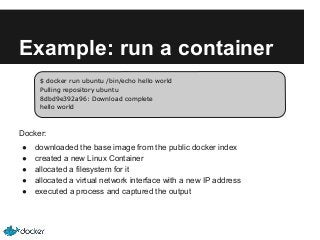
Example: run a container
$ docker run ubuntu /bin/echo hello world
Pulling repository ubuntu
8dbd9e392a96: Download complete
hello world

Docker:
●
●
●
●
●

downloaded the base image from the public docker index
created a new Linux Container
allocated a filesystem for it
allocated a virtual network interface with a new IP address
executed a process and captured the output
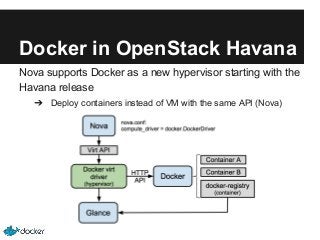
Docker in OpenStack Havana
Nova supports Docker as a new hypervisor starting with the
Havana release
➔ Deploy containers instead of VM with the same API (Nova)
What is Heat?

“Heat implements an orchestration engine to
launch multiple composite cloud applications
based on templates.

”

Source: https://wiki.openstack.org/wiki/Heat
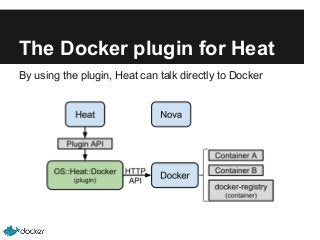
The Docker plugin for Heat
By using the plugin, Heat can talk directly to Docker
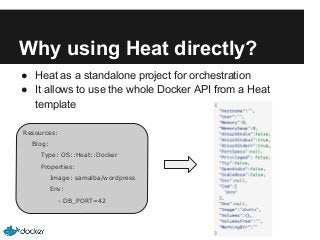
Why using Heat directly?
● Heat as a standalone project for orchestration
● It allows to use the whole Docker API from a Heat
template
Resources:
Blog:
Type: OS::Heat::Docker
Properties:
Image: samalba/wordpress
Env:
- DB_PORT=42
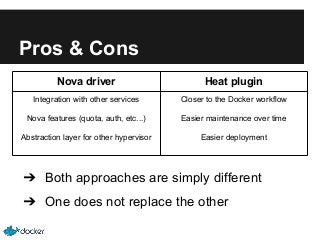
Pros & Cons
Nova driver

Heat plugin

Integration with other services

Closer to the Docker workflow

Nova features (quota, auth, etc...)

Easier maintenance over time

Abstraction layer for other hypervisor

Easier deployment

➔ Both approaches are simply different
➔ One does not replace the other
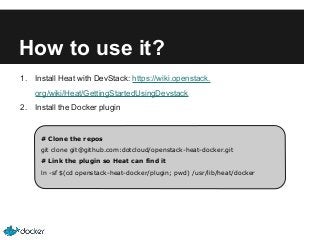
How to use it?
1.

Install Heat with DevStack: https://wiki.openstack.
org/wiki/Heat/GettingStartedUsingDevstack

2.

Install the Docker plugin

# Clone the repos
git clone git@github.com:dotcloud/openstack-heat-docker.git
# Link the plugin so Heat can find it
ln -sf $(cd openstack-heat-docker/plugin; pwd) /usr/lib/heat/docker
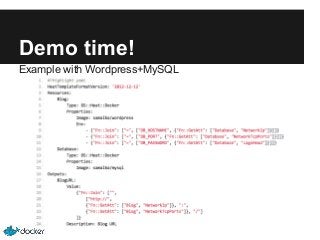
Demo time!
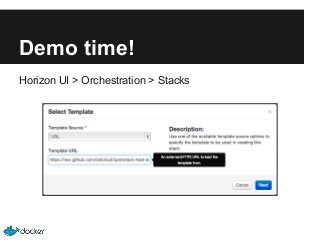
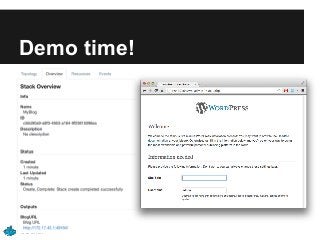
Example with Wordpress+MySQL
Demo time!
Horizon UI > Orchestration > Stacks
Demo time!
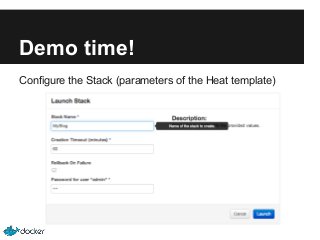
Configure the Stack (parameters of the Heat template)
Demo time!
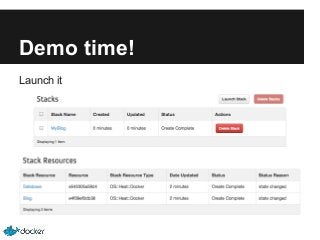
Launch it
Demo time!
What’s next?
Design session: “Docker support in OpenStack”
➔ Friday, 11am - AWE Level 2, Room 204-205

Project home page:
https://github.com/dotcloud/openstack-heat-docker

OpenStack Heat + Docker | Unconference | OpenStack Summit HK 2013

  • 1.
    Docker plugin forHeat Orchestrate containers with OpenStack Heat by Sam Alba @sam_alba sam@docker.com November 2013
  • 2.
    What is Docker? “Dockeris an open-source project to easily create lightweight, portable, self-sufficient containers from any application. ” Source: http://www.docker.io
  • 3.
    Example: run acontainer $ docker run ubuntu /bin/echo hello world Pulling repository ubuntu 8dbd9e392a96: Download complete hello world Docker: ● ● ● ● ● downloaded the base image from the public docker index created a new Linux Container allocated a filesystem for it allocated a virtual network interface with a new IP address executed a process and captured the output
  • 4.
    Docker in OpenStackHavana Nova supports Docker as a new hypervisor starting with the Havana release ➔ Deploy containers instead of VM with the same API (Nova)
  • 5.
    What is Heat? “Heatimplements an orchestration engine to launch multiple composite cloud applications based on templates. ” Source: https://wiki.openstack.org/wiki/Heat
  • 6.
    The Docker pluginfor Heat By using the plugin, Heat can talk directly to Docker
  • 7.
    Why using Heatdirectly? ● Heat as a standalone project for orchestration ● It allows to use the whole Docker API from a Heat template Resources: Blog: Type: OS::Heat::Docker Properties: Image: samalba/wordpress Env: - DB_PORT=42
  • 8.
    Pros & Cons Novadriver Heat plugin Integration with other services Closer to the Docker workflow Nova features (quota, auth, etc...) Easier maintenance over time Abstraction layer for other hypervisor Easier deployment ➔ Both approaches are simply different ➔ One does not replace the other
  • 9.
    How to useit? 1. Install Heat with DevStack: https://wiki.openstack. org/wiki/Heat/GettingStartedUsingDevstack 2. Install the Docker plugin # Clone the repos git clone git@github.com:dotcloud/openstack-heat-docker.git # Link the plugin so Heat can find it ln -sf $(cd openstack-heat-docker/plugin; pwd) /usr/lib/heat/docker
  • 10.
    Demo time! Example withWordpress+MySQL
  • 11.
    Demo time! Horizon UI> Orchestration > Stacks
  • 12.
    Demo time! Configure theStack (parameters of the Heat template)
  • 13.
  • 14.
  • 15.
    What’s next? Design session:“Docker support in OpenStack” ➔ Friday, 11am - AWE Level 2, Room 204-205 Project home page: https://github.com/dotcloud/openstack-heat-docker