June 2024
Presenter name
Title
What’s new in
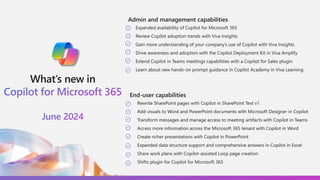
Admin and management capabilities
• Expanded availability of Copilot for Microsoft 365
• Review Copilot adoption trends with Viva Insights
• Gain more understanding of your company’s use of Copilot with Viva Insights
• Drive awareness and adoption with the Copilot Deployment Kit in Viva Amplify
• Extend Copilot in Teams meetings capabilities with a Copilot for Sales plugin
• Learn about new hands-on prompt guidance in Copilot Academy in Viva Learning
End-user capabilities
• Rewrite SharePoint pages with Copilot in SharePoint Text v1
• Add visuals to Word and PowerPoint documents with Microsoft Designer in Copilot
• Transform messages and manage access to meeting artifacts with Copilot in Teams
• Access more information across the Microsoft 365 tenant with Copilot in Word
• Create richer presentations with Copilot in PowerPoint
• Expanded data structure support and comprehensive answers in Copilot in Excel
• Share work plans with Copilot-assisted Loop page creation
• Shifts plugin for Copilot for Microsoft 365
Copilot for Microsoft 365 can now be purchased as an add-on to
the following plans:
• Microsoft 365 Apps for business and enterprise
• Microsoft Teams Essentials, Enterprise, and EEA
• Exchange Kiosk, Plan 1, and Plan 2
• SharePoint Plan 1 and Plan 2
• OneDrive for Business Plan 1 and Plan 2
• Microsoft Planner Plan 1 (formerly Project Plan 1)
• Microsoft Project Plan 3 and Plan 5
• Project Online Essentials
• Visio Plan 1 and Plan 2
• Microsoft ClipChamp
Users licensed with one of the plans listed above and Copilot for
Microsoft 365 can use all the Copilot capabilities available within
the apps and services included with that plan. Copilot for Microsoft 365
Copilot for Microsoft 365
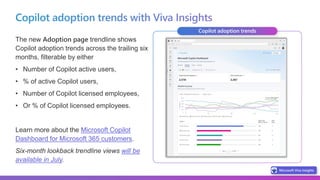
The new Adoption page trendline shows
Copilot adoption trends across the trailing six
months, filterable by either
• Number of Copilot active users,
• % of active Copilot users,
• Number of Copilot licensed employees,
• Or % of Copilot licensed employees.
Learn more about the Microsoft Copilot
Dashboard for Microsoft 365 customers.
Six-month lookback trendline views will be
available in July.
Copilot adoption trends
Microsoft Viva Insights
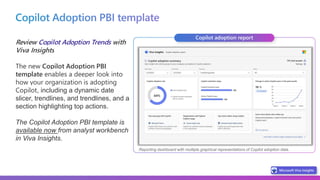
Review Copilot Adoption Trends with
Viva Insights
The new Copilot Adoption PBI
template enables a deeper look into
how your organization is adopting
Copilot, including a dynamic date
slicer, trendlines, and trendlines, and a
section highlighting top actions.
The Copilot Adoption PBI template is
available now from analyst workbench
in Viva Insights.
Copilot adoption report
Reporting dashboard with multiple graphical representations of Copilot adoption data.
Microsoft Viva Insights
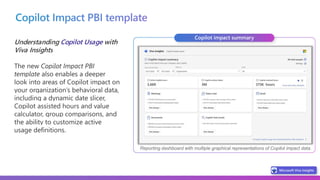
Understanding Copilot Usage with
Viva Insights
The new Copilot Impact PBI
template also enables a deeper
look into areas of Copilot impact on
your organization’s behavioral data,
including a dynamic date slicer,
Copilot assisted hours and value
calculator, group comparisons, and
the ability to customize active
usage definitions.
Copilot impact summary
Reporting dashboard with multiple graphical representations of Copilot impact data.
Microsoft Viva Insights
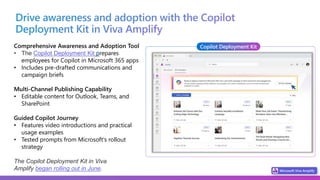
Comprehensive Awareness and Adoption Tool
• The Copilot Deployment Kit prepares
employees for Copilot in Microsoft 365 apps
• Includes pre-drafted communications and
campaign briefs
Multi-Channel Publishing Capability
• Editable content for Outlook, Teams, and
SharePoint
Guided Copilot Journey
• Features video introductions and practical
usage examples
• Tested prompts from Microsoft's rollout
strategy
The Copilot Deployment Kit in Viva
Amplify began rolling out in June.
Copilot Deployment Kit
Microsoft Viva Amplify
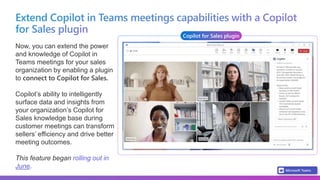
Now, you can extend the power
and knowledge of Copilot in
Teams meetings for your sales
organization by enabling a plugin
to connect to Copilot for Sales.
Copilot’s ability to intelligently
surface data and insights from
your organization’s Copilot for
Sales knowledge base during
customer meetings can transform
sellers’ efficiency and drive better
meeting outcomes.
This feature began rolling out in
June.
Copilot for Sales plugin
Microsoft Teams
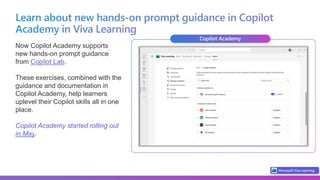
Now Copilot Academy supports
new hands-on prompt guidance
from Copilot Lab.
These exercises, combined with the
guidance and documentation in
Copilot Academy, help learners
uplevel their Copilot skills all in one
place.
Copilot Academy started rolling out
in May.
Copilot Academy
Microsoft Viva Learning
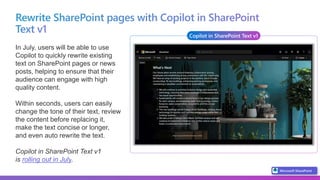
In July, users will be able to use
Copilot to quickly rewrite existing
text on SharePoint pages or news
posts, helping to ensure that their
audience can engage with high
quality content.
Within seconds, users can easily
change the tone of their text, review
the content before replacing it,
make the text concise or longer,
and even auto rewrite the text.
Copilot in SharePoint Text v1
is rolling out in July.
Copilot in SharePoint Text v1
Microsoft SharePoint
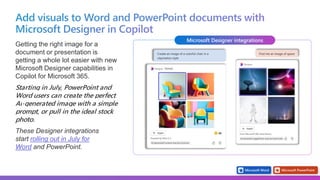
Getting the right image for a
document or presentation is
getting a whole lot easier with new
Microsoft Designer capabilities in
Copilot for Microsoft 365.
Starting in July, PowerPoint and
Word users can create the perfect
AI-generated image with a simple
prompt, or pull in the ideal stock
photo.
These Designer integrations
start rolling out in July for
Word and PowerPoint.
Microsoft Designer integrations
Microsoft Word Microsoft PowerPoint
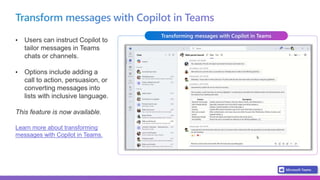
• Users can instruct Copilot to
tailor messages in Teams
chats or channels.
• Options include adding a
call to action, persuasion, or
converting messages into
lists with inclusive language.
This feature is now available.
Learn more about transforming
messages with Copilot in Teams.
Transforming messages with Copilot in Teams
Microsoft Teams
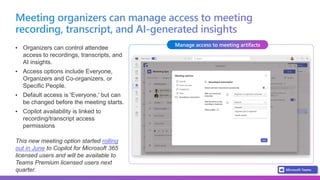
• Organizers can control attendee
access to recordings, transcripts, and
AI insights.
• Access options include Everyone,
Organizers and Co-organizers, or
Specific People.
• Default access is 'Everyone,' but can
be changed before the meeting starts.
• Copilot availability is linked to
recording/transcript access
permissions
This new meeting option started rolling
out in June to Copilot for Microsoft 365
licensed users and will be available to
Teams Premium licensed users next
quarter.
Manage access to meeting artifacts
Microsoft Teams
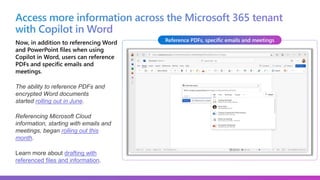
Now, in addition to referencing Word
and PowerPoint files when using
Copilot in Word, users can reference
PDFs and specific emails and
meetings.
The ability to reference PDFs and
encrypted Word documents
started rolling out in June.
Referencing Microsoft Cloud
information, starting with emails and
meetings, began rolling out this
month.
Learn more about drafting with
referenced files and information.
Reference PDFs, specific emails and meetings
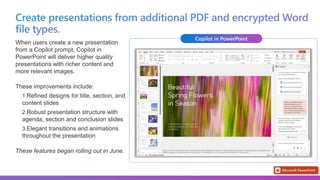
When users create a new presentation
from a Copilot prompt, Copilot in
PowerPoint will deliver higher quality
presentations with richer content and
more relevant images.
These improvements include:
1.Refined designs for title, section, and
content slides
2.Robust presentation structure with
agenda, section and conclusion slides
3.Elegant transitions and animations
throughout the presentation
These features began rolling out in June.
Copilot in PowerPoint
Microsoft PowerPoint
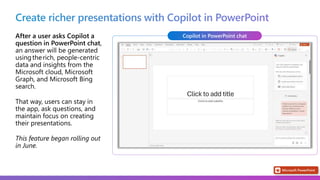
After a user asks Copilot a
question in PowerPoint chat,
an answer will be generated
usingtherich, people-centric
data and insights from the
Microsoft cloud, Microsoft
Graph, and Microsoft Bing
search.
That way, users can stay in
the app, ask questions, and
maintain focus on creating
their presentations.
This feature began rolling out
in June.
Copilot in PowerPoint chat
Microsoft PowerPoint
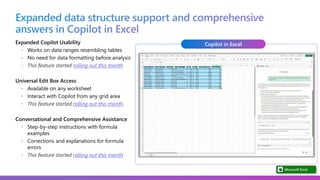
Expanded Copilot Usability
 Works on data ranges resembling tables
 No need for data formatting before analysis
 This feature started rolling out this month
Universal Edit Box Access
 Available on any worksheet
 Interact with Copilot from any grid area
 This feature started rolling out this month.
Conversational and Comprehensive Assistance
 Step-by-step instructions with formula
examples
 Corrections and explanations for formula
errors
 This feature started rolling out this month
Copilot in Excel
Microsoft Excel
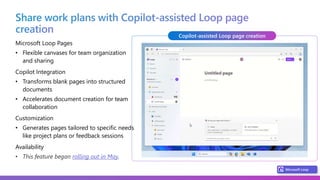
Microsoft Loop Pages
• Flexible canvases for team organization
and sharing
Copilot Integration
• Transforms blank pages into structured
documents
• Accelerates document creation for team
collaboration
Customization
• Generates pages tailored to specific needs
like project plans or feedback sessions
Availability
• This feature began rolling out in May.
Copilot-assisted Loop page creation
Microsoft Loop
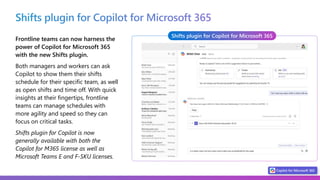
Frontline teams can now harness the
power of Copilot for Microsoft 365
with the new Shifts plugin.
Both managers and workers can ask
Copilot to show them their shifts
schedule for their specific team, as well
as open shifts and time off. With quick
insights at their fingertips, frontline
teams can manage schedules with
more agility and speed so they can
focus on critical tasks.
Shifts plugin for Copilot is now
generally available with both the
Copilot for M365 license as well as
Microsoft Teams E and F-SKU licenses.
Shifts plugin for Copilot for Microsoft 365
Copilot for Microsoft 365
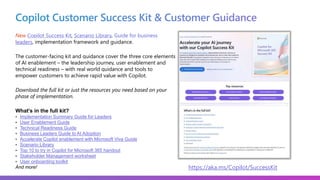
New Copilot Success Kit, Scenario Library, Guide for business
leaders, implementation framework and guidance.
The customer-facing kit and guidance cover the three core elements
of AI enablement – the leadership journey, user enablement and
technical readiness – with real world guidance and tools to
empower customers to achieve rapid value with Copilot.
Download the full kit or just the resources you need based on your
phase of implementation.
What’s in the full kit?
• Implementation Summary Guide for Leaders
• User Enablement Guide
• Technical Readiness Guide
• Business Leaders Guide to AI Adoption
• Accelerate Copilot enablement with Microsoft Viva Guide
• Scenario Library
• Top 10 to try in Copilot for Microsoft 365 handout
• Stakeholder Management worksheet
• User onboarding toolkit
And more! https://aka.ms/Copilot/SuccessKit
Microsoft 365 Roadmap - See What's Coming | Microsoft 365
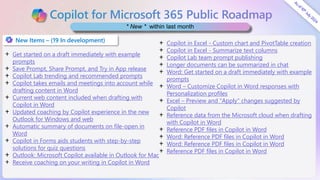
New Items – (19 In development)
Get started on a draft immediately with example
prompts
Save Prompt, Share Prompt, and Try in App release
Copilot Lab trending and recommended prompts
Copilot takes emails and meetings into account while
drafting content in Word
Current web content included when drafting with
Copilot in Word
Updated coaching by Copilot experience in the new
Outlook for Windows and web
Automatic summary of documents on file-open in
Word
Copilot in Forms aids students with step-by-step
solutions for quiz questions
Outlook: Microsoft Copilot available in Outlook for Mac
Receive coaching on your writing in Copilot in Word
Copilot in Excel - Custom chart and PivotTable creation
Copilot in Excel - Summarize text columns
Copilot Lab team prompt publishing
Longer documents can be summarized in chat
Word: Get started on a draft immediately with example
prompts
Word – Customize Copilot in Word responses with
Personalization profiles
Excel – Preview and "Apply" changes suggested by
Copilot
Reference data from the Microsoft cloud when drafting
with Copilot in Word
Reference PDF files in Copilot in Word
Word: Reference PDF files in Copilot in Word
Reference PDF files in Copilot in Word
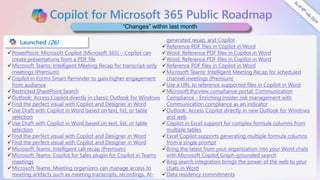
PowerPoint: Microsoft Copilot (Microsoft 365) – Copilot can
create presentations from a PDF file
Microsoft Teams: Intelligent Meeting Recap for transcript-only
meetings (Premium)
Copilot in Forms Smart Reminder to gain higher engagement
from audience
Restricted SharePoint Search
Outlook: Access Copilot directly in classic Outlook for Windows
Find the perfect visual with Copilot and Designer in Word
Use Draft with Copilot in Word based on text, list, or table
selection
Use Draft with Copilot in Word based on text, list, or table
selection
Find the perfect visual with Copilot and Designer in Word
Microsoft Teams: Intelligent call recap (Premium)
Microsoft Teams: Copilot for Sales plugin for Copilot in Teams
meetings
Microsoft Teams: Meeting organizers can manage access to
meeting artifacts such as meeting transcripts, recordings, AI-
generated recap, and Copilot
Reference PDF files in Copilot in Word
Word: Reference PDF files in Copilot in Word
Reference PDF files in Copilot in Word
Microsoft Teams: Intelligent Meeting Recap for scheduled
channel meetings (Premium)
Use a URL to reference supported files in Copilot in Word
Microsoft Purview compliance portal: Communication
Compliance - Enriching Insider risk management with
Communication compliance as an indicator
Outlook: Access Copilot directly in new Outlook for Windows
and web
Copilot in Excel support for complex formula columns from
multiple tables
Excel Copilot supports generating multiple formula columns
from a single prompt
Bring the latest from your organization into your Word chats
with Microsoft Copilot Graph-grounded search
Bing search integration brings the power of the web to your
chats in Word
Data residency commitments
Launched (26)
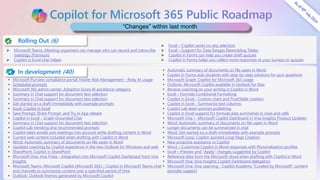
Rolling Out (6)
 Microsoft Teams: Meeting organizers can manage who can record and transcribe
meetings (Premium)
 Copilot in Excel chat helper
 Excel – Copilot works on any selection
 Excel – Support for Data Ranges Resembling Tables
 Copilot in Forms can help you create draft quizzes
 Copilot in Forms helps you collect more responses to your surveys or quizzes
• Microsoft Purview compliance portal: Insider Risk Management - Risky AI usage
• Scheduled prompts
• Microsoft 365 admin center: Adoption Score AI assistance category
• Summary in Chat support for document text selection
• Get started on a draft immediately with example prompts
• Excel: Copilot in Excel
• Save Prompt, Share Prompt, and Try in App release
• Copilot in Excel - Graph Grounded Chat
• Summary in Chat support for document text selection
• Copilot Lab trending and recommended prompts
• Copilot takes emails and meetings into account while drafting content in Word
• Current web content included when drafting with Copilot in Word
• Word: Automatic summary of documents on file-open in Word
• Updated coaching by Copilot experience in the new Outlook for Windows and web
• SharePoint: Copilot in SharePoint
• Microsoft Viva: Viva Pulse - Integration into Microsoft Copilot Dashboard from Viva
Insights
• Microsoft Teams: Microsoft Copilot (Microsoft 365) – Copilot in Microsoft Teams chat
and channels to summarize content over a specified period of time
• Outlook: Outlook themes generated by Microsoft Copilot
• Automatic summary of documents on file-open in Word
• Copilot in Forms aids students with step-by-step solutions for quiz questions
• Microsoft Graph: Copilot for Microsoft 365 usage
• Outlook: Microsoft Copilot available in Outlook for Mac
• Receive coaching on your writing in Copilot in Word
• Excel – Formula Conditional Formatting
• Copilot in Excel - Custom chart and PivotTable creation
• Copilot in Excel - Summarize text columns
• Copilot Lab team prompt publishing
• Copilot in Excel support for formula data summaries in rows and cells
• Microsoft Viva – Microsoft Copilot Dashboard in Viva Insights Product Updates
• Word: Automatic summary of documents on file-open in Word
• Longer documents can be summarized in chat
• Word: Get started on a draft immediately with example prompts
• Microsoft Loop: Copilot-assisted Loop Page Creation
• New proactive assistance in Copilot
• Word – Customize Copilot in Word responses with Personalization profiles
• Excel – Preview and "Apply" changes suggested by Copilot
• Reference data from the Microsoft cloud when drafting with Copilot in Word
• Microsoft Viva: Viva Insights Copilot Dashboard delegation
• Microsoft Viva: Viva Learning - Copilot Academy "Curated by Microsoft" content
provider support
In development (40)
👏