Power Up Your Games: A Deep Dive into Google's Developer Tech
1.
Power Up YourGames:
A Deep Dive into
Google's
Developer Tech
Sri Lanka
Suresh Peiris
Co-Founder | Inforwaves & Articom.io
2.
Google's Mission: Toprovide developers with the tools and resources they need to
create amazing games and successful businesses.
A Comprehensive Ecosystem: From cloud infrastructure and backend services to
analytics, AI, and monetization, Google offers a complete suite of tools for every
stage of the game development lifecycle.
Workshop Goals:
● Explore key Google technologies for game development.
● Understand how to apply these technologies with practical examples.
● Learn about the process of publishing your game on the Google Play Store.
Introduction - The Google
for Games Ecosystem
3.
3Bil
Android's Reach
You're notjust publishing a
game; you're launching it on an
ecosystem with over 3 billion
active Android devices
worldwide.
4.
What it is?
Asuite of cloud computing services that run on
the same infrastructure that Google uses
internally for its end-user products, such as
Google Search, Gmail, and YouTube.
Why Google Cloud for
Games?
Why it matters for games
Global Reach: Deploy servers close to your players to minimize
latency.
Scalability: Automatically scale your resources up or down
based on player demand.
Reliability: Benefit from Google's secure and high-performance
network.
Key Services: Agones, Open Saves, Game Servers, Cloud
Spanner.
5.
What it is:A suite of cloud computing services that run on the same infrastructure
that Google uses internally for its end-user products, such as Google Search, Gmail,
and YouTube.
Why it matters for games:
● Global Reach: Deploy servers close to your players to minimize latency.
● Scalability: Automatically scale your resources up or down based on player
demand.
● Reliability: Benefit from Google's secure and high-performance network.
Key Services: Agones, Open Saves, Game Servers, Cloud Spanner.
Why Google Cloud for
Games?
6.
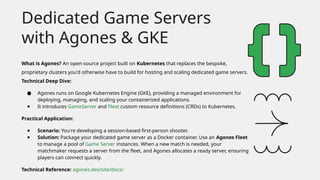
What is Agones?An open-source project built on Kubernetes that replaces the bespoke,
proprietary clusters you'd otherwise have to build for hosting and scaling dedicated game servers.
Technical Deep Dive:
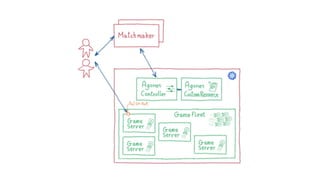
● Agones runs on Google Kubernetes Engine (GKE), providing a managed environment for
deploying, managing, and scaling your containerized applications.
● It introduces GameServer and Fleet custom resource definitions (CRDs) to Kubernetes.
Practical Application:
● Scenario: You're developing a session-based first-person shooter.
● Solution: Package your dedicated game server as a Docker container. Use an Agones Fleet
to manage a pool of Game Server instances. When a new match is needed, your
matchmaker requests a server from the fleet, and Agones allocates a ready server, ensuring
players can connect quickly.
Technical Reference: agones.dev/site/docs/
Dedicated Game Servers
with Agones & GKE
8.
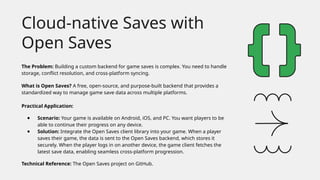
The Problem: Buildinga custom backend for game saves is complex. You need to handle
storage, conflict resolution, and cross-platform syncing.
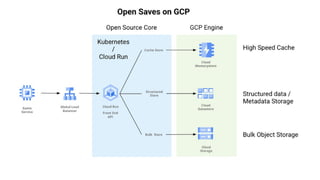
What is Open Saves? A free, open-source, and purpose-built backend that provides a
standardized way to manage game save data across multiple platforms.
Practical Application:
● Scenario: Your game is available on Android, iOS, and PC. You want players to be
able to continue their progress on any device.
● Solution: Integrate the Open Saves client library into your game. When a player
saves their game, the data is sent to the Open Saves backend, which stores it
securely. When the player logs in on another device, the game client fetches the
latest save data, enabling seamless cross-platform progression.
Technical Reference: The Open Saves project on GitHub.
Cloud-native Saves with
Open Saves
10.
What it is:A free and unlimited analytics solution that provides insights into user behavior and
app performance. It's the foundation for understanding your game's health.
Core Concepts:
● Events: Occurrences in your game that you want to measure, like level_start,
item_purchased, or ad_impression.
● Parameters: Contextual data attached to events, e.g., for item_purchased, parameters
could be item_name and item_cost.
● User Properties: Attributes you define to describe segments of your user base, such as
player_level or preferred_character.
Practical Application:
● Goal: Understand the difficulty of your first 5 levels.
● Implementation: Log a level_complete event with parameters for level_name and
time_taken_seconds. By analyzing the average time taken for each level, you can identify
difficulty spikes that may be causing players to quit.
Technical Reference: firebase.google.com/docs/analytics
Google Analytics for Firebase
11.
Funnels: Visualizations ofthe steps players take to complete a task in your game (e.g., the
tutorial). They are crucial for identifying where players are dropping off.
Audiences: Segments of users defined by a combination of events and user properties.
Practical Application:
● Scenario: You want to re-engage players who haven't played in a week.
● Solution: Create an Audience in Analytics for users who have been inactive for 7
days. You can then target this audience with a re-engagement campaign using
Firebase Cloud Messaging, offering them a special "welcome back" bonus.
Technical Reference: Search for "Funnels" and "Audiences" in the Firebase documentation.
Advanced Analytics:
Funnels & Audiences
12.
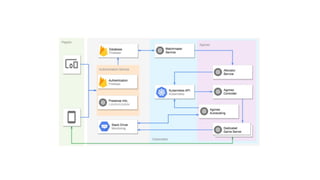
What is Firebase?A mobile and web application development platform that
provides a suite of tools to build your game's backend without managing servers.
Key Services for Games:
● Cloud Firestore: Real-time NoSQL database.
● Firebase Authentication: Secure user login.
● Cloud Functions: Serverless, event-driven code.
● Cloud Storage: Store and serve user-generated content like screenshots or
replays.
Firebase: Your Serverless
Game Backend ⚡
13.
What it is:A flexible, scalable NoSQL cloud database for mobile, web, and server development.
Key Feature: Real-time Listeners. Your game client can "listen" to a document or a collection
in Firestore. When the data changes, Firestore automatically pushes the updated data to the
client.
Practical Application:
● Scenario: You want to build a live leaderboard that updates for all players as soon as a
new high score is set.
● Solution: Store your leaderboard data in a Firestore collection. In your game, attach a
real-time listener to this collection. When one player's score update writes to the
database, the new data is pushed to all connected clients, and their leaderboard UI
updates instantly without needing to manually refresh.
Technical Reference: firebase.google.com/docs/firestore
Real-time Player Data with
Cloud Firestore
15.
What it is:A serverless framework that lets you automatically run backend code in response to
events triggered by Firebase features and HTTPS requests.
How it works: You write small, single-purpose functions in JavaScript, TypeScript, or Python
and deploy them to Google's cloud.
Practical Application:
● Scenario: You want to prevent players from cheating by modifying their device's clock to
claim daily rewards multiple times.
● Solution: Instead of having the game client grant the reward, have the client call a
Cloud Function. The function's server-side logic can securely check the last-claimed
timestamp in Firestore and grant the reward only if 24 hours have passed.
Technical Reference: firebase.google.com/docs/functions
Server-side Logic with Cloud
Functions
16.
What is Gemini?A family of powerful, multimodal AI models from Google that can
understand and generate text, code, images, and more.
Why it's a game-changer: It allows for the procedural generation of high-quality content
that feels human-authored.
Practical Application:
● Scenario: You're building a large open-world RPG and want to fill it with unique lore
books and NPC backstories.
● Solution: Use the Gemini API with a prompt that provides context about a specific
region or character in your game. The model can generate unique, coherent text for
books, letters, or dialogue, making your world feel deeper and more expansive
without manually writing every word.
Technical Reference: ai.google.dev
Generative AI with Gemini:
Dynamic Content 🤖
17.
Beyond Scripting: Traditionalgame AI often relies on finite state machines or behavior
trees, which can be predictable.
Gemini-powered Agents: Gemini can act as the "brain" for an NPC. By giving it a persona,
goals, and knowledge of the game world state, it can make its own decisions and generate
dialogue in real-time.
Practical Application:
● Scenario: You want a detective NPC in your mystery game to be able to answer
player questions about the case, even questions you didn't anticipate.
● Solution: Create an AI agent powered by Gemini. Feed the model all the clues and
case files as context. When the player types a question, the model can reason over
the provided information to formulate an intelligent, in-character response, creating
a truly interactive investigation.
Technical Reference: Explore the Google AI for Developers blog for case studies.
Gemini for Game AI &
Intelligent Agents
18.
What it is:A mobile advertising platform that helps you generate revenue from your apps
with high-quality ads.
Key Ad Formats:
● Rewarded: Players opt-in to watch a video in exchange for an in-game reward (e.g.,
currency, extra life). Highest player satisfaction.
● Interstitial: Full-screen ads that appear at natural breaks in your game, like between
levels.
● Banner: Text or image ads that appear in a banner at the top or bottom of the screen.
Practical Application:
● Scenario: A player runs out of moves in your puzzle game.
● Solution: Offer them a choice: either spend premium currency to continue or watch a
Rewarded Ad for free. This provides a non-paying player a path to continue, improving
retention, while still generating revenue.
Technical Reference: admob.google.com/home/
Maximizing Revenue with
Google AdMob 💰
19.
What it is:The service that enables you to sell digital products and content in your Android
app.
Product Types:
● Consumables: Products that can be purchased multiple times (e.g., in-game currency).
● Non-consumables: Products that are purchased once and provide a permanent
benefit (e.g., "remove ads" or unlocking a character).
● Subscriptions: A recurring charge for content or features (e.g., a monthly battle pass).
Practical Application:
● Scenario: You want to offer a premium version of your game.
● Solution: Implement a Non-consumable in-app purchase to "Unlock Pro Version." For
ongoing revenue, create a monthly Subscription that gives players exclusive cosmetic
items and a currency bonus each month.
Technical Reference: developer.android.com/google/play/billing
In-App Purchases with
Google Play Billing
20.
What it is:The platform where you upload your game, manage your store listing,
view performance data, and engage with user reviews.
Key Concept: Android App Bundles (.aab)
● The modern standard for publishing. You upload a single .aab file containing
all your game's compiled code and resources.
● Google Play's Dynamic Delivery then uses your app bundle to generate and
serve optimized APKs for each user's device configuration, resulting in a
smaller download size for players.
Technical Reference: play.google.com/console/
The Launchpad:
Google Play Console 🚀
21.
Why test? Releasinga buggy game can lead to bad reviews and high uninstall rates. Use
testing tracks to get feedback before a full launch.
Testing Tracks:
● Internal Testing: For a small group of trusted testers (e.g., your QA team). Deployed
almost instantly.
● Closed Testing: For a larger group of testers who you invite via email or Google
Groups. Good for alpha/beta programs.
● Open Testing: Anyone on Google Play can join your test. A great way to get feedback
at scale.
Practical Application: Staged Rollouts
● When you're ready to go live, don't release to 100% of users at once. Start with a
staged rollout to 5% or 10% of users. Monitor crash reports and feedback in the Play
Console. If everything looks good, you can gradually increase the percentage until you
reach a full release. This minimizes the impact of any undiscovered bugs.
Technical Reference: Search for "release management" in the Play Console Help Center.
Testing Tracks & Staged Rollouts
22.
Key Takeaways:
● Googleprovides a complete, integrated ecosystem for the entire game development
lifecycle.
● Start with a solid backend using Firebase and Google Cloud.
● Understand your players with Google Analytics.
● Innovate with Gemini for dynamic content and AI.
● Monetize effectively with AdMob and Play Billing.
● Launch confidently using the Google Play Console's testing and rollout features.
Official Resources:
● Google for Games: games.withgoogle.com
● Firebase: firebase.google.com
● Google Cloud: cloud.google.com
● Google AI: ai.google.dev
Conclusion & Resources