Building Data DynamicWeb Sites
Building Data Dynamic Web Sites
• mysqli and PDO are two different PHP extensions that
provide ways to interact with databases, particularly
MySQL.
• Both extensions facilitate communication between PHP
scripts and MySQL databases, allowing you to execute
SQL queries, fetch results, and manage transactions.
Let's take a closer look at each of these PHP database
extensions:
3.
MySQLi (MySQL Improved)
MySQLi(MySQL Improved)
• MySQLi provides both a procedural and an object-oriented
interface, giving developers flexibility in choosing their
preferred programming style.
• MySQLi supports prepared statements, which are precompiled
SQL statements that can be executed multiple times with
different parameters. Prepared statements help prevent SQL
injection attacks.
• MySQLi allows the execution of multiple SQL statements in a
single call using mysqli_multi_query().
4.
PDO (PHP DataObjects)
PDO (PHP Data Objects)
• PDO is a database abstraction layer that provides a consistent
interface for interacting with different database management
systems, not just MySQL. It supports various databases like
MySQL, PostgreSQL, SQLite, and more.
• PDO primarily uses named parameter binding in prepared
statements, improving code readability and reducing the risk
of errors.
• PDO uses exceptions for error handling. This allows
developers to use try-catch blocks to handle database-related
exceptions.
6.
Database
Database
• Structured collectionof data.
Structured collection of data.
• Tables
Tables
• Fields
Fields
• Query
Query
• Reports
Reports
• Essentially a much more sophisticated
Essentially a much more sophisticated
implementation of the flat files.
implementation of the flat files.
8.
Relational Database
Relational Database
•Stores data in
Stores data in separate tables
separate tables instead
instead
of a single store.
of a single store.
• Relationships
Relationships between tables are set
between tables are set
• In theory, this provides a
In theory, this provides a faster
faster,
, more
more
flexible
flexible database system.
database system.
9.
Example
Example
• We wishto maintain a database
database of student names, IDs, addresses,
and any other information.
• Will be updated frequently
updated frequently with new names and information.
• Will want to retrieve data
retrieve data based on some predicate.
• e.g, ‘give me the names of all BS students who live in
Multan’.
• Will want to update database with new information about students,
not previously recorded.
• e.g., may decide we want to include Reg nos.
• Very difficult to manage using ‘flat file’ systems
10.
Databases
Databases
Fast, Efficient backend storage
Easier to manage than file system based approach
Relational Database structure
Well developed theory and practise
Multi-user capable
Multithreaded, multiprocessor, sometimes cluster
based systems
Standards based queries
Structured Query Language (SQL
Structured Query Language (SQL)
11.
MySQL Database
MySQL Database
world'smost popular open source database
because of its consistent fast performance, high
fast performance, high
reliability and ease of use
reliability and ease of use
Open Source License:- free
GNU General Public License
Free to modify and distribute but all modification must
be available in source code format
Commercial:- not free
Fully paid up professional support
• used by
used by Google, Facebook Nokia, YouTube,
Google, Facebook Nokia, YouTube,
Yahoo!, Alcatel-Lucent, Zappos.com, etc
Yahoo!, Alcatel-Lucent, Zappos.com, etc.
12.
Basic Database ServerConcepts
Basic Database Server Concepts
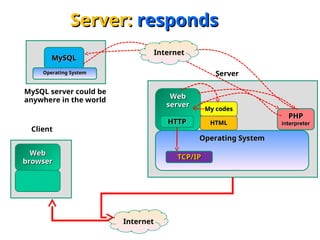
Database runs as a server
Attaches to either a default port or an administrator
specified port
Clients connect to database
For secure systems
authenticated connections
usernames and passwords
Clients make queries on the database
Retrieve content
Insert content
SQL (Structured Query Language) is the language used
to insert and retrieve content
14.
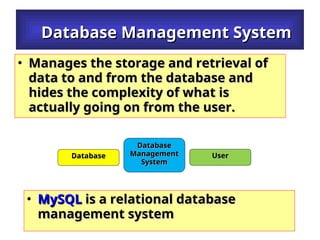
Database Management System
DatabaseManagement System
• Manages the storage and retrieval of
Manages the storage and retrieval of
data to and from the database and
data to and from the database and
hides the complexity of what is
hides the complexity of what is
actually going on from the user.
actually going on from the user.
Database
Database User
User
Database
Database
Management
Management
System
System
• MySQL
MySQL is a relational database
is a relational database
management system
management system
15.
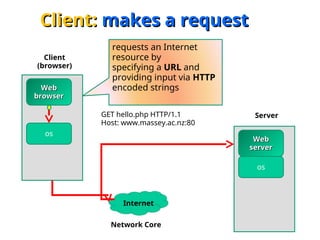
Client:
Client: makes arequest
makes a request
Client
(browser)
Web
Web
browser
browser
os
Web
Web
server
server
os
Server
Internet
requests an Internet
resource by
specifying a URL and
providing input via HTTP
encoded strings
Network Core
GET hello.php HTTP/1.1
Host: www.massey.ac.nz:80
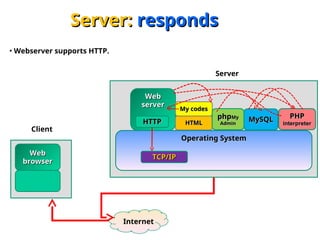
• MySQL canbe controlled through a
MySQL can be controlled through a
simple command-line interface;
simple command-line interface;
however, we can use phpMyAdmin as
however, we can use phpMyAdmin as
an interface to MySQL.
an interface to MySQL.
• phpMyAdmin is a very powerful tool; it
phpMyAdmin is a very powerful tool; it
provides a large number of facilities
provides a large number of facilities
for customising a database
for customising a database
management system.
management system.
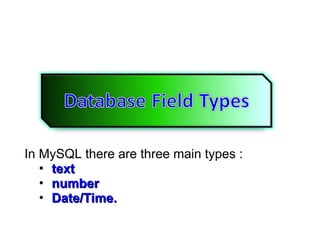
In MySQL thereare three main types :
• text
text
• number
number
• Date/Time.
Date/Time.
27.
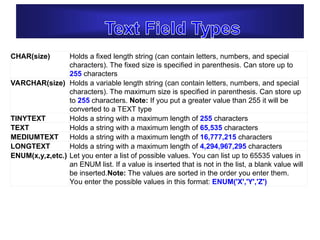
CHAR(size) Holds afixed length string (can contain letters, numbers, and special
characters). The fixed size is specified in parenthesis. Can store up to
255 characters
VARCHAR(size) Holds a variable length string (can contain letters, numbers, and special
characters). The maximum size is specified in parenthesis. Can store up
to 255 characters. Note: If you put a greater value than 255 it will be
converted to a TEXT type
TINYTEXT Holds a string with a maximum length of 255 characters
TEXT Holds a string with a maximum length of 65,535 characters
MEDIUMTEXT Holds a string with a maximum length of 16,777,215 characters
LONGTEXT Holds a string with a maximum length of 4,294,967,295 characters
ENUM(x,y,z,etc.) Let you enter a list of possible values. You can list up to 65535 values in
an ENUM list. If a value is inserted that is not in the list, a blank value will
be inserted.Note: The values are sorted in the order you enter them.
You enter the possible values in this format: ENUM('X','Y','Z')
28.
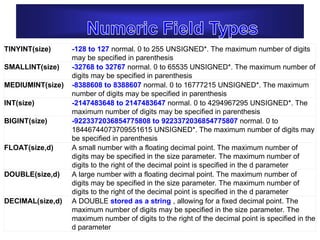
TINYINT(size) -128 to127 normal. 0 to 255 UNSIGNED*. The maximum number of digits
may be specified in parenthesis
SMALLINT(size) -32768 to 32767 normal. 0 to 65535 UNSIGNED*. The maximum number of
digits may be specified in parenthesis
MEDIUMINT(size) -8388608 to 8388607 normal. 0 to 16777215 UNSIGNED*. The maximum
number of digits may be specified in parenthesis
INT(size) -2147483648 to 2147483647 normal. 0 to 4294967295 UNSIGNED*. The
maximum number of digits may be specified in parenthesis
BIGINT(size) -9223372036854775808 to 9223372036854775807 normal. 0 to
18446744073709551615 UNSIGNED*. The maximum number of digits may
be specified in parenthesis
FLOAT(size,d) A small number with a floating decimal point. The maximum number of
digits may be specified in the size parameter. The maximum number of
digits to the right of the decimal point is specified in the d parameter
DOUBLE(size,d) A large number with a floating decimal point. The maximum number of
digits may be specified in the size parameter. The maximum number of
digits to the right of the decimal point is specified in the d parameter
DECIMAL(size,d) A DOUBLE stored as a string , allowing for a fixed decimal point. The
maximum number of digits may be specified in the size parameter. The
maximum number of digits to the right of the decimal point is specified in the
d parameter
29.
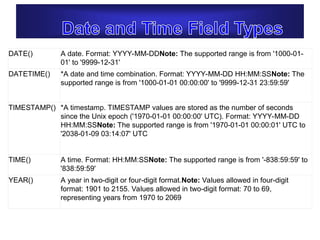
DATE() A date.Format: YYYY-MM-DDNote: The supported range is from '1000-01-
01' to '9999-12-31'
DATETIME() *A date and time combination. Format: YYYY-MM-DD HH:MM:SSNote: The
supported range is from '1000-01-01 00:00:00' to '9999-12-31 23:59:59'
TIMESTAMP() *A timestamp. TIMESTAMP values are stored as the number of seconds
since the Unix epoch ('1970-01-01 00:00:00' UTC). Format: YYYY-MM-DD
HH:MM:SSNote: The supported range is from '1970-01-01 00:00:01' UTC to
'2038-01-09 03:14:07' UTC
TIME() A time. Format: HH:MM:SSNote: The supported range is from '-838:59:59' to
'838:59:59'
YEAR() A year in two-digit or four-digit format.Note: Values allowed in four-digit
format: 1901 to 2155. Values allowed in two-digit format: 70 to 69,
representing years from 1970 to 2069
Summary
• Concept ofdatabases
• Tables and Fields
• Field Types
• phpMyAdmin Tool for manipulating databases
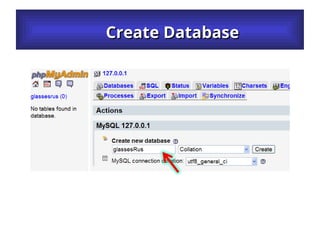
• Creation of a database
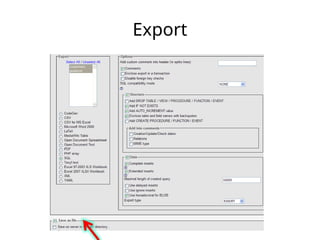
• How to add and edit records
• How to back-up a database
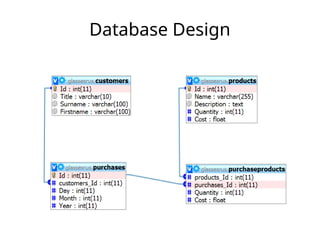
• Database Design
49.
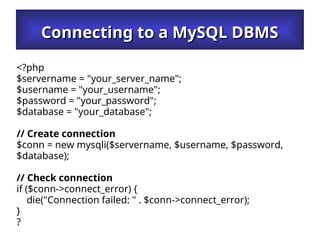
Connecting to aMySQL DBMS
Connecting to a MySQL DBMS
<?php
$servername = "your_server_name";
$username = "your_username";
$password = "your_password";
$database = "your_database";
// Create connection
$conn = new mysqli($servername, $username, $password,
$database);
// Check connection
if ($conn->connect_error) {
die("Connection failed: " . $conn->connect_error);
}
?
50.
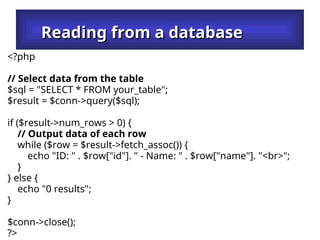
<?php
// Select datafrom the table
$sql = "SELECT * FROM your_table";
$result = $conn->query($sql);
if ($result->num_rows > 0) {
// Output data of each row
while ($row = $result->fetch_assoc()) {
echo "ID: " . $row["id"]. " - Name: " . $row["name"]. "<br>";
}
} else {
echo "0 results";
}
$conn->close();
?>
Reading from a database
Reading from a database
51.
SQL statement
SQL statement
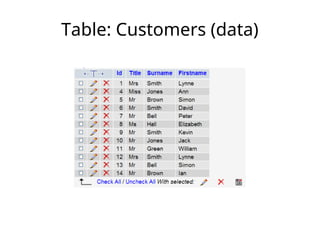
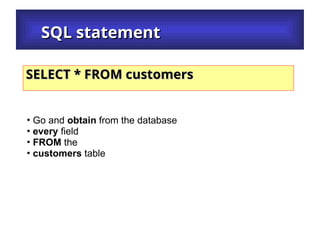
SELECT* FROM customers
SELECT * FROM customers
• Go and obtain from the database
• every field
• FROM the
• customers table
52.
Separating the database
Separatingthe database
connection
connection
It is worth separating the database
It is worth separating the database
connectivity from our scripts and
connectivity from our scripts and
placing it in a separate file.
placing it in a separate file.
•It provides a convenient means of moving your scripts from
one database platform to another.
53.
Limiting the recordsreturned
Limiting the records returned
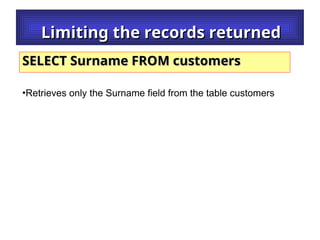
SELECT Surname FROM customers
SELECT Surname FROM customers
•Retrieves only the Surname field from the table customers
54.
Limiting the recordsreturned
Limiting the records returned
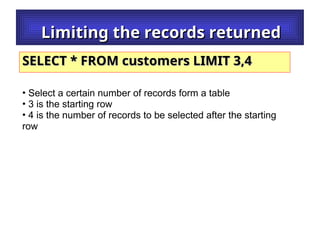
SELECT * FROM customers LIMIT 3,4
SELECT * FROM customers LIMIT 3,4
• Select a certain number of records form a table
• 3 is the starting row
• 4 is the number of records to be selected after the starting
row
55.
Searching for matchingrecords
Searching for matching records
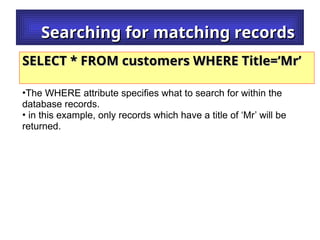
SELECT * FROM customers WHERE Title=‘Mr’
SELECT * FROM customers WHERE Title=‘Mr’
•The WHERE attribute specifies what to search for within the
database records.
• in this example, only records which have a title of ‘Mr’ will be
returned.
56.
Searching for matchingrecords
Searching for matching records
SELECT * FROM customers WHERE Title=‘Mr’
SELECT * FROM customers WHERE Title=‘Mr’
OR
OR Title=‘Mrs’
Title=‘Mrs’
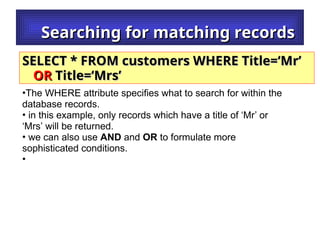
•The WHERE attribute specifies what to search for within the
database records.
• in this example, only records which have a title of ‘Mr’ or
‘Mrs’ will be returned.
• we can also use AND and OR to formulate more
sophisticated conditions.
•
57.
Searching for matchingrecords
Searching for matching records
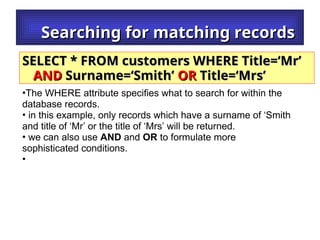
SELECT * FROM customers WHERE Title=‘Mr’
SELECT * FROM customers WHERE Title=‘Mr’
AND
AND Surname=‘Smith’
Surname=‘Smith’ OR
OR Title=‘Mrs’
Title=‘Mrs’
•The WHERE attribute specifies what to search for within the
database records.
• in this example, only records which have a surname of ‘Smith
and title of ‘Mr’ or the title of ‘Mrs’ will be returned.
• we can also use AND and OR to formulate more
sophisticated conditions.
•
58.
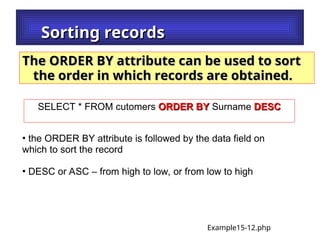
Sorting records
Sorting records
TheORDER BY attribute can be used to sort
The ORDER BY attribute can be used to sort
the order in which records are obtained.
the order in which records are obtained.
• the ORDER BY attribute is followed by the data field on
which to sort the record
• DESC or ASC – from high to low, or from low to high
SELECT * FROM cutomers ORDER BY
ORDER BY Surname DESC
DESC
Example15-12.php
59.
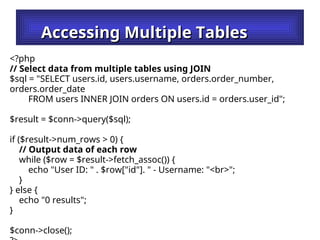
Accessing Multiple Tables
AccessingMultiple Tables
<?php
// Select data from multiple tables using JOIN
$sql = "SELECT users.id, users.username, orders.order_number,
orders.order_date
FROM users INNER JOIN orders ON users.id = orders.user_id";
$result = $conn->query($sql);
if ($result->num_rows > 0) {
// Output data of each row
while ($row = $result->fetch_assoc()) {
echo "User ID: " . $row["id"]. " - Username: "<br>";
}
} else {
echo "0 results";
}
$conn->close();
60.
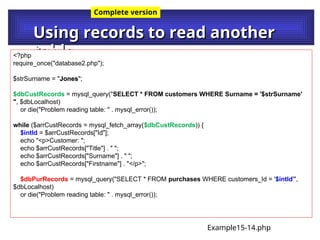
Using records toread another
Using records to read another
table
table
Example15-14.php
<?php
require_once("database2.php");
$strSurname = "Jones
Jones";
$dbCustRecords = mysql_query("SELECT * FROM customers WHERE Surname = '$strSurname'
", $dbLocalhost)
or die("Problem reading table: " . mysql_error());
while ($arrCustRecords = mysql_fetch_array($dbCustRecords)) {
$intId = $arrCustRecords["Id"];
echo "<p>Customer: ";
echo $arrCustRecords["Title"] . " ";
echo $arrCustRecords["Surname"] . " ";
echo $arrCustRecords["Firstname"] . "</p>";
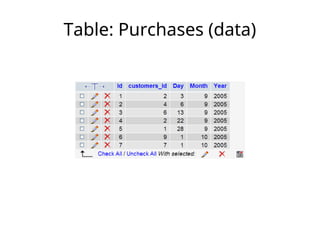
$dbPurRecords = mysql_query("SELECT * FROM purchases WHERE customers_Id = '$intId'",
$dbLocalhost)
or die("Problem reading table: " . mysql_error());
Complete version
61.
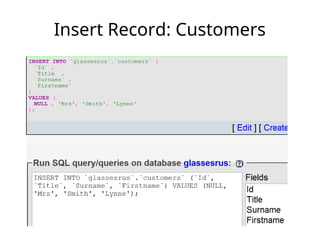
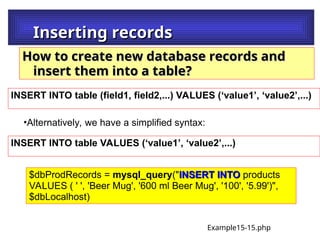
Inserting records
Inserting records
Howto create new database records and
How to create new database records and
insert them into a table?
insert them into a table?
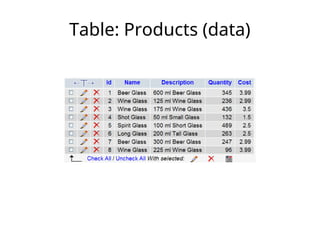
INSERT INTO table (field1, field2,...) VALUES (‘value1’, ‘value2’,...)
Example15-15.php
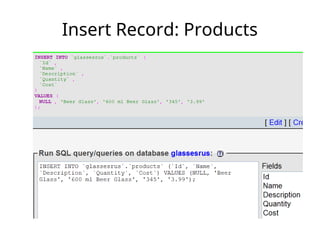
INSERT INTO table VALUES (‘value1’, ‘value2’,...)
•Alternatively, we have a simplified syntax:
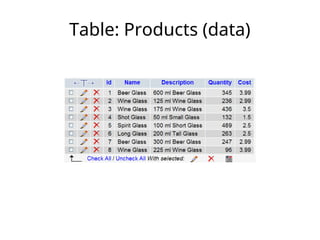
$dbProdRecords = mysql_query("INSERT INTO
INSERT INTO products
VALUES ( ' ', 'Beer Mug', '600 ml Beer Mug', '100', '5.99')",
$dbLocalhost)
62.
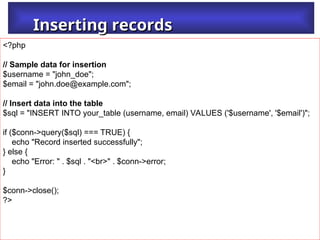
Inserting records
Inserting records
Example15-14.php
<?php
//Sample data for insertion
$username = "john_doe";
$email = "john.doe@example.com";
// Insert data into the table
$sql = "INSERT INTO your_table (username, email) VALUES ('$username', '$email')";
if ($conn->query($sql) === TRUE) {
echo "Record inserted successfully";
} else {
echo "Error: " . $sql . "<br>" . $conn->error;
}
$conn->close();
?>
63.
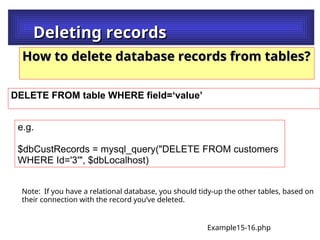
Deleting records
Deleting records
Howto delete database records from tables?
How to delete database records from tables?
DELETE FROM table WHERE field=‘value’
Example15-16.php
e.g.
$dbCustRecords = mysql_query("DELETE FROM customers
WHERE Id='3'", $dbLocalhost)
Note: If you have a relational database, you should tidy-up the other tables, based on
their connection with the record you’ve deleted.
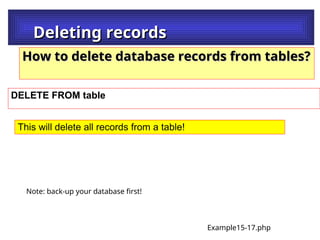
64.
Deleting records
Deleting records
Howto delete database records from tables?
How to delete database records from tables?
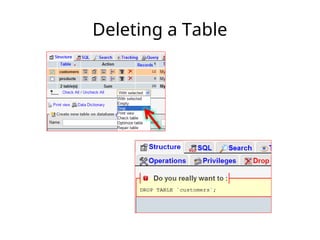
DELETE FROM table
Example15-17.php
This will delete all records from a table!
Note: back-up your database first!
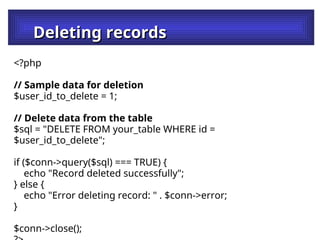
65.
Deleting records
Deleting records
<?php
//Sample data for deletion
$user_id_to_delete = 1;
// Delete data from the table
$sql = "DELETE FROM your_table WHERE id =
$user_id_to_delete";
if ($conn->query($sql) === TRUE) {
echo "Record deleted successfully";
} else {
echo "Error deleting record: " . $conn->error;
}
$conn->close();
66.
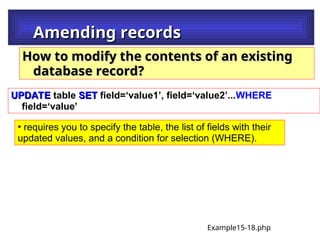
Amending records
Amending records
Howto modify the contents of an existing
How to modify the contents of an existing
database record?
database record?
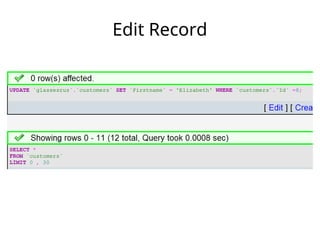
UPDATE
UPDATE table SET
SET field=‘value1’, field=‘value2’...WHERE
field=‘value’
Example15-18.php
• requires you to specify the table, the list of fields with their
updated values, and a condition for selection (WHERE).
67.
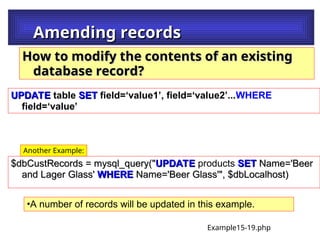
Amending records
Amending records
Howto modify the contents of an existing
How to modify the contents of an existing
database record?
database record?
$dbCustRecords = mysql_query("
$dbCustRecords = mysql_query("UPDATE
UPDATE products SET
SET Name='Beer
Name='Beer
and Lager Glass'
and Lager Glass' WHERE
WHERE Name='Beer Glass'", $dbLocalhost)
Name='Beer Glass'", $dbLocalhost)
Example15-19.php
•A number of records will be updated in this example.
Another Example:
UPDATE
UPDATE table SET
SET field=‘value1’, field=‘value2’...WHERE
field=‘value’
68.
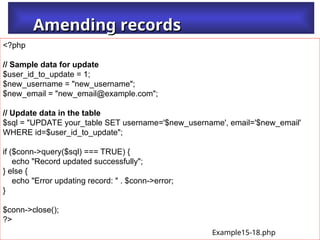
Amending records
Amending records
Example15-14.php
<?php
//Sample data for update
$user_id_to_update = 1;
$new_username = "new_username";
$new_email = "new_email@example.com";
// Update data in the table
$sql = "UPDATE your_table SET username='$new_username', email='$new_email'
WHERE id=$user_id_to_update";
if ($conn->query($sql) === TRUE) {
echo "Record updated successfully";
} else {
echo "Error updating record: " . $conn->error;
}
$conn->close();
?>
Example15-18.php
69.
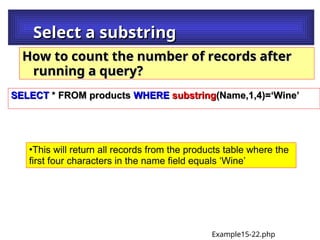
Select a substring
Selecta substring
How to count the number of records after
How to count the number of records after
running a query?
running a query?
SELECT
SELECT * FROM products
* FROM products WHERE
WHERE substring
substring(Name,1,4)=‘Wine’
(Name,1,4)=‘Wine’
•This will return all records from the products table where the
first four characters in the name field equals ‘Wine’
Example15-22.php