Copyright (C) 2018 Namito.Satoyama, Shinji.Ichien All Rights Reserved. 無断引用・転載禁止
スマホでもスピーカーでも!
誰でもできる
Googleアシスタントアプリ開発
Android Bazaar and Conference
2018 Autumn in KAWASAKI
Copyright (C) 2018 Namito.Satoyama, Shinji.Ichien All Rights Reserved. 無断引用・転載禁止
1. 自己紹介
2. Googleアシスタントとは
3. 標準開発環境とSDK
4. マルチデバイスの考え方
5. マルチデバイスアプリの実装
6. リッチなUIや音声の合成
Agenda
Copyright (C) 2018 Namito.Satoyama, Shinji.Ichien All Rights Reserved. 無断引用・転載禁止
自己紹介
Copyright (C) 2018 Namito.Satoyama, Shinji.Ichien All Rights Reserved. 無断引用・転載禁止
Community
Video Market Corporation
VP of Engineering
Product Manager
Twitter: @ns_twt
Writing
Shibuya.apk
ときどきGDGでの登壇やお手伝いなど
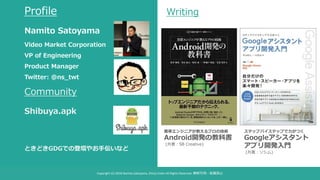
Namito Satoyama
Profile
黒帯エンジニアが教えるプロの技術
Android開発の教科書
(共著:SB Creative)
ステップバイステップで力がつく
Googleアシスタント
アプリ開発入門
(共著:ソシム)
Copyright (C) 2018 Namito.Satoyama, Shinji.Ichien All Rights Reserved. 無断引用・転載禁止
Yahoo Japan Corporation
Yahoo! MAP
Android App Developer
Twitter: @1coin178
Geo, Locationが好き
Writing
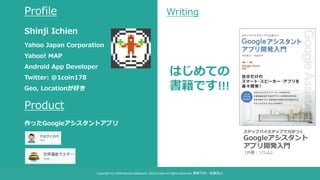
Shinji Ichien
Profile
ステップバイステップで力がつく
Googleアシスタント
アプリ開発入門
(共著:ソシム)
Product
作ったGoogleアシスタントアプリ
はじめての
書籍です!!!
Copyright (C) 2018 Namito.Satoyama, Shinji.Ichien All Rights Reserved. 無断引用・転載禁止
Googleアシスタントとは
Copyright (C) 2018 Namito.Satoyama. All Rights Reserved. 無断引用・転載禁止
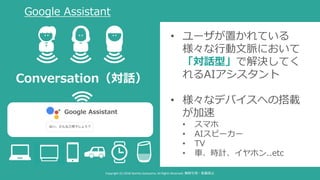
Google Assistant
• ユーザが置かれている
様々な行動文脈において
「対話型」で解決してく
れるAIアシスタント
• 様々なデバイスへの搭載
が加速
• スマホ
• AIスピーカー
• TV
• 車、時計、イヤホン..etc
Google Assistant
Conversation(対話)
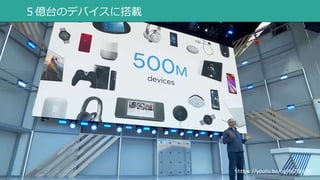
5億台のデバイスに搭載
https://youtu.be/ogfYd705cRs
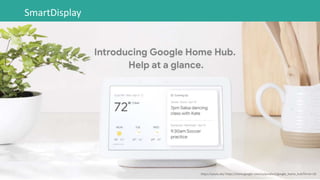
SmartDisplay
https://youtu.be/ https://store.google.com/us/product/google_home_hub?hl=en-US
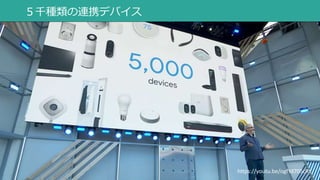
5千種類の連携デバイス
https://youtu.be/ogfYd705cRs
Copyright (C) 2018 Namito.Satoyama, Shinji.Ichien All Rights Reserved. 無断引用・転載禁止
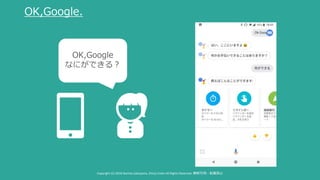
OK,Google
なにができる?
OK,Google.
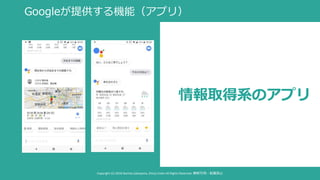
Googleが提供する機能(アプリ)
情報取得系のアプリ
Copyright (C) 2018 Namito.Satoyama, Shinji.Ichien All Rights Reserved. 無断引用・転載禁止
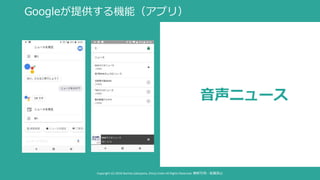
音声ニュース
Googleが提供する機能(アプリ)
Copyright (C) 2018 Namito.Satoyama, Shinji.Ichien All Rights Reserved. 無断引用・転載禁止
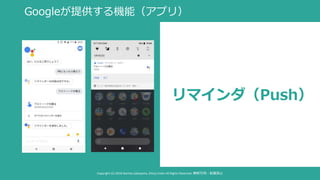
リマインダ(Push)
Googleが提供する機能(アプリ)
Copyright (C) 2018 Namito.Satoyama, Shinji.Ichien All Rights Reserved. 無断引用・転載禁止
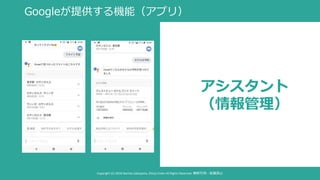
アシスタント
(情報管理)
Googleが提供する機能(アプリ)
Copyright (C) 2018 Namito.Satoyama, Shinji.Ichien All Rights Reserved. 無断引用・転載禁止
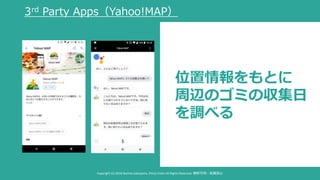
3rd Party Apps(Yahoo!MAP)
位置情報をもとに
周辺のゴミの収集日
を調べる
Copyright (C) 2018 Namito.Satoyama, Shinji.Ichien All Rights Reserved. 無断引用・転載禁止
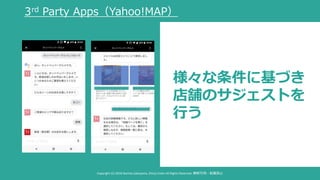
3rd Party Apps(Yahoo!MAP)
様々な条件に基づき
店舗のサジェストを
行う
Copyright (C) 2018 Namito.Satoyama, Shinji.Ichien All Rights Reserved. 無断引用・転載禁止
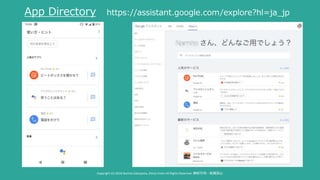
App Directory https://assistant.google.com/explore?hl=ja_jp
Copyright (C) 2018 Namito.Satoyama, Shinji.Ichien All Rights Reserved. 無断引用・転載禁止
標準開発環境とSDK
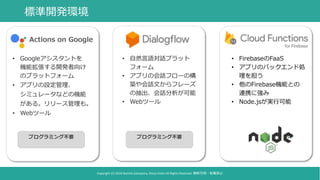
標準開発環境
Actions on Google
• Googleアシスタントを
機能拡張する開発者向け
のプラットフォーム
• アプリの設定管理、
シミュレータなどの機能
がある。リリース管理も。
• Webツール
• 自然言語対話プラット
フォーム
• アプリの会話フローの構
築や会話文からフレーズ
の抽出、会話分析が可能
• Webツール
• FirebaseのFaaS
• アプリのバックエンド処
理を担う
• 他のFirebase機能との
連携に強み
• Node.jsが実行可能
プログラミング不要 プログラミング不要
Copyright (C) 2018 Namito.Satoyama, Shinji.Ichien All Rights Reserved. 無断引用・転載禁止Copyright (C) 2018 Namito.Satoyama, Shinji.Ichien All Rights Reserved. 無断引用・転載禁止
Copyright (C) 2018 Namito.Satoyama, Shinji.Ichien All Rights Reserved. 無断引用・転載禁止
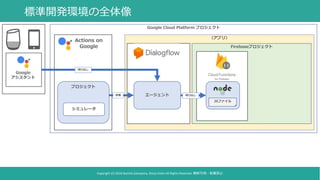
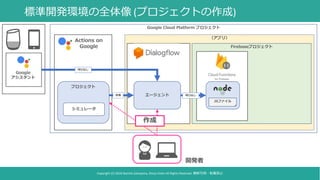
標準開発環境の全体像
Google Cloud Platform プロジェクト
(アプリ)
プロジェクト
エージェント
接続
Firebaseプロジェクト
管理 呼び出し
JSファイル
シミュレータ
Google
アシスタント
呼び出し
Actions on
Google
Copyright (C) 2018 Namito.Satoyama, Shinji.Ichien All Rights Reserved. 無断引用・転載禁止
標準開発環境の全体像 (プロジェクトの作成)
Google Cloud Platform プロジェクト
(アプリ)
Actions on
Google
プロジェクト
エージェント
開発者
接続
Firebaseプロジェクト
管理 呼び出し
JSファイル
シミュレータ
Google
アシスタント
呼び出し
作成
Copyright (C) 2018 Namito.Satoyama, Shinji.Ichien All Rights Reserved. 無断引用・転載禁止
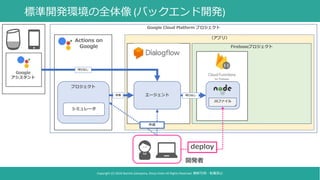
標準開発環境の全体像 (バックエンド開発)
Google Cloud Platform プロジェクト
(アプリ)
プロジェクト
エージェント
開発者
接続
Firebaseプロジェクト
管理 呼び出し
JSファイル
シミュレータ
Google
アシスタント
呼び出し
作成
Actions on
Google
deploy
Copyright (C) 2018 Namito.Satoyama, Shinji.Ichien All Rights Reserved. 無断引用・転載禁止
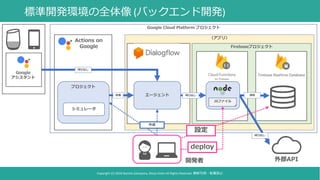
標準開発環境の全体像 (バックエンド開発)
Google Cloud Platform プロジェクト
(アプリ)
プロジェクト
エージェント
開発者
接続
Firebaseプロジェクト
管理 呼び出し 接続
外部API
JSファイル
呼び出し
シミュレータ
設定
Google
アシスタント
呼び出し
作成
Actions on
Google
deploy
設定
Google Cloud Platform プロジェクト
Copyright (C) 2018 Namito.Satoyama, Shinji.Ichien All Rights Reserved. 無断引用・転載禁止
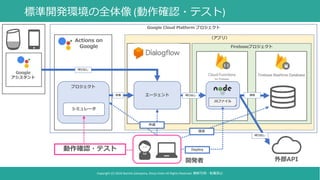
標準開発環境の全体像 (動作確認・テスト)
(アプリ)
プロジェクト
エージェント
開発者
接続
Firebaseプロジェクト
管理 呼び出し 接続
外部API
JSファイル
呼び出し
シミュレータ
Deploy
設定
Google
アシスタント
呼び出し
作成
Actions on
Google
動作確認・テスト
Copyright (C) 2018 Namito.Satoyama, Shinji.Ichien All Rights Reserved. 無断引用・転載禁止
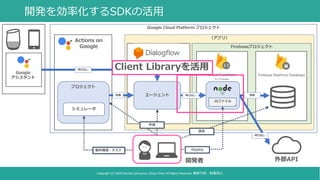
開発を効率化するSDKの活用
Google Cloud Platform プロジェクト
(アプリ)
プロジェクト
エージェント
開発者
接続
Firebaseプロジェクト
管理 呼び出し 接続
外部API
JSファイル
呼び出し
シミュレータ
動作確認・テスト Deploy
設定
Google
アシスタント
呼び出し
作成
Actions on
Google
Client Libraryを活用
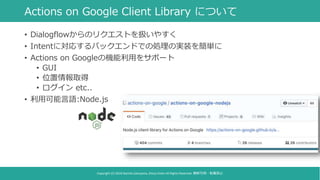
• Dialogflowからのリクエストを扱いやすく
• Intentに対応するバックエンドでの処理の実装を簡単に
• Actions on Googleの機能利用をサポート
• GUI
• 位置情報取得
• ログイン etc..
• 利用可能言語:Node.js
Actions on Google Client Library について
Copyright (C) 2018 Namito.Satoyama, Shinji.Ichien All Rights Reserved. 無断引用・転載禁止
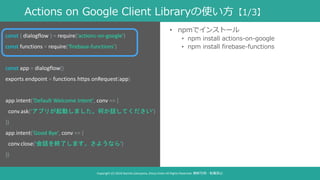
Actions on Google Client Libraryの使い方【1/3】
Copyright (C) 2018 Namito.Satoyama. All Rights Reserved. 無断引用・転載禁止Copyright (C) 2018 Namito.Satoyama, Shinji.Ichien All Rights Reserved. 無断引用・転載禁止
const { dialogflow } = require('actions-on-google')
const functions = require(‘firebase-functions’)
const app = dialogflow()
exports.endpoint = functions.https.onRequest(app)
app.intent(‘Default Welcome Intent’, conv => {
conv.ask(‘アプリが起動しました。何か話してください’)
})
app.intent('Good Bye', conv => {
conv.close('会話を終了します。さようなら')
})
• npmでインストール
• npm install actions-on-google
• npm install firebase-functions
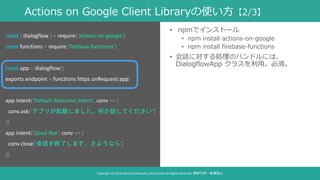
Actions on Google Client Libraryの使い方【2/3】
Copyright (C) 2018 Namito.Satoyama. All Rights Reserved. 無断引用・転載禁止Copyright (C) 2018 Namito.Satoyama, Shinji.Ichien All Rights Reserved. 無断引用・転載禁止
const { dialogflow } = require('actions-on-google')
const functions = require(‘firebase-functions’)
const app = dialogflow()
exports.endpoint = functions.https.onRequest(app)
app.intent(‘Default Welcome Intent’, conv => {
conv.ask(‘アプリが起動しました。何か話してください’)
})
app.intent('Good Bye', conv => {
conv.close('会話を終了します。さようなら')
})
• npmでインストール
• npm install actions-on-google
• npm install firebase-functions
• 会話に対する処理のハンドルには、
DialogflowApp クラスを利用。必須。
Actions on Google Client Libraryの使い方【3/3】
Copyright (C) 2018 Namito.Satoyama. All Rights Reserved. 無断引用・転載禁止Copyright (C) 2018 Namito.Satoyama, Shinji.Ichien All Rights Reserved. 無断引用・転載禁止
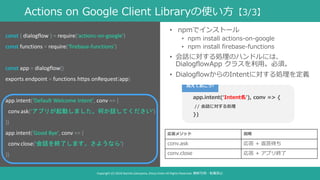
const { dialogflow } = require('actions-on-google')
const functions = require(‘firebase-functions’)
const app = dialogflow()
exports.endpoint = functions.https.onRequest(app)
app.intent(‘Default Welcome Intent’, conv => {
conv.ask(‘アプリが起動しました。何か話してください’)
})
app.intent('Good Bye', conv => {
conv.close('会話を終了します。さようなら')
})
• npmでインストール
• npm install actions-on-google
• npm install firebase-functions
• 会話に対する処理のハンドルには、
DialogflowApp クラスを利用。必須。
• DialogflowからのIntentに対する処理を定義
app.intent(‘Intent名’), conv => {
// 会話に対する処理
})
覚えておこう!
応答メソッド 説明
conv.ask 応答 + 返答待ち
conv.close 応答 + アプリ終了
Copyright (C) 2018 Namito.Satoyama, Shinji.Ichien All Rights Reserved. 無断引用・転載禁止
マルチデバイスの考え方
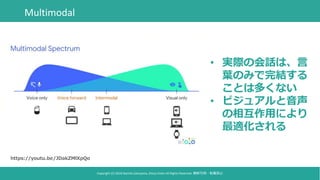
Multimodal
Copyright (C) 2018 Namito.Satoyama. All Rights Reserved. 無断引用・転載禁止
https://youtu.be/JDakZMlXpQo
Copyright (C) 2018 Namito.Satoyama, Shinji.Ichien All Rights Reserved. 無断引用・転載禁止
• 実際の会話は、言
葉のみで完結する
ことは多くない
• ビジュアルと音声
の相互作用により
最適化される
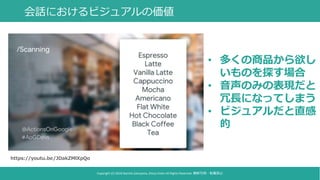
会話におけるビジュアルの価値
Copyright (C) 2018 Namito.Satoyama. All Rights Reserved. 無断引用・転載禁止
https://youtu.be/JDakZMlXpQo
Copyright (C) 2018 Namito.Satoyama, Shinji.Ichien All Rights Reserved. 無断引用・転載禁止
• 多くの商品から欲し
いものを探す場合
• 音声のみの表現だと
冗長になってしまう
• ビジュアルだと直感
的
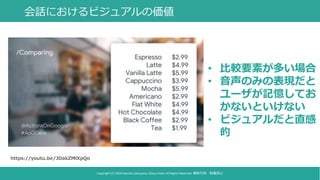
会話におけるビジュアルの価値
Copyright (C) 2018 Namito.Satoyama. All Rights Reserved. 無断引用・転載禁止
https://youtu.be/JDakZMlXpQo
Copyright (C) 2018 Namito.Satoyama, Shinji.Ichien All Rights Reserved. 無断引用・転載禁止
• 比較要素が多い場合
• 音声のみの表現だと
ユーザが記憶してお
かないといけない
• ビジュアルだと直感
的
会話におけるビジュアルの価値
Copyright (C) 2018 Namito.Satoyama. All Rights Reserved. 無断引用・転載禁止
https://youtu.be/JDakZMlXpQo
Copyright (C) 2018 Namito.Satoyama, Shinji.Ichien All Rights Reserved. 無断引用・転載禁止
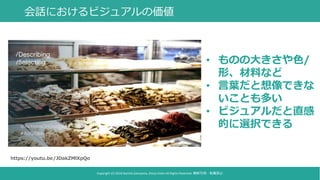
• ものの大きさや色/
形、材料など
• 言葉だと想像できな
いことも多い
• ビジュアルだと直感
的に選択できる
マルチデバイスの会話設計
Copyright (C) 2018 Namito.Satoyama. All Rights Reserved. 無断引用・転載禁止
https://youtu.be/JDakZMlXpQo
Copyright (C) 2018 Namito.Satoyama, Shinji.Ichien All Rights Reserved. 無断引用・転載禁止
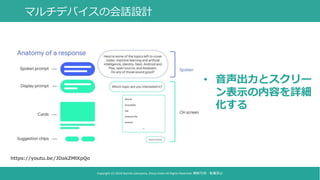
• 音声出力とスクリー
ン表示の内容を詳細
化する
マルチデバイスの会話設計
Copyright (C) 2018 Namito.Satoyama. All Rights Reserved. 無断引用・転載禁止
https://youtu.be/JDakZMlXpQo
Copyright (C) 2018 Namito.Satoyama, Shinji.Ichien All Rights Reserved. 無断引用・転載禁止
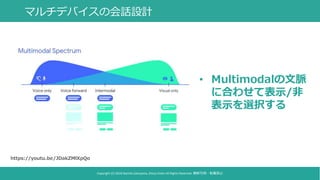
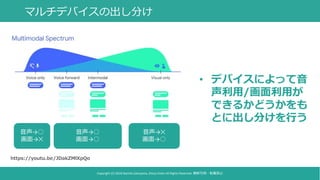
• Multimodalの文脈
に合わせて表示/非
表示を選択する
マルチデバイスの出し分け
Copyright (C) 2018 Namito.Satoyama. All Rights Reserved. 無断引用・転載禁止
https://youtu.be/JDakZMlXpQo
Copyright (C) 2018 Namito.Satoyama, Shinji.Ichien All Rights Reserved. 無断引用・転載禁止
音声→✕
画面→○
音声→○
画面→○
音声→○
画面→✕
• デバイスによって音
声利用/画面利用が
できるかどうかをも
とに出し分けを行う
Copyright (C) 2018 Namito.Satoyama, Shinji.Ichien All Rights Reserved. 無断引用・転載禁止
マルチデバイスアプリの
実装
音声出力/画面出力の認識
Copyright (C) 2018 Namito.Satoyama. All Rights Reserved. 無断引用・転載禁止Copyright (C) 2018 Namito.Satoyama, Shinji.Ichien All Rights Reserved. 無断引用・転載禁止
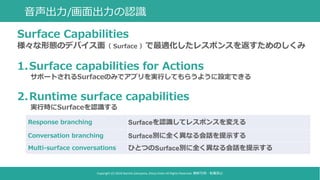
Surface Capabilities
様々な形態のデバイス面( Surface )で最適化したレスポンスを返すためのしくみ
1.Surface capabilities for Actions
サポートされるSurfaceのみでアプリを実行してもらうように設定できる
2.Runtime surface capabilities
実行時にSurfaceを認識する
Response branching Surfaceを認識してレスポンスを変える
Conversation branching Surface別に全く異なる会話を提示する
Multi-surface conversations ひとつのSurface別に全く異なる会話を提示する
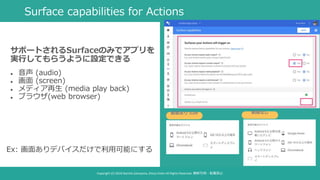
Surface capabilities for Actions
サポートされるSurfaceのみでアプリを
実行してもらうように設定できる
● 音声 (audio)
● 画面 (screen)
● メディア再生 (media play back)
● ブラウザ(web browser)
Ex: 画面ありデバイスだけで利用可能にする
Copyright (C) 2018 Namito.Satoyama, Shinji.Ichien All Rights Reserved. 無断引用・転載禁止
画面あり のみ 制限なし
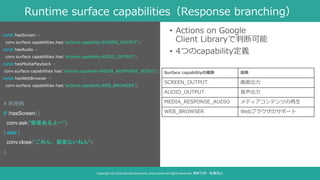
• Actions on Google
Client Libraryで判断可能
• 4つのcapability定義
Runtime surface capabilities(Response branching)
Copyright (C) 2018 Namito.Satoyama. All Rights Reserved. 無断引用・転載禁止Copyright (C) 2018 Namito.Satoyama, Shinji.Ichien All Rights Reserved. 無断引用・転載禁止
const hasScreen =
conv.surface.capabilities.has('actions.capability.SCREEN_OUTPUT');
const hasAudio =
conv.surface.capabilities.has('actions.capability.AUDIO_OUTPUT');
const hasMediaPlayback =
conv.surface.capabilities.has('actions.capability.MEDIA_RESPONSE_AUDIO');
const hasWebBrowser =
conv.surface.capabilities.has('actions.capability.WEB_BROWSER');
# 利用例
if (hasScreen) {
conv.ask("画面あるよー");
} else {
conv.close("ごめん、画面ないねん");
};
Surface capabilityの種類 説明
SCREEN_OUTPUT 画面出力
AUDIO_OUTPUT 音声出力
MEDIA_RESPONSE_AUDIO メディアコンテンツの再生
WEB_BROWSER Webブラウザのサポート
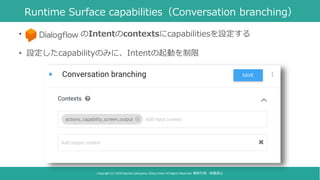
• のIntentのcontextsにcapabilitiesを設定する
• 設定したcapabilityのみに、Intentの起動を制限
Runtime Surface capabilities(Conversation branching)
Copyright (C) 2018 Namito.Satoyama. All Rights Reserved. 無断引用・転載禁止Copyright (C) 2018 Namito.Satoyama, Shinji.Ichien All Rights Reserved. 無断引用・転載禁止
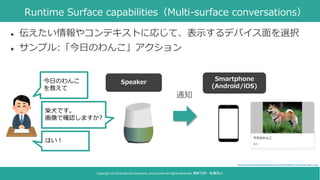
Runtime Surface capabilities(Multi-surface conversations)
● 伝えたい情報やコンテキストに応じて、表示するデバイス面を選択
● サンプル:「今日のわんこ」アクション
Speaker
Smartphone
(Android/iOS)
通知
今日のわんこ
を教えて
柴犬です。
画像で確認しますか?
はい!
https://upload.wikimedia.org/wikipedia/commons/thumb/2/20/Shiba_Inu.jpg/250px-Shiba_Inu.jpg
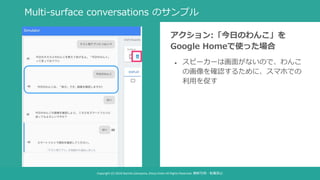
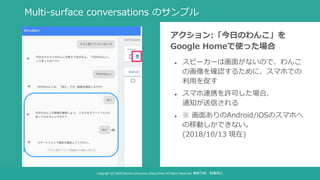
Multi-surface conversations のサンプル
アクション:「今日のわんこ」を
Google Homeで使った場合
● スピーカーは画面がないので、わんこ
の画像を確認するために、スマホでの
利用を促す
Copyright (C) 2018 Namito.Satoyama, Shinji.Ichien All Rights Reserved. 無断引用・転載禁止
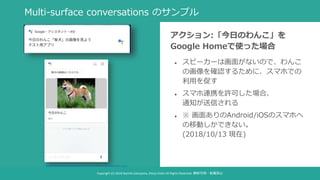
Multi-surface conversations のサンプル
アクション:「今日のわんこ」を
Google Homeで使った場合
● スピーカーは画面がないので、わんこ
の画像を確認するために、スマホでの
利用を促す
● スマホ連携を許可した場合、
通知が送信される
● ※ 画面ありのAndroid/iOSのスマホへ
の移動しかできない。
(2018/10/13 現在)
Copyright (C) 2018 Namito.Satoyama, Shinji.Ichien All Rights Reserved. 無断引用・転載禁止
Multi-surface conversations のサンプル
アクション:「今日のわんこ」を
Google Homeで使った場合
● スピーカーは画面がないので、わんこ
の画像を確認するために、スマホでの
利用を促す
● スマホ連携を許可した場合、
通知が送信される
● ※ 画面ありのAndroid/iOSのスマホへ
の移動しかできない。
(2018/10/13 現在)
Copyright (C) 2018 Namito.Satoyama, Shinji.Ichien All Rights Reserved. 無断引用・転載禁止
https://upload.wikimedia.org/wikipedia/commons/thumb/2/20/Shiba_Inu.jpg/250px-Shiba_Inu.jpg
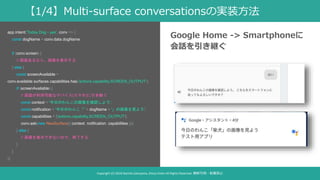
【1/4】Multi-surface conversationsの実装方法
app.intent('Today Dog - yes', conv => {
const dogName = conv.data.dogName
if (conv.screen) {
// 画面あるなら、画像を表示する
} else {
const screenAvailable =
conv.available.surfaces.capabilities.has('actions.capability.SCREEN_OUTPUT');
if (screenAvailable) {
// 画面が利用可能なデバイス(スマホ)に引き継ぐ
const context = '今日のわんこの画像を確認しよう';
const notification = '今日のわんこ「' + dogName + '」の画像を見よう';
const capabilities = ['actions.capability.SCREEN_OUTPUT'];
conv.ask(new NewSurface({ context, notification, capabilities }));
} else {
// 画像を表示できないので、終了する
}
}
})
Google Home -> Smartphoneに
会話を引き継ぐ
Copyright (C) 2018 Namito.Satoyama, Shinji.Ichien All Rights Reserved. 無断引用・転載禁止
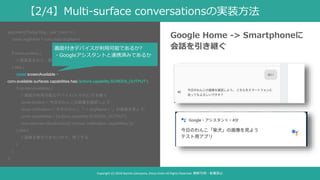
【2/4】Multi-surface conversationsの実装方法
app.intent('Today Dog - yes', conv => {
const dogName = conv.data.dogName
if (conv.screen) {
// 画面あるなら、画像を表示する
} else {
const screenAvailable =
conv.available.surfaces.capabilities.has('actions.capability.SCREEN_OUTPUT');
if (screenAvailable) {
// 画面が利用可能なデバイス(スマホ)に引き継ぐ
const context = '今日のわんこの画像を確認しよう';
const notification = '今日のわんこ「' + dogName + '」の画像を見よう';
const capabilities = ['actions.capability.SCREEN_OUTPUT'];
conv.ask(new NewSurface({ context, notification, capabilities }));
} else {
// 画像を表示できないので、終了する
}
}
})
Google Home -> Smartphoneに
会話を引き継ぐ画面付きデバイスが利用可能であるか?
・Googleアシスタントと連携済みであるか
Copyright (C) 2018 Namito.Satoyama, Shinji.Ichien All Rights Reserved. 無断引用・転載禁止
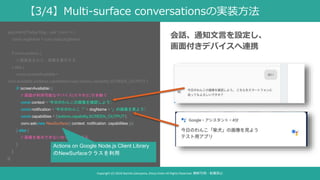
【3/4】Multi-surface conversationsの実装方法
app.intent('Today Dog - yes', conv => {
const dogName = conv.data.dogName
if (conv.screen) {
// 画面あるなら、画像を表示する
} else {
const screenAvailable =
conv.available.surfaces.capabilities.has('actions.capability.SCREEN_OUTPUT');
if (screenAvailable) {
// 画面が利用可能なデバイス(スマホ)に引き継ぐ
const context = '今日のわんこの画像を確認しよう';
const notification = '今日のわんこ「' + dogName + '」の画像を見よう';
const capabilities = ['actions.capability.SCREEN_OUTPUT'];
conv.ask(new NewSurface({ context, notification, capabilities }));
} else {
// 画像を表示できないので、終了する
}
}
})
Actions on Google Node.js Client Library
のNewSurfaceクラスを利用
会話、通知文言を設定し、
画面付きデバイスへ連携
Copyright (C) 2018 Namito.Satoyama, Shinji.Ichien All Rights Reserved. 無断引用・転載禁止
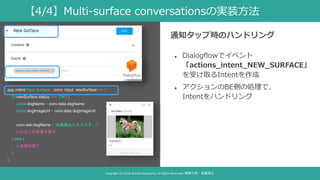
【4/4】Multi-surface conversationsの実装方法
Copyright (C) 2018 Namito.Satoyama. All Rights Reserved. 無断引用・転載禁止
通知タップ時のハンドリング
● Dialogflowでイベント
「actions_intent_NEW_SURFACE」
を受け取るIntentを作成
● アクションのBE側の処理で、
Intentをハンドリング
app.intent('New Surface', (conv, input, newSurface) => {
if (newSurface.status === 'OK') {
const dogName = conv.data.dogName
const dogImageUrl = conv.data.dogImageUrl
conv.ask(dogName + 'の画像はこちらです。')
// わんこの画像を表示
} else {
// 会話の終了
}
})
Copyright (C) 2018 Namito.Satoyama, Shinji.Ichien All Rights Reserved. 無断引用・転載禁止
リッチなUIや音声の合成
Copyright (C) 2018 Namito.Satoyama, Shinji.Ichien All Rights Reserved. 無断引用・転載禁止
RichResponse
Copyright (C) 2018 Namito.Satoyama, Shinji.Ichien All Rights Reserved. 無断引用・転載禁止
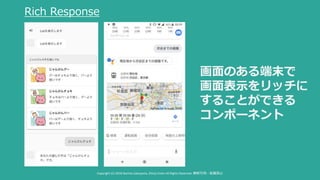
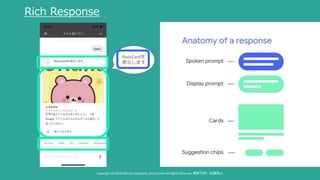
Rich Response
画面のある端末で
画面表示をリッチに
することができる
コンポーネント
Copyright (C) 2018 Namito.Satoyama, Shinji.Ichien All Rights Reserved. 無断引用・転載禁止
BasicCardを
表示します
Rich Response
Copyright (C) 2018 Namito.Satoyama, Shinji.Ichien All Rights Reserved. 無断引用・転載禁止
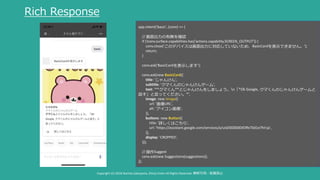
Rich Response
app.intent('basic', (conv) => {
// 画面出力の有無を確認
if (!conv.surface.capabilities.has('actions.capability.SCREEN_OUTPUT')) {
conv.close('このデバイスは画面出力に対応していないため、BasicCardを表示できません。');
return;
}
conv.ask('BasicCardを表示します’);
conv.ask(new BasicCard({
title: 'じゃんけん',
subtitle: 'クマくんのじゃんけんゲーム',
text: '**クマくん**とじゃんけんをしましょう。n「*Ok Google, クマくんのじゃんけんゲームと
話す」と言ってください。*',
image: new Image({
url: '画像URL',
alt: 'アイコン画像',
}),
buttons: new Button({
title: '詳しくはこちら',
url: 'https://assistant.google.com/services/a/uid/00000045ffe70d1e?hl=ja',
}),
display: 'CROPPED',
}));
// 操作Suggest
conv.ask(new Suggestions(suggestions));
});
Copyright (C) 2018 Namito.Satoyama, Shinji.Ichien All Rights Reserved. 無断引用・転載禁止
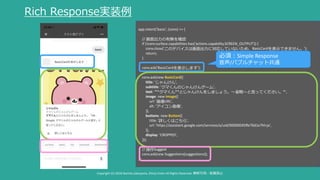
Rich Response実装例
app.intent('basic', (conv) => {
// 画面出力の有無を確認
if (!conv.surface.capabilities.has('actions.capability.SCREEN_OUTPUT')) {
conv.close('このデバイスは画面出力に対応していないため、BasicCardを表示できません。');
return;
}
conv.ask('BasicCardを表示します’);
conv.ask(new BasicCard({
title: 'じゃんけん',
subtitle: 'クマくんのじゃんけんゲーム',
text: ‘**クマくん**とじゃんけんをしましょう。〜省略〜と言ってください。*',
image: new Image({
url: '画像URL',
alt: 'アイコン画像',
}),
buttons: new Button({
title: '詳しくはこちら',
url: 'https://assistant.google.com/services/a/uid/00000045ffe70d1e?hl=ja',
}),
display: 'CROPPED',
}));
// 操作Suggest
conv.ask(new Suggestions(suggestions));
});
必須:Simple Response
音声/バブルチャット共通
Copyright (C) 2018 Namito.Satoyama, Shinji.Ichien All Rights Reserved. 無断引用・転載禁止
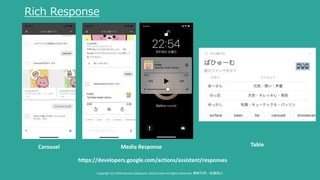
Rich Response
Carousel Media Response Table
https://developers.google.com/actions/assistant/responses
Copyright (C) 2018 Namito.Satoyama, Shinji.Ichien All Rights Reserved. 無断引用・転載禁止
SSML
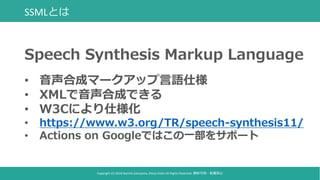
SSMLとは
Copyright (C) 2018 Namito.Satoyama. All Rights Reserved. 無断引用・転載禁止Copyright (C) 2018 Namito.Satoyama, Shinji.Ichien All Rights Reserved. 無断引用・転載禁止
Speech Synthesis Markup Language
• 音声合成マークアップ言語仕様
• XMLで音声合成できる
• W3Cにより仕様化
• https://www.w3.org/TR/speech-synthesis11/
• Actions on Googleではこの一部をサポート
Copyright (C) 2018 Namito.Satoyama, Shinji.Ichien All Rights Reserved. 無断引用・転載禁止
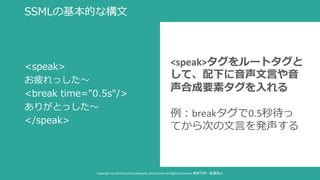
<speak>
お疲れっした〜
<break time="0.5s"/>
ありがとっした〜
</speak>
SSMLの基本的な構文
<speak>タグをルートタグと
して、配下に音声文言や音
声合成要素タグを入れる
例:breakタグで0.5秒待っ
てから次の文言を発声する
Copyright (C) 2018 Namito.Satoyama, Shinji.Ichien All Rights Reserved. 無断引用・転載禁止
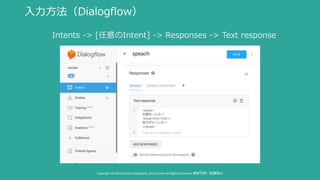
入力方法(Dialogflow)
Intents -> [任意のIntent] -> Responses -> Text response
Copyright (C) 2018 Namito.Satoyama, Shinji.Ichien All Rights Reserved. 無断引用・転載禁止
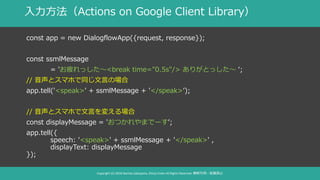
入力方法(Actions on Google Client Library)
const app = new DialogflowApp({request, response});
const ssmlMessage
= 'お疲れっした〜<break time="0.5s"/> ありがとっした〜 ‘;
// 音声とスマホで同じ文言の場合
app.tell('<speak>' + ssmlMessage + '</speak>’);
// 音声とスマホで文言を変える場合
const displayMessage = 'おつかれやまでーす’;
app.tell({
speech: '<speak>' + ssmlMessage + '</speak>' ,
displayText: displayMessage
});
Copyright (C) 2018 Namito.Satoyama, Shinji.Ichien All Rights Reserved. 無断引用・転載禁止
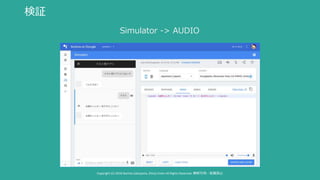
検証
Simulator -> AUDIO
Copyright (C) 2018 Namito.Satoyama, Shinji.Ichien All Rights Reserved. 無断引用・転載禁止
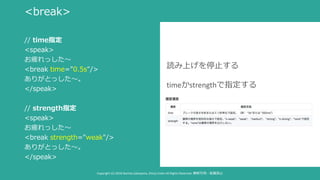
SSMLタグの例
Copyright (C) 2018 Namito.Satoyama, Shinji.Ichien All Rights Reserved. 無断引用・転載禁止
// time指定
<speak>
お疲れっした〜
<break time="0.5s"/>
ありがとっした〜。
</speak>
// strength指定
<speak>
お疲れっした〜
<break strength="weak"/>
ありがとっした〜。
</speak>
<break>
読み上げを停止する
timeかstrengthで指定する
Copyright (C) 2018 Namito.Satoyama, Shinji.Ichien All Rights Reserved. 無断引用・転載禁止
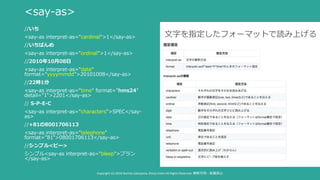
//いち
<say-as interpret-as="cardinal">1</say-as>
//いちばんめ
<say-as interpret-as="ordinal">1</say-as>
//2010年10月08日
<say-as interpret-as="date"
format="yyyymmdd">20101008</say-as>
//22時1分
<say-as interpret-as="time" format="hms24"
detail="1">2201</say-as>
// S-P-E-C
<say-as interpret-as="characters">SPEC</say-
as>
//+81の8001706113
<say-as interpret-as="telephone"
format="81">08001706113</say-as>
//シンプル<ピー>
シンプル<say-as interpret-as="bleep">プラン
</say-as>
<say-as>
文字を指定したフォーマットで読み上げる
Copyright (C) 2018 Namito.Satoyama, Shinji.Ichien All Rights Reserved. 無断引用・転載禁止
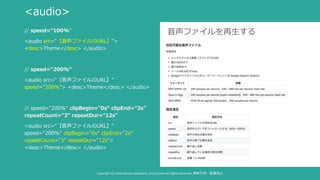
// speed=”100%”
<audio src="【音声ファイルのURL】">
<desc>Theme</desc> </audio>
// speed="200%”
<audio src="【音声ファイルのURL】"
speed="200%"> <desc>Theme</desc> </audio>
// speed="200%" clipBegin="0s" clipEnd=”2s”
repeatCount="3" repeatDur="12s"
<audio src="【音声ファイルのURL】"
speed="200%" clipBegin="0s" clipEnd=”2s"
repeatCount="3" repeatDur="12s">
<desc>Theme</desc> </audio>
<audio>
音声ファイルを再生する
Copyright (C) 2018 Namito.Satoyama, Shinji.Ichien All Rights Reserved. 無断引用・転載禁止
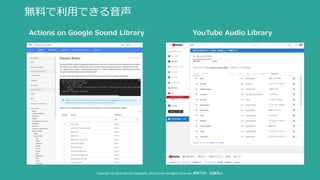
無料で利用できる音声
Actions on Google Sound Library YouTube Audio Library
Copyright (C) 2018 Namito.Satoyama, Shinji.Ichien All Rights Reserved. 無断引用・転載禁止
頑張ってみた例
詳しくは、SlideShareにて公開しています。
「SSMLでできること」
https://www.slideshare.net/nsface/ssml
Copyright (C) 2018 Namito.Satoyama, Shinji.Ichien All Rights Reserved. 無断引用・転載禁止
まとめ
まとめ
Copyright (C) 2018 Namito.Satoyama. All Rights Reserved. 無断引用・転載禁止
• Googleアシスタントはすでにとても普及している
• Googleアシスタントははじめから様々なデバイス
での利用が想定されている
• Audio+Visualで、本質的な会話に近づくので、画
面がある端末は積極利用する
• リッチなUIや音声合成で、会話をさらに最適化す
ることが可能
Copyright (C) 2018 Namito.Satoyama, Shinji.Ichien All Rights Reserved. 無断引用・転載禁止
Thanks!