Game Development
Using SDL and the
      PDK
             Aaron Ardiri
  Cross-Platform Development Guru
            April 24, 2010
Getting Started With the PDK
Now you have a device—start developing native applications for it

•  Installing the PDK
  •  developer.palm.com
•  Configuring the device for development
  •  Enable developer mode, connect via USB
  •  Execute the pdk-device-install script
    • Installs the SSH sub-system on the device
•  Compiling the sample applications
  •  Build for the desktop (Host) or device (Palm® Pre™ or Palm Pixi™)
•  Accessing the device environment/operating system
  •  ssh –p 10022 root@localhost to remote login to the device
The Anatomy of a PDK Application
webOS and plug-in integration—how does it work?

•  A PDK application is a webOS application
•  Use the pdk-generate tool to create an empty structure
•  Modify the appinfo.json file
  •  Change the “type” attribute from “web” to “game”
  •  Change the “main” attribute from “index.html” to your plug-in name
  •  Insert the “requiredMemory” attribute memory usage information
•  Copy the executable to the package structure
•  Create package.properties file to define execution rights
•  Use the pdk-package tool to create an .ipk file
•  Use the pdk-install tool to install the package on device
Simple DirectMedia Layer
Cross-platform multimedia library—available within the PDK

 Simple DirectMedia Layer (SDL) is
 a cross-platform multimedia library
 designed to provide developers low-
 level access to audio, keyboard,
 mouse, joystick, and video frame buffer
•  SDL version 1.2 used
  •  sdl-image
  •  sdl-mixer
  •  sdl-net
  •  sdl-ttf
  •  Some “unofficial” tweaks :)
•  Existing SDL applications can be migrated easily
The Anatomy of an SDL Application
Hello World in SDL—not much different from classic C applications

 #include “SDL.h”
 #include <stdio.h>

 int
 main(int argc, char **argv)
 {
   Uint32 flags = SDL_INIT_EVERYTHING;
   if (SDL_Init(flags) == -1) exit(1);

     // say hello world!
     printf(“Hello World from SDL!n”);

     SDL_Quit();
     exit(0);
 }
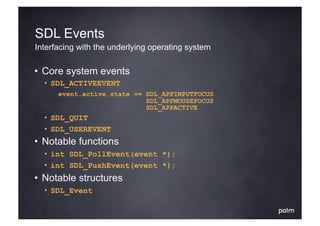
SDL Events
Interfacing with the underlying operating system

•  Core system events
  •  SDL_ACTIVEEVENT
       event.active.state == SDL_APPINPUTFOCUS
                             SDL_APPMOUSEFOCUS
                             SDL_APPACTIVE
  •  SDL_QUIT
  •  SDL_USEREVENT
•  Notable functions
  •  int SDL_PollEvent(event *);
  •  int SDL_PushEvent(event *);
•  Notable structures
  •  SDL_Event
SDL Events: Example
Interfacing with the underlying operating system—getting hands dirty

 SDL_Event e;
 int       running = 1;

 // while the application is active; keep going
 while (running)
 {
   // is there an event to process?
   if (SDL_PollEvent(&e))
   {
     switch (e.type)
     {
       case SDL_QUIT: running = 0; break;
       default: break;
     }
   }
 }
SDL Graphics
How to access the 2D graphics frame buffer

•  SDL_INIT_VIDEO
•  Frame buffer graphics
  •  A representation of an offscreen surface that the developer can
     read/write from to present information on the device display
•  Notable functions
  •  SDL_Surface *SDL_SetVideoMode(w, h, depth, flags);
  •  void           SDL_LockSurface(surface *);
  •  void           SDL_UnlockSurface(surface *);
  •  void           SDL_Flip(surface *);
•  Notable structures
  •  SDL_Surface, SDL_PixelFormat, SDL_Rect, SDL_Color
SDL Graphics: Example
How to access the 2D graphics frame buffer—getting hands dirty

 SDL_Surface *surface;
 Uint8        surface_r, surface_g, surface_b;
 void        *surface_bits;
 Uint32       color_red;

 // initialize the video mode
 surface = SDL_SetVideoMode(width, height, 0, 0);

 // obtain   information about     the surface
 surface_r   = bitsset(surface     -> format -> Rmask);
 surface_g   = bitsset(surface     -> format -> Gmask);
 surface_b   = bitsset(surface     -> format -> Bmask);

 // get a pointer to the surface / define a color
 surface_bits = surface -> pixels;
 color_red = SDL_MapRGB(surface -> format, 255, 0, 0);
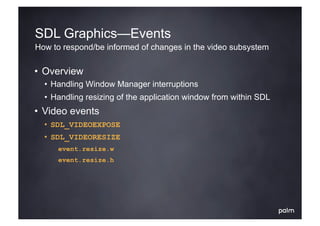
SDL Graphics—Events
How to respond/be informed of changes in the video subsystem

•  Overview
  •  Handling Window Manager interruptions
  •  Handling resizing of the application window from within SDL
•  Video events
  •  SDL_VIDEOEXPOSE
  •  SDL_VIDEORESIZE
       event.resize.w
       event.resize.h
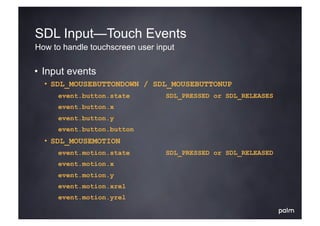
SDL Input—Touch Events
How to handle touchscreen user input

•  Input events
  •  SDL_MOUSEBUTTONDOWN / SDL_MOUSEBUTTONUP
       event.button.state        SDL_PRESSED or SDL_RELEASES
       event.button.x
       event.button.y
       event.button.button
  •  SDL_MOUSEMOTION
       event.motion.state        SDL_PRESSED or SDL_RELEASED
       event.motion.x
       event.motion.y
       event.motion.xrel
       event.motion.yrel
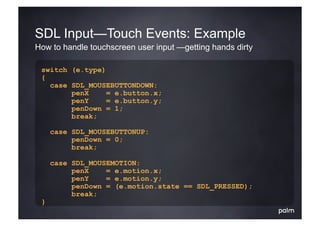
SDL Input—Touch Events: Example
How to handle touchscreen user input —getting hands dirty

 switch (e.type)
 {
   case SDL_MOUSEBUTTONDOWN:
        penX     = e.button.x;
        penY     = e.button.y;
        penDown = 1;
        break;

     case SDL_MOUSEBUTTONUP:
          penDown = 0;
          break;

     case SDL_MOUSEMOTION:
          penX    = e.motion.x;
          penY    = e.motion.y;
          penDown = (e.motion.state == SDL_PRESSED);
          break;
 }
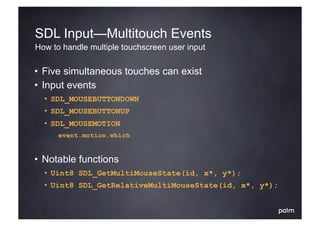
SDL Input—Multitouch Events
How to handle multiple touchscreen user input

•  Five simultaneous touches can exist
•  Input events
  •  SDL_MOUSEBUTTONDOWN
  •  SDL_MOUSEBUTTONUP
  •  SDL_MOUSEMOTION
       event.motion.which


•  Notable functions
  •  Uint8 SDL_GetMultiMouseState(id, x*, y*);
  •  Uint8 SDL_GetRelativeMultiMouseState(id, x*, y*);
SDL Input—Key Events
How to handle keyboard user input

•  Input events
  •  SDL_KEYDOWN / SDL_KEYUP
       event.key.type               SDL_KEYUP   or SDL_KEYDOWN
       event.key.state              SDL_PRESSED or SDL_RELEASED
       event.key.keysym.scancode
       event.key.keysym.sym
       event.key.keysym.mod
       event.key.keysym.unicode     * only if UNICODE enabled
•  Notable functions
  •  int    SDL_EnableUNICODE(enable);
  •  Uint8 *SDL_GetKeyState(numkeys);
SDL Input—Key Events: Example
How to handle keyboard user input—getting hands dirty

 // event loop
 switch (e.type)
 {
   case SDL_KEYDOWN:
        chr = e.key.keysym.sym;      // SDL key
        chr = e.key.keysym.scancode; // generic key
        break;
 }

 Uint8 *keyState;
 keyState = SDL_GetKeyState(NULL);
 if (keyState[SDLK_UP])    printf(“move         upn”);
 if (keyState[SDLK_DOWN]) printf(“move          downn”);
 if (keyState[SDLK_LEFT]) printf(“move          leftn”);
 if (keyState[SDLK_RIGHT]) printf(“move         rightn”);
SDL Input—Joystick Events
How to handle accelerometer user input

•  SDL_INIT_JOYSTICK
•  Input events
  •  SDL_JOYAXISMOTION
       event.joy.axis             x-axis = 0
                                  y-axis = 1
                                  z-axis = 2
       event.joy.value            -32768 through 32767

•  Notable functions
  •  SDL_Joystick *SDL_JoystickOpen(id);
  •  int                SDL_JoystickNumAxes(joy *);
  •  Sint16         *SDL_JoystickGetAxis(joy *, axis);
  •  void               SDL_JoystickClose(joy *);
SDL Input—Joystick Events: Example
How to handle accelerometer user input—getting hands dirty

 // open the joystick
 SDL_Joystick *joy;
 joy = SDL_JoystickOpen(0);

 // event loop
 switch (e.type)
 {
   case SDL_JOYAXISMOTION:
        if (e.joy.axis == 0) accX = e.joy.value; else
        if (e.joy.axis == 1) accY = e.joy.value; else
        if (e.joy.axis == 2) accZ = e.joy.value;
        break;
 }

 // close the joystick
 SDL_JoystickClose(joy);
SDL Audio
What is a game without sound and music?

•  SDL_INIT_AUDIO
•  PCM implementation
  •  Sound is a series of values (samples) representing a wave—
     pulse-code modulation is the digitized form of analog audio
•  Notable functions
  •  int   SDL_OpenAudio(desired *, obtained *);
  •  void SDL_PauseAudio(state);
  •  void SDL_CloseAudio();
•  Notable structures
  •  SDL_AudioSpec
SDL Audio—Specification
Frequency, channels, and samples—define the PCM format

 SDL_AudioSpec *spec, *hw_spec;

 // define our audio specification
 spec = malloc(sizeof(SDL_AudioSpec));
 memset(spec, 0, sizeof(SDL_AudioSpec);
 spec -> freq     = 11025;
 spec -> format   = AUDIO_S8;
 spec -> channels = 2;
 spec -> samples = 4096;
 spec -> callback = (void *)my_audio_callback;

 // lets try and get what we want
 SDL_OpenAudio(spec, hw_spec);

 // start playing
 SDL_PauseAudio(0);
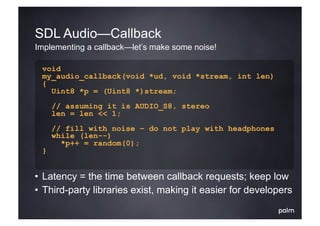
SDL Audio—Callback
Implementing a callback—let’s make some noise!

 void
 my_audio_callback(void *ud, void *stream, int len)
 {
   Uint8 *p = (Uint8 *)stream;
     // assuming it is AUDIO_S8, stereo
     len = len << 1;
     // fill with noise – do not play with headphones
     while (len--)
       *p++ = random(0);
 }


•  Latency = the time between callback requests; keep low
•  Third-party libraries exist, making it easier for developers
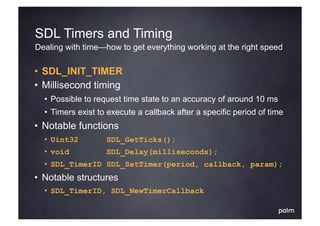
SDL Timers and Timing
Dealing with time—how to get everything working at the right speed

•  SDL_INIT_TIMER
•  Millisecond timing
  •  Possible to request time state to an accuracy of around 10 ms
  •  Timers exist to execute a callback after a specific period of time
•  Notable functions
  •  Uint32        SDL_GetTicks();
  •  void          SDL_Delay(milliseconds);
  •  SDL_TimerID SDL_SetTimer(period, callback, param);
•  Notable structures
  •  SDL_TimerID, SDL_NewTimerCallback
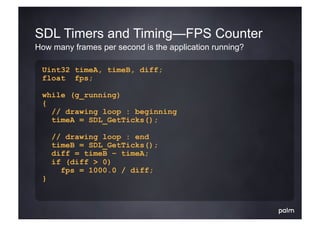
SDL Timers and Timing—FPS Counter
How many frames per second is the application running?

 Uint32 timeA, timeB, diff;
 float fps;

 while (g_running)
 {
   // drawing loop : beginning
   timeA = SDL_GetTicks();

     // drawing loop : end
     timeB = SDL_GetTicks();
     diff = timeB – timeA;
     if (diff > 0)
       fps = 1000.0 / diff;
 }
C Standard Library (libc) Support
The ultimate portable library—there is so much you can use

•  Memory allocation
  •  malloc, memset, memcpy, free ..
•  Standard IO/file access
  •  fopen, fprintf, fread, fwrite, fseek ..
•  Time and date functions
  •  time, mktime, localtime, sleep ..
•  Berkeley sockets
  •  socket, connect, recv, send ..
•  String functions
  •  sprintf, strlen, strcat, strcpy ..
           en.wikipedia.com/wiki/C_standard_library
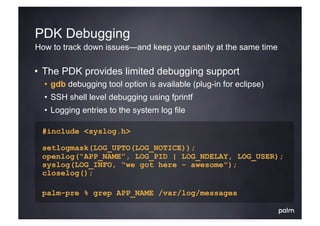
PDK Debugging
How to track down issues—and keep your sanity at the same time

•  The PDK provides limited debugging support
  •  gdb debugging tool option is available (plug-in for eclipse)
  •  SSH shell level debugging using fprintf
  •  Logging entries to the system log file

 #include <syslog.h>

 setlogmask(LOG_UPTO(LOG_NOTICE));
 openlog(“APP_NAME”, LOG_PID | LOG_NDELAY, LOG_USER);
 syslog(LOG_INFO, “we got here - awesome”);
 closelog();

 palm-pre % grep APP_NAME /var/log/messages
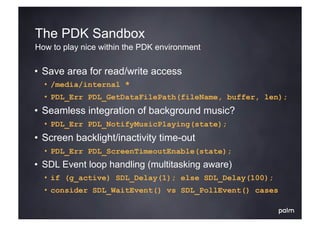
The PDK Sandbox
How to play nice within the PDK environment

•  Save area for read/write access
  •  /media/internal *
  •  PDL_Err PDL_GetDataFilePath(fileName, buffer, len);
•  Seamless integration of background music?
  •  PDL_Err PDL_NotifyMusicPlaying(state);
•  Screen backlight/inactivity time-out
  •  PDL_Err PDL_ScreenTimeoutEnable(state);
•  SDL Event loop handling (multitasking aware)
  •  if (g_active) SDL_Delay(1); else SDL_Delay(100);
  •  consider SDL_WaitEvent() vs SDL_PollEvent() cases
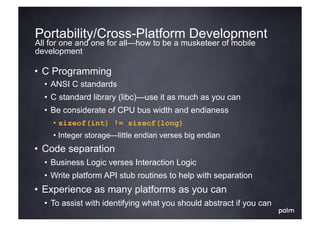
Portability/Cross-Platform Development
All for one and one for all—how to be a musketeer of mobile
development

•  C Programming
  •  ANSI C standards
  •  C standard library (libc)—use it as much as you can
  •  Be considerate of CPU bus width and endianess
    • sizeof(int) != sizeof(long)
    • Integer storage—little endian verses big endian
•  Code separation
  •  Business Logic verses Interaction Logic
  •  Write platform API stub routines to help with separation
•  Experience as many platforms as you can
  •  To assist with identifying what you should abstract if you can
Mobile 1UP                                 mobile1up.com
10+ years of mobile application development—so many devices!

•  iPhone games ported to the PDK in less than 5 hours
  •  10+ applications ported with ease
  •  Games utilize cross-platform design approach
  •  SDL bindings worked well for the in-house build SDK used
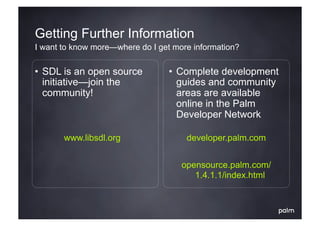
Getting Further Information
I want to know more—where do I get more information?

•  SDL is an open source          •  Complete development
   initiative—join the               guides and community
   community!                        areas are available
                                     online in the Palm
                                     Developer Network

       www.libsdl.org                 developer.palm.com


                                     opensource.palm.com/
                                        1.4.1.1/index.html
Q &A
Game Development using SDL and the PDK