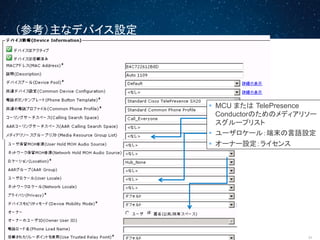
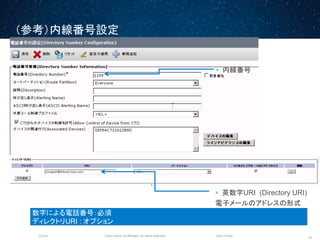
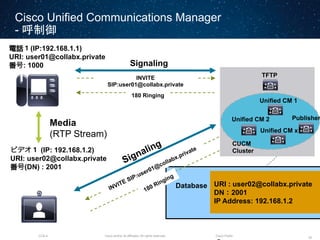
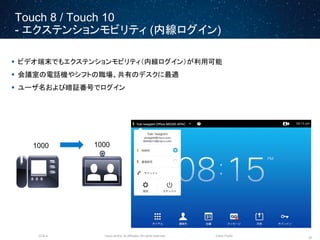
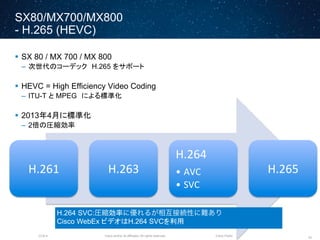
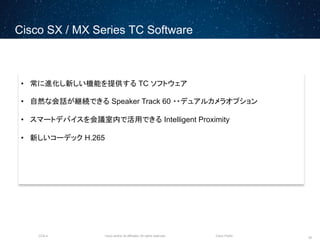
Cisco and/or itsaffiliates. All rights reserved.CC6-4 Cisco Public
3
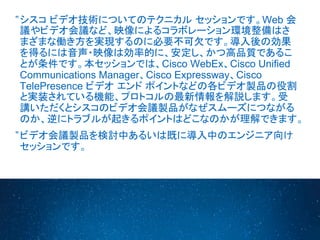
(参考)主な登場人物と略称
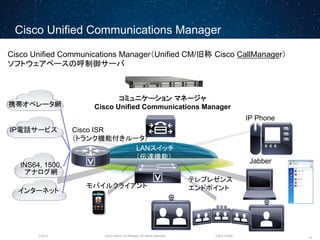
Cisco Unified Communications Manager
(Unified CM)
Cisco Video Communications Server – Control
(VCS-C)
Cisco Expressway - C
Video Communications Server – Expressway
(VCS-E)
Cisco Expressway – E
Cisco Prime Collaboration
または
Cisco TelePresence Management Suite
(TMS)
Cisco TelePresence Conductor
Cisco TelePresence Server
または
Cisco Media Control Unit (MCU)
Voice 機能付きルータ (ISR)
Voice に最適化された
スイッチ (Catalyst)
4.
Cisco and/or itsaffiliates. All rights reserved.CC6-4 Cisco Public
4
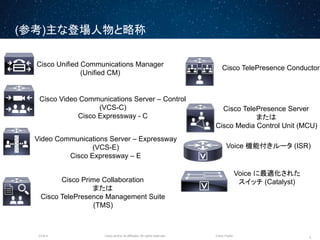
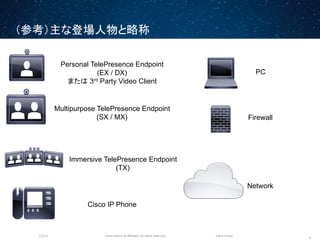
(参考)主な登場人物と略称
Personal TelePresence Endpoint
(EX / DX)
または 3rd Party Video Client
Multipurpose TelePresence Endpoint
(SX / MX)
Immersive TelePresence Endpoint
(TX)
PC
Cisco IP Phone
Firewall
Network
Cisco and/or itsaffiliates. All rights reserved.CC6-4 Cisco Public
16
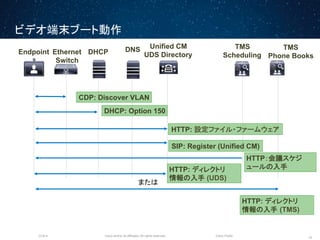
ビデオ端末ブート動作
Endpoint Ethernet
Switch
DHCP
TMS
Scheduling
DNS TMS
Phone Books
Unified CM
UDS Directory
DHCP: Option 150
HTTP: ディレクトリ情
報の入手 (UDS)
CDP: Discover VLAN
HTTP: 設定ファイル・ファームウェア
SIP: Register (Unified CM)
HTTP:会議スケジュ
ールの入手
HTTP: ディレクトリ情
報の入手 (TMS)
または
17.
Cisco and/or itsaffiliates. All rights reserved.CC6-4 Cisco Public
17
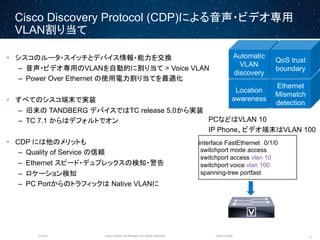
Cisco Discovery Protocol (CDP)による音声・ビデオ専用
VLAN割り当て
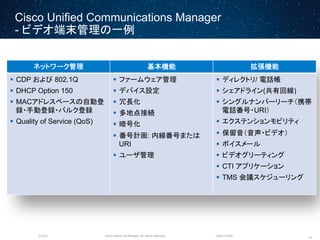
シスコのルータ・スイッチとデバイス情報・能力を交換
‒ 音声・ビデオ専用のVLANを自動的に割り当て > Voice VLAN
‒ Power Over Ethernet の使用電力割り当てを最適化
すべてのシスコ端末で実装
‒ 旧来の TANDBERG デバイスではTC release 5.0から実装
‒ TC 7.1 からはデフォルトでオン
CDP には他のメリットも
‒ Quality of Service の信頼
‒ Ethernet スピード・デュプレックスの検知・警告
‒ ロケーション検知
‒ PC Portからのトラフィックは Native VLANに
Location
awareness
Ethernet
Mismatch
detection
Automatic
VLAN
discovery
QoS trust
boundary
PCなどはVLAN 10
IP Phone、ビデオ端末はVLAN 100
interface FastEthernet 0/1/0
switchport mode access
switchport access vlan 10
switchport voice vlan 100
spanning-tree portfast
18.
Cisco and/or itsaffiliates. All rights reserved.CC6-4 Cisco Public
18
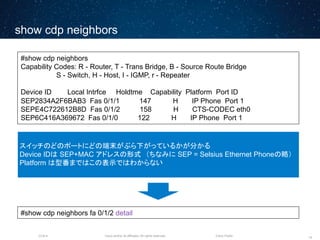
show cdp neighbors
#show cdp neighbors
Capability Codes: R - Router, T - Trans Bridge, B - Source Route Bridge
S - Switch, H - Host, I - IGMP, r - Repeater
Device ID Local Intrfce Holdtme Capability Platform Port ID
SEP2834A2F6BAB3 Fas 0/1/1 147 H IP Phone Port 1
SEPE4C722612B8D Fas 0/1/2 158 H CTS-CODEC eth0
SEP6C416A369672 Fas 0/1/0 122 H IP Phone Port 1
スイッチのどのポートにどの端末がぶら下がっているかが分かる
Device IDは SEP+MAC アドレスの形式 (ちなみに SEP = Selsius Ethernet Phoneの略)
Platform は型番まではこの表示ではわからない
#show cdp neighbors fa 0/1/2 detail
19.
Cisco and/or itsaffiliates. All rights reserved.CC6-4 Cisco Public
19
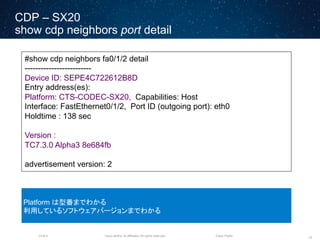
CDP – SX20
show cdp neighbors port detail
#show cdp neighbors fa0/1/2 detail
-------------------------
Device ID: SEPE4C722612B8D
Entry address(es):
Platform: CTS-CODEC-SX20, Capabilities: Host
Interface: FastEthernet0/1/2, Port ID (outgoing port): eth0
Holdtime : 138 sec
Version :
TC7.3.0 Alpha3 8e684fb
advertisement version: 2
Platform は型番までわかる
利用しているソフトウェアバージョンまでわかる
20.
Cisco and/or itsaffiliates. All rights reserved.CC6-4 Cisco Public
20
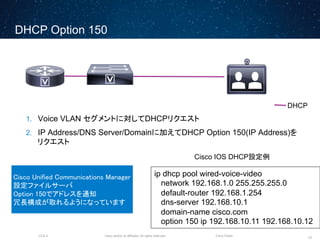
DHCP Option 150
1. Voice VLAN セグメントに対してDHCPリクエスト
2. IP Address/DNS Server/Domainに加えてDHCP Option 150(IP Address)を
リクエスト
ip dhcp pool wired-voice-video
network 192.168.1.0 255.255.255.0
default-router 192.168.1.254
dns-server 192.168.10.1
domain-name cisco.com
option 150 ip 192.168.10.11 192.168.10.12
Cisco Unified Communications Manager
設定ファイルサーバ
Option 150でアドレスを通知
冗長構成が取れるようになっています
Cisco IOS DHCP設定例
DHCP
Cisco and/or itsaffiliates. All rights reserved.CC6-4 Cisco Public
31
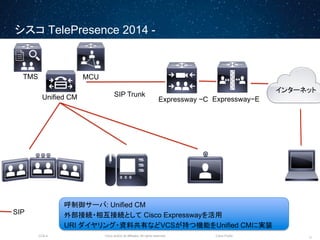
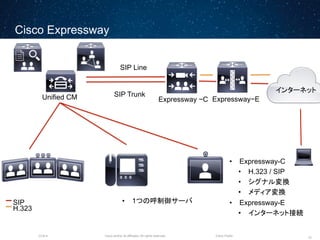
Cisco Expressway
Expressway −C Expressway−EUnified CM
• 1つの呼制御サーバ
SIP Trunk
インターネット
• Expressway-C
• H.323 / SIP
• シグナル変換
• メディア変換
• Expressway-E
• インターネット接続
SIP Line
SIP
H.323
32.
Cisco and/or itsaffiliates. All rights reserved.CC6-4 Cisco Public
32
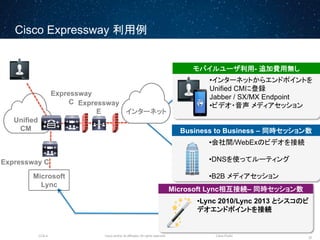
Unified
CM
Expressway
C Expressway
E
モバイルユーザ利用- 追加費用無し
•インターネットからエンドポイントを
Unified CMに登録
Jabber / SX/MX Endpoint
•ビデオ・音声 メディアセッション
Business to Business – 同時セッション数
•会社間/WebExのビデオを接続
•DNSを使ってルーティング
•B2B メディアセッション
Expressway C
Microsoft
Lync
Internet
Microsoft Lync相互接続– 同時セッション数
•Lync 2010/Lync 2013 とシスコのビ
デオエンドポイントを接続
インターネット
Cisco Expressway 利用例
33.
Cisco and/or itsaffiliates. All rights reserved.CC6-4 Cisco Public
33
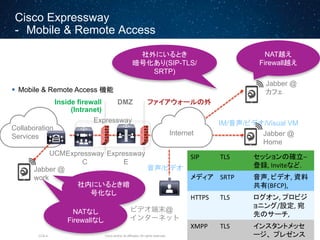
Cisco Expressway
- Mobile & Remote Access
Mobile & Remote Access 機能
Inside firewall
(Intranet)
Collaboration
Services
UCM
Internet
DMZ ファイアウォールの外
Jabber @
Home
Jabber @
カフェ
Jabber @
work
Expressway
Expressway
E
Expressway
C
社内にいるとき暗
号化なし
社外にいるとき
暗号化あり(SIP-
TLS/SRTP)
NAT越え
Firewall越え
IM/音声/ビデオ/Visual VM
音声/ビデオ
ビデオ端末@
インターネット
SIP TLS セッションの確立–
登録, Inviteなど.
メディア SRTP 音声, ビデオ, 資料
共有(BFCP),
HTTPS TLS ログオン, プロビジ
ョニング/設定, 宛
先のサーチ,
XMPP TLS インスタントメッセ
ージ、 プレゼンス
NATなし
Firewallなし
34.
Cisco and/or itsaffiliates. All rights reserved.CC6-4 Cisco Public
34
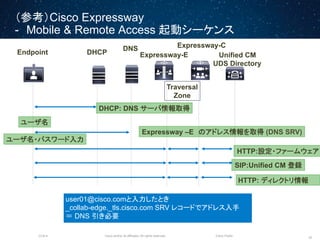
(参考)Cisco Expressway
- Mobile & Remote Access 起動シーケンス
DHCP: DNS サーバ情報取得
HTTP: ディレクトリ情報
HTTP:設定・ファームウェア
SIP:Unified CM 登録
Traversal
Zone
ユーザ名
Expressway –E のアドレス情報を取得 (DNS SRV)
Unified CM
UDS Directory
Endpoint DHCP
DNS
Expressway-E
Expressway-C
user01@cisco.comと入力したとき
_collab-edge._tls.cisco.com SRV レコードでアドレス入手
= DNS 引き必要
ユーザ名・パスワード入力
35.
Cisco and/or itsaffiliates. All rights reserved.CC6-4 Cisco Public
35
Cisco Expressway
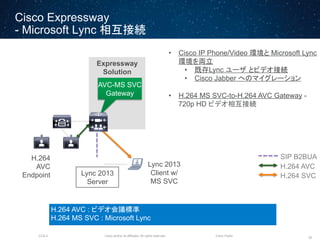
- Microsoft Lync 相互接続
Expressway
Solution
Lync 2013
Server
Lync 2013
Client
w/MS SVC
H.264
AVC
Endpoint
AVC-MS
SVC
Gateway
H.264 AVC
H.264 SVC
SIP B2BUA
• Cisco IP Phone/Video 環境と Microsoft Lync
環境を両立
• 既存Lync ユーザ とビデオ接続
• Cisco Jabber へのマイグレーション
• H.264 MS SVC-to-H.264 AVC Gateway -
720p HD ビデオ相互接続
H.264 AVC : ビデオ会議標準
H.264 MS SVC : Microsoft Lync
36.
Cisco and/or itsaffiliates. All rights reserved.CC6-4 Cisco Public
36
Cisco Expressway
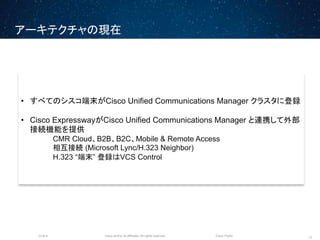
• 社外と接続する役目
• シスコ以外のビデオ会議製品と接続する役目
• メディアを変換=相互接続性を高める
Cisco and/or itsaffiliates. All rights reserved.CC6-4 Cisco Public
38
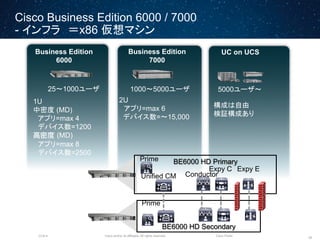
Cisco Business Edition 6000 / 7000
- インフラ =x86 仮想マシン
Business Edition
6000
UC on UCSBusiness Edition
7000
25~1000ユーザ 1000~5000ユーザ 5000ユーザ~
1U
中密度 (MD)
アプリ=max 4
デバイス数=1200
高密度 (MD)
アプリ=max 8
デバイス数=2500
2U
アプリ=max 6
デバイス数=〜15,000
構成は自由
検証構成あり
BE6000 HD PrimaryPrime
Expy C
Unified CM Conductor
Expy E
BE6000 HD Secondary
Prime
39.
Cisco and/or itsaffiliates. All rights reserved.CC6-4 Cisco Public
39
UC on UCS / Cisco Business Edition
• x86 アーキテクチャで投資保護
• Cisco Collaboration サーバを複数実装することが可能
• ビデオ多地点接続も収容可能
Cisco and/or itsaffiliates. All rights reserved.CC6-4 Cisco Public
41
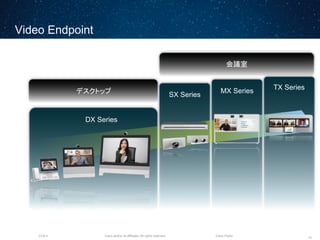
Video Endpoint
会議室
MX Series TX Series
デスクトップ
DX Series
SX Series
42.
Cisco and/or itsaffiliates. All rights reserved.CC6-4 Cisco Public
42
Collaboration Endpoints
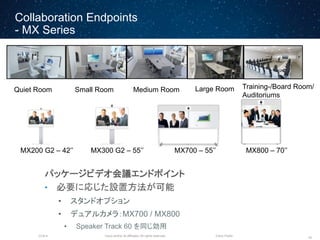
- MX Series
パッケージビデオ会議エンドポイント
• 必要に応じた設置方法が可能
• スタンドオプション
• デュアルカメラ:MX700 / MX800
• Speaker Track 60 を同じ効用
MX200 G2 – 42’’ MX300 G2 – 55’’ MX700 – 55’’ MX800 – 70’’
Quiet Room Small Room Medium Room Large Room Training-/Board Room/
Auditoriums
43.
Cisco and/or itsaffiliates. All rights reserved.CC6-4 Cisco Public
43
Collaboration Endpoints
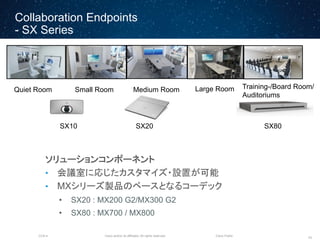
- SX Series
Quiet Room Small Room Medium Room Large Room Training-/Board Room/
Auditoriums
SX20 SX80SX10
ソリューションコンポーネント
• 会議室に応じたカスタマイズ・設置が可能
• MXシリーズ製品のベースとなるコーデック
• SX20 : MX200 G2/MX300 G2
• SX80 : MX700 / MX800
44.
Cisco and/or itsaffiliates. All rights reserved.CC6-4 Cisco Public
44
Collaboration Endpoints
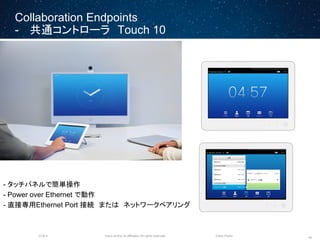
- 共通コントローラ Touch 10
- タッチパネルで簡単操作
- Power over Ethernet で動作
- 直接専用Ethernet Port 接続 または ネットワークペアリング
Cisco and/or itsaffiliates. All rights reserved.CC6-4 Cisco Public
50
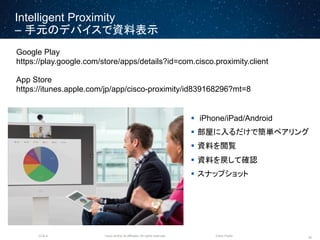
Intelligent Proximity
– 手元のデバイスで資料表示
Google Play
https://play.google.com/store/apps/details?id=com.cisco.proximity.client
App Store
https://itunes.apple.com/jp/app/cisco-proximity/id839168296?mt=8
iPhone/iPad/Android
部屋に入るだけで簡単ペアリング
資料を閲覧
資料を戻して確認
スナップショット
51.
Cisco and/or itsaffiliates. All rights reserved.CC6-4 Cisco Public
51
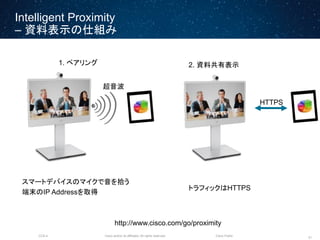
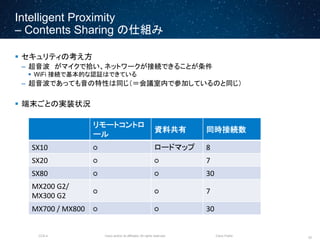
Intelligent Proximity
– 資料表示の仕組み
HTTPS
超音波
1. ペアリング 2. 資料共有表示
http://www.cisco.com/go/proximity
スマートデバイスのマイクで音を拾う
端末のIP Addressを取得
トラフィックはHTTPS
Cisco and/or itsaffiliates. All rights reserved.CC6-4 Cisco Public
56
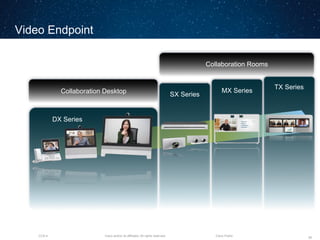
Video Endpoint
Collaboration Rooms
MX Series
TX Series
Collaboration Desktop
DX Series
SX Series
57.
Cisco and/or itsaffiliates. All rights reserved.CC6-4 Cisco Public
57
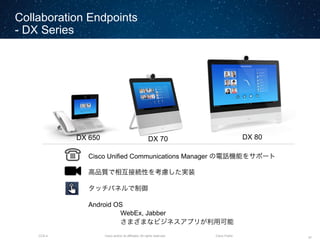
Collaboration Endpoints
- DX Series
Cisco Unified Communications Manager の電話機能をサポー
ト
タッチパネルで制御
Apps Android OS
WebEx, Jabber
さまざまなビジネスアプリが利用可能
高品質で相互接続性を考慮した実装
DX 650 DX 70 DX 80
58.
Cisco and/or itsaffiliates. All rights reserved.CC6-4 Cisco Public
58
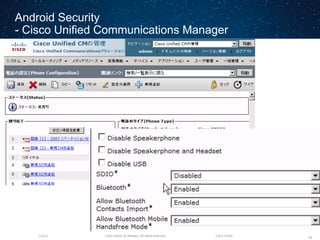
Android Security
- Cisco Unified Communications Manager
59.
Cisco and/or itsaffiliates. All rights reserved.CC6-4 Cisco Public
59
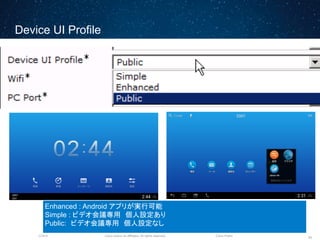
Device UI Profile
Enhanced : Android アプリが実行可能
Simple : ビデオ会議専用 個人設定あり
Public: ビデオ会議専用 個人設定なし
60.
Cisco and/or itsaffiliates. All rights reserved.CC6-4 Cisco Public
60
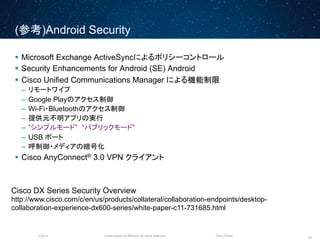
(参考)Android Security
Microsoft Exchange ActiveSyncによるポリシーコントロール
Security Enhancements for Android (SE) Android
Cisco Unified Communications Manager による機能制限
– リモートワイプ
– Google Playのアクセス制御
– Wi-Fi・Bluetoothのアクセス制御
– 提供元不明アプリの実行
– ”シンプルモード” “パブリックモード”
– USB ポート
– 呼制御・メディアの暗号化
Cisco AnyConnect® 3.0 VPN クライアント
Cisco DX Series Security Overview
http://www.cisco.com/c/en/us/products/collateral/collaboration-endpoints/desktop-
collaboration-experience-dx600-series/white-paper-c11-731685.html
61.
Cisco and/or itsaffiliates. All rights reserved.CC6-4 Cisco Public
61
Cisco DX Series
• Android OS で動作する ビデオ “電話” 端末
• Cisco Unified Communications Manager が簡易 MDM として動作
• 用途・セキュリティ要件に応じたカスタマイズ
• Android OSをスマートデバイスにする
• Android OSを組み込みOSとして使う
Cisco and/or itsaffiliates. All rights reserved.CC6-4 Cisco Public
63
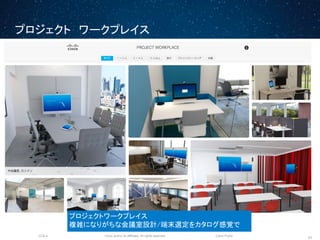
プロジェクト ワークプレイス
プロジェクトワークプレイス
複雑になりがちな会議室設計/端末選定をカタログ感覚で
64.
Cisco and/or itsaffiliates. All rights reserved.CC6-4 Cisco Public
64
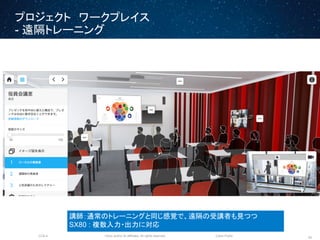
プロジェクト ワークプレイス
- 遠隔トレーニング
講師:通常のトレーニングと同じ感覚で、遠隔の受講者も見つつ
SX80 : 複数入力・出力に対応
65.
Cisco and/or itsaffiliates. All rights reserved.CC6-4 Cisco Public
65
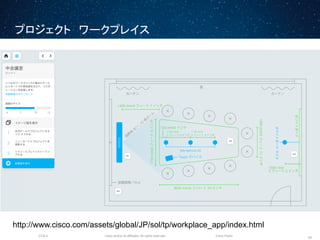
プロジェクト ワークプレイス
http://www.cisco.com/assets/global/JP/sol/tp/workplace_app/index.html