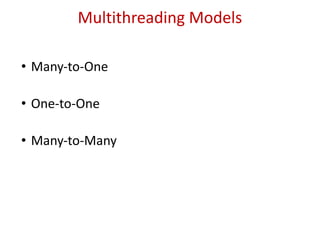
Comprehensive Overview of Process Management in Operating Systems
Explore key concepts of process management including process states, scheduling algorithms, context switching, interprocess communication, and multiprocessor scheduling in operating systems.
Process
• A programin execution is called process.
• Process execution must progress in sequential
order.
• A process is also called as task.
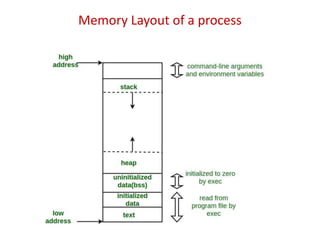
• Each process has its own address space.
• Address space is divided into
✔ Text region – Stores the code that the processor
executes.
✔ Data Region – Stores variables and dynamically
allocate memory.
✔ Stack region - stores instructions and local
variables for active procedure calls
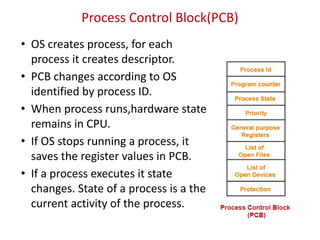
Process Control Block(PCB)
•OS creates process, for each
process it creates descriptor.
• PCB changes according to OS
identified by process ID.
• When process runs,hardware state
remains in CPU.
• If OS stops running a process, it
saves the register values in PCB.
• If a process executes it state
changes. State of a process is a the
current activity of the process.
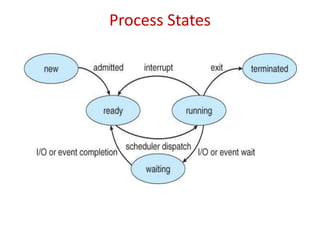
Process States …
•New – The process is being created.
• Running – Instructions are being executed.
• Waiting – A process is waiting for some event
to occur.
Example : I/O completion, reception of a signal.
• Ready - A process is waiting to be assigned to
a processor.
• Terminated – Process has finished execution.
7.
Process Scheduling
• Schedulingone process among the queue of process
in the ready queue by process scheduler is called
process scheduling.
OS maintains various queues,
• Job queue − This queue keeps all the processes in
the system.
• Ready queue − This queue keeps a set of all
processes residing in main memory, ready and
waiting to execute. ...
• Device queue − The processes which are blocked
due to unavailability of an I/O device constitute
this queue.
8.
Schedulers
• Used tohandle process scheduling.
• It is a kind of system software.
• Three types of scheduler are,
– Long term scheduler
– Short term scheduler
– Medium term scheduler
9.
Long Term Scheduler
•Select processes from the queue and load
them into memory for execution.
• Control degree of multiprogramming.
• Used in RTOS(real time os).
• Process state is new to ready.
• Absent in time sharing system.
• Also known as job scheduler.
10.
Short Term Scheduler
•Also known as CPU scheduler.
• Speed is very fast.
• Less control over degree of multiprogramming
• Minimal in Time sharing system.
• Process state is ready to running.
11.
Medium Term Scheduler
•Part of swapping function.
• Sometimes it removes process from memory.
• Reduces degree of multiprogramming.
• If process makes an I/O request and it is in
memory then operating system takes this
process into suspended state.
• Once process is suspended, a new process
takes space for execution.
12.
Context Switching
• Switchingof CPU from one process or thread to another
process or thread is called context switching.
• Switching CPU to other process has to save the old process
and load new process with its old state. It is context switch.
• If it occurs kernel saves the context of old process in PCB and
loads new process with its old state to run.
• Under three circumstances context switching happens,
– Multitasking
– Interrupt handling
– User and kernel mode switching.
13.
Operations on Process
ProcessCreation
A process is created in following situations,
• Starting a new batch job.
• User request for creating new process.
• To provide new services by OS.
• System call from currently running process.
• OS creates a new process with Specified or default attribute.
• A sub process is called child process.
• Parent process and child process execute concurrently.
• Parent process waits until some or all of its children have terminated.
• Whenever os creates a process,it builds data structure for managing
process and allocate address space in primary memory.
• Unix processes are created using fork() system call. fork() is parent
process.
• Both parent process and child process have their own and private
memory.
14.
Process Termination
• Whena process finishes its normal execution, then
that process is terminated.
• Os delete process using exit() system call.
Reason for termination
• Normal completion of operation.
• Memory unavailable.
• Time slice expired.
• Parent termination.
• Failures of I/O.
• Request from parent process.
• Misuse of access rights.
15.
CPU Scheduler orShort Term Scheduler
• Selects a process from among the processes in memory that
are ready to execute, and allocates the CPU.
• CPU scheduling decisions may take place when a process:
1. Switches from running to waiting state
2. Switches from running to ready state
3. Switches from waiting to ready
4. Terminates
16.
Dispatcher
• Dispatcher modulegives control of the CPU to the
process selected by the scheduler, this involves:
– switching context
– switching to user mode
– jumping to the proper location in the user
program to restart that program
• Dispatch latency – time it takes for the dispatcher to
stop one process and start another running
17.
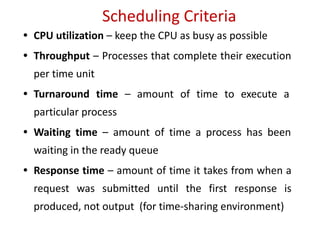
Scheduling Criteria
• CPUutilization – keep the CPU as busy as possible
• Throughput – Processes that complete their execution
per time unit
• Turnaround time – amount of time to execute a
particular process
• Waiting time – amount of time a process has been
waiting in the ready queue
• Response time – amount of time it takes from when a
request was submitted until the first response is
produced, not output (for time-sharing environment)
18.
Scheduling Algorithm Criteria
•Max CPU utilization
• Max throughput
• Min turnaround time
• Min waiting time
• Min response time
19.
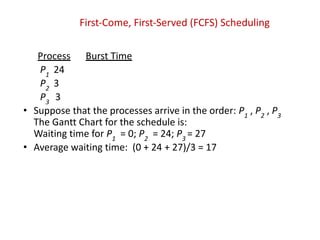
First-Come, First-Served (FCFS)Scheduling
Process Burst Time
P1
24
P2
3
P3
3
• Suppose that the processes arrive in the order: P1
, P2
, P3
The Gantt Chart for the schedule is:
Waiting time for P1
= 0; P2
= 24; P3
= 27
• Average waiting time: (0 + 24 + 27)/3 = 17
20.
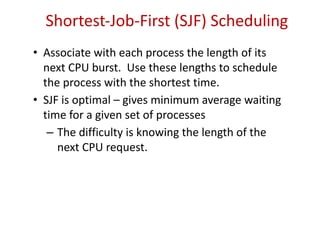
Shortest-Job-First (SJF) Scheduling
•Associate with each process the length of its
next CPU burst. Use these lengths to schedule
the process with the shortest time.
• SJF is optimal – gives minimum average waiting
time for a given set of processes
– The difficulty is knowing the length of the
next CPU request.
21.
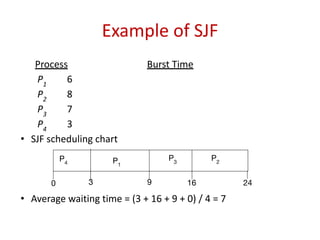
Example of SJF
ProcessArrival Time Burst Time
P1
0.0 6
P2
2.0 8
P3
4.0 7
P4
5.0 3
• SJF scheduling chart
• Average waiting time = (3 + 16 + 9 + 0) / 4 = 7
P4
P3
P1
3 16
0 9
P2
24
22.
Priority Scheduling
• Apriority number (integer) is associated with each
process
• The CPU is allocated to the process with the highest
priority (smallest integer ≡ highest priority)
– Preemptive
– Non-preemptive
• Note that SJF is a priority scheduling where priority is the
predicted next CPU burst time
• Problem ≡ Starvation – low priority processes may never
execute
• Solution ≡ Aging – as time progresses increase the
priority of the process
23.
Round Robin (RR)
•Each process gets a small unit of CPU time (time quantum),
usually 10-100 milliseconds. After this time has elapsed, the
process is preempted and added to the end of the ready
queue.
• We can predict wait time: If there are n processes in the
ready queue and the time quantum is q, then each process
gets 1/n of the CPU time in chunks of at most q time units at
once. No process waits more than (n-1)q time units.
• Performance
– q large ⇒ FIFO
– q small ⇒ may hit the context switch wall: q must be
large with respect to context switch, otherwise overhead
is too high
24.
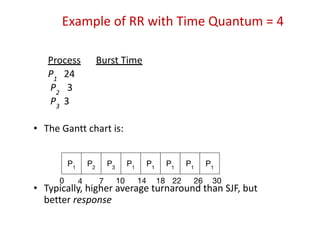
Example of RRwith Time Quantum = 4
Process Burst Time
P1
24
P2
3
P3
3
• The Gantt chart is:
• Typically, higher average turnaround than SJF, but
better response
P1
P2
P3
P1
P1
P1
P1
P1
0 4 7 10 14 18 22 26 30
25.
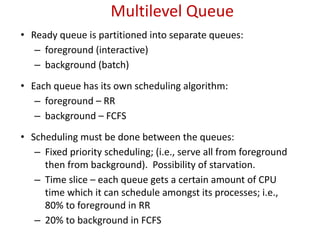
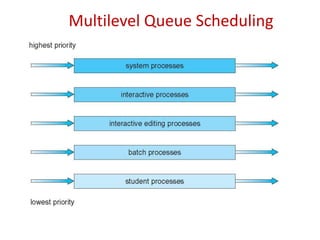
Multilevel Queue
• Readyqueue is partitioned into separate queues:
– foreground (interactive)
– background (batch)
• Each queue has its own scheduling algorithm:
– foreground – RR
– background – FCFS
• Scheduling must be done between the queues:
– Fixed priority scheduling; (i.e., serve all from foreground
then from background). Possibility of starvation.
– Time slice – each queue gets a certain amount of CPU
time which it can schedule amongst its processes; i.e.,
80% to foreground in RR
– 20% to background in FCFS
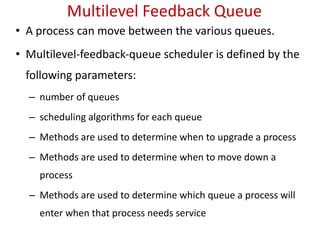
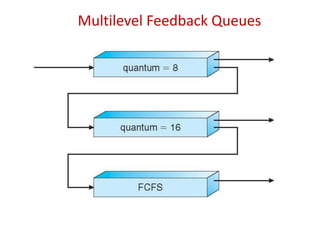
Multilevel Feedback Queue
•A process can move between the various queues.
• Multilevel-feedback-queue scheduler is defined by the
following parameters:
– number of queues
– scheduling algorithms for each queue
– Methods are used to determine when to upgrade a process
– Methods are used to determine when to move down a
process
– Methods are used to determine which queue a process will
enter when that process needs service
28.
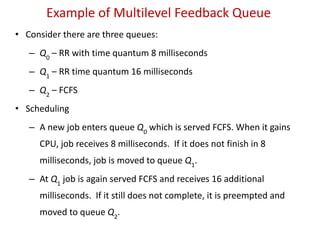
Example of MultilevelFeedback Queue
• Consider there are three queues:
– Q0
– RR with time quantum 8 milliseconds
– Q1
– RR time quantum 16 milliseconds
– Q2
– FCFS
• Scheduling
– A new job enters queue Q0
which is served FCFS. When it gains
CPU, job receives 8 milliseconds. If it does not finish in 8
milliseconds, job is moved to queue Q1
.
– At Q1
job is again served FCFS and receives 16 additional
milliseconds. If it still does not complete, it is preempted and
moved to queue Q2
.
Multiple-Processor Scheduling
• CPUscheduling is more complex when multiple CPUs are
available.
• Here more number of processors are present.
• It has a common ready queue and uniform memory access.
• One acts as a master and remaining processors act as a slave.
• Load is shared among processors.
• The identical processor share their job.
31.
Inter process Communication
•Enables exchange of data between two or more separate
independent process / threads.
• Os provides resources such as message queue, shared memory.
• In complex programming environment, multiple co-operating
process perform related operation, they must communicate
with each other.
• Kernel provide mechanism to make this possible.
• It is mostly used in distributed environment.
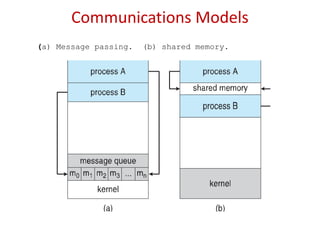
• Cooperating processes need interprocess communication (IPC)
• There are two models of IPC
– Shared memory
– Message passing
IPC Types
• SharedMemory – Permit process to
communicate by simply reading and writing to a
specified memory location.
• Mapped Memory – It is associated with a file in a
file system.
• Pipes – Permit sequential communication from
one process to a related process.
• FIFO – Even unrelated process communicate
because pipe is given name in file system.
• Sockets – Support unrelated process to
communicate even on different computers.
34.
Purpose of IPC
•Data Transfer
• Data Sharing
• Event Modification – A process notify another
process.
• Resource Sharing
• Process control – for eg., compiler and
debuggers have complete control over
another process.
35.
Cooperating Processes
• Independentprocess cannot affect or be affected
by the execution of another process
• Cooperating process can affect or be affected by
the execution of another process
• Advantages of process cooperation
– Information sharing
– Computation speed-up
– Modularity
– Convenience
36.
Interprocess Communication –Shared Memory
• An area of memory shared among the processes that wish to
communicate.
• Permit process to communicate by simply reading and writing to a
specified memory location.
• The communication is under the control of the users processes not
the operating system.
• Used to co-ordinate resources among process and also to co-ordinate
execution of process.
• Major issues is to provide mechanism that will allow the user
processes to synchronize their actions when they access shared
memory.
37.
Interprocess Communication –Message Passing
• Mechanism for processes to communicate and to
synchronize their actions.
• Used when process wish to exchange information. It
takes several forms such as pipes, message queue and
shared memory.
• Pipes permit sequential communication from one
process to a related process.
• IPC facility provides two operations:
– send(message)
– receive(message)
• The message size is either fixed or variable
38.
Direct Communication
• Processesmust name each other explicitly:
– send (P, message) – send a message to process P
– receive(Q, message) – receive a message from process Q
• Properties of communication link
– Links are established automatically
– A link is associated with exactly one pair of communicating
processes
– Between each pair there exists exactly one link
– The link may be unidirectional, but is usually bi-directional
39.
Indirect Communication
• Messagesare directed and received from mailboxes (also
referred to as ports)
– Each mailbox has a unique id
– Processes can communicate only if they share a mailbox
• Properties of communication link
– Link established only if processes share a common mailbox
– A link may be associated with many processes
– Each pair of processes may share several communication links
– Link may be unidirectional or bi-directional
40.
Indirect Communication
• Operations
–create a new mailbox (port)
– send and receive messages through mailbox
– destroy a mailbox
• Primitives are defined as:
send(A, message) – send a message to
mailbox A
receive(A, message) – receive a message
from mailbox A
41.
Synchronization
• Message passingmay be either blocking or
non-blocking
• Blocking is considered synchronous
– Blocking send -- the sender is blocked until the message
is received
– Blocking receive -- the receiver is blocked until a
message is available
• Non-blocking is considered asynchronous
– Non-blocking send -- the sender sends the message and
continue
– Non-blocking receive -- the receiver receives:
● A valid message, or
● Null message
42.
Buffering
• Queue ofmessages attached to the link.
• implemented in one of three ways
1.Zero capacity – no messages are queued on a link.
Sender must wait for receiver (rendezvous)
2.Bounded capacity – finite length of n messages
Sender must wait if link full
3.Unbounded capacity – infinite length
Sender never waits
43.
Pipes
• Allow twoprocesses to communicate
• Ordinary pipes – cannot be accessed from outside the process
that created it. Typically, a parent process creates a pipe and
uses it to communicate with a child process that it created.
• Named pipes – can be accessed without a parent-child
relationship.
44.
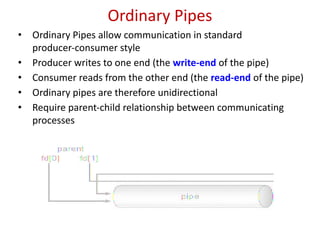
Ordinary Pipes
• OrdinaryPipes allow communication in standard
producer-consumer style
• Producer writes to one end (the write-end of the pipe)
• Consumer reads from the other end (the read-end of the pipe)
• Ordinary pipes are therefore unidirectional
• Require parent-child relationship between communicating
processes
45.
Named Pipes
• NamedPipes are more powerful than ordinary pipes
• Communication is bidirectional
• No parent-child relationship is necessary between
the communicating processes
• Several processes can use the named pipe for
communication
• Provided on both UNIX and Windows systems
• While designingIPC protocol, following issues are
considered,
1. Senders identity
2. Receivers identity
3. Number of receivers
4. Guaranteed acceptance of sent messages by receiver.
5. Acknowledgement by sender
6. Handling system crashes or link
7. Handling of buffer
8. Order of delivery of messages.
48.
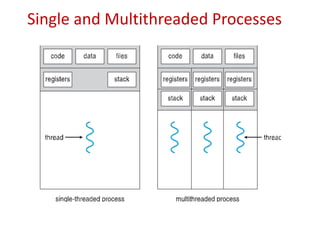
Thread
• Is alight weight process.
• Take fewer resources then a process.
• Easy to create & destroy.
• Each thread executes a set of instruction
independent of other threads and process.
• Every program has at least one thread.
• Programs without multithreading executes
sequentially.
• Each thread belongs to exactly only one process and
no thread exist outside a process.
• OS has separate thread for each different activity.
49.
Thread Advantages
• Contextswitching time is minimized
• Efficient communication
• Resource sharing is possible
• Provides concurrency within a process.
• Responsiveness.
User Threads andKernel Threads
User threads
• Management done by user-level threads library.
• Uses user space for scheduling.
• Transparent to OS and can run on any OS.
• It is smaller and faster.
• Represented by PC, Registers, stack and small thread control
block.
• They don’t invoke kernel for scheduling decision.
• Os maps all threads in multithread process to a single
execution context.
• Three primary thread libraries are POSIX Pthreads,
Windows threads, Java threads.
• They are portable but not suited for multiprocessor system.
• Doesn’t support priority scheduling.
52.
Kernel threads
• Supportedby the Kernel.
• They are specific to OS.
• Thread management is done by kernel.
• Supports one to one thread mapping, OS performs this mapping.
• Threads are constructed and controlled by system calls.
• Kernel support for scheduling and management.
• Slower then user thread.
• A thread blocking in kernel doesn’t block all other threads in same
process.
• There will be overhead and increased kernel capacity.
• Examples – virtually all general purpose operating systems, including:
– Windows
– Solaris
– Linux
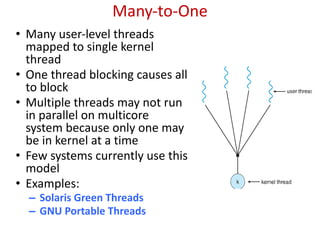
Many-to-One
• Many user-levelthreads
mapped to single kernel
thread
• One thread blocking causes all
to block
• Multiple threads may not run
in parallel on multicore
system because only one may
be in kernel at a time
• Few systems currently use this
model
• Examples:
– Solaris Green Threads
– GNU Portable Threads
55.
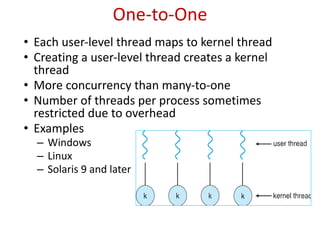
One-to-One
• Each user-levelthread maps to kernel thread
• Creating a user-level thread creates a kernel
thread
• More concurrency than many-to-one
• Number of threads per process sometimes
restricted due to overhead
• Examples
– Windows
– Linux
– Solaris 9 and later
56.
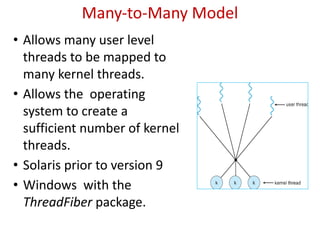
Many-to-Many Model
• Allowsmany user level
threads to be mapped to
many kernel threads.
• Allows the operating
system to create a
sufficient number of kernel
threads.
• Solaris prior to version 9
• Windows with the
ThreadFiber package.
57.
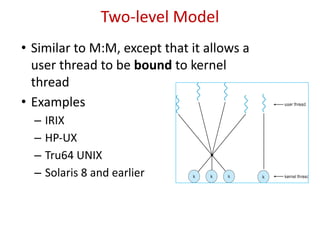
Two-level Model
• Similarto M:M, except that it allows a
user thread to be bound to kernel
thread
• Examples
– IRIX
– HP-UX
– Tru64 UNIX
– Solaris 8 and earlier
58.
Thread Libraries
• Threadlibrary provides programmer with
API for creating and managing threads
• Two primary ways of implementing
– Library entirely in user space
– Kernel-level library supported by the OS
59.
Process Synchronization
• Cooperatingprocesses directly share a logical address space or
share data through files.
• Concurrent access to shared data may result in data
inconsistency.
• Maintaining data consistency requires mechanisms to ensure the
orderly execution of cooperating processes.
• Concurrency creates problems because of sharing data
structures, deadlock due to resource conflict and process
interaction.
• Concurrency is 2 or more calculation happen in same time with
some dependencies among them.
• Parallelism is 2 or more calculations happen simultaneously.
60.
Types of Concurrency
•Concurrency in multiprogramming
Interaction between multiple process running in one
CPU.
• Concurrency in multithreading
Interaction between multiple threads running in one
process.
• Concurrency in multiprocessors
Interaction between multiple CPU’s running multiple
process or threads.
• Concurrency in multi computers
Interaction between multiple computers running
distributed processes or threads.
61.
Race Condition
• Thesituation where several processes access and manipulate
shared data concurrently.
• The final value of the shared data depends upon which process
finishes last.
• To prevent race conditions, concurrent processes must be
synchronized.
• This condition occurs if two or more operations occur in
undefined manner.
• If two or more processes are reading or writing some shared data
and final result depends on precise running is called race
condition.
• For example: In a banking system, after deposit amount, bal = bal
+ amt. At the same time, amount is transferred somewhere online
then bal = bal - amt.
• The last update define the final balance.
• Tracking of various process is done by OS.
62.
Classical Problems ofSynchronization
• Producer Consumer Problem or Bounded Buffer
Problem
• Readers and Writers Problem
• Dining-Philosophers Problem
63.
Producer Consumer Problem
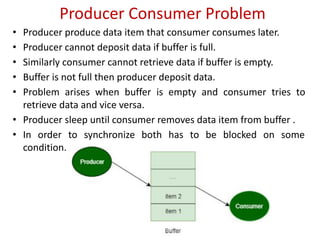
•Producer produce data item that consumer consumes later.
• Producer cannot deposit data if buffer is full.
• Similarly consumer cannot retrieve data if buffer is empty.
• Buffer is not full then producer deposit data.
• Problem arises when buffer is empty and consumer tries to
retrieve data and vice versa.
• Producer sleep until consumer removes data item from buffer .
• In order to synchronize both has to be blocked on some
condition.
64.
Example:
✔ Compiler produceassembly code which is
consumed by assembler. Speed of producer is
higher than consumer.
✔ Suppose CPU is producer and line printer is
consumer, then CPU can generate data much
faster than a line printer.
65.
The three statesof buffer is full buffer, empty
buffer and partially empty buffer.
• When buffer is full, producer must wait.
Producer don’t produce data item.
• When buffer is empty, consumer must wait.
• Mutual exclusion is required for accessing the
buffer.
66.
Reader Writer Problem
•Two types of process need to access a shared resource
such as a file or database.
• A data set is shared among a number of concurrent
processes
Readers – only read the data set, they do not perform
any updates
Writers – can both read and write
67.
Reader Writer Problem…
•Allow multiple readers to read at the same time.
Only one single writer can access the shared data at
the same time.
• There is no need to enforce mutual exclusion
among readers.
• But in case of writers when 2 or more writer need to
change the data, then mutual exclusion must be
enforced among writers.
68.
Example: Online TicketReservation System
✔ If writer wants to append the file then no other
process should have access to the file, when writer has
access to it.
✔ If reader has higher priority then the writer then there
will be starvation with writers and vice versa.
✔ No reader kept waiting unless writer has permission to
use shared object.
✔ Once writer is ready, it performs write operation.
• Philosophers spendtheir lives thinking and eating.
• Food is present at the centre with 5 spoons available.
• They don’t interact with their neighbors, occasionally try
to pick up 2 Spoons (one at a time) to eat from bowl.
• If they decide to eat then he/she has to take two spoons,
first from left and from right.
• Need both spoons to eat, then release both when done.
• In the case of 5 philosophers
Shared data is,
• Bowl of rice (data set)
• Spoons
71.
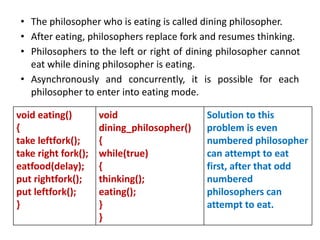
• The philosopherwho is eating is called dining philosopher.
• After eating, philosophers replace fork and resumes thinking.
• Philosophers to the left or right of dining philosopher cannot
eat while dining philosopher is eating.
• Asynchronously and concurrently, it is possible for each
philosopher to enter into eating mode.
void eating()
{
take leftfork();
take right fork();
eatfood(delay);
put rightfork();
put leftfork();
}
void
dining_philosopher()
{
while(true)
{
thinking();
eating();
}
}
Solution to this
problem is even
numbered philosopher
can attempt to eat
first, after that odd
numbered
philosophers can
attempt to eat.
72.
Critical Section Problem
•Consider a processes { p1,p2,p3…pn } present in a system.
• Each process has a code segment called critical section,
where processes may change variables, update a table,
writing a file, etc.,
• If one process is executing in a critical section other process
are not allowed. ie) Processes should be mutually exclusive
in time.
• Every process must request permission to enter its critical
section.
73.
Solution to CriticalSection Problem
• Mutual exclusion
• Mutex
• Semaphores
• Binary Semaphores
• Monitor
74.
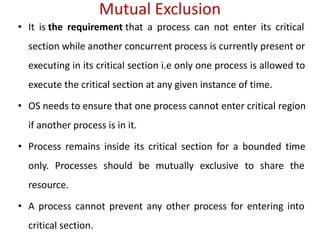
Mutual Exclusion
• Itis the requirement that a process can not enter its critical
section while another concurrent process is currently present or
executing in its critical section i.e only one process is allowed to
execute the critical section at any given instance of time.
• OS needs to ensure that one process cannot enter critical region
if another process is in it.
• Process remains inside its critical section for a bounded time
only. Processes should be mutually exclusive to share the
resource.
• A process cannot prevent any other process for entering into
critical section.
75.
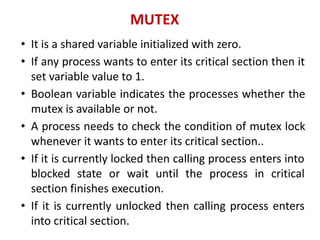
MUTEX
• It isa shared variable initialized with zero.
• If any process wants to enter its critical section then it
set variable value to 1.
• Boolean variable indicates the processes whether the
mutex is available or not.
• A process needs to check the condition of mutex lock
whenever it wants to enter its critical section..
• If it is currently locked then calling process enters into
blocked state or wait until the process in critical
section finishes execution.
• If it is currently unlocked then calling process enters
into critical section.
76.
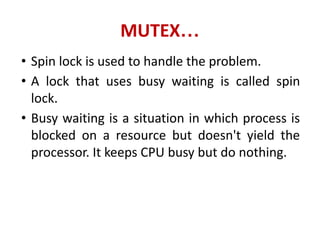
MUTEX…
• Spin lockis used to handle the problem.
• A lock that uses busy waiting is called spin
lock.
• Busy waiting is a situation in which process is
blocked on a resource but doesn't yield the
processor. It keeps CPU busy but do nothing.
77.
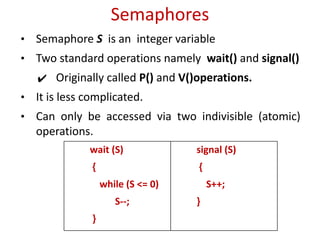
Semaphores
• Semaphore Sis an integer variable
• Two standard operations namely wait() and signal()
✔ Originally called P() and V()operations.
• It is less complicated.
• Can only be accessed via two indivisible (atomic)
operations.
wait (S)
{
while (S <= 0)
S--;
}
signal (S)
{
S++;
}
78.
Semaphores…
• Binary semaphoreis called as mutex lock.
• A semaphore that does not specify the order in
which processes are removed from queue is called
weak semaphore.
• A process that has been blocked the longest is
released from queue first is called strong
semaphore.
79.
Monitor
• When processcalls a monitor procedure, the first few
instructions of procedure will check whether other
process is currently active with monitor.
• If so, the calling process is suspended.
• If not, the calling process may enter monitor.
• Conditional variable operates on 2 monitor.
• Cwait – Suspend execution of calling process.
• Csignal – Resumes execution of calling process.
80.
Deadlock
• A deadlockoccurs when a process or thread enters a
waiting state because a requested system resource is held
by another waiting process, which in turn is waiting for
another resource held by another waiting process.
Two Types of deadlock
• Resource Deadlock. Occurs when processes are trying to
get exclusive access to devices, files, locks, servers, or
other resources.
• Communication Deadlock.
81.
Resource Allocation Graph
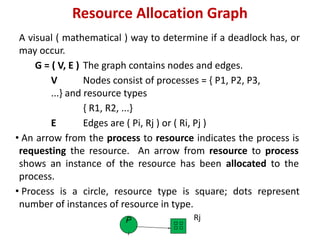
Avisual ( mathematical ) way to determine if a deadlock has, or
may occur.
G = ( V, E ) The graph contains nodes and edges.
V Nodes consist of processes = { P1, P2, P3,
...} and resource types
{ R1, R2, ...}
E Edges are ( Pi, Rj ) or ( Ri, Pj )
• An arrow from the process to resource indicates the process is
requesting the resource. An arrow from resource to process
shows an instance of the resource has been allocated to the
process.
• Process is a circle, resource type is square; dots represent
number of instances of resource in type.
Rj
P
i
82.
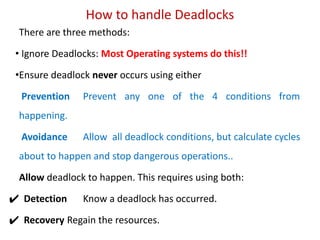
How to handleDeadlocks
There are three methods:
• Ignore Deadlocks: Most Operating systems do this!!
•Ensure deadlock never occurs using either
Prevention Prevent any one of the 4 conditions from
happening.
Avoidance Allow all deadlock conditions, but calculate cycles
about to happen and stop dangerous operations..
Allow deadlock to happen. This requires using both:
✔ Detection Know a deadlock has occurred.
✔ Recovery Regain the resources.
83.
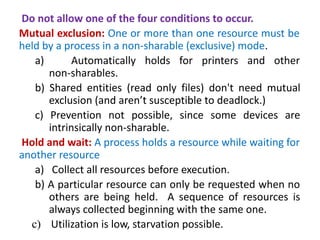
Do not allowone of the four conditions to occur.
Mutual exclusion: One or more than one resource must be
held by a process in a non-sharable (exclusive) mode.
a) Automatically holds for printers and other
non-sharables.
b) Shared entities (read only files) don't need mutual
exclusion (and aren’t susceptible to deadlock.)
c) Prevention not possible, since some devices are
intrinsically non-sharable.
Hold and wait: A process holds a resource while waiting for
another resource
a) Collect all resources before execution.
b) A particular resource can only be requested when no
others are being held. A sequence of resources is
always collected beginning with the same one.
c) Utilization is low, starvation possible.
84.
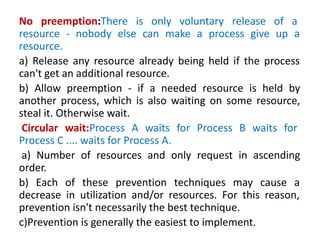
No preemption:There isonly voluntary release of a
resource - nobody else can make a process give up a
resource.
a) Release any resource already being held if the process
can't get an additional resource.
b) Allow preemption - if a needed resource is held by
another process, which is also waiting on some resource,
steal it. Otherwise wait.
Circular wait:Process A waits for Process B waits for
Process C .... waits for Process A.
a) Number of resources and only request in ascending
order.
b) Each of these prevention techniques may cause a
decrease in utilization and/or resources. For this reason,
prevention isn't necessarily the best technique.
c)Prevention is generally the easiest to implement.
85.
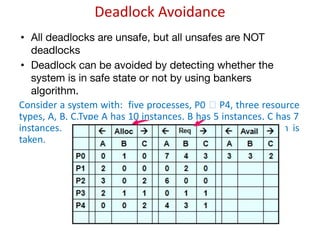
Deadlock Avoidance
• Alldeadlocks are unsafe, but all unsafes are NOT
deadlocks
• Deadlock can be avoided by detecting whether the
system is in safe state or not by using bankers
algorithm.
Consider a system with: five processes, P0 🡪 P4, three resource
types, A, B, C.Type A has 10 instances, B has 5 instances, C has 7
instances. At time T0 the following snapshot of the system is
taken.