Comprehensive Guide to Firewalls in Computer Security: Types, Design, and Deployment
Explore firewall fundamentals, types, design principles, deployment strategies, and their critical role in protecting networks and systems from cyber threats and unauthorized access.
Comprehensive Guide to Firewalls in Computer Security: Types, Design, and Deployment
1.
INTRODUCTION TO FIREWALLS
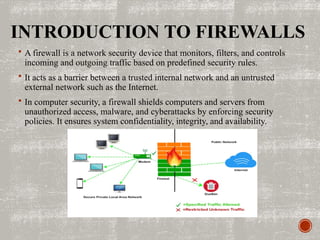
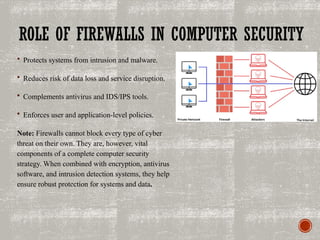
A firewall is a network security device that monitors, filters, and controls
incoming and outgoing traffic based on predefined security rules.
It acts as a barrier between a trusted internal network and an untrusted
external network such as the Internet.
In computer security, a firewall shields computers and servers from
unauthorized access, malware, and cyberattacks by enforcing security
policies. It ensures system confidentiality, integrity, and availability.
2.
THE NEED FORFIREWALLS
Protects your network from unauthorized access.
Acts as a barrier between trusted and untrusted networks.
Regulates and manages network traffic with its security policies.
Blocks inappropriate or harmful content.
Detects, logs and mitigates malicious activities.
Ensures secure distributed operations.
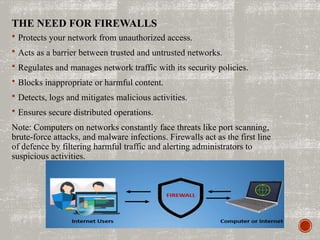
Note: Computers on networks constantly face threats like port scanning,
brute-force attacks, and malware infections. Firewalls act as the first line
of defence by filtering harmful traffic and alerting administrators to
suspicious activities.
3.
COMMON THREATS ANDVULNERABILITIES
ADDRESSED BY FIREWALLS
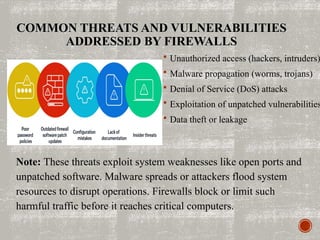
Unauthorized access (hackers, intruders)
Malware propagation (worms, trojans)
Denial of Service (DoS) attacks
Exploitation of unpatched vulnerabilities
Data theft or leakage
Note: These threats exploit system weaknesses like open ports and
unpatched software. Malware spreads or attackers flood system
resources to disrupt operations. Firewalls block or limit such
harmful traffic before it reaches critical computers.
4.
FIREWALL CHARACTERISTICS
Performsstateful packet inspection and logging.
Provides authentication mechanisms.
Offers reliability, scalability, and configuration flexibility.
Traffic Control: Filters packets based on IP, port, and protocol.
Policy Enforcement: Applies rules for what is allowed or denied.
Logging and Monitoring: Records activities for auditing.
Defense in Depth: Part of a layered security approach.
Note: A good firewall operates seamlessly, remaining transparent to
users. It enforces strict security rules to block unauthorized access.
In computer security, it aligns with organizational policies to protect
systems without hindering normal operations.
5.
FIREWALL DESIGN PRINCIPLES
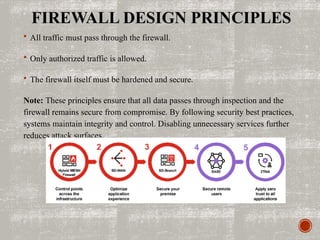
All traffic must pass through the firewall.
Only authorized traffic is allowed.
The firewall itself must be hardened and secure.
Note: These principles ensure that all data passes through inspection and the
firewall remains secure from compromise. By following security best practices,
systems maintain integrity and control. Disabling unnecessary services further
reduces attack surfaces.
6.
TYPES OF FIREWALLS
PACKETFILTERING FIREWALL
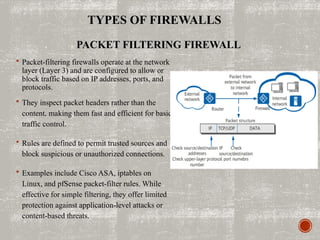
Packet-filtering firewalls operate at the network
layer (Layer 3) and are configured to allow or
block traffic based on IP addresses, ports, and
protocols.
They inspect packet headers rather than the
content, making them fast and efficient for basic
traffic control.
Rules are defined to permit trusted sources and
block suspicious or unauthorized connections.
Examples include Cisco ASA, iptables on
Linux, and pfSense packet-filter rules. While
effective for simple filtering, they offer limited
protection against application-level attacks or
content-based threats.
7.
STATEFUL INSPECTION FIREWALL
Stateful firewalls monitor active connections and maintain the state of each
session.
They allow packets only if they are part of a valid, established session, providing
stronger security than basic packet filtering.
In computer security, they are configured to track protocols like TCP and UDP,
ensuring only legitimate traffic passes through.
Examples include Cisco ASA and Windows Defender Firewall with Advanced
Security. By validating session states, they effectively block unsolicited or
malicious traffic targeting both individual systems and networks.
8.
APPLICATION-LEVEL GATEWAYS
Application-levelfirewalls (proxy firewalls) operate at Layer 7 for
detailed filtering, focusing on specific application protocols like HTTP,
FTP, and SMTP. They act as an intermediary between user and
application.
They are configured to inspect the actual content of traffic, allowing them
to filter commands or detect malicious data.
By analyzing application-level requests, they can block harmful activities
such as scripts, phishing attempts, or unauthorized commands.
Examples include Squid Proxy and Microsoft Forefront Threat
Management Gateway. These firewalls provide deep inspection, making
them highly effective for protecting computers and servers from
sophisticated attacks.
9.
CIRCUIT-LEVEL GATEWAYS
Circuit-levelgateways operate at the session layer (Layer 5) and focus on
monitoring the establishment of TCP sessions.
They are configured to verify handshakes and ensure that only legitimate
sessions are allowed, without inspecting the actual data making them fast
and efficient.
This prevents unauthorized connections and secures internal
communications between systems. Examples include Cisco PIX and
Check Point FireWall-1 configured for session-level filtering. By
validating session integrity, these firewalls help protect servers and clients
from unauthorized access within a network.
10.
FIREWALL BASING
Firewall basingrefers to how and where firewalls are deployed on a network
infrastructure.
Bastion Host, are highly secured systems placed at critical network points,
configured to run firewall services and protect servers from external attacks. It
Logs all traffic for auditing and intrusion detection. Examples include
hardened Linux or Windows servers. Hosts application-level or circuit-level
gateways
Host-Based Firewall: Software firewall installed on individual hosts
(computers) to monitor and filter both incoming and outgoing traffic,
providing protection from local and network threats, such as Windows
Defender Firewall or pfSense. Filters and restricts traffic specific to that
system. Provides an additional layer of protection.
Personal Firewall: Software-based, designed for individual computers.
Monitors inbound and outbound traffic. These firewalls are configured with
rules defining allowed and blocked traffic, tailored to the system’s role.
Together, they provide layered protection at both network and endpoint levels.
Example: macOS built-in firewall, ZoneAlarm and Norton Personal Firewall.
11.
FIREWALL LOCATION AND
CONFIGURATIONS
Organizationsimplement multiple firewall strategies to protect systems
effectively.
1. A DMZ is configured as an isolated network segment hosting public services
like web or mail servers, keeping external users away from internal
resources, with examples like Cisco ASA or pfSense.
2. VPNs create secure, encrypted tunnels through firewalls for remote access,
using tools like OpenVPN or Fortinet VPN.
3. Distributed firewalls apply uniform security policies across multiple devices
and systems, ensuring consistent protection enterprise-wide, as seen in
VMware NSX or Cisco ACI. Together, these configurations provide layered
and comprehensive security for both internal and external communications.
12.
SUMMARY OF FIREWALLLOCATIONS AND
TOPOLOGIES
Perimeter Firewalls
These firewalls protect the
boundary between an
organization’s internal
network and external
networks, such as the
Internet. They filter
incoming and outgoing
traffic to block
unauthorized access. This
layer serves as the first
line of defense against
external threats.
Internal Firewalls:
These firewalls segment
the network into smaller
zones to control access
between departments or
sensitive areas. They
prevent lateral
movement of attackers
if an external breach
occurs. This
segmentation enhances
overall security within
the organization.
Host Firewalls
These firewalls are
installed on individual
computers to monitor and
filter traffic at the system
level. They provide
protection from both
local and network-based
threats. This ensures that
each computer remains
secure even if other
defences are bypassed.
13.
ROLE OF FIREWALLSIN COMPUTER SECURITY
Protects systems from intrusion and malware.
Reduces risk of data loss and service disruption.
Complements antivirus and IDS/IPS tools.
Enforces user and application-level policies.
Note: Firewalls cannot block every type of cyber
threat on their own. They are, however, vital
components of a complete computer security
strategy. When combined with encryption, antivirus
software, and intrusion detection systems, they help
ensure robust protection for systems and data.
14.
CONCLUSION
In computersecurity, firewalls are more than just network devices -they are
essential tools for protecting systems.
They help maintain the integrity of computers by monitoring and controlling
traffic.
Firewalls prevent unauthorized access and block malicious activities targeting
critical systems.
They form a key part of a layered security approach alongside antivirus and
intrusion detection.
Properly configured firewalls ensure secure computing environments for both
individual devices and organizational networks.
Overall, they are fundamental for safeguarding data, applications, and system
resources from cyber threats.