


Case study from a Webinar presentation:

Combining Lab and Online Usability Testing:
                          Lessons Learned


                                                   May 2010
Overview


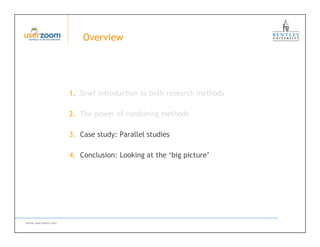
                   1.  Brief introduction to both research methods

                   2.  The power of combining methods

                   3.  Case study: Parallel studies

                   4.  Conclusion: Looking at the ‘big picture’


www.userzoom.com
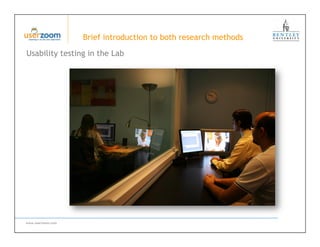
Brief introduction to both research methods
Usability testing in the Lab


www.userzoom.com
Brief introduction to both research methods

Usability testing in the Lab  Benefits/pros & limitations/cons


                   +  The face-to-face  Catching the very details

                   +  Ability to ask questions/interact with the participant live

                   +  The ability to invite others to attend the sessions


                   −  Small sample size

                   −  Lack of natural environment/context

                   −  Cost +++


www.userzoom.com
Brief introduction to both research methods


                   Online Usability Testing

                   (a.k.a. Unmoderated Remote Usability Testing)


www.userzoom.com
Brief introduction to both research methods

Online usability testing


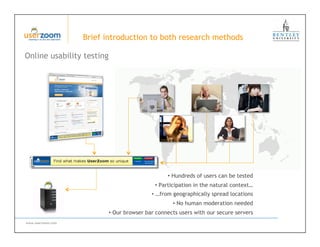
                                                  •  Hundreds of users can be tested
                                             •  Participation in the natural context…
                                           •  …from geographically spread locations
                                                    •  No human moderation needed
                           •  Our browser bar connects users with our secure servers
www.userzoom.com
Brief introduction to both research methods

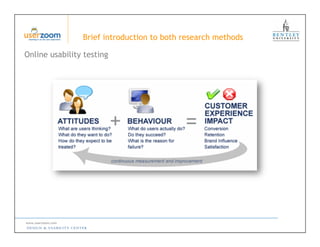
Online usability testing


www.userzoom.com
Brief introduction to both research methods

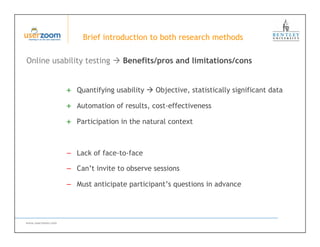
Online usability testing  Benefits/pros and limitations/cons


                   +  Quantifying usability  Objective, statistically significant data

                   +  Automation of results, cost-effectiveness

                   +  Participation in the natural context


                   −  Lack of face-to-face

                   −  Can’t invite to observe sessions

                   −  Must anticipate participant’s questions in advance


www.userzoom.com
Overview


                   1.  Brief introduction to both research methods

                   2.  The power of combining methods

                   3.  Case study: Parallel studies

                   4.  Conclusion: Looking at the ‘big picture’


www.userzoom.com
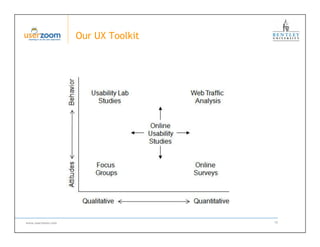
Our UX Toolkit


www.userzoom.com                    10
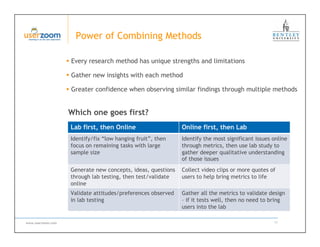
Power of Combining Methods

                     Every research method has unique strengths and limitations

                     Gather new insights with each method

                     Greater confidence when observing similar findings through multiple methods


                   Which one goes first?
                    Lab first, then Online                    Online first, then Lab
                    Identify/fix “low hanging fruit”, then    Identify the most significant issues online
                    focus on remaining tasks with large       through metrics, then use lab study to
                    sample size                               gather deeper qualitative understanding
                                                              of those issues
                    Generate new concepts, ideas, questions   Collect video clips or more quotes of
                    through lab testing, then test/validate   users to help bring metrics to life
                    online
                    Validate attitudes/preferences observed   Gather all the metrics to validate design
                    in lab testing                            – if it tests well, then no need to bring
                                                              users into the lab

www.userzoom.com                                                                                   11
Overview


                   1.  Brief introduction to both research methods

                   2.  The power of combining methods

                   3.  Case study: Parallel studies

                   4.  Conclusion: Looking at the ‘big picture’


www.userzoom.com
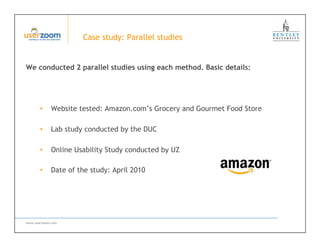
Case study: Parallel studies


We conducted 2 parallel studies using each method. Basic details:


       •     Website tested: Amazon.com’s Grocery and Gourmet Food Store

       •     Lab study conducted by the DUC

       •     Online Usability Study conducted by UZ

       •     Date of the study: April 2010


www.userzoom.com
Case study: Parallel studies

Basic details of the studies (II)
       •     Objectives:

              •    What is the unique contribution of each method?

              •    What do we learn by combining methods?

       •     Participants: 10 for the lab study, 100 for the online study

       •     Study design:

              •    Initial questionnaire

              •    3 tasks

              •    Follow up questions

              •    Final questionnaire


www.userzoom.com
Case study: Parallel studies

Participant demographics from the Lab Usability Study:	
  
       •  Average age 29

       •  Age range between 19 and 51

       •  6 Males, 4 Females

       •  All had previously used Amazon.com website

       •  None had ordered groceries on-line

       •  Visited Amazon.com approximately every 2 weeks, on average

       •  Previously purchased books, electronics, toys, and more.

       •  Expected packaged, non-perishable grocery items to be sold on-line

       •  Most said they hadn’t bought groceries on-line because they, “like the experience of picking
           up the produce and meat.”

              •  Expressed concern about products being fresh

       •  A few worried about exorbitant service or shipping charges making it not worthwhile.

www.userzoom.com
Case study: Parallel studies


                   Task 1:


                      “You just ran out of dishwasher detergent. See if Amazon has a pack
                      of 6 Cascade Complete Dishwasher Detergent Powder, in the 45
                      ounce size.”


www.userzoom.com
Results of Locating Dishwashing Detergent	
  
                   Case study: Parallel studies

Search vs. Menu Navigation
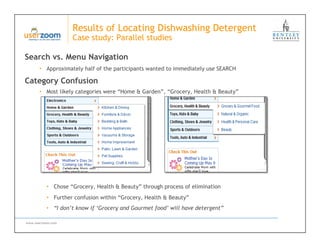
      •  Approximately half of the participants wanted to immediately use SEARCH

Category Confusion
      •  Most likely categories were “Home & Garden”, “Grocery, Health & Beauty”


          •  Chose “Grocery, Health & Beauty” through process of elimination
          •  Further confusion within “Grocery, Health & Beauty”
          •  “I don’t know if ‘Grocery and Gourmet food’ will have detergent”

www.userzoom.com
Results of Locating Dishwashing Detergent	
  
                    Case study: Parallel studies
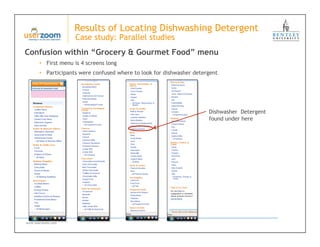
Confusion within “Grocery & Gourmet Food” menu
      •  First menu is 4 screens long
      •  Participants were confused where to look for dishwasher detergent


                                                                      Dishwasher Detergent
                                                                      found under here


www.userzoom.com
Results of Locating Dishwashing Detergent	
  
                    Case study: Parallel studies
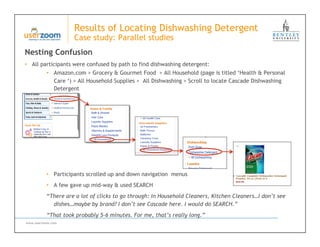
Nesting Confusion
•  All participants were confused by path to find dishwashing detergent:
          •  Amazon.com > Grocery & Gourmet Food > All Household (page is titled ‘Health & Personal
             Care ‘) > All Household Supplies > All Dishwashing > Scroll to locate Cascade Dishwashing
             Detergent


          •  Participants scrolled up and down navigation menus
          •  A few gave up mid-way & used SEARCH
          “There are a lot of clicks to go through: In Household Cleaners, Kitchen Cleaners…I don’t see
            dishes…maybe by brand? I don’t see Cascade here. I would do SEARCH.”
          “That took probably 5-6 minutes. For me, that’s really long.”
www.userzoom.com
Case study: Parallel studies


                   Task 2:


                      “You want to buy Skippy Peanut Butter. Find out if there are any
                      discounts or coupons for it.”


www.userzoom.com
Results of Locating Skippy Peanut Butter Coupon	
  
                   Case study: Parallel studies
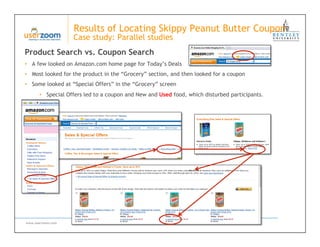
Product Search vs. Coupon Search
•  A few looked on Amazon.com home page for Today’s Deals
•  Most looked for the product in the “Grocery” section, and then looked for a coupon
•  Some looked at “Special Offers” in the “Grocery” screen
      •  Special Offers led to a coupon and New and Used food, which disturbed participants.


www.userzoom.com
Results of Locating Skippy Peanut Butter Coupon
                      Case study: Parallel studies
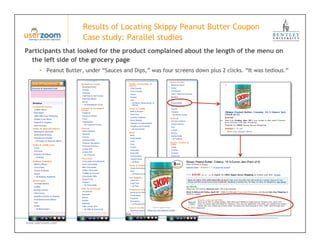
Participants that looked for the product complained about the length of the menu on
  the left side of the grocery page
      •  Peanut Butter, under “Sauces and Dips,” was four screens down plus 2 clicks. “It was tedious.”


www.userzoom.com
Results of Locating Skippy Coupon
                   Case study: Parallel studies

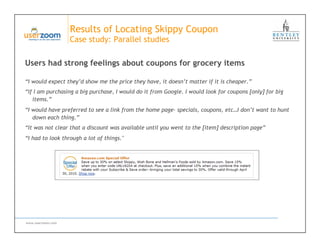
Users had strong feelings about coupons for grocery items

“I would expect they’d show me the price they have, it doesn’t matter if it is cheaper.”
“If I am purchasing a big purchase, I would do it from Google. I would look for coupons [only] for big
   items.”
“I would have preferred to see a link from the home page– specials, coupons, etc…I don’t want to hunt
   down each thing.”
“It was not clear that a discount was available until you went to the [item] description page”
“I had to look through a lot of things."


www.userzoom.com
Case study: Parallel studies


                   Task 3:


                      “Find out how you would schedule the same groceries to be
                      delivered every 3 months.”


www.userzoom.com
Scheduling Groceries for Repeated Delivery	
  
                    Case study: Parallel studies

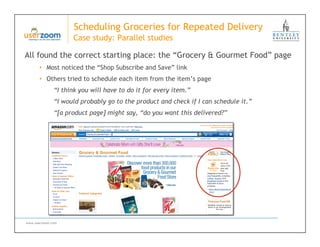
All found the correct starting place: the “Grocery & Gourmet Food” page
      •  Most noticed the “Shop Subscribe and Save” link
      •  Others tried to schedule each item from the item’s page
              “I think you will have to do it for every item.”
              “I would probably go to the product and check if I can schedule it.”
              “[a product page] might say, “do you want this delivered?”


www.userzoom.com
Scheduling Groceries for Repeated Delivery
                   Case study: Parallel studies
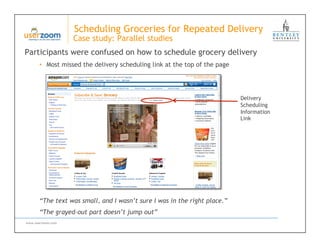
Participants were confused on how to schedule grocery delivery
      •  Most missed the delivery scheduling link at the top of the page


                                                                           Delivery
                                                                           Scheduling
                                                                           Information
                                                                           Link


      “The text was small, and I wasn’t sure I was in the right place.”
      “The grayed-out part doesn’t jump out”
www.userzoom.com
Conclusions from the Lab Study	
  
                    Case study: Parallel studies


Confusing IA
    “Dishwasher detergent was under “Health [& Personal Care], which is not the first place I’d look.””
    “There were too many categories, it confuses you…”
    “It is not as well organized as other parts of Amazon.”
    “I don’t know why ‘All Household Supplies’ is under ‘Health and Personal Care’”


Difficult navigation
    “Navigation wasn’t intuitive. The left-hand-side menu was so far down the page and not duplicated
    in the banner.”
    “The browse list was too long. I don’t want to go through 10 chocolates before going to the pasta.”
    “It didn’t feel intuitive.”
    “I didn’t like how many levels I had to go through.”
    “It was hard to find things. There were long lists to find food items.”


www.userzoom.com
Case study: Parallel studies


                   Highlighted findings from the Online Usability Study:


www.userzoom.com
Study Background


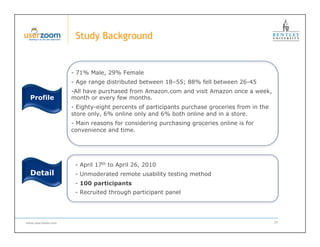
                   - 71% Male, 29% Female
                   -  Age range distributed between 18–55; 88% fell between 26-45
                   - All have purchased from Amazon.com and visit Amazon once a week,
  Profile          month or every few months.
                   -  Eighty-eight percents of participants purchase groceries from in the
                   store only, 6% online only and 6% both online and in a store.
                   -  Main reasons for considering purchasing groceries online is for
                   convenience and time.


                    - April 17th to April 26, 2010
  Detail            -  Unmoderated remote usability testing method
  s                 -  100 participants
                    -  Recruited through participant panel


www.userzoom.com                                                                             29
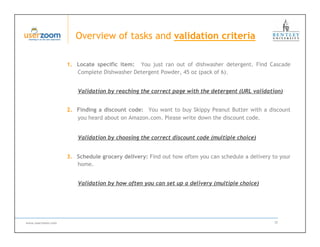
Overview of tasks and validation criteria

                   1.  Locate specific item: You just ran out of dishwasher detergent. Find Cascade
                       Complete Dishwasher Detergent Powder, 45 oz (pack of 6).


                       Validation by reaching the correct page with the detergent (URL validation)


                   2.  Finding a discount code: You want to buy Skippy Peanut Butter with a discount
                       you heard about on Amazon.com. Please write down the discount code.


                       Validation by choosing the correct discount code (multiple choice)


                   3.  Schedule grocery delivery: Find out how often you can schedule a delivery to your
                       home.


                       Validation by how often you can set up a delivery (multiple choice)


www.userzoom.com                                                                                 30
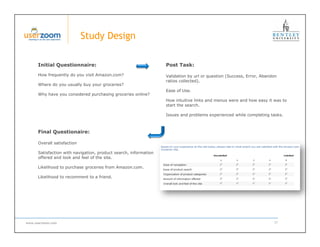
Study Design

      Initial Questionnaire:                                      Post Task:

      How frequently do you visit Amazon.com?                     Validation by url or question (Success, Error, Abandon
                                                                  ratios collected).
      Where do you usually buy your groceries?
                                                                  Ease of Use.
      Why have you considered purchasing groceries online?
                                                                  How intuitive links and menus were and how easy it was to
                                                                  start the search.

                                                                  Issues and problems experienced while completing tasks.


      Final Questionaire:

      Overall satisfaction

      Satisfaction with navigation, product search, information
      offered and look and feel of the site.

      Likelihood to purchase groceries from Amazon.com.

      Likelihood to recomment to a friend.


www.userzoom.com                                                                                                      31
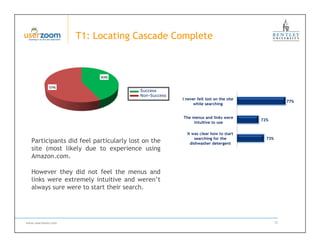
T1: Locating Cascade Complete


                                        Success
                                        Non-Success
                                                      I never felt lost on the site
                                                                                                   77%
                                                            while searching


                                                      The menus and links were
                                                                                      72%
                                                           intuitive to use

                                                        It was clear how to start
                                                            searching for the           73%
  Participants did feel particularly lost on the          dishwasher detergent
  site (most likely due to experience using
  Amazon.com.

  However they did not feel the menus and
  links were extremely intuitive and weren’t
  always sure were to start their search.


www.userzoom.com                                                                              32
T1: Locating Cascade Complete


                                                                 Highlights	
  dominant	
  path	
  

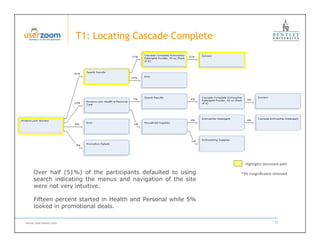
    Over half (51%) of the participants defaulted to using    *3%	
  insignificance	
  removed	
  
    search indicating the menus and navigation of the site
    were not very intuitive.

    Fifteen percent started in Health and Personal while 5%
    looked in promotional deals.

www.userzoom.com                                                                        33
T1: Locating Cascade Complete

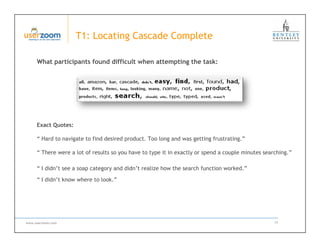
     What participants found difficult when attempting the task:


     Exact Quotes:

     “ Hard to navigate to find desired product. Too long and was getting frustrating.”

     “ There were a lot of results so you have to type it in exactly or spend a couple minutes searching.”

     “ I didn’t see a soap category and didn’t realize how the search function worked.”

     “ I didn’t know where to look.”


www.userzoom.com                                                                                   34
T2: Finding a discount code

                                                Success
                                                Non-Success


         Extremely Difficult	

                                  Extremely Easy 	

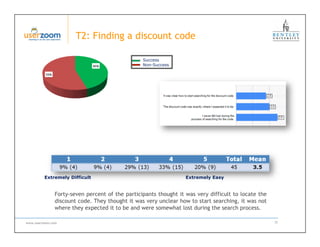
              Forty-seven percent of the participants thought it was very difficult to locate the
              discount code. They thought it was very unclear how to start searching, it was not
              where they expected it to be and were somewhat lost during the search process.

www.userzoom.com                                                                                    35
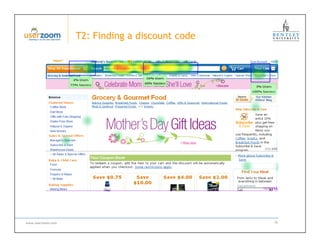
T2: Finding a discount code


www.userzoom.com                                 36
T2: Finding a discount code


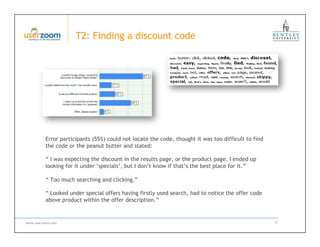
          Error participants (55%) could not locate the code, thought it was too difficult to find
          the code or the peanut butter and stated:

          “ I was expecting the discount in the results page, or the product page. I ended up
          looking for it under ’specials’, but I don’t know if that’s the best place for it.”

          “ Too much searching and clicking.”

          “ Looked under special offers having firstly used search, had to notice the offer code
          above product within the offer description.”


www.userzoom.com                                                                                     37
T3: Schedule Grocery Delivery

                                              Success
                                              Non-Success


           Extremely Difficult                                 Extremely Easy 	

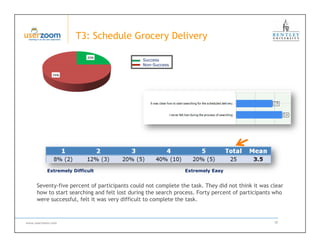
     Seventy-five percent of participants could not complete the task. They did not think it was clear
     how to start searching and felt lost during the search process. Forty percent of participants who
     were successful, felt it was very difficult to complete the task.


www.userzoom.com                                                                                  38
T3: Schedule Grocery Delivery


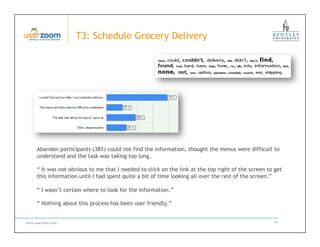
     Abandon participants (38%) could not find the information, thought the menus were difficult to
     understand and the task was taking too long.

     “ It was not obvious to me that I needed to click on the link at the top right of the screen to get
     this information until I had spent quite a bit of time looking all over the rest of the screen.”

     “ I wasn’t certain where to look for the information.”

     “ Nothing about this process has been user friendly.”


www.userzoom.com                                                                                    39
Final Questionnaire


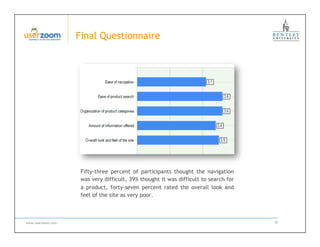
                    Fifty-three percent of participants thought the navigation
                    was very difficult, 39% thought it was difficult to search for
                    a product, forty-seven percent rated the overall look and
                    feel of the site as very poor.


www.userzoom.com                                                                     40
Final Questionnaire

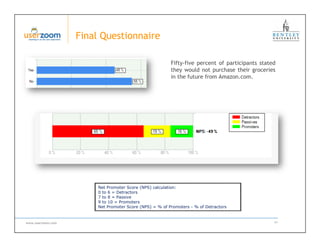
                                                         Fifty-five percent of participants stated
                                                         they would not purchase their groceries
                                                         in the future from Amazon.com.


                        Net Promoter Score (NPS) calculation:
                        0 to 6 = Detractors
                        7 to 8 = Passive
                        9 to 10 = Promoters
                        Net Promoter Score (NPS) = % of Promoters - % of Detractors


www.userzoom.com                                                                                 41
Overview


                   1.  Brief introduction to both research methods

                   2.  The power of combining methods

                   3.  Case study: Parallel studies

                   4.  Conclusion: Looking at the ‘big picture’


www.userzoom.com
Conclusions: Looking at the ‘big picture’


                   •    Main, obvious issue:


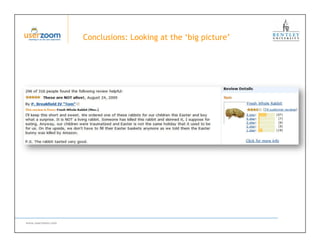
                                  Gourmet store was built like the book store


                   •    IA + navigation + labeling + content problems/issues encountered


                   •    Both research methods prove this:

                         1.  By observing & listening at the Lab we learned a lot, but also…

                         2.  …we quantified how big the issues were using UserZoom


www.userzoom.com
Conclusions: Looking at the ‘big picture’


www.userzoom.com
The introductions…


                   Alfonso de la Nuez        Kim Oslob              Bill Albert
                     Partner & Chief    Research & Product   Director of the Design &
                    Marketing Officer    Strategy Director       Usability Center,
                      at UserZoom	

       at UserZoom	

      Bentley University	


www.userzoom.com
The introductions

                     Leading online user experience research software company
                     Develops proprietary on-demand software app for online research

                     Built for & by UX & marketing professionals

                     Offers a cost-effective, time-saving methodology

                     Has 9 years of experience in UX research & consulting

                     Has offices in Sunnyvale (CA), London (UK) & Barcelona (Spain)	


www.userzoom.com
The introductions


                     The Design and Usability Center at Bentley University was founded in 1999

                     Provides UX consulting services to corporate clients

                     Supports the MS program in Human Factors in Information Design

                     Focuses on user experience research and evaluation


www.userzoom.com
Acknowledgements

                     Special thanks to Cynthia Kamishlian
                   and Dharmesh Mistry from Bentley
                   University   for   carrying   out   this
                   research


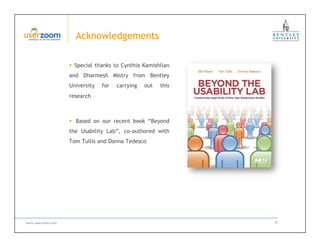
                     Based on our recent book “Beyond
                   the Usability Lab”, co-authored with
                   Tom Tullis and Donna Tedesco


www.userzoom.com                                              48
º
                                  Thanks so much for your time!

                                          Oh! Don’t forget:

       The slides and the video of this webinar will be available in a few days in our blog

                                          www.userzoom.com


        USA                                UK                            SPAIN
        440 N. Wolfe Rd.                   Aylesbury House, 17 – 18      Av. Diagonal 419 3º 2ª
        Sunnyvale, CA 94085 USA            Aylesbury Street, London      08008 Barcelona, Spain
                                           ECIR 0DB, UK
        Phone: +1 (408) 524 – 74 45                                      Phone: +34 93 414 7554
        Contact: Alfonso de la Nuez        Phone: +44 (0) 20 7193 2171   Cell: +34 93 368 4295
        alfonso@userzoom.com               Cell: +44 (0) 7900 472 920    Contact: Javier Darriba
                                           Contact: Arthur Moan          jdarriba@userzoom.com
www.userzoom.com                           amoan@userzoom.com                                      49