Explore the risks, verification process, and legitimate alternatives to buying verified TransferWise accounts for multi-currency use and business needs.
Buy Verified TransferWiseAccount: What
“Verified” Actually Means (and Why
People Want It)
Wise (formerly TransferWise) is basically a regulated money service that lets you
hold multiple currencies, convert between them, and send money internationally
3.
without the classicbank markup vibes. People love it because it’s fast, the fees
are usually clear, and the exchange rate is close to mid market.
Now, when someone says a “verified” Wise account, they usually mean:
Identity checks are done (KYC). Name, date of birth, ID document,
sometimes a selfie or liveness check.
Profile details are complete enough to unlock normal limits and features.
The account can actually do the thing they came for, like sending larger
transfers, getting local account details, ordering a card, or opening a Wise
Business profile (where available).
And yes, I know why people search “buy verified TransferWise account” or
“buy verified Wise account”.
Usually it’s one of these:
They want speed. Like, they have a client payment coming in and they
don’t want verification delays.
They had verification friction before and they’re trying to avoid going
through it again.
They want multi currency features right now. Hold USD, EUR, GBP,
receive money, convert, pay suppliers.
They’re doing business and want receiving details quickly. Or they want
multiple accounts for different flows.
This article is not here to hype that up. It’s here to make it real. Safety,
compliance, the stuff that actually happens when money hits an account that
doesn’t “belong” to the person using it. And then the legit ways to get multi
currency ready without setting yourself up for a freeze.
The Big Problem: Buying a Verified Wise
Account Can Put Your Money at Risk
4.
If you’re doingthis to save time, it can cost you more time. And sometimes real
money.
Buying a verified Wise account is risky for a simple reason: Wise verification is
tied to a specific identity. Not just the profile name, but the documents, the
biometric checks if they were used, and the audit trail of how the account was
created and accessed.
Here’s what tends to go wrong:
Account ownership mismatch. You log in, start moving money, and
something doesn’t line up. The name on the account. The device history.
The country. The behavior.
KYC and AML re checks. Wise is regulated. They monitor patterns. When
something looks off, they can pause activity and ask for documents again.
Device and IP fingerprinting. If the account was created and verified in
one place, then suddenly it’s being accessed from a different country, new
device, new SIM, different typing pattern, it can trigger security locks.
Login anomaly detection. Multiple failed logins, rapid changes (new
phone, new email, new bank), unusual transfer size. These are classic
triggers.
And the consequences are not cute:
Your balance can be locked while they review.
Payouts can be delayed, including incoming transfers.
You might not be able to withdraw to your bank.
Wise can request re verification and if you can’t provide the original
person’s documents, you’re stuck.
Cards can stop working. Virtual cards too.
In some cases transfers get reversed or canceled and you’re left explaining
things to a client or supplier.
5.
Also, “verified” isnot a permanent badge. It’s not like a game achievement you
keep forever.
Wise can re check identity at any time, especially after:
Large transfers
A sudden change in activity
Adding a new card or bank account
Changing personal details
Accessing from new locations repeatedly
So if you’re thinking “I’ll buy one, use it once, done”. Maybe. But if the money
matters, this is the wrong place to gamble.
How Wise Verification Works (So You
Don't Get Surprised Later)
Wise verification is usually straightforward when you do it cleanly. But it can feel
random if you don't understand what triggers extra steps.
Typical flow looks like this:
Create an account and enter personal details — including your legal name,
date of birth, address, phone, and email.
Upload an identity document — a passport, national ID, or driver's license
depending on your country. The photo or scan must be clear, uncropped, and
unblurred.
Complete a selfie or liveness check (in some regions) — a quick camera
check to match your document to a real person.
Submit proof of address or extra documents if requested — such as a utility
bill, bank statement, or government letter. This is typically triggered when you hit
transfer limits, request certain features, or your address needs confirmation.
What Triggers Additional Checks
High volume transfers or a sudden jump in amounts
6.
Sending tonew payees repeatedly
Business-like activity on a personal account
Using multiple currencies in a way that resembles merchant processing
Unusual patterns, such as many small transactions or round number
transfers
Frequent logins from different locations
Verified vs. Features Enabled
Being verified and having full feature access are not the same thing. Profile
verified means you passed identity checks. Features enabled means you can
access local account details, cards, higher limits, or business tools. Some
features are eligibility-based and depend on your country, residency, and local
regulations. Two verified users can still have different feature access.
Requirements also vary by region and account type. A Wise personal account in
one country may follow a different verification path than another, and Wise
Business accounts add further layers on top.
7.
“Multi-Currency Ready” Explained:What
You Actually Get With a Proper Wise
Account
When people say “multi currency ready” they usually mean: I want to use Wise
like a global wallet, not just a one off transfer app.
8.
A properly verifiedWise account can typically give you:
Hold multiple currencies in one place (balances)
Convert currencies at close to mid market rate plus a transparent fee
Receive money from abroad
Send internationally to banks and sometimes to other Wise users
Local account details for certain currencies, depending on eligibility
(commonly people look for USD, GBP, EUR, and more)
Wise card (virtual and or physical where available) to spend from balances
Common use cases where this matters:
Freelancers getting paid in USD or EUR, then converting only when
needed
Travelers who don’t want to constantly exchange cash
Cross border ecommerce paying suppliers in different currencies
Remote teams and contractors, payroll like payouts (more of a business
use case)
People who want local receiving details so clients can pay them “locally”
Important reality check though. Not every feature is available everywhere.
Card availability can vary.
Local account details can vary by currency and region.
Some people expect “US bank account details” instantly. Sometimes it’s
available, sometimes it needs extra steps, sometimes it’s not offered for
that profile.
So “multi currency ready” is real, but it’s not a magical universal package. It’s a
set of features tied to eligibility plus clean verification.
9.
If You’re Searching“Buy Verified
TransferWise Account” — Here Are the
Most Common Use Cases (and Better
Alternatives)
Let’s talk about why you’re here, basically. And what to do instead that won’t blow
up later.
Use case 1: You need a verified account fast (client payment
deadline)
Better alternative: verify properly, but do it like you actually want it approved
quickly.
Use your exact legal name, not a nickname
Use a high quality document photo in good lighting
Make sure the address formatting matches your proof of address
Don’t use a VPN or proxy while signing up and verifying
Respond fast if Wise asks for additional info
A lot of “verification takes days” stories are really “verification got stuck because
the upload was messy” stories.
Use case 2: You want to bypass country restrictions
This is where people get themselves into the most trouble. If Wise doesn’t
support your country or you’re not eligible for a feature, buying an account tied to
a different identity or residency is basically misrepresentation.
Better alternative:
Use providers that are legitimately available in your jurisdiction
10.
Look atmulti currency accounts from banks or regulated EMIs that support
your country
If you’re relocating or you have dual residency, use the correct legal setup
and documents. Don’t wing it.
Use case 3: You run a business and need multi currency receiving
details
Better alternative: open Wise Business (where available) and verify the
company properly.
Business verification usually includes:
Company registration details
Director information
UBO checks (ultimate beneficial owners)
Sometimes extra documents depending on activity
This is exactly where bought accounts fall apart. Because even if you buy a
“verified” personal account, it doesn’t solve proper business compliance.
Use case 4: You want multiple Wise accounts
Better alternative: keep one compliant account.
If you’re trying to separate flows (sales vs payroll vs savings), look for:
Business team access and permissions
Proper accounting categories and references
Clean internal tracking
Multiple identities and multiple accounts bought in bulk is one of the easiest ways
to trigger security and compliance reviews. Even if it “works” for a week.
11.
What to Lookfor If You’re Evaluating a
Seller (Reality Check + Red Flags)
This section is risk reduction education. Not endorsement. Because the safest
move is still not buying one.
But if someone is evaluating sellers anyway, at least know the red flags.
Major red flags:
“Guaranteed no verification” (that’s not how regulated platforms work)
“Lifetime verified” (verification can be re requested anytime)
Accounts created with fake or edited documents
Seller refuses a video call or any identity consistency proof
Seller tells you to change core identity info after purchase
Name and DOB don’t match what you will use
Selling many accounts in bulk like it’s inventory
Operational red flags that usually lead to lockouts:
Shared logins, shared devices, shared IP setups
Suspicious email domains or emails you can’t fully control
No recovery access (you can’t truly own the email, the phone number,
backups)
No proof of clean history (chargebacks, disputes, suspicious transfers)
Pressure tactics like “only 3 left” or “buy now before it closes”
One more thing people miss.
Even a “freshly verified” account can fail later the moment you:
Add your own phone number
Add your own bank account or card
12.
Start transferringmeaningful amounts
Start logging in from your normal device and location
That’s when the system realizes the operator changed. And that’s when the fun
begins.
Security Checklist Before You Put Any
Money In (Whether Bought or Not)
If you use Wise the normal way, still do this. If you're using an account you didn't
create, you definitely need to read this twice.
Basic Account Security
Change the password immediately
Enable 2FA (two-factor authentication)
Secure the email account tied to Wise — this is your real key
Review connected devices and active sessions
Update recovery options including phone number and backup codes if
available
Compliance and Identity Consistency
The account holder identity should match the person operating it
The name on Wise should match the name on linked bank accounts and
cards where possible
Do not attempt to gradually change identity details — this is a fast track to
account review
Start Small
Do a low-value test transfer first
Verify you can withdraw to your bank successfully
Confirm recipient name matching rules in your region
Do not load the account with money you cannot afford to have frozen for
days or weeks
13.
Documentation Readiness
Keepyour ID and proof of address ready
Make sure documents are current — not expired and not showing an
outdated address
Be prepared for re-verification after high-value activity
The Legit Way to Become Verified and
14.
Multi-Currency Ready inthe Fastest
Possible Time
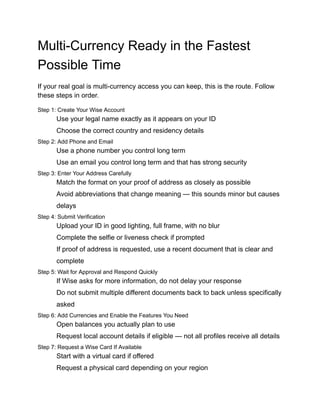
If your real goal is multi-currency access you can keep, this is the route. Follow
these steps in order.
Step 1: Create Your Wise Account
Use your legal name exactly as it appears on your ID
Choose the correct country and residency details
Step 2: Add Phone and Email
Use a phone number you control long term
Use an email you control long term and that has strong security
Step 3: Enter Your Address Carefully
Match the format on your proof of address as closely as possible
Avoid abbreviations that change meaning — this sounds minor but causes
delays
Step 4: Submit Verification
Upload your ID in good lighting, full frame, with no blur
Complete the selfie or liveness check if prompted
If proof of address is requested, use a recent document that is clear and
complete
Step 5: Wait for Approval and Respond Quickly
If Wise asks for more information, do not delay your response
Do not submit multiple different documents back to back unless specifically
asked
Step 6: Add Currencies and Enable the Features You Need
Open balances you actually plan to use
Request local account details if eligible — not all profiles receive all details
Step 7: Request a Wise Card If Available
Start with a virtual card if offered
Request a physical card depending on your region
15.
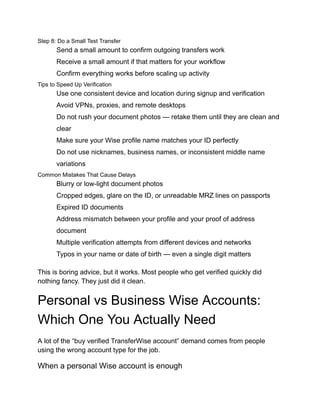
Step 8: Doa Small Test Transfer
Send a small amount to confirm outgoing transfers work
Receive a small amount if that matters for your workflow
Confirm everything works before scaling up activity
Tips to Speed Up Verification
Use one consistent device and location during signup and verification
Avoid VPNs, proxies, and remote desktops
Do not rush your document photos — retake them until they are clean and
clear
Make sure your Wise profile name matches your ID perfectly
Do not use nicknames, business names, or inconsistent middle name
variations
Common Mistakes That Cause Delays
Blurry or low-light document photos
Cropped edges, glare on the ID, or unreadable MRZ lines on passports
Expired ID documents
Address mismatch between your profile and your proof of address
document
Multiple verification attempts from different devices and networks
Typos in your name or date of birth — even a single digit matters
This is boring advice, but it works. Most people who get verified quickly did
nothing fancy. They just did it clean.
Personal vs Business Wise Accounts:
Which One You Actually Need
A lot of the “buy verified TransferWise account” demand comes from people
using the wrong account type for the job.
When a personal Wise account is enough
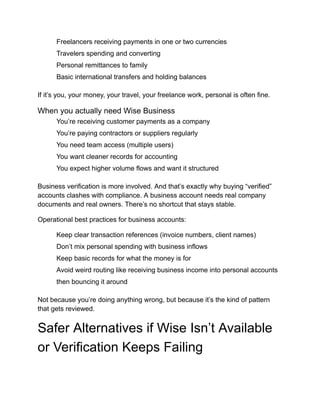
16.
Freelancers receivingpayments in one or two currencies
Travelers spending and converting
Personal remittances to family
Basic international transfers and holding balances
If it’s you, your money, your travel, your freelance work, personal is often fine.
When you actually need Wise Business
You’re receiving customer payments as a company
You’re paying contractors or suppliers regularly
You need team access (multiple users)
You want cleaner records for accounting
You expect higher volume flows and want it structured
Business verification is more involved. And that’s exactly why buying “verified”
accounts clashes with compliance. A business account needs real company
documents and real owners. There’s no shortcut that stays stable.
Operational best practices for business accounts:
Keep clear transaction references (invoice numbers, client names)
Don’t mix personal spending with business inflows
Keep basic records for what the money is for
Avoid weird routing like receiving business income into personal accounts
then bouncing it around
Not because you’re doing anything wrong, but because it’s the kind of pattern
that gets reviewed.
Safer Alternatives if Wise Isn’t Available
or Verification Keeps Failing
17.
Sometimes Wise issimply not an option. Or verification keeps failing because
your documents don’t match local requirements, or the service isn’t supported in
your region, or you have a specific edge case.
Safer alternatives depend on what you actually need:
If you need multi currency holding and receiving:
Look at banks that offer multi currency accounts in your country
Look at regulated EMIs that provide local receiving details
If you need freelancer or ecommerce payouts:
Use payout platforms that support your marketplace or client payment flow
Some platforms specialize in contractor payments, invoicing, or cross
border payouts with built in compliance
How to choose, without falling into another account buying loop:
Check country support first (before signing up)
Compare fees for the currencies you actually use
Confirm whether local receiving details exist for the currencies you need
Look at support quality and dispute handling
Read the compliance requirements upfront so you’re not surprised later
Neutral but honest takeaway. If verification keeps failing, buying accounts is
usually not the “solution”. It just delays the same problem until there’s money on
the line.
Closing: The Real “Multi-Currency
Ready” Goal (Access You Can Keep)
The goal is not a “verified” label you bought from someone. The goal is stable
access to multi currency features that won’t disappear the moment you receive a
large payment or try to withdraw.
18.
If you wantto be truly multi currency ready:
Verify properly with your real identity
Keep your account behavior clean and consistent
Secure the account like you actually care about it
Start with a small transfer, confirm everything works, then scale
So yeah. If you searched “Buy Verified TransferWise Account: Multi-Currency
Ready”, what you probably want is speed and access. The fastest path that still
holds up later is boring. Gather your documents, verify once, do it right, and build
an account you can actually keep.
FAQs (Frequently Asked Questions)
What does a "verified" Wise (formerly TransferWise) account mean?
A "verified" Wise account means the user has completed identity checks (KYC),
including providing name, date of birth, ID documents, and sometimes a selfie or
liveness check. It also means the profile details are complete enough to unlock
normal limits and features such as sending larger transfers, getting local account
details, ordering a card, or opening a Wise Business profile.
Why do people search for "buy verified TransferWise account" or "buy
verified Wise account"?
People often search for buying verified Wise accounts to save time on verification
delays, avoid previous verification friction, access multi-currency features
immediately, conduct business with receiving details quickly, or manage multiple
accounts for different financial flows.
What are the risks of buying a verified Wise account?
Buying a verified Wise account is risky because verification is tied to a specific
identity including documents and biometric checks. Risks include account
ownership mismatches triggering security locks, KYC and AML rechecks leading
to paused activity, device and IP fingerprinting causing access issues, login
19.
anomaly detection resultingin locked balances or delayed payouts, and potential
permanent freezes if original documents can't be provided.
How does Wise verification work?
Wise verification typically involves creating an account with personal details
(legal name, date of birth, address, phone, email), uploading identity documents
like passports or driver's licenses with clear photos/scans, completing selfie or
liveness checks in some regions, and submitting proof of address or extra
documents if requested. Additional checks may be triggered by high volume
transfers, business-like activity on personal accounts, unusual transaction
patterns, or frequent logins from different locations.
Is being verified the same as having full feature access on Wise?
No. Being verified means you have passed identity checks. However, full feature
access—such as local account details, cards issuance, higher transfer limits, or
business tools—depends on eligibility criteria like country of residence and local
regulations. Two verified users can have different levels of feature access based
on these factors.
What does "multi-currency ready" mean with a proper Wise account?
"Multi-currency ready" refers to the ability to hold multiple currencies within a
single Wise account, convert between them at close-to-mid-market exchange
rates without classic bank markups, receive money in various currencies using
local bank details (like USD, EUR, GBP), pay suppliers internationally efficiently,
and use features like ordering cards linked to these multiple currency balances.