Buy Old Gmail Accounts With Privacy Protection
Meta Description: Learn the privacy and security risks of buying old Gmail accounts, safer
alternatives, account protection practices, and legitimate ways to get the email access you
need.
Introduction
The phrase “Buy Old Gmail Accounts With Privacy Protection” suggests a straightforward
need: obtaining an established Gmail account while keeping personal information and account
2
activity protected. However, buying an existing Google account creates an important problem
that is easy to overlook: you cannot reliably verify the account’s history, ownership, recovery
information, previous activity, or whether the seller will retain some form of access.
For that reason, the safest approach is not to treat an old Gmail account as a normal product
that can simply be purchased and transferred. A Gmail account is connected to Google's
authentication, recovery, security, and privacy systems. An account that was previously
controlled by another person can therefore create security and privacy risks for the new user.
Google provides official account-recovery and security mechanisms rather than a marketplace
for transferring personal Gmail accounts. Google also warns users not to provide passwords or
verification codes to services claiming to provide account or password support.
This guide explains what people usually mean when searching for Buy Old Gmail Accounts
With Privacy Protection, why account age should not be confused with trust or security, what
risks to consider, and what legitimate alternatives can satisfy common underlying needs.
The goal is simple: help you obtain the email functionality, separation, privacy, or
organizational structure you actually need without inheriting an unknown person's account
history.
Quick Answer: What Should You Know Before Buying an
Old Gmail Account?
If you're considering purchasing an aged Gmail account, keep these points in mind:
● An old account is not automatically a trustworthy or secure account.
● A seller may have previously controlled recovery methods, devices, sessions, or other
account-security mechanisms.
● You generally cannot independently verify everything that happened on an account
before you received it.
● Account transfers can create problems with recovery, authentication, ownership, and
compliance.
● Never purchase or use an account for impersonation, fraud, spam, evading platform
restrictions, or bypassing verification.
● If your real requirement is a separate email identity, create a new Google Account and
configure its privacy and security settings yourself.
● For business use, consider an organization-managed email solution rather than buying
someone else's personal Gmail account.
● Google's own security guidance recommends Security Checkup, recovery options, strong
passwords, and 2-Step Verification.
3
The most important distinction is this: privacy protection is something you configure and
maintain; it is not something that can be reliably guaranteed merely because an account
is old or advertised as “private.”
What Does “Old Gmail Account” Actually Mean?
An “old Gmail account” generally refers to a Google Account that was created some time ago
and has an established history of use.
The term aged Gmail account is commonly used in online marketplaces to distinguish such
accounts from newly created accounts. Sellers may emphasize factors such as:
● Account creation date
● Previous activity
● Country or region
● Whether the account has a recovery email
● Whether a phone number was associated with it
● Whether it has been used with other Google services
● Whether it is described as “clean” or “verified”
The problem is that these descriptions do not necessarily tell a buyer whether the account is
safe, appropriate, or genuinely controlled by the buyer.
An account's age is simply one characteristic. It does not prove:
● That the original owner has permanently relinquished access
● That the account has no suspicious history
● That the recovery information has been completely transferred
● That there are no active sessions or devices
● That the account complies with the rules of services where you intend to use it
● That messages or files associated with the previous user have not exposed private
information
● That Google will treat the new user's activity exactly as it treated the previous user's
activity
This distinction matters because many buyers are actually looking for something other than
“age.”
They may want:
1. A separate inbox for a project.
2. An email address that does not expose their primary address.
3. A business communication account.
4
4. A dedicated account for newsletters or subscriptions.
5. A separate identity for legitimate online activities.
6. A way to keep personal and professional communications apart.
Those needs can usually be addressed without purchasing an account previously controlled by
somebody else.
Why Buying an Existing Gmail Account Creates Privacy
Risks
Privacy is one of the biggest reasons people search for old Gmail accounts. Ironically,
purchasing an account from another person can introduce additional privacy concerns.
Unknown account history
You may not know what information remains associated with an old account.
Depending on how the account was used, it could contain:
● Old emails
● Contacts
● Google Drive files
● Photos
● Calendar information
● YouTube activity
● Third-party application connections
● Saved account preferences
● Security events
Even if a seller claims that an account is empty, a buyer has limited ability to independently
establish its complete history.
Recovery information
Recovery information exists specifically to help establish legitimate access to an account.
Google explains that recovery information can help users regain access if they forget a
password, are locked out, or if another person attempts to use the account.
That means recovery mechanisms are not merely administrative details. They are part of the
security architecture of the account.
5
A previously owned account can therefore create uncertainty about who can recover it or
receive security-related notifications.
Previous devices and sessions
An account may previously have been accessed from phones, computers, browsers, or other
devices.
If an account has changed hands, you should not assume that every previous session,
authorization, or connection has disappeared simply because you received a password.
Third-party access
Google Accounts can interact with external applications and services. Google specifically
recommends reviewing account permissions as part of its Security Checkup process.
An old account can therefore have a history of third-party connections that a new user may not
fully understand.
Seller trust is not the same as technical ownership
A marketplace seller might promise:
“Full access, private, secure, never recovered.”
But a statement from a seller does not replace Google's own authentication and recovery
systems.
The key question is not simply whether a seller gives you a password. The question is whether
you can establish legitimate, durable control of the account without relying on the seller.
Old Does Not Mean Trusted
One of the most common misconceptions surrounding aged Gmail accounts is that account age
automatically creates trust.
It does not.
Account age can be a historical attribute, but it is not a universal reputation score.
For example, an old account could have been:
6
● Inactive for years
● Used heavily for personal communications
● Connected to numerous services
● Compromised at some point
● Used in ways that violate another platform's rules
● Associated with information belonging to a previous owner
Similarly, a new account can be perfectly legitimate, secure, and appropriate for its intended
purpose.
This is why it is risky to base a purchasing decision on claims such as “10-year-old account,”
“high trust,” or “aged Gmail.”
If your intended application has a requirement concerning account age, you should check that
application's own rules rather than assuming an old Gmail account will satisfy them.
A Safer Approach: Create and Secure Your Own Google
Account
If what you really need is a separate Gmail identity, creating your own account is generally the
cleaner solution.
You control the account from the beginning, which means you can establish:
● Your own password
● Your own recovery email
● Your own recovery options
● Your own authentication methods
● Your own privacy settings
● Your own trusted devices
● Your own account history
Google provides official account-recovery guidance and specifically recommends avoiding
services that claim to provide account or password support. It also advises users not to share
passwords or verification codes.
Step 1: Define why you need another account
What to do: Identify the actual reason you need another email account.
Why it matters: A second Gmail account may not be the best solution for every problem.
7
For example:
● A newsletter address may only require an email alias or separate inbox.
● A business may need a managed organizational account.
● A private project may need a separate identity.
● A temporary communication purpose may be better served by an appropriate privacy-
focused email provider.
What to check: Make sure the account type you choose is permitted for your intended use.
Common mistake: Buying an aged account simply because it appears more established when
your actual need is basic email separation.
Step 2: Create the account through Google's normal process
What to do: Create a Google Account using Google's official account-creation process.
Why it matters: You become the original account holder instead of inheriting an unknown
account history.
What to check: Use accurate information where Google requires it and follow the normal
authentication process.
Common mistake: Looking for shortcuts around verification or account-creation safeguards.
Avoid attempts to bypass Google's security systems.
Step 3: Configure recovery information
What to do: Add appropriate recovery information that you control.
Google explains that recovery information can help you regain access if you forget your
password or become locked out.
Why it matters: Losing access to your email account can be more disruptive than paying for an
account in the first place.
What to check: Make sure recovery information belongs to you and can actually be accessed
when needed.
Common mistake: Using another person's recovery details or leaving recovery information
incomplete.
8
Step 4: Enable strong authentication
What to do: Enable 2-Step Verification and consider a passkey or security key where
appropriate.
Google states that 2-Step Verification adds another layer of protection if a password is stolen.
Google also describes passkeys and hardware security keys as phishing-resistant authentication
options.
Why it matters: A password by itself is a single point of failure.
What to check: Make sure you have a recovery method available before relying heavily on an
authentication device.
Common mistake: Sharing verification codes with another person. Google explicitly warns
users never to share their verification codes.
Step 5: Review account access
What to do: Check security activity, connected applications, devices, and relevant account
permissions.
Why it matters: This establishes whether unexpected access exists.
What to check: Look for unfamiliar devices, applications, sessions, or security changes.
Common mistake: Assuming that changing a password automatically solves every account-
security issue.
Google recommends Security Checkup as a way to review account recovery options, 2-Step
Verification, and account permissions.
Step 6: Separate your personal and professional information
What to do: Decide what information belongs in the new account.
Why it matters: Privacy is partly about limiting unnecessary exposure.
A dedicated account can help separate:
9
● Personal correspondence
● Business communications
● Project registrations
● Online subscriptions
● Professional services
What to check: Avoid automatically forwarding sensitive information between accounts
unless there is a legitimate need.
Common mistake: Creating a “private” secondary account but then linking it everywhere to
your primary identity.
Privacy Protection: What It Actually Means
“Privacy protection” can mean several different things, and confusing them can lead to poor
security decisions.
Privacy from other users
This means limiting who can see your email address, messages, profile information, or other
account data.
Account confidentiality
This means protecting your login credentials and authentication methods from unauthorized
access.
Data minimization
This means avoiding unnecessary personal information in an account.
Device privacy
Your account may be secure while the device used to access it is compromised. Keeping devices
updated and protected is therefore also important.
Provider-level privacy
Every email service has its own policies concerning data collection, retention, processing, and
legal disclosures. If this is your primary concern, read the provider's current privacy
10
documentation rather than relying on a seller's description of an “anonymous” or “private”
account.
Google provides its current Privacy Policy and related privacy controls through its official
Privacy & Terms resources.
The practical lesson is that privacy is a system, not a label.
An account advertised as “private” does not automatically provide better privacy.
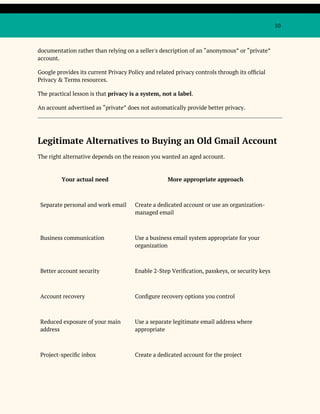
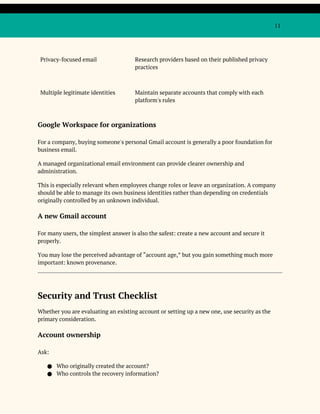
Legitimate Alternatives to Buying an Old Gmail Account
The right alternative depends on the reason you wanted an aged account.
Your actual need More appropriate approach
Separate personal and work email Create a dedicated account or use an organization-
managed email
Business communication Use a business email system appropriate for your
organization
Better account security Enable 2-Step Verification, passkeys, or security keys
Account recovery Configure recovery options you control
Reduced exposure of your main
address
Use a separate legitimate email address where
appropriate
Project-specific inbox Create a dedicated account for the project
11
Privacy-focused email Research providers based on their published privacy
practices
Multiple legitimate identities Maintain separate accounts that comply with each
platform's rules
Google Workspace for organizations
For a company, buying someone's personal Gmail account is generally a poor foundation for
business email.
A managed organizational email environment can provide clearer ownership and
administration.
This is especially relevant when employees change roles or leave an organization. A company
should be able to manage its own business identities rather than depending on credentials
originally controlled by an unknown individual.
A new Gmail account
For many users, the simplest answer is also the safest: create a new account and secure it
properly.
You may lose the perceived advantage of “account age,” but you gain something much more
important: known provenance.
Security and Trust Checklist
Whether you are evaluating an existing account or setting up a new one, use security as the
primary consideration.
Account ownership
Ask:
● Who originally created the account?
● Who controls the recovery information?
12
● Who controls the authentication methods?
● Can the account's ownership be legitimately established?
If the answers are unclear, treat the account as high risk.
Recovery
Google recommends adding recovery information so you can regain access when necessary.
Do not treat recovery information as an afterthought.
Authentication
Use strong authentication and consider 2-Step Verification, passkeys, or hardware security keys
where appropriate.
Account activity
Review security activity regularly.
Google's guidance for compromised accounts includes reviewing activity and checking for
unfamiliar changes or access.
Verification codes
Never give your Google verification codes to a seller, “support agent,” marketer, or other third
party.
Google explicitly advises users not to share these codes.
Third-party applications
Review connected applications and permissions. Remove access you do not recognize or no
longer need.
Terms of service
Always consider the rules of both Google and the service where you intend to use an account.
An account purchased from a third party does not grant permission to circumvent another
platform's rules.
13
Common Mistakes When Looking for “Buy Old Gmail
Accounts With Privacy Protection”
1. Assuming account age equals reputation
An old account is not automatically more trustworthy.
Better approach: Evaluate your actual business or personal requirement and use a legitimate
account designed for that purpose.
2. Trusting “fully private” claims
A seller cannot necessarily guarantee that an account has no previous connections or
undisclosed history.
Better approach: Maintain accounts whose provenance and security configuration you
control.
3. Sharing verification codes
This can expose control of an account.
Better approach: Keep authentication codes and security credentials private.
4. Ignoring recovery settings
A password is not the entire account.
Better approach: Configure recovery information and authentication methods yourself.
5. Using purchased accounts to evade restrictions
An aged account should not be used to circumvent bans, verification requirements, anti-abuse
systems, or platform restrictions.
Better approach: Resolve restrictions through the affected platform's legitimate appeal or
support process.
6. Using an old account for spam
Buying multiple accounts for unsolicited messaging can create security, reputation, and
compliance problems.
14
Better approach: Use legitimate email marketing systems and obtain appropriate recipient
consent.
7. Putting sensitive information into an account with uncertain ownership
This can expose personal, financial, business, or confidential information.
Better approach: Use an account whose security history you control from the beginning.
What If You Already Bought an Old Gmail Account?
If you already purchased an account and are concerned about its security, avoid assuming that
simply changing the password makes it safe.
Instead, focus on legitimate account-security measures.
Review the account
Look for unfamiliar activity, devices, security events, connected applications, and recovery
information.
Secure authentication
Use Google's available security features, including 2-Step Verification where appropriate.
Review recovery methods
Make sure recovery information is accurate and under your control.
Remove unnecessary access
Review connected services and permissions.
Protect sensitive data
Do not immediately use an account of uncertain provenance for sensitive financial, legal,
business, or personal information.
Consider starting fresh
15
If you cannot establish legitimate, durable control of the account, creating a new account may
be safer than attempting to inherit an unknown history.
If you believe an account has been compromised, Google provides an official process for
securing a hacked or compromised Google Account.
When an Old Account Might Be the Wrong Solution
Entirely
Sometimes the search for an aged Gmail account comes from a misunderstanding of what a
platform actually requires.
For example, someone might think they need an “old email account” because a website appears
to treat new accounts differently.
Before purchasing anything, identify the underlying requirement.
Is the platform asking for:
● A verified email address?
● A business identity?
● An established account on its own service?
● A domain email address?
● A particular subscription?
● Identity verification?
● A history of legitimate activity?
Those are different requirements.
An old Gmail account does not necessarily satisfy any of them.
If another platform requires verification or an established account, use that platform's official
process rather than attempting to manufacture eligibility through a purchased identity.
Practical Decision Guide
Use this simple framework before spending money on an aged email account.
If you want privacy
16
Best starting point: Create a separate legitimate email account and minimize the personal
information associated with it where the provider permits.
If you want security
Best starting point: Use an account you control from creation, enable strong authentication,
and configure recovery options.
If you want business continuity
Best starting point: Use an organization-managed email solution with appropriate
administrative controls.
If you want a separate inbox
Best starting point: Create a dedicated account rather than inheriting somebody else's
mailbox.
If you need an account for a platform
Best starting point: Follow that platform's account and verification requirements.
If someone is selling an account as “guaranteed safe”
Best starting point: Treat the guarantee cautiously. Security ultimately depends on account
provenance, authentication, recovery, connected services, and ongoing user behavior—not
marketing language.
Frequently Asked Questions
Is it safe to buy an old Gmail account?
There are significant security, privacy, ownership, and compliance risks. An account's age does
not establish that it is safe or that the seller can permanently transfer control.
Does an old Gmail account provide better privacy?
Not necessarily. Account age does not inherently provide privacy. In fact, an old account may
contain information or connections belonging to its previous user.
17
Can I completely remove the previous owner's access?
You should not assume that a purchased account can be made equivalent to an account you
created yourself. Authentication and recovery history can create uncertainty about control.
Should I use an old Gmail account for business?
For business use, an account with known ownership and appropriate organizational
administration is generally more appropriate than an account previously controlled by an
unknown person.
How can I protect a Gmail account I created myself?
Use a strong, unique password, configure recovery information, enable 2-Step Verification,
review account activity and permissions, and consider passkeys or security keys. Google's
official security guidance covers these measures.
What should I do if I lose access to Gmail?
Use Google's official account-recovery process. Google explains that recovery may require
information that helps confirm that you own the account.
Should I give a seller my Gmail verification code?
No. Google explicitly warns users not to share verification codes.
Is there a legitimate reason to have multiple Gmail accounts?
Yes. People and organizations may legitimately maintain separate accounts for personal,
professional, project, or organizational purposes. The important point is that the accounts
should be created and used in accordance with Google's policies and the rules of other services
involved.
Conclusion
The search phrase “Buy Old Gmail Accounts With Privacy Protection” reflects a real set of
needs: privacy, account separation, security, convenience, and sometimes the desire for an
established online identity. But purchasing an existing Gmail account is not a reliable way to
obtain those benefits.
18
The fundamental issue is provenance. With an account created by someone else, you may not
know its complete history, previous connections, recovery configuration, devices, or security
activity. An account described as “aged,” “verified,” or “private” is therefore not automatically
safer than an account you create yourself.
For most legitimate purposes, a better approach is to identify the actual requirement first. If
you need a separate inbox, create one. If you need stronger privacy, use appropriate privacy
controls and minimize unnecessary information. If you need better security, enable Google's
available authentication and recovery features. If you need business email, use an
organizational solution that provides clear ownership and administration.
Google's own guidance emphasizes Security Checkup, recovery options, 2-Step Verification,
and careful protection of passwords and verification codes.
If you are researching account security, privacy, or legitimate email-management options,
Allaccit can be used as an educational resource for understanding the choices before you
commit to a particular setup.
The safest next step is straightforward: build an email environment you control rather than
inheriting an unknown account history. That approach may not provide the perceived
shortcut of an “old Gmail account,” but it gives you a much clearer foundation for privacy,
security, recovery, and long-term account ownership.