Buy Old Gmail Accounts With Account Details (PVA & Aged)
Learn why buying old Gmail accounts with account details is risky, what Google’s rules mean,
and safer alternatives for legitimate email and business needs.
Introduction
The search for “Buy Old Gmail Accounts With Account Details” usually comes from a
practical goal: someone wants an established-looking email account rather than creating a new
2
one from scratch. Buyers may be looking for an older mailbox for business communication,
testing, outreach, account management, or another online activity.
However, purchasing an existing Gmail account together with its login credentials is
fundamentally different from purchasing a normal digital product. A Gmail account is tied to
authentication, personal information, recovery methods, communications, and Google services.
An account advertised as “old,” “aged,” or “verified” may also have an unknown history that the
buyer cannot reliably establish before taking possession.
That creates substantial security, privacy, ownership, and platform-compliance concerns.
This article explains what the search term means, why third-party Gmail account sales can be
problematic, what to check before relying on an existing email identity, and which legitimate
alternatives can accomplish the same underlying goals. It does not provide instructions for
obtaining stolen credentials, bypassing Google's security controls, defeating verification, or
disguising unauthorized account activity.
If your objective is simply to obtain a reliable email presence, there are safer approaches: create
and manage your own Google account, use an organization-managed Google Workspace
account where appropriate, or use a dedicated email service for legitimate business
communication and testing.
For readers researching the subject for educational purposes, the key lesson is simple: an older
Gmail address is not automatically a safer, more trustworthy, or more useful account.
Account ownership and security history matter more than age alone.
Quick Answer: What Should You Know?
●​ Buying Gmail credentials from an unknown seller creates an ownership and security
risk.
●​ You cannot reliably verify that a seller legitimately owns an account merely because
they provide its password.
●​ An existing account may contain private messages, contacts, recovery information, or
other data belonging to another person.
●​ A seller's description such as “aged,” “verified,” or “clean” should not be treated as proof
of account history or future reliability.
3
●​ Attempting to use an account to impersonate someone, circumvent platform
restrictions, or misrepresent identity can create additional problems.
●​ For legitimate needs, creating your own Google account or using an
organization-managed email account is generally more appropriate.
●​ For businesses that need multiple addresses, domain-based email can provide better
ownership and administration than purchased consumer accounts.
●​ Never request or use someone else's recovery codes, authentication tokens, or security
information.
What Does “Buy Old Gmail Accounts With Account
Details” Mean?
The phrase generally refers to the purchase of an existing Gmail account rather than the
creation of a new mailbox.
“Old Gmail account” typically means an account that was created some time ago. Sellers may
advertise accounts using terms such as:
●​ Aged Gmail account
●​ Old email account
●​ Established Gmail account
●​ Verified Gmail account
●​ Gmail account with details
●​ Gmail account with recovery information
“Account details” can be particularly ambiguous. It might refer to basic information supplied by
a seller, but it can also mean sensitive credentials or recovery information.
That distinction matters.
An email address is not the same thing as authorization to access the associated account. A
password, recovery email, phone number, authentication code, or backup code can all be
security-sensitive information. Possessing those details does not necessarily establish
legitimate ownership.
4
There is also an important privacy issue. An existing mailbox can contain correspondence,
attachments, contact information, invoices, documents, account notifications, and other
information associated with the previous account holder.
For that reason, an existing Gmail account should not be treated like a disposable username
that can simply be transferred between strangers.
Why do people search for aged accounts?
The underlying reasons vary. Someone might want:
●​ A professional-looking email address
●​ A mailbox for business communication
●​ An address that is separate from a personal inbox
●​ Multiple addresses for legitimate organizational purposes
●​ An account for software testing
●​ A dedicated mailbox for customer support
●​ An established identity for a particular project
Those goals can often be achieved without purchasing another person's account.
The important distinction is between the goal and the risky method used to achieve it.
Why Buying Existing Gmail Credentials Can Be Risky
An account purchased from a third party comes with information the buyer cannot necessarily
verify.
1. The seller may not be the legitimate owner
A seller can claim that an account belongs to them without proving it.
If the account was compromised, obtained through phishing, or transferred without
authorization, purchasing it does not make its history legitimate. The original owner may still
attempt to recover it, or Google may detect suspicious activity.
5
A password alone is therefore poor evidence of ownership.
2. The account may contain someone else's private information
An existing mailbox can contain personal or confidential material.
Even if a seller says that an account has been “cleaned,” a buyer should not assume that all
historical information has actually been removed. There may also be data stored in associated
Google services.
Accessing another person's private communications without proper authorization can create
serious privacy and legal concerns.
3. Account recovery can become complicated
Google accounts use security and recovery mechanisms designed to protect account ownership.
An account transferred between unrelated people can have an unclear recovery history. A
previous owner may retain information that could be relevant to recovery, while the new user
may not have a legitimate basis for controlling all historical security information.
Trying to defeat or bypass those mechanisms is not an appropriate solution.
4. “Verified” does not mean “safe to buy”
Third-party sellers frequently use reassuring terminology, but buyers generally cannot
independently establish what happened to an account before it was sold.
An account described as:
●​ “verified”
●​ “aged”
●​ “high quality”
●​ “trusted”
●​ “clean”
●​ “ready to use”
may still have an unknown provenance.
6
Marketing language should not be confused with independently verifiable security information.
5. The account may have an unknown activity history
An account's history can affect its reliability.
For example, an account may previously have been used for activities that resulted in security
alerts, complaints, suspicious login patterns, or other enforcement actions.
A buyer cannot assume that a dormant-looking inbox has a clean history simply because it has
few visible messages.
Google Account Rules and Responsible Account
Ownership
A Google account provides access to more than Gmail. Depending on the account and services
being used, it can connect to products such as Google Drive, Google Photos, Calendar, YouTube,
Contacts, and other Google services.
That makes account credentials significantly more sensitive than an ordinary username.
Google's account policies and terms can change, so users should consult Google's current
official documentation before creating, transferring, or administering accounts.
Google Account Help
The safest principle is to use accounts that you are legitimately authorized to control and to
follow the rules applicable to the relevant Google service.
Consumer Gmail versus organization-managed email
There is also an important distinction between a personal Gmail account and an
organization-managed email account.
7
If a company needs addresses for employees, contractors, departments, or projects, it may be
more appropriate to use an organizational email system where administrators can manage
users and access according to the organization's policies.
Google Workspace is one example of an organization-managed environment.
Google Workspace
This approach provides a clearer relationship between the organization, the email identity, and
the person authorized to use it.
Safer Alternatives to Buying Old Gmail Accounts
If you are considering Buy Old Gmail Accounts With Account Details because you need an
established or dedicated email presence, first identify the actual requirement.
Alternative 1: Create your own Gmail account
If you simply need another mailbox, creating an account yourself gives you direct control over
its security and recovery configuration.
You know:
●​ When you created it
●​ Which recovery methods you configured
●​ Who has access
●​ What information is stored in it
●​ How the account has been used
That transparency is much more valuable than an unknown account age.
Alternative 2: Use Google Workspace for business email
If the objective is professional communication, a domain-based business address may be more
suitable than a purchased consumer Gmail account.
8
For example, a company can use an address associated with its own domain rather than relying
on a mailbox previously controlled by an unrelated person.
This can make organizational ownership, employee changes, and administrative management
clearer.
Alternative 3: Use a dedicated mailbox for testing
Software developers and QA teams sometimes need multiple email addresses for testing.
Instead of acquiring real people's accounts, create test accounts under controlled conditions
and document their intended purpose.
For automated testing, teams can also use dedicated test-email systems or staging
environments where appropriate.
Alternative 4: Create separate project addresses
A legitimate project may need an address such as a support, billing, marketing, or notification
mailbox.
Creating a dedicated address gives the project a known owner and predictable access history.
Alternative 5: Use an email service appropriate to your use case
Organizations that need transactional messages, newsletters, customer communication, or
application-generated email may benefit from a dedicated email platform rather than consumer
Gmail accounts.
The right solution depends on the use case, volume, authentication requirements, and
applicable policies.
A Step-by-Step Legitimate Process for Getting an
Established Email Presence
9
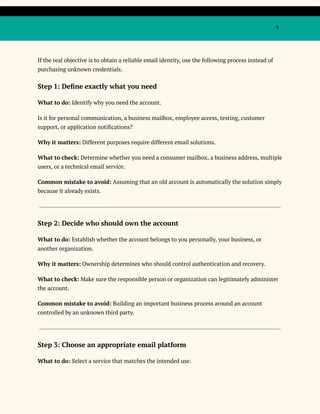
If the real objective is to obtain a reliable email identity, use the following process instead of
purchasing unknown credentials.
Step 1: Define exactly what you need
What to do: Identify why you need the account.
Is it for personal communication, a business mailbox, employee access, testing, customer
support, or application notifications?
Why it matters: Different purposes require different email solutions.
What to check: Determine whether you need a consumer mailbox, a business address, multiple
users, or a technical email service.
Common mistake to avoid: Assuming that an old account is automatically the solution simply
because it already exists.
Step 2: Decide who should own the account
What to do: Establish whether the account belongs to you personally, your business, or
another organization.
Why it matters: Ownership determines who should control authentication and recovery.
What to check: Make sure the responsible person or organization can legitimately administer
the account.
Common mistake to avoid: Building an important business process around an account
controlled by an unknown third party.
Step 3: Choose an appropriate email platform
What to do: Select a service that matches the intended use.
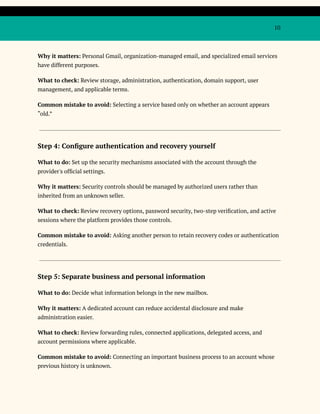
10
Why it matters: Personal Gmail, organization-managed email, and specialized email services
have different purposes.
What to check: Review storage, administration, authentication, domain support, user
management, and applicable terms.
Common mistake to avoid: Selecting a service based only on whether an account appears
“old.”
Step 4: Configure authentication and recovery yourself
What to do: Set up the security mechanisms associated with the account through the
provider's official settings.
Why it matters: Security controls should be managed by authorized users rather than
inherited from an unknown seller.
What to check: Review recovery options, password security, two-step verification, and active
sessions where the platform provides those controls.
Common mistake to avoid: Asking another person to retain recovery codes or authentication
credentials.
Step 5: Separate business and personal information
What to do: Decide what information belongs in the new mailbox.
Why it matters: A dedicated account can reduce accidental disclosure and make
administration easier.
What to check: Review forwarding rules, connected applications, delegated access, and
account permissions where applicable.
Common mistake to avoid: Connecting an important business process to an account whose
previous history is unknown.
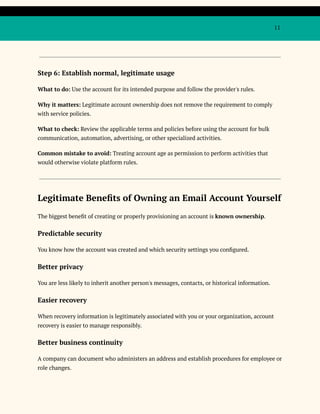
11
Step 6: Establish normal, legitimate usage
What to do: Use the account for its intended purpose and follow the provider's rules.
Why it matters: Legitimate account ownership does not remove the requirement to comply
with service policies.
What to check: Review the applicable terms and policies before using the account for bulk
communication, automation, advertising, or other specialized activities.
Common mistake to avoid: Treating account age as permission to perform activities that
would otherwise violate platform rules.
Legitimate Benefits of Owning an Email Account Yourself
The biggest benefit of creating or properly provisioning an account is known ownership.
Predictable security
You know how the account was created and which security settings you configured.
Better privacy
You are less likely to inherit another person's messages, contacts, or historical information.
Easier recovery
When recovery information is legitimately associated with you or your organization, account
recovery is easier to manage responsibly.
Better business continuity
A company can document who administers an address and establish procedures for employee or
role changes.
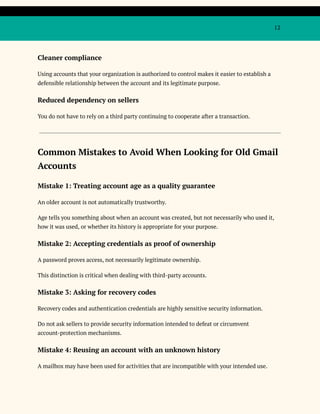
12
Cleaner compliance
Using accounts that your organization is authorized to control makes it easier to establish a
defensible relationship between the account and its legitimate purpose.
Reduced dependency on sellers
You do not have to rely on a third party continuing to cooperate after a transaction.
Common Mistakes to Avoid When Looking for Old Gmail
Accounts
Mistake 1: Treating account age as a quality guarantee
An older account is not automatically trustworthy.
Age tells you something about when an account was created, but not necessarily who used it,
how it was used, or whether its history is appropriate for your purpose.
Mistake 2: Accepting credentials as proof of ownership
A password proves access, not necessarily legitimate ownership.
This distinction is critical when dealing with third-party accounts.
Mistake 3: Asking for recovery codes
Recovery codes and authentication credentials are highly sensitive security information.
Do not ask sellers to provide security information intended to defeat or circumvent
account-protection mechanisms.
Mistake 4: Reusing an account with an unknown history
A mailbox may have been used for activities that are incompatible with your intended use.
13
Unknown history creates unnecessary risk.
Mistake 5: Connecting important services immediately
Linking payment systems, business applications, customer records, or other sensitive services
to an account with uncertain ownership can magnify the consequences of an account problem.
Mistake 6: Ignoring privacy
An existing mailbox may contain information that should never be accessed by a new user.
Even if the account is presented as transferable, privacy concerns remain.
Mistake 7: Assuming a seller's guarantee overrides platform rules
A seller's promise cannot change Google's policies or establish authorization that did not
previously exist.
Mistake 8: Using accounts to impersonate people or organizations
An email account should not be used to misrepresent identity, deceive recipients, or gain
unauthorized access to other services.
Security and Trust Considerations
Account security should be considered before convenience.
Account credentials
Never share passwords or authentication codes unnecessarily. Credentials should be handled
only by people who are authorized to access the account.
Recovery information
Recovery methods are part of an account's security architecture. They should be controlled by
the legitimate account owner or authorized administrator.
14
Two-step verification
Where supported and appropriate, additional authentication can provide an important layer of
account protection. Follow the provider's official instructions rather than attempting to
circumvent authentication.
Google Account Security Help
Connected applications
Review applications and services that have access to an account. Unnecessary third-party access
can create additional exposure.
Active sessions
When managing an account you legitimately own, periodically review signed-in devices and
account activity.
Privacy
Never assume that a transferred mailbox is free from sensitive information. The safest approach
is to avoid taking control of another person's private mailbox in the first place.
Fraud prevention
Be cautious when a seller pressures you to:
●​ Use someone else's identity
●​ Avoid standard verification
●​ Share authentication codes
●​ Conceal account ownership
●​ Circumvent security controls
●​ Misrepresent the account's history
●​ Use an account for activity prohibited by a service
Those are warning signs rather than indicators of a high-quality account.
15
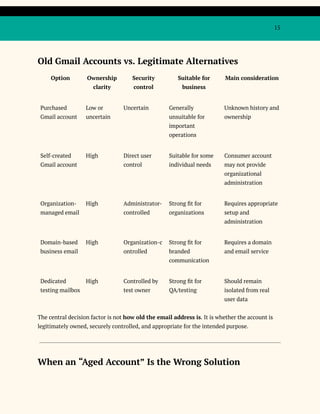
Old Gmail Accounts vs. Legitimate Alternatives
Option Ownership
clarity
Security
control
Suitable for
business
Main consideration
Purchased
Gmail account
Low or
uncertain
Uncertain Generally
unsuitable for
important
operations
Unknown history and
ownership
Self-created
Gmail account
High Direct user
control
Suitable for some
individual needs
Consumer account
may not provide
organizational
administration
Organization-
managed email
High Administrator-
controlled
Strong fit for
organizations
Requires appropriate
setup and
administration
Domain-based
business email
High Organization-c
ontrolled
Strong fit for
branded
communication
Requires a domain
and email service
Dedicated
testing mailbox
High Controlled by
test owner
Strong fit for
QA/testing
Should remain
isolated from real
user data
The central decision factor is not how old the email address is. It is whether the account is
legitimately owned, securely controlled, and appropriate for the intended purpose.
When an “Aged Account” Is the Wrong Solution
16
There are several situations where buying an old account does not solve the underlying
problem.
You need a professional identity
A company-owned domain is usually more directly connected to organizational identity than a
random consumer Gmail address.
You need multiple users
An organization-managed environment is more appropriate when several employees need
controlled access.
You need testing accounts
Purpose-built test accounts provide clearer ownership and predictable test data.
You need application email
A transactional email service may be more appropriate than a consumer mailbox.
You need marketing email
Use a legitimate email marketing solution and follow applicable consent, anti-spam, and
platform requirements.
You need account history
If your workflow genuinely depends on historical data or an existing business relationship,
obtain the necessary authorization and documentation rather than relying on an anonymous
account marketplace.
Frequently Asked Questions
1. Is it safe to buy old Gmail accounts?
17
There is no reliable way to guarantee that a third-party Gmail account is safe merely because it
is advertised as old or verified. Unknown ownership, security history, privacy issues, and
recovery complications can make purchased accounts risky.
2. What does “Gmail account details” usually mean?
The phrase can refer to basic account information, login credentials, recovery information, or
other sensitive data. Because the term is ambiguous, buyers should not assume that all
requested information is legitimate or appropriate to transfer.
3. Does an old Gmail account have an automatic advantage?
No. Account age by itself does not establish trustworthiness, legitimate ownership, security, or
suitability for a particular purpose.
4. Can I use someone else's Gmail account if they give me the password?
Having a password does not automatically establish that you are authorized to access or control
the account. You should use accounts that you legitimately own or are explicitly authorized to
administer.
5. What should I use instead of a purchased Gmail account for business?
Depending on the requirement, options include a self-managed business mailbox, a
domain-based email address, or an organization-managed service such as Google Workspace.
6. Are Gmail accounts transferable between people?
Account transfer questions depend on the applicable Google service, account type, and policies.
Rather than assuming that a marketplace transaction is permitted, consult Google's current
terms and account documentation.
7. What is the safest way to get multiple email accounts for testing?
Create accounts specifically for testing under your own control, or use a suitable testing/email
platform. Avoid using real people's mailboxes or accounts with unknown histories.
18
8. Should I buy an old account if the seller promises a replacement?
A seller's replacement policy does not eliminate security, privacy, ownership, or
platform-compliance risks. For important work, establishing direct ownership is generally a
more reliable approach.
A Practical Decision Guide
Before searching for Buy Old Gmail Accounts With Account Details, ask five questions:
1.​ Do I actually need an existing account?
2.​ Why does the account need to be old?
3.​ Can I accomplish the same goal with an account I create myself?
4.​ Who should legally and operationally control the account?
5.​ Would my intended use comply with the relevant platform's rules?
If the answer to the third question is yes, creating your own account is usually the cleaner path.
If the need is business-related, consider an organization-managed email solution.
If the need is technical testing, create controlled test accounts.
If the need is marketing or transactional communication, select a service designed for that
purpose.
If the requirement depends on another person's identity or private account history, stop and
determine whether you have legitimate authorization before proceeding.
Conclusion
The search for “Buy Old Gmail Accounts With Account Details” often reflects a desire for
convenience: an established email address can appear easier than starting from scratch. But an
existing Gmail account is not simply a pre-owned username. It can be connected to
19
authentication systems, private communications, recovery mechanisms, Google services, and
an account history that a purchaser cannot independently verify.
That makes third-party account purchases fundamentally different from buying an ordinary
digital product.
The safer approach is to identify the actual objective behind the purchase. If you need another
mailbox, create one under your own control. If you need business email, consider an
organization-managed or domain-based solution. If you need testing accounts, create
dedicated test identities. If you need email for applications or campaigns, use a service
designed for that purpose and follow its requirements.
Most importantly, do not use another person's credentials, recovery information, or identity to
bypass verification, impersonate an individual, evade platform restrictions, or obtain
unauthorized access.
For readers researching Gmail account management, digital security, email infrastructure, and
related topics, Allaccit can serve as an educational resource for understanding safer and more
legitimate approaches to online account management.
The practical takeaway is straightforward: account age should never be more important
than legitimate ownership, security, privacy, and appropriate use. A new account that you
properly control is often a far more dependable foundation than an old account with an
unknown history.