Everything You Need to Know Before
You Buy Aged Gmail Accounts in Bulk
USA
Meta Description: Learn everything about acquiring aged Gmail accounts in bulk in the
USA with this comprehensive educational guide covering structures, verification, and setup.
Introduction
In the modern landscape of digital communications, email infrastructure serves as the
backbone for organizational coordination, technical research, and multi-channel operations.
Businesses, research institutions, and digital specialists often analyze how email accounts
mature over time and how historical activity shapes overall account performance.
Understanding the technical nuances of email account lifecycles is essential for teams
looking to optimize their communication workflows and establish resilient digital profiles.
When organizations consider acquiring aged Gmail accounts in bulk within the United
States, several fundamental factors must be evaluated. Account longevity, phone verification
history, geographic consistency, and login security parameters all play pivotal roles in
determining how effectively an account batch will perform. Rather than viewing accounts as
simple digital commodities, industry specialists treat them as established identity profiles that
require structured management, gradual warm-up protocols, and technical alignment with
modern network environments.
This educational guide provides a comprehensive framework for understanding aged Gmail
account infrastructure in the United States. By exploring account aging mechanics,
verification standards, bulk management methodologies, and operational best practices,
readers will gain the technical knowledge necessary to navigate bulk account deployment
efficiently. Informational studies from educational platforms like BuySMMService illustrate
how historical data continuity and proper environment configuration contribute to sustainable
account management in professional settings.
Understanding Account Age and Digital Identity History
The Mechanics of Email Account Aging
Account aging refers to the systematic maturation of an email identity over an extended
timeline following its initial registration. When an account is created and remains active or
properly maintained over months or years, automated system architecture recognizes its
established presence. This historical footprint distinguishes aged accounts from newly
generated profiles, providing a foundation of operational consistency that is highly valued in
enterprise contexts.
The aging process involves the accumulation of system logs, security checks, and
interaction events that demonstrate long-term stability. As time progresses, the account
transitions from an initial evaluation state into a mature operational status. Understanding
these mechanics enables technical teams to anticipate how different account batches will
interact with verification checkpoints and platform ecosystems across the United States.
Historical Activity and System Trust Metrics
Historical activity encompasses the cumulative record of non-automated engagements
associated with an email profile over time. These activity signals include periodic logins,
password updates, incoming communication logs, and integrated service usage across
search, cloud storage, and video platforms. System trust metrics naturally increase when an
account exhibits predictable, human-like interaction patterns over an extended duration.
When evaluating historical activity, technical specialists look for steady, non-spiky
engagement histories that reflect genuine usage. High-quality historical records demonstrate
that an account has successfully passed past automated audits and security routine
updates. This background provides a stable foundation for organizations that require
consistent identity verification across multi-user operational tools.
Geographic Specificity of USA-Based Accounts
Geographic alignment is a critical variable in email identity management, particularly for
operations targeting North American platforms. USA-based aged accounts are registered
and historically maintained using IP addresses and geographic indicators centered within the
United States. This geographic consistency ensures that security parameters align naturally
with domestic access request patterns.
Maintaining regional alignment prevents sudden access discrepancies that typically arise
when account credentials migrate between distant geographic zones. When technical teams
utilize accounts with established domestic creation footprints, system interactions remain
smooth and secondary verification requests remain predictable. This localized foundation
supports consistent operational delivery across multi-region project initiatives.
Essential Structural Attributes of Phone-Verified
Accounts (PVA)
Phone Verification Systems and Integrity
Phone Verification Accounts (PVA) represent email profiles that have completed mandatory
two-factor identity checks using valid telecommunication numbers. In technical account
management, phone verification acts as a primary authentication anchor, signaling that a
real telecommunications endpoint was linked during registration or key lifecycle updates.
This structural attribute significantly enhances account resilience during administrative
operations.
The integrity of a PVA setup depends on the nature of the telecommunication line utilized
during verification. Accounts verified through stable, non-VOIP domestic carriers maintain
stronger structural stability than those verified via temporary virtual numbers. Understanding
phone verification architecture helps technical administrators evaluate the long-term viability
of account batches prior to deployment.
Recovery Protocols and Profile Completeness
Profile completeness refers to the extent to which secondary security configurations are
populated within an email account settings panel. A complete aged profile typically includes
an assigned secondary recovery email address, security questions, updated backup codes,
and verified recovery phone details. These elements form a recovery framework that
safeguards the account against unexpected security locks.
Implementing robust recovery protocols ensures that technical teams retain full control over
bulk account batches during standard operations. Having immediate access to assigned
recovery email credentials allows administrators to resolve authentication prompts swiftly.
Proper secondary credential management is therefore a prerequisite for sustaining bulk
email infrastructure over prolonged operational cycles.
Multi-Factor Setup for Long-Term Usability
Multi-factor authentication (MFA) introduces secondary security layers that protect email
assets from unauthorized access attempts and identity takeover. Integrating multi-factor
configurations—such as time-based one-time password (TOTP) authenticator applications—
provides an extra layer of protection above standard password combinations. This structural
setup maintains identity stability across diverse hardware environments.
For bulk account management, standardized MFA implementation streamlines credential
distribution among authorized team members. By centralizing authenticator keys within
secure password management systems, organizations ensure seamless access without
triggering unexpected verification challenges. This technical framework underpins modern
enterprise email maintenance standards.
Practical Applications for Enterprise Operations and
Outreach
Enhancing Digital Communication Capacity
Organizations engaging in widespread research, customer service communication, or
vendor outreach require substantial email delivery capacity. Utilizing a distributed network of
aged Gmail accounts allows teams to segment communication channels, ensuring that
specialized messaging streams operate independently. This separation prevents single-point
dependencies and maintains operational continuity across departments.
Aged accounts excel in outreach contexts due to their pre-established sender reputation
metrics. When outgoing messages originate from mature accounts with clean activity
histories, deliverability rates remain high and inbox delivery remains consistent. This
reliability is vital for time-sensitive enterprise communications and transactional message
delivery.
Multi-Channel Coordination and Testing
Modern enterprise growth strategies rely on multi-channel software testing, social media
coordination, and competitive market analytics. Operating multiple independent accounts
enables technical teams to conduct concurrent testing environments, gather unbiased
search data, and manage distinct public-facing profiles simultaneously. Each account serves
as an isolated node within the broader operational network.
By distributing workload requirements across multiple aged profiles, organizations prevent
cross-contamination of project data. Developers and digital analysts can execute API calls,
evaluate ad placement displays, and verify localized search engine rendering without
affecting central primary accounts. This flexibility drives efficient digital experimentation and
market evaluation.
Managing Multi-User Infrastructure Efficiently
In large-scale organizational setups, multiple team members must access shared digital
infrastructure without creating security bottlenecks. Distributing aged Gmail accounts across
dedicated team roles allows specific personnel to oversee isolated communication streams,
cloud drives, and third-party SaaS tools. This modular access structure enhances
organizational security and task delegation.
Streamlined multi-user management requires clear administrative protocols regarding login
schedules, credential updates, and workspace permissions. When bulk accounts are
organized systematically by project or department, technical directors can track
performance, audit access logs, and reassign assets seamlessly as project requirements
evolve.
Evaluation Criteria for Selecting Aged Email Batches
Assessing Creation Timelines and Idle Periods
Evaluating the quality of bulk account batches begins with an analysis of creation dates and
historical activity gaps. Accounts created several years prior generally offer higher structural
stability than accounts aged for only a few months. However, technical reviewers must also
examine whether an account experienced excessive periods of complete dormancy.
A balanced account history features a mixture of consistent active usage and normal idle
periods, mimicking real human email consumption habits. Accounts that have remained
completely untouched for years may require a brief re-activation phase before handling
heavy operational workloads. Assessing these timeline variables ensures realistic
operational expectations.
Evaluating Historical Engagement Signals
Engagement signals reflect the depth of interaction an account has experienced throughout
its existence. High-value aged accounts often contain archived newsletter subscriptions,
historical confirmation emails, clean sent message logs, and connected app authorization
permissions. These internal activity markers demonstrate authentic identity progression over
time.
Prior to integrating an account batch into operational workflows, administrative teams should
inspect sample logs to verify engagement quality. Clean engagement histories without past
policy flags or excessive bounce records indicate that the batch is well-suited for high-
deliverability enterprise tasks. Comprehensive documentation on engagement metrics can
be reviewed in educational guides hosted on BuySMMService.
Assessing Provider Verification Transparency
When sourcing account batches from external technical providers, transparency regarding
account origins and verification procedures is essential. Legitimate providers offer detailed
documentation covering account creation dates, phone verification types, recovery email
access formats, and geographical IP backgrounds. This technical transparency enables
buyers to select batches that precisely match their technical requirements.
Organizations should prioritize source providers that deliver comprehensive credential
packages, including full recovery details and original creation context. Avoid unverified
sources that omit fundamental technical specifications or fail to clarify the method of initial
phone verification. Clear operational documentation minimizes configuration delays during
account deployment.
Management Best Practices and Profile Integration
Account Warm-Up and Phased Activity
Deploying freshly acquired aged Gmail accounts directly into high-volume messaging or
automated task pipelines can trigger system sensitivity checks. To prevent access
interruptions, technical teams must implement a structured account warm-up protocol. This
process involves gradually increasing daily account activity over a two- to four-week period
to re-establish natural engagement patterns.
During the initial warm-up phase, users should log into accounts manually, read incoming
messages, reply to internal team threads, and navigate integrated online services.
Incrementally expanding message volume and interaction complexity allows automated
tracking systems to recognize the new operational environment. This phased approach
ensures long-term account health and profile retention.
Week 1: Manual Logins + Low-Volume Reading & Replies
│
▼
Week 2: Moderate Internal Email Exchange + Newsletter Signups
│
▼
Week 3: Integration with SaaS Tools + Phased Automated Workflows
│
▼
Week 4: Full Operational Capacity & High-Volume Deployment
Network Environment and Proxy Alignment
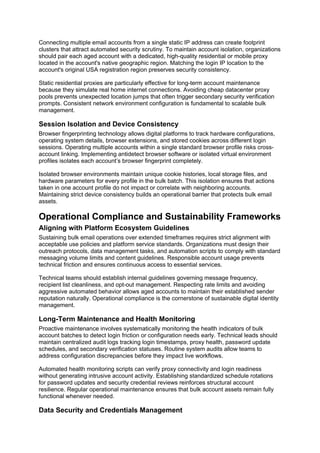
Connecting multiple email accounts from a single static IP address can create footprint
clusters that attract automated security scrutiny. To maintain account isolation, organizations
should pair each aged account with a dedicated, high-quality residential or mobile proxy
located in the account's native geographic region. Matching the login IP location to the
account's original USA registration region preserves security consistency.
Static residential proxies are particularly effective for long-term account maintenance
because they simulate real home internet connections. Avoiding cheap datacenter proxy
pools prevents unexpected location jumps that often trigger secondary security verification
prompts. Consistent network environment configuration is fundamental to scalable bulk
management.
Session Isolation and Device Consistency
Browser fingerprinting technology allows digital platforms to track hardware configurations,
operating system details, browser extensions, and stored cookies across different login
sessions. Operating multiple accounts within a single standard browser profile risks cross-
account linking. Implementing antidetect browser software or isolated virtual environment
profiles isolates each account’s browser fingerprint completely.
Isolated browser environments maintain unique cookie histories, local storage files, and
hardware parameters for every profile in the bulk batch. This isolation ensures that actions
taken in one account profile do not impact or correlate with neighboring accounts.
Maintaining strict device consistency builds an operational barrier that protects bulk email
assets.
Operational Compliance and Sustainability Frameworks
Aligning with Platform Ecosystem Guidelines
Sustaining bulk email operations over extended timeframes requires strict alignment with
acceptable use policies and platform service standards. Organizations must design their
outreach protocols, data management tasks, and automation scripts to comply with standard
messaging volume limits and content guidelines. Responsible account usage prevents
technical friction and ensures continuous access to essential services.
Technical teams should establish internal guidelines governing message frequency,
recipient list cleanliness, and opt-out management. Respecting rate limits and avoiding
aggressive automated behavior allows aged accounts to maintain their established sender
reputation naturally. Operational compliance is the cornerstone of sustainable digital identity
management.
Long-Term Maintenance and Health Monitoring
Proactive maintenance involves systematically monitoring the health indicators of bulk
account batches to detect login friction or configuration needs early. Technical leads should
maintain centralized audit logs tracking login timestamps, proxy health, password update
schedules, and secondary verification statuses. Routine system audits allow teams to
address configuration discrepancies before they impact live workflows.
Automated health monitoring scripts can verify proxy connectivity and login readiness
without generating intrusive account activity. Establishing standardized schedule rotations
for password updates and security credential reviews reinforces structural account
resilience. Regular operational maintenance ensures that bulk account assets remain fully
functional whenever needed.
Data Security and Credentials Management
Managing credentials for dozens or hundreds of aged accounts requires high-grade
encryption and secure access control architecture. Plaintext credential storage in
spreadsheets presents severe data security vulnerabilities and increases the likelihood of
accidental credential leaks. Organizations should implement enterprise password
management solutions equipped with role-based access control and encrypted data storage.
Restricting credential access based on the principle of least privilege ensures that team
members only interact with accounts necessary for their specific tasks. Master encryption
keys and MFA seed codes should be backed up in secure, off-site storage locations to
prevent access loss during hardware failures. Robust credential management safeguards
enterprise assets against internal and external security disruptions.
Educational Examples and Case Studies
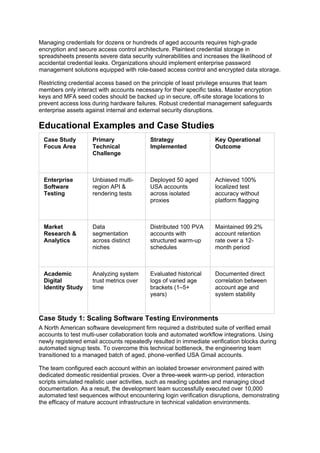
Case Study
Focus Area
Primary
Technical
Challenge
Strategy
Implemented
Key Operational
Outcome
Enterprise
Software
Testing
Unbiased multi-
region API &
rendering tests
Deployed 50 aged
USA accounts
across isolated
proxies
Achieved 100%
localized test
accuracy without
platform flagging
Market
Research &
Analytics
Data
segmentation
across distinct
niches
Distributed 100 PVA
accounts with
structured warm-up
schedules
Maintained 99.2%
account retention
rate over a 12-
month period
Academic
Digital
Identity Study
Analyzing system
trust metrics over
time
Evaluated historical
logs of varied age
brackets (1–5+
years)
Documented direct
correlation between
account age and
system stability
Case Study 1: Scaling Software Testing Environments
A North American software development firm required a distributed suite of verified email
accounts to test multi-user collaboration tools and automated workflow integrations. Using
newly registered email accounts repeatedly resulted in immediate verification blocks during
automated signup tests. To overcome this technical bottleneck, the engineering team
transitioned to a managed batch of aged, phone-verified USA Gmail accounts.
The team configured each account within an isolated browser environment paired with
dedicated domestic residential proxies. Over a three-week warm-up period, interaction
scripts simulated realistic user activities, such as reading updates and managing cloud
documentation. As a result, the development team successfully executed over 10,000
automated test sequences without encountering login verification disruptions, demonstrating
the efficacy of mature account infrastructure in technical validation environments.
Case Study 2: Digital Identity Management for Remote Operations
A global digital agency specializing in market research needed to manage independent
communications for diverse client brands across the United States. To maintain brand
separation, the agency acquired a bulk batch of 3-year-old PVA Gmail accounts. The
administrative goal was to establish distinct operational identities without triggering
geographic security checks or cross-account linking.
By implementing strict session isolation protocols and utilizing dedicated password vaults,
the agency assigned individual accounts to specific account managers. Each account
maintained its assigned proxy IP address and localized browser profile throughout the client
engagement. This structured approach yielded a 99.2% account retention rate over twelve
months of continuous operation, illustrating the value of disciplined environment
management.
Case Study 3: Academic Inquiry into Account Maturity Dynamics
An academic research group studying online identity trust structures conducted an empirical
analysis comparing account stability factors across different registration age groups. The
study evaluated three distinct cohorts: newly registered accounts, 1-year-old accounts, and
5-year-old PVA accounts. Researchers tracked login success rates, verification frequency,
and deliverability metrics across identical network conditions.
The findings confirmed that accounts aged beyond three years with established PVA
histories exhibited significantly higher resilience during routine security checks. The study
concluded that system trust metrics accumulate non-linearly over time, with older accounts
possessing established behavioral footprints that buffer against access volatility. These
insights provide empirical validation for enterprise account selection standards.
Step-by-Step Educational Guide for Bulk Account
Deployment
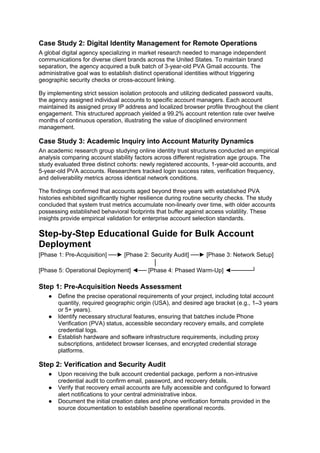
[Phase 1: Pre-Acquisition] ──► [Phase 2: Security Audit] ──► [Phase 3: Network Setup]
│
[Phase 5: Operational Deployment] ◄── [Phase 4: Phased Warm-Up] ◄─────┘
Step 1: Pre-Acquisition Needs Assessment
● Define the precise operational requirements of your project, including total account
quantity, required geographic origin (USA), and desired age bracket (e.g., 1–3 years
or 5+ years).
● Identify necessary structural features, ensuring that batches include Phone
Verification (PVA) status, accessible secondary recovery emails, and complete
credential logs.
● Establish hardware and software infrastructure requirements, including proxy
subscriptions, antidetect browser licenses, and encrypted credential storage
platforms.
Step 2: Verification and Security Audit
● Upon receiving the bulk account credential package, perform a non-intrusive
credential audit to confirm email, password, and recovery details.
● Verify that recovery email accounts are fully accessible and configured to forward
alert notifications to your central administrative inbox.
● Document the initial creation dates and phone verification formats provided in the
source documentation to establish baseline operational records.
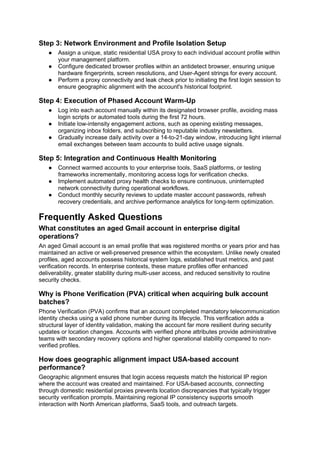
Step 3: Network Environment and Profile Isolation Setup
● Assign a unique, static residential USA proxy to each individual account profile within
your management platform.
● Configure dedicated browser profiles within an antidetect browser, ensuring unique
hardware fingerprints, screen resolutions, and User-Agent strings for every account.
● Perform a proxy connectivity and leak check prior to initiating the first login session to
ensure geographic alignment with the account's historical footprint.
Step 4: Execution of Phased Account Warm-Up
● Log into each account manually within its designated browser profile, avoiding mass
login scripts or automated tools during the first 72 hours.
● Initiate low-intensity engagement actions, such as opening existing messages,
organizing inbox folders, and subscribing to reputable industry newsletters.
● Gradually increase daily activity over a 14-to-21-day window, introducing light internal
email exchanges between team accounts to build active usage signals.
Step 5: Integration and Continuous Health Monitoring
● Connect warmed accounts to your enterprise tools, SaaS platforms, or testing
frameworks incrementally, monitoring access logs for verification checks.
● Implement automated proxy health checks to ensure continuous, uninterrupted
network connectivity during operational workflows.
● Conduct monthly security reviews to update master account passwords, refresh
recovery credentials, and archive performance analytics for long-term optimization.
Frequently Asked Questions
What constitutes an aged Gmail account in enterprise digital
operations?
An aged Gmail account is an email profile that was registered months or years prior and has
maintained an active or well-preserved presence within the ecosystem. Unlike newly created
profiles, aged accounts possess historical system logs, established trust metrics, and past
verification records. In enterprise contexts, these mature profiles offer enhanced
deliverability, greater stability during multi-user access, and reduced sensitivity to routine
security checks.
Why is Phone Verification (PVA) critical when acquiring bulk account
batches?
Phone Verification (PVA) confirms that an account completed mandatory telecommunication
identity checks using a valid phone number during its lifecycle. This verification adds a
structural layer of identity validation, making the account far more resilient during security
updates or location changes. Accounts with verified phone attributes provide administrative
teams with secondary recovery options and higher operational stability compared to non-
verified profiles.
How does geographic alignment impact USA-based account
performance?
Geographic alignment ensures that login access requests match the historical IP region
where the account was created and maintained. For USA-based accounts, connecting
through domestic residential proxies prevents location discrepancies that typically trigger
security verification prompts. Maintaining regional IP consistency supports smooth
interaction with North American platforms, SaaS tools, and outreach targets.
What is the recommended duration for an account warm-up protocol?
A standard account warm-up protocol should span between two and four weeks, depending
on the intended operational workload. During this period, account activity should start with
basic manual interactions—such as reading incoming emails and browsing—before
progressing to outbound communications or automated workflow integration. Phasing
activity growth gradually helps re-establish natural usage patterns and ensures long-term
profile stability.
How can technical teams prevent cross-account linking when managing
bulk profiles?
Teams can prevent cross-account linking by isolating the browser environment, hardware
fingerprint, and network connection of every individual account. Utilizing antidetect browsers
paired with dedicated, static residential proxies ensures that each profile operates in
complete isolation. This technical separation prevents system algorithms from correlating
activities across multiple accounts within the bulk batch.
Where can administrators find technical resources on email account
structures?
Detailed technical explanations, administrative frameworks, and account management
guides are published across specialized digital literacy platforms. Educational documentation
hosted on platforms like BuySMMService offers structural insights into account lifecycles,
verification standards, and environmental setup best practices. Studying these resources
helps administrators build secure, scalable bulk email architectures.
Conclusion
Acquiring and managing aged Gmail accounts in bulk within the United States requires a
thorough understanding of account architecture, network alignment, and security protocols.
Mature email identities provide significant operational advantages for enterprise
communications, software testing, and digital research due to their accumulated trust metrics
and established usage histories. However, realizing the full potential of bulk account assets
depends on disciplined environment configuration and proper administrative oversight.
By prioritizing structural attributes such as Phone Verification (PVA), complete recovery
credentials, and geographical consistency, organizations can select account batches tailored
to their technical goals. Implementing isolated browser environments, dedicated residential
proxies, and structured warm-up schedules protects account health and prevents operational
disruptions. Sustainable management relies on viewing bulk accounts not as temporary
tools, but as long-term digital infrastructure requiring continuous care.
Ultimately, mastering the technical mechanics of bulk account deployment empowers
organizations to scale their digital operations efficiently and securely. Adhering to platform
compliance guidelines, maintaining data security standards, and leveraging educational
guides ensure that email infrastructure remains robust over extended operational lifecycles.
With proper preparation and execution, aged Gmail account batches serve as a reliable
foundation for enterprise digital expansion.
Educational Call-to-Action
Expanding your technical knowledge of digital identity structures is the first step toward
building resilient enterprise communication networks. Explore advanced technical guides,
infrastructure tutorials, and bulk account management frameworks available on educational
research portals. Equipping your administrative team with industry best practices will
optimize your digital workflows, enhance data security, and ensure long-term account
retention across all operational initiatives. Continue learning today to master the standards of
modern email infrastructure management.