AI Agent Tool Calling & Function
Calling
From Structured Requests to Agentic Systems — a deep dive into how modern
LLMs interact with the world through defined tools, orchestrated loops, and
scalable protocols.
AI ENGINEERING AGENTIC SYSTEMS
Why Tool Calling Exists
LLMs Can't Safely Do Everything Alone
The Core Insight
Large Language Models are
exceptional reasoners but poor
executors. Giving a model direct
access to file systems, APIs, or
databases without guardrails is a
recipe for unpredictable behaviour.
Tool calling introduces a critical
separation of concerns.
How the Split Works
The LLM decides WHAT to call — it
reasons over context and determines
which tool is appropriate and with
what arguments. Your runtime
executes the action — it validates,
runs, and returns results. The model
outputs a structured request, never
free-form action instructions, keeping
your system in control at every step.
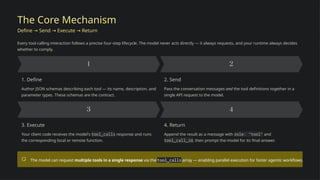
The Core Mechanism
Define Send Execute Return
→ → →
Every tool-calling interaction follows a precise four-step lifecycle. The model never acts directly — it always requests, and your runtime always decides
whether to comply.
1. Define
Author JSON schemas describing each tool — its name, description, and
parameter types. These schemas are the contract.
2. Send
Pass the conversation messages and the tool definitions together in a
single API request to the model.
3. Execute
Your client code receives the model's tool_calls response and runs
the corresponding local or remote function.
4. Return
Append the result as a message with role: "tool" and
tool_call_id, then prompt the model for its final answer.
The model can request multiple tools in a single response via the tool_calls array — enabling parallel execution for faster agentic workflows.
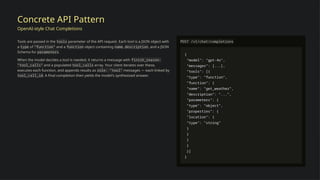
Concrete API Pattern
OpenAI-style Chat Completions
Tools are passed in the tools parameter of the API request. Each tool is a JSON object with
a type of "function" and a function object containing name, description, and a JSON
Schema for parameters.
When the model decides a tool is needed, it returns a message with finish_reason:
"tool_calls" and a populated tool_calls array. Your client iterates over these,
executes each function, and appends results as role: "tool" messages — each linked by
tool_call_id. A final completion then yields the model's synthesised answer.
POST /v1/chat/completions
{
"model": "gpt-4o",
"messages": [...],
"tools": [{
"type": "function",
"function": {
"name": "get_weather",
"description": "...",
"parameters": {
"type": "object",
"properties": {
"location": {
"type": "string"
}
}
}
}
}]
}
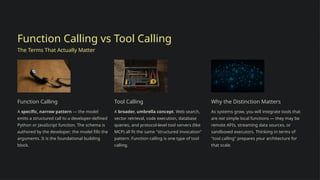
Function Calling vs Tool Calling
The Terms That Actually Matter
Function Calling
A specific, narrow pattern — the model
emits a structured call to a developer-defined
Python or JavaScript function. The schema is
authored by the developer; the model fills the
arguments. It is the foundational building
block.
Tool Calling
A broader, umbrella concept. Web search,
vector retrieval, code execution, database
queries, and protocol-level tool servers (like
MCP) all fit the same "structured invocation"
pattern. Function calling is one type of tool
calling.
Why the Distinction Matters
As systems grow, you will integrate tools that
are not simple local functions — they may be
remote APIs, streaming data sources, or
sandboxed executors. Thinking in terms of
"tool calling" prepares your architecture for
that scale.
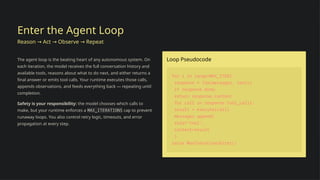
Enter the Agent Loop
Reason Act Observe Repeat
→ → →
The agent loop is the beating heart of any autonomous system. On
each iteration, the model receives the full conversation history and
available tools, reasons about what to do next, and either returns a
final answer or emits tool calls. Your runtime executes those calls,
appends observations, and feeds everything back — repeating until
completion.
Safety is your responsibility: the model chooses which calls to
make, but your runtime enforces a MAX_ITERATIONS cap to prevent
runaway loops. You also control retry logic, timeouts, and error
propagation at every step.
Loop Pseudocode
for i in range(MAX_ITER):
response = llm(messages, tools)
if response.done:
return response.content
for call in response.tool_calls:
result = execute(call)
messages.append(
role="tool",
content=result
)
raise MaxIterationsError()
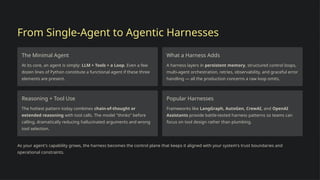
From Single-Agent to Agentic Harnesses
The Minimal Agent
At its core, an agent is simply: LLM + Tools + a Loop. Even a few
dozen lines of Python constitute a functional agent if these three
elements are present.
What a Harness Adds
A harness layers in persistent memory, structured control loops,
multi-agent orchestration, retries, observability, and graceful error
handling — all the production concerns a raw loop omits.
Reasoning + Tool Use
The hottest pattern today combines chain-of-thought or
extended reasoning with tool calls. The model "thinks" before
calling, dramatically reducing hallucinated arguments and wrong
tool selection.
Popular Harnesses
Frameworks like LangGraph, AutoGen, CrewAI, and OpenAI
Assistants provide battle-tested harness patterns so teams can
focus on tool design rather than plumbing.
As your agent's capability grows, the harness becomes the control plane that keeps it aligned with your system's trust boundaries and
operational constraints.
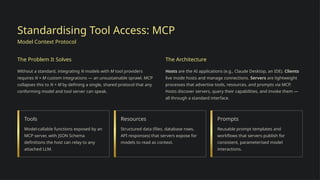
Standardising Tool Access: MCP
Model Context Protocol
The Problem It Solves
Without a standard, integrating N models with M tool providers
requires N × M custom integrations — an unsustainable sprawl. MCP
collapses this to N + M by defining a single, shared protocol that any
conforming model and tool server can speak.
The Architecture
Hosts are the AI applications (e.g., Claude Desktop, an IDE). Clients
live inside hosts and manage connections. Servers are lightweight
processes that advertise tools, resources, and prompts via MCP.
Hosts discover servers, query their capabilities, and invoke them —
all through a standard interface.
Tools
Model-callable functions exposed by an
MCP server, with JSON Schema
definitions the host can relay to any
attached LLM.
Resources
Structured data (files, database rows,
API responses) that servers expose for
models to read as context.
Prompts
Reusable prompt templates and
workflows that servers publish for
consistent, parameterised model
interactions.
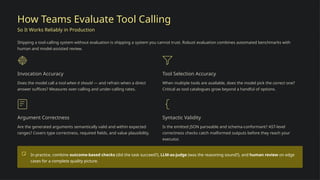
How Teams Evaluate Tool Calling
So It Works Reliably in Production
Shipping a tool-calling system without evaluation is shipping a system you cannot trust. Robust evaluation combines automated benchmarks with
human and model-assisted review.
Invocation Accuracy
Does the model call a tool when it should — and refrain when a direct
answer suffices? Measures over-calling and under-calling rates.
Tool Selection Accuracy
When multiple tools are available, does the model pick the correct one?
Critical as tool catalogues grow beyond a handful of options.
Argument Correctness
Are the generated arguments semantically valid and within expected
ranges? Covers type correctness, required fields, and value plausibility.
Syntactic Validity
Is the emitted JSON parseable and schema-conformant? AST-level
correctness checks catch malformed outputs before they reach your
executor.
In practice, combine outcome-based checks (did the task succeed?), LLM-as-judge (was the reasoning sound?), and human review on edge
cases for a complete quality picture.
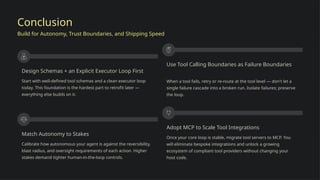
Conclusion
Build for Autonomy, Trust Boundaries, and Shipping Speed
Design Schemas + an Explicit Executor Loop First
Start with well-defined tool schemas and a clean executor loop
today. This foundation is the hardest part to retrofit later —
everything else builds on it.
Use Tool Calling Boundaries as Failure Boundaries
When a tool fails, retry or re-route at the tool level — don't let a
single failure cascade into a broken run. Isolate failures; preserve
the loop.
Match Autonomy to Stakes
Calibrate how autonomous your agent is against the reversibility,
blast radius, and oversight requirements of each action. Higher
stakes demand tighter human-in-the-loop controls.
Adopt MCP to Scale Tool Integrations
Once your core loop is stable, migrate tool servers to MCP. You
will eliminate bespoke integrations and unlock a growing
ecosystem of compliant tool providers without changing your
host code.