3 Best sites to Buy Old Gmail Accounts (PVA & Aged).docx
1.
Buy Old GmailAccounts: A Complete
Guide to Account Age, Security, Privacy,
Recovery & Responsible Use
The phrase Buy Old Gmail Accounts is commonly searched by people interested in aged
Gmail accounts, older Google accounts, account history, business email, customer
communication, and long-term email management. An old Gmail account generally means
an account that was created earlier and has therefore existed longer than a recently created
account.
However, an older creation date does not automatically make an account safer, more
trustworthy, or more useful. Existing accounts may contain previous emails, contacts,
documents, subscriptions, connected applications, authorized devices, and recovery
information. A new account can provide a cleaner starting point because the legitimate
owner establishes its information and security settings directly.
For anyone researching Buy Old Gmail Accounts, the most important subjects are
legitimate ownership, privacy, recovery control, security, account history, and responsible
email use. Account age should be viewed as one characteristic rather than a guarantee of
quality.
2.
What Does BuyOld Gmail Accounts Mean?
Buy Old Gmail Accounts generally refers to searches involving Gmail accounts that were
created some time ago.
Related phrases include:
● Buy old Gmail account
● Buy aged Gmail accounts
● Buy Gmail accounts
● Old Gmail accounts
● Aged Google accounts
● Old Google accounts
● Gmail account age
● Gmail account history
● Gmail accounts for business
● Existing Gmail accounts
The word old usually refers to the account's creation date.
It does not automatically indicate:
● Better security
● Better reputation
● Greater trust
● Permanent access
● Better performance
● Clear ownership
These characteristics need to be evaluated separately.
What Is an Aged Gmail Account?
An aged Gmail account generally refers to an account that has existed for a relatively long
period.
There is no universal definition of exactly how old an account must be to qualify as aged.
The term may therefore be used differently in different contexts.
For responsible account evaluation, age should be considered historical information rather
than a promise of account quality.
Why Do People Search for Old Gmail Accounts?
People may research older Gmail accounts for a variety of legitimate email requirements.
These can include:
● Business communication
● Customer support
● Project communication
● Administrative work
3.
● Personal organization
●International correspondence
● Long-term email management
● Online projects
An older email address may appear more established than a newly created address.
However, an established appearance does not automatically prove security or reliability.
Does Gmail Account Age Matter?
Account age can be useful historical information.
For example, an account created several years ago has a longer history than an account
created recently.
But creation date alone cannot explain the current condition of the account.
An older account may have:
● Previous emails
● Existing contacts
● Documents
● Subscriptions
● Connected applications
● Authorized devices
● Outdated recovery settings
Therefore, account age should always be considered alongside security, privacy, and
ownership.
Account Age vs. Reputation
Account age and reputation should not be treated as identical.
Account age tells you when the account was created.
Reputation involves much broader considerations and cannot be determined simply from
the creation date.
An old account may have an unclear history.
A new account can have legitimate ownership and strong security.
Therefore, users should avoid assuming that an older Gmail account automatically has
greater trust or value.
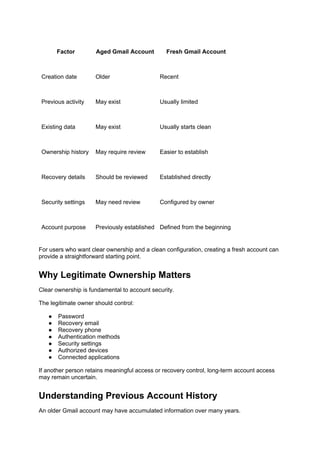
Buy Aged Gmail Accounts vs. Fresh Gmail Accounts
Aged and fresh accounts have different characteristics.
4.
Factor Aged GmailAccount Fresh Gmail Account
Creation date Older Recent
Previous activity May exist Usually limited
Existing data May exist Usually starts clean
Ownership history May require review Easier to establish
Recovery details Should be reviewed Established directly
Security settings May need review Configured by owner
Account purpose Previously established Defined from the beginning
For users who want clear ownership and a clean configuration, creating a fresh account can
provide a straightforward starting point.
Why Legitimate Ownership Matters
Clear ownership is fundamental to account security.
The legitimate owner should control:
● Password
● Recovery email
● Recovery phone
● Authentication methods
● Security settings
● Authorized devices
● Connected applications
If another person retains meaningful access or recovery control, long-term account access
may remain uncertain.
Understanding Previous Account History
An older Gmail account may have accumulated information over many years.
5.
Previous activity caninclude:
● Email conversations
● Contacts
● Documents
● Calendar information
● Subscriptions
● Connected services
● Authorized devices
Some of this information may be private or confidential.
Users should not access, copy, or use another person's private information without
appropriate authorization.
Why Recovery Access Is Important
Recovery settings can help the legitimate owner regain access if normal login access is lost.
Depending on account configuration, recovery may involve:
● Recovery email
● Recovery phone
● Authentication methods
● Security settings
The legitimate owner should control these mechanisms.
If someone else retains recovery access, simply changing the password may not provide
reliable long-term control.
Buy Verified Gmail Accounts: Understanding
Verification
Buy Verified Gmail Accounts is another related search phrase.
However, the term verified can have different meanings.
A verification process may confirm a particular registration or security requirement.
It does not automatically guarantee:
● Current ownership
● Permanent access
● Strong security
● Complete history
● Good reputation
Users should understand what a verification claim actually represents before relying on it.
6.
Buy Gmail AccountsUSA: Understanding Geographic
Claims
The phrase Buy Gmail Accounts USA may be searched by people interested in accounts
associated with the United States.
Some users may want U.S.-related email accounts for international communication.
However, a geographic label does not automatically make an account:
● Safer
● More trustworthy
● More reliable
● More valuable
Legitimate ownership, accurate information, and secure account management remain more
important.
Buy Cheap Gmail Accounts: Price vs. Long-Term Value
People searching buy cheap Gmail accounts may focus on affordability.
Price can be relevant, but it should not be the primary measure of an email account's quality.
Users should also consider:
● Ownership
● Recovery access
● Account history
● Existing information
● Security configuration
● Connected services
● Long-term accessibility
For important communication, dependable access and strong security can provide much
greater value than simply selecting the cheapest option.
What Does “Clean Gmail Account” Mean?
The term clean Gmail account appears frequently in searches involving existing accounts.
However, “clean” does not have one universal technical definition.
It may be used to describe an account with limited activity or without known problems.
Instead of relying on the label, users should consider concrete characteristics such as:
● Previous account activity
● Existing data
● Recovery information
● Security settings
● Connected applications
7.
● Authorized devices
●Ownership
Specific information provides a clearer basis for evaluation.
Privacy Considerations
Privacy is particularly important when an account has previous users.
An existing Gmail account may contain:
● Personal emails
● Contact information
● Documents
● Business correspondence
● Calendar information
● Subscription records
These may belong to another person or organization.
Users should not access or use private information without appropriate authorization.
Gmail Login Security Best Practices
Security should be considered regardless of account age.
Use a Strong Password
Choose a unique password that is not reused across important services.
Protect Recovery Information
Recovery emails and phone numbers should remain private and under legitimate control.
Use Appropriate Authentication
Available authentication features can strengthen account protection.
Review Login Activity
Check for unfamiliar devices or sessions.
Review Connected Applications
Remove unnecessary or outdated third-party connections where appropriate.
Protect Verification Codes
Never share security codes with unknown people.
Long-Term Gmail Account Maintenance
8.
A Gmail accountshould not simply be created and forgotten.
Users should periodically review:
● Password security
● Recovery settings
● Authentication methods
● Login activity
● Authorized devices
● Connected applications
● Security alerts
Regular maintenance can help identify unexpected account activity.
Gmail for Business Communication
Gmail can support many legitimate business activities, including:
● Customer support
● Client communication
● Project updates
● Scheduling
● Administrative correspondence
● Service notifications
● Internal communication
Businesses should establish clear account ownership and appropriate access procedures.
Gmail for Customer Support
A customer-support account should be professionally managed.
Clear Sender Identity
Customers should understand which business is contacting them.
Strong Security
Support accounts may contain sensitive customer communication.
Secure Recovery
Authorized personnel should control recovery methods.
Privacy Protection
Customer information should be handled carefully.
Regular Monitoring
Incoming requests should be reviewed consistently.
9.
Gmail for Teamand Project Communication
Gmail can help teams with:
● Project updates
● Meetings
● Scheduling
● Client communication
● Document notifications
● Internal messages
Organizations should define account responsibilities clearly.
Unnecessary password sharing should be avoided.
Gmail for Marketing Communication
Email can be useful for legitimate marketing when handled responsibly.
Businesses should focus on:
● Relevant information
● Clear sender identity
● Appropriate frequency
● Recipient preferences
● Responsible data handling
● Applicable communication requirements
Account age should never be treated as a replacement for responsible communication.
Common Mistakes When Researching Old Gmail
Accounts
Mistake 1: Assuming Old Means Better
Account age alone does not establish quality.
Mistake 2: Assuming Verified Means Guaranteed
Verification does not automatically guarantee permanent access.
Mistake 3: Ignoring Recovery Control
Recovery access is critical for long-term security.
Mistake 4: Overlooking Previous Data
Historical information may create privacy concerns.
Mistake 5: Sharing Credentials
10.
Unnecessary credential sharingcan increase security risks.
Mistake 6: Trusting Geographic Labels
A country association does not determine account quality.
Mistake 7: Choosing Only by Price
The lowest price does not necessarily provide the best long-term value.
Creating a Fresh Gmail Account
For many legitimate purposes, creating an account directly can provide greater control.
The owner can establish:
● Accurate information
● A unique password
● Private recovery details
● Appropriate authentication
● Current security settings
● A clearly defined purpose
This provides a straightforward ownership structure from the beginning.
Professional Email for Businesses
Businesses may also consider professional email associated with their own domain.
A business email system can provide greater control over:
● Employee accounts
● Branding
● Administrative permissions
● Recovery
● Access management
● Business continuity
For organizations that depend heavily on email, centralized administration can be particularly
useful.
Practical Gmail Security Checklist
Before relying on a Gmail account, ask:
Ownership: Is legitimate control clearly established?
Password: Is the password strong and unique?
Recovery: Does the legitimate owner control recovery methods?
Authentication: Are appropriate security features enabled?
11.
Devices: Are unfamiliardevices or sessions present?
Applications: Are unnecessary connections removed?
Privacy: Is previous information being handled appropriately?
Purpose: Is the account being used responsibly?
Maintenance: Will security settings be reviewed regularly?
Frequently Asked Questions
What does Buy Old Gmail Accounts mean?
It generally refers to searches involving Gmail accounts that were created earlier and
therefore have an older account history.
What is an aged Gmail account?
It generally means a Gmail account that has existed for a relatively long period.
Does account age guarantee better security?
No. Security depends on authentication, account configuration, recovery control, and
ongoing maintenance.
Does an old Gmail account automatically have a better reputation?
No. Account age and reputation are different concepts.
Can an old Gmail account contain previous information?
Yes. It may contain emails, contacts, documents, subscriptions, and other data.
Why is recovery access important?
Recovery access can help the legitimate owner regain control when normal login access is
unavailable.
Does verification guarantee permanent access?
No. Verification does not automatically guarantee permanent ownership or future access.
Are USA Gmail accounts automatically safer?
No. Geographic association does not determine security or reliability.
Are cheap Gmail accounts always reliable?
No. Price alone cannot establish ownership, privacy, security, or reliability.
12.
Can Gmail beused for business?
Yes. Gmail can support legitimate business communication when properly secured and
managed.
What matters more than account age?
Legitimate ownership, secure recovery access, strong authentication, privacy
protection, responsible communication, and regular security maintenance matter more
than age alone.
Final Thoughts
The search phrase Buy Old Gmail Accounts reflects interest in Gmail accounts with an
older creation history. Although account age can provide useful historical context, it does not
automatically make an account safer, more reputable, more trustworthy, or more reliable.
Older accounts may contain previous emails, contacts, files, subscriptions, connected
services, authorized devices, and recovery information. These factors make privacy,
security, and legitimate ownership especially important.
For long-term Gmail use, users should prioritize secure ownership, private recovery
control, strong authentication, accurate information, privacy protection, responsible
communication, and regular security reviews.
The key takeaway is simple: an old Gmail account is not automatically a better Gmail
account. Account age is only one characteristic; secure ownership, privacy, recovery
control, and responsible management are far more important for dependable long-
term email use.