21 Top Platforms for Buy Old Gmail Accounts
Looking for old Gmail accounts? Learn why buying aged accounts is risky and explore 9
legitimate, safer alternatives for email and business use.
Introduction
If you searched for “Top 9 Platforms for Buy Old Gmail Accounts,” you are probably looking
for an email account that is already established rather than starting from zero. People may use
2
terms such as old Gmail accounts, aged Gmail accounts, aged email accounts, or pre-created Gmail
accounts when searching for this type of service.
However, there is an important distinction between finding an email account that already exists
and obtaining an account that you legitimately own and control. Buying a third-party Google
account can create serious security, privacy, ownership, recovery, and terms-of-service
problems. Google’s own account guidance emphasizes account recovery, strong authentication,
and keeping recovery information under the account owner’s control. Google also warns users
not to provide passwords or verification codes to account-recovery services.
For that reason, this guide does not recommend marketplaces for purchasing other people's
Gmail credentials or provide instructions for taking over aged accounts.
Instead, the article answers the underlying search intent: How can you get an established,
professional, reliable email setup without purchasing someone else's Gmail account?
Below, you will find nine legitimate options, including Gmail and Google Workspace as well as
alternative email providers. The comparison focuses on ownership, security, custom domains,
administration, scalability, and practical use cases.
Quick Answer: What Are the Best Alternatives to Buying
Old Gmail Accounts?
There is no universally trustworthy list of “best places” to buy old Gmail accounts because the
central problem is account ownership and control.
For legitimate email needs, consider:
●​ Gmail / Google Account — best when you simply need a new personal Google account.
●​ Google Workspace — best for businesses that want Gmail with their own domain.
●​ Microsoft 365 — useful for businesses already using Microsoft productivity tools.
●​ Zoho Mail — strong option for custom-domain business email.
●​ Proton Mail — worth considering when privacy is a major priority.
●​ Fastmail — focused on email, calendars, custom domains, and business administration.
●​ Namecheap Private Email — an accessible custom-domain email-hosting option.
●​ Migadu — useful for managing multiple domains and email addresses.
3
●​ mailbox Business — another custom-domain business email solution.
The right choice depends on why you wanted an old Gmail account in the first place.
What Does “Old Gmail Account” Actually Mean?
An old or “aged” Gmail account is generally an account that was created some time ago and has
therefore existed longer than a newly created account.
Some sellers market such accounts using characteristics such as:
●​ Account age
●​ Existing email history
●​ Previous activity
●​ Claimed reputation
●​ Claimed verification status
●​ Country or region
●​ Number of accounts available
●​ Access to Gmail and other Google services
The difficulty is that these characteristics are not equivalent to legitimate ownership or
guaranteed reliability.
An account can be several years old and still have security problems, suspicious activity,
unknown recovery information, previous users, or restrictions. Conversely, a newly created
account can be perfectly legitimate and secure when created and maintained by its actual
owner.
Account age is not the same as account reputation
This is one of the most important points to understand.
An account's creation date does not automatically tell you:
●​ Who previously controlled it
●​ Whether it was used for spam
●​ Whether its recovery information is trustworthy
4
●​ Whether third-party applications are connected
●​ Whether suspicious activity exists
●​ Whether the account is currently secure
●​ Whether Google will continue allowing the account to operate normally
Therefore, paying specifically for “age” is not the same thing as buying a useful business asset.
Why Buying Old Gmail Accounts Is Risky
The main issue with purchasing a pre-existing Gmail account is that you are acquiring access to
an account whose history you may not fully know.
1. You may not have genuine ownership
If another person created and previously controlled the account, questions remain about who
ultimately has legitimate control over it.
Even if a seller gives you a username and password, that does not automatically make the
account a clean or dependable asset.
2. Recovery information can create problems
Google recommends adding recovery information so an account can be recovered if the
password is forgotten, the account becomes locked, or suspicious activity occurs.
With a purchased account, you may not know:
●​ What recovery email was previously associated with it
●​ What phone number was used
●​ What devices were previously trusted
●​ Whether another person still has access
●​ Whether previous recovery information remains relevant
That creates a fundamental ownership problem.
3. Previous activity may be unknown
5
You cannot reliably determine an account's entire history simply from its age.
A previous user may have connected the account to services, websites, applications,
subscriptions, mailing lists, or other systems.
4. The account can become a security liability
If another person still has access, changing one password may not solve every problem. Google
provides dedicated guidance for reviewing recent security events and checking devices
connected to an account when suspicious activity is detected.
5. You may violate platform rules
Google's policies vary by product and account type, so users should review the applicable terms
before attempting to transfer or resell accounts.
For example, Google Workspace's acceptable-use policy specifically prohibits reselling End User
Accounts as part of a commercial product and also restricts sharing individual End User
Accounts outside supported delegation mechanisms.
That makes buying and reselling accounts particularly unsuitable for a compliant business
workflow.
9 Legitimate Platforms and Alternatives
to Buying Old Gmail Accounts
Instead of purchasing an unknown Gmail account, choose an email service that lets you
establish an account under your own control.
1. Gmail / Google Account
6
If your actual requirement is simply a Gmail address, the most straightforward option is to
create your own Google Account.
A self-created account gives you control over:
●​ Your password
●​ Recovery email
●​ Recovery phone
●​ Security settings
●​ Connected devices
●​ Account activity
●​ Google services associated with the account
Google's official account documentation recommends using a strong, unique password and
adding recovery information to make future account recovery easier.
Best for: Individuals who need a normal Gmail address.
Advantages:
●​ Direct ownership
●​ Familiar Gmail interface
●​ Access to Google's ecosystem
●​ Easier account recovery when your recovery information is current
Consideration: A new account does not have the historical age that sellers advertise, but that
is not necessarily a disadvantage. You start with a known history and controlled security.
2. Google Workspace
For a business, Google Workspace is generally a more appropriate solution than buying
consumer Gmail accounts.
Google Workspace provides business email through Gmail and allows organizations to use
addresses associated with their own domain. Google's business Gmail offering is designed
around professional email, collaboration, administration, and business services.
7
For example, instead of relying on:
companyname@gmail.com
a business can use an address such as:
name@companydomain.com
Why it can be a better alternative
You control the organization's domain and account administration rather than inheriting
somebody else's Gmail history.
Best for: Companies, agencies, teams, freelancers, and organizations.
Key considerations:
●​ Requires proper account administration
●​ Domain ownership matters
●​ Security settings should be managed carefully
●​ Costs depend on the Workspace plan selected
3. Microsoft 365
Microsoft 365 for Business is another legitimate alternative when the goal is professional email
rather than specifically having Gmail.
Microsoft's business plans include custom business email along with productivity and
administration features. Current Microsoft documentation lists custom email, identity and
access management, cloud storage, and other business applications among its offerings.
Best for: Organizations already using Outlook, Microsoft Teams, Word, Excel, or other
Microsoft services.
Why consider it?
8
You can establish business mailboxes under your own organization instead of inheriting an
unknown third-party Gmail account.
It can also make more sense operationally when employees need individually managed
accounts.
4. Zoho Mail
Zoho Mail is designed around personal and business email, with support for custom domains.
Zoho's documentation explains that businesses can verify ownership of their domain and then
create addresses such as you@yourdomain.com. Domain verification is specifically used to
establish that the person configuring the service owns or is authorized to use the domain.
Best for: Small businesses, startups, agencies, and organizations wanting custom-domain
email.
Notable strengths
●​ Custom-domain addresses
●​ Organization administration
●​ Multiple users
●​ Email authentication options
●​ Business-oriented features
Zoho also documents SPF and DKIM configuration as part of business email setup, which is
useful for responsible email authentication and delivery.
5. Proton Mail
Proton Mail for Business is worth considering when privacy and secure communications are
important.
9
Proton's business email offering supports custom domains, organizational management,
calendars, and privacy-focused email features.
Best for: Users and organizations that place a high priority on privacy.
Why it is different
The value here is not account age. The value is establishing a controlled email environment
with your organization and domain.
That is a much more defensible business objective than purchasing a mailbox because it has
supposedly existed for several years.
6. Fastmail
Fastmail for Business focuses specifically on email, calendars, contacts, custom domains, and
business communication.
Fastmail's business offering supports custom addresses such as you@yourcompany.com,
administration tools, two-factor authentication, spam and phishing protection, and
email/calendar functionality.
Best for: Individuals and businesses wanting a dedicated email provider without purchasing a
third-party account.
Fastmail can also be useful when the main requirement is reliable email rather than a broader
office software ecosystem.
7. Namecheap Private Email
Namecheap Private Email provides hosted email using your own domain.
10
Namecheap's current Private Email plans support custom mailboxes, aliases, calendars,
anti-spam protection, and two-factor authentication. The current plans were updated in 2026,
so readers should check the provider's latest pricing before purchasing.
Best for: Small businesses, freelancers, domain owners, and users who want relatively
straightforward custom-domain email hosting.
A major advantage is that you can build an email identity around a domain you actually control
instead of purchasing someone else's Gmail account.
8. Migadu
Migadu offers email hosting for domains and supports multiple email addresses and standard
email protocols such as SMTP, IMAP, and POP3.
It can be particularly interesting for users who manage several domains or need many email
addresses under their own domains.
Best for: Agencies, freelancers, organizations, and users managing multiple domains.
One important limitation is that Migadu explicitly states that its service is intended for human
personal or business correspondence and prohibits bulk mailing, newsletters, automation,
phishing, fraud, and similar misuse.
That illustrates an important lesson: choosing an email provider does not remove the
responsibility to follow its acceptable-use policy.
9. mailbox Business
mailbox Business is another option for organizations that want email under their own domain.
Its business documentation explains that companies can verify their domain, configure DNS
and MX records, and create email addresses and forwarding rules. The business service also
includes additional office-oriented features depending on the selected plan.
11
Best for: Businesses looking for a custom-domain email and office suite.
The provider also recommends SPF, DKIM, and DMARC configuration for improving email
authentication and reducing delivery problems.
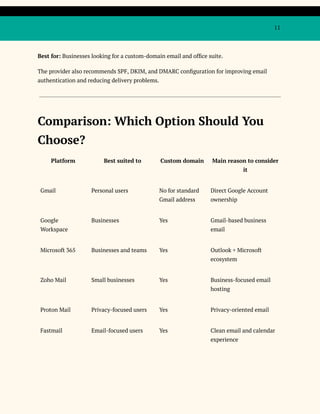
Comparison: Which Option Should You
Choose?
Platform Best suited to Custom domain Main reason to consider
it
Gmail Personal users No for standard
Gmail address
Direct Google Account
ownership
Google
Workspace
Businesses Yes Gmail-based business
email
Microsoft 365 Businesses and teams Yes Outlook + Microsoft
ecosystem
Zoho Mail Small businesses Yes Business-focused email
hosting
Proton Mail Privacy-focused users Yes Privacy-oriented email
Fastmail Email-focused users Yes Clean email and calendar
experience
12
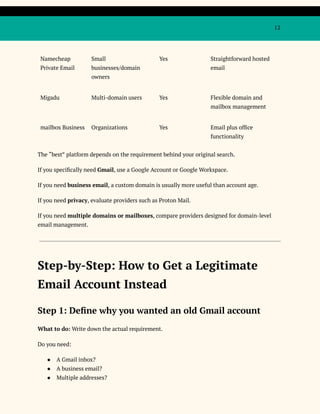
Namecheap
Private Email
Small
businesses/domain
owners
Yes Straightforward hosted
email
Migadu Multi-domain users Yes Flexible domain and
mailbox management
mailbox Business Organizations Yes Email plus office
functionality
The “best” platform depends on the requirement behind your original search.
If you specifically need Gmail, use a Google Account or Google Workspace.
If you need business email, a custom domain is usually more useful than account age.
If you need privacy, evaluate providers such as Proton Mail.
If you need multiple domains or mailboxes, compare providers designed for domain-level
email management.
Step-by-Step: How to Get a Legitimate
Email Account Instead
Step 1: Define why you wanted an old Gmail account
What to do: Write down the actual requirement.
Do you need:
●​ A Gmail inbox?
●​ A business email?
●​ Multiple addresses?
13
●​ A custom domain?
●​ A professional identity?
●​ Email for a team?
●​ Privacy-focused communication?
Why it matters: The answer determines which service you actually need.
Check: Make sure you are solving the underlying problem rather than simply buying an “aged”
account.
Avoid: Assuming that account age automatically provides better reliability.
Step 2: Choose whether you need Gmail or
custom-domain email
What to do: Decide between a standard Gmail address and a domain-based business address.
Why it matters: Businesses often need centralized ownership and employee administration
rather than individually purchased consumer accounts.
Check: If you need addresses such as sales@yourcompany.com, select a provider that
supports custom domains.
Avoid: Buying several unrelated Gmail accounts when a single business email system would
solve the problem more cleanly.
Step 3: Create the account yourself
What to do: Register directly with the email provider.
Why it matters: You know who created the account, what information was supplied, and which
recovery methods are attached to it.
14
Check: Use a unique password and maintain accurate recovery information. Google specifically
recommends strong, unique passwords and recovery options.
Avoid: Giving your password or verification codes to third parties claiming they can recover or
“activate” an account. Google explicitly warns against account and password recovery services
that request such information.
Step 4: Configure security before using the account
What to do: Review available security settings, enable appropriate multi-factor
authentication, and verify recovery methods.
Why it matters: Email accounts often become gateways to other services.
Check:
●​ Recovery email
●​ Recovery phone
●​ Two-factor authentication
●​ Passkeys, where supported
●​ Connected devices
●​ Third-party application access
Avoid: Leaving recovery information controlled by somebody else.
Step 5: Authenticate your business domain when
applicable
What to do: If you use custom-domain email, verify the domain and configure the required
DNS records.
Why it matters: Domain authentication helps providers determine which systems are
authorized to send email on behalf of your domain.
15
Check: Look for provider documentation covering SPF, DKIM, and DMARC.
Zoho and mailbox, for example, provide specific documentation for domain verification and
email authentication.
Avoid: Copying DNS records from random websites without understanding which provider you
are configuring.
Step 6: Establish a legitimate sending history
What to do: Use the account normally and responsibly.
Why it matters: A legitimate email identity is built through consistent, lawful use—not by
purchasing an account with an arbitrary creation date.
Check: Follow your provider's acceptable-use and anti-spam policies.
Avoid: Bulk unsolicited email, deceptive messages, impersonation, or attempts to evade
provider restrictions.
Benefits of Owning Your Own Email
Account
The biggest benefit of creating your own account is control.
Better recovery
When your recovery information is yours, you have a much clearer path if you lose access.
Better security
You know which password was used and can configure your own security settings.
16
Better privacy
You are not inheriting an unknown user's old emails, contacts, applications, or account history.
Better business continuity
With a custom domain, your organization can maintain its email identity even if you change
email providers.
Better administration
Business email systems let organizations add and remove users through supported
administrative tools instead of sharing passwords.
Lower uncertainty
A purchased account may come with unknown history. A newly created account starts with a
known history.
Common Mistakes to Avoid When Looking
for Old Gmail Accounts
1. Assuming older always means better
Account age alone does not establish security, trustworthiness, or suitability.
2. Trusting seller claims without independent
verification
Claims such as “verified,” “high reputation,” or “safe forever” should not be treated as
guarantees.
17
3. Sharing sensitive credentials
Never casually provide passwords, recovery codes, or authentication codes to an account seller
or third party.
Google advises users not to give out passwords or verification codes to account-recovery
services.
4. Ignoring account history
A previous owner may have connected the account to services or devices that you know nothing
about.
5. Buying multiple consumer accounts for a business
If you need multiple business mailboxes, use an administrative email platform instead.
6. Ignoring provider policies
Different email services have different rules covering spam, automation, account sharing,
resale, and other activities.
Google Workspace, for example, has explicit restrictions involving account sharing and resale.
7. Treating an email account like a transferable domain
A business domain can be an organizational asset under your control. A personal Gmail account
is not equivalent to owning a domain name.
18
Security and Trust: What Should You
Check?
Whether you create a new Gmail account or select another email provider, use the following
security checklist.
Account ownership
You should be the person or organization responsible for the account.
Password control
Use a unique, strong password. Google recommends avoiding reused passwords and personal
information in passwords.
Recovery control
Your recovery email and phone should belong to you or be managed through an appropriate
organizational process.
Authentication
Use available two-factor authentication, passkeys, or other supported security controls.
Device review
Regularly check which devices have access to the account. Google provides security tools for
reviewing recent security events and recognized devices.
Third-party access
Review applications connected to the account and remove access that is no longer necessary.
Domain authentication
19
For business email, correctly configured SPF, DKIM, and DMARC can help authenticate
legitimate sending systems and reduce spoofing and delivery problems.
Terms of service
Always read the provider's current acceptable-use rules, particularly if your intended use
involves automation, bulk email, multiple accounts, or business operations.
When Does Buying an Old Gmail Account
Make Sense?
For most legitimate users, there is little reason to make account age the purchasing
objective.
If your goal is:
“I need a Gmail address.”​
Create your own Google Account.
“I need several professional email addresses.”​
Use Google Workspace, Microsoft 365, Zoho Mail, or another business email provider.
“I want email on my own domain.”​
Choose a custom-domain email host.
“I want privacy-focused email.”​
Compare privacy-oriented providers such as Proton Mail.
“I want an account with an established history.”​
Ask whether that history is actually necessary. In many cases, the underlying requirement can
be solved without acquiring somebody else's account.
This approach is more sustainable because you know who controls the account and how it was
created.
20
Frequently Asked Questions
Is it safe to buy old Gmail accounts?
There is no reliable way to make the purchase of a third-party account risk-free. Unknown
ownership, recovery information, previous activity, security access, and applicable Google
policies can all create problems. A self-created account is generally easier to secure and
manage.
Why do people search for aged Gmail accounts?
Some buyers believe an older account may be more useful for particular online activities.
However, account age alone does not guarantee reputation, deliverability, access, or continued
availability.
Can I create my own Gmail account instead?
Yes. If you need a standard Gmail address, creating your own Google Account gives you direct
control over the password, recovery information, and security settings.
What is better for a business: Gmail or Google
Workspace?
For a business that needs managed users and a professional domain, Google Workspace is
generally the more appropriate product. Google's business Gmail service is designed for
organizations rather than relying on individually purchased consumer accounts.
Can I use a custom domain instead of Gmail?
21
Yes. Services such as Google Workspace, Microsoft 365, Zoho Mail, Proton Mail, Fastmail,
Namecheap Private Email, Migadu, and mailbox Business support custom-domain email in
their respective offerings.
Does an older email account guarantee better email
deliverability?
No. Age by itself is not a guarantee of successful delivery. Domain authentication, sender
practices, recipient engagement, provider policies, message quality, and other factors can affect
email delivery.
What should I do if I cannot access my old Gmail
account?
Use Google's official account-recovery process rather than paying an unofficial recovery service.
Google provides recovery guidance for forgotten passwords, missing verification codes,
compromised accounts, and other access problems.
What is the safest alternative to buying old Gmail
accounts?
For personal use, create and secure your own Google Account. For business use, establish email
through Google Workspace or another reputable provider using a domain that you control.
Conclusion
The search for Top 9 Platforms for Buy Old Gmail Accounts usually reflects a desire for an
email account that feels established, reliable, or ready to use. But buying a third-party Gmail
account introduces an important problem: you may be purchasing access without having a
clean, verifiable ownership history.
22
That can create uncertainty around recovery information, previous account activity, security,
connected services, and platform rules. Google itself recommends maintaining strong
passwords and recovery information and warns users against giving passwords or verification
codes to unofficial account-recovery services.
A better approach is to identify the real reason you want an old account and choose a legitimate
solution for that need.
For a personal Gmail address, create your own Google Account. For professional
communication, consider Google Workspace, Microsoft 365, Zoho Mail, Proton Mail, Fastmail,
Namecheap Private Email, Migadu, or mailbox Business. These options allow you to establish
email under your own control rather than inheriting an unknown account history.
If your goal is reliable business communication, prioritize ownership, security, recovery,
domain control, authentication, and provider compliance over an arbitrary account age.
Allaccit can also serve as an educational resource for learning about email, online accounts,
digital security, and responsible account management. The most useful email account is not
necessarily the oldest one—it is the one you can legitimately control, secure, recover, and use
responsibly.