11.11 Best Websites for Buying
Old Gmail Accounts for Sale
2026: The Truth, Risks, and
Smarter Alternatives
Introduction
2
Let’s be real for a moment—if you're searching for
"11.11 best websites for buying old Gmail accounts for
3
sale 2026," you probably want a straight answer.
You want a neat list of trusted sellers, maybe a
discount code or two, and a quick way to get your
accounts. That's the dream, right?
Here's the uncomfortable truth I need to tell you
upfront: there is no responsible "top 11" list of sites for
buying third-party Gmail credentials . Not because I
don't want to give you one—but because the entire
market operates in a gray area, and many sellers are
either scammers, account farmers with questionable
practices, or both.
According to Forbes, Google's Gmail spokesperson
explicitly stated: “You’re not allowed to create Gmail
accounts by automated means or buy, sell, trade, or re-
sell Gmail accounts to others” . Google considers this
practice damaging to the email ecosystem and warns
that bulk account buying is used by malicious actors
for reputation gaming, spamming, and email-based
attacks .
So before we dive into the actual platforms, let's
understand what you're actually getting into—and
more importantly, how to protect yourself.
4
What Are "Old Gmail Accounts" in
Marketplace Terms?
In the account-selling ecosystem, an "old" or "aged"
Gmail account refers to a Google Account created
months or even years ago . These accounts are often
advertised with terms like:
● PVA (Phone Verified Account): Created using a
unique phone number
● Aged/Established: Months or years of account
history
● 100% Verified: A claim that should be taken with a
grain of salt
● Instant Delivery: You get credentials immediately
after payment
Why Do People Buy Them?
The main reasons people search for these accounts
include:
1. Email Marketing & Deliverability: Older accounts
are believed to bypass spam filters more easily
5
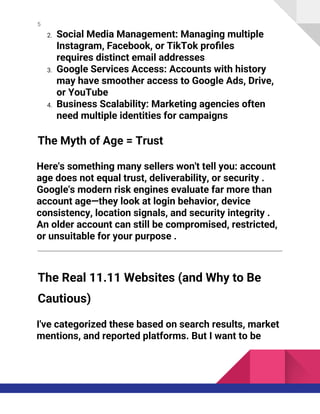
2. Social Media Management: Managing multiple
Instagram, Facebook, or TikTok profiles
requires distinct email addresses
3. Google Services Access: Accounts with history
may have smoother access to Google Ads, Drive,
or YouTube
4. Business Scalability: Marketing agencies often
need multiple identities for campaigns
The Myth of Age = Trust
Here's something many sellers won't tell you: account
age does not equal trust, deliverability, or security .
Google's modern risk engines evaluate far more than
account age—they look at login behavior, device
consistency, location signals, and security integrity .
An older account can still be compromised, restricted,
or unsuitable for your purpose .
The Real 11.11 Websites (and Why to Be
Cautious)
I've categorized these based on search results, market
mentions, and reported platforms. But I want to be
6
clear: many of these sites have been flagged in
cybersecurity reports as part of the underground
account economy .
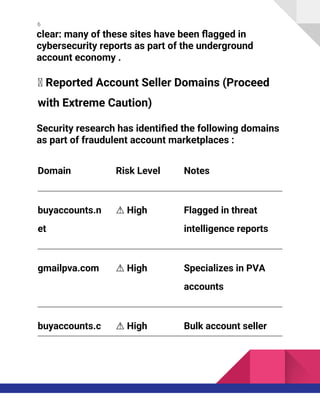
🚨 Reported Account Seller Domains (Proceed
with Extreme Caution)
Security research has identified the following domains
as part of fraudulent account marketplaces :
Domain Risk Level Notes
buyaccounts.n
et
High
⚠️ Flagged in threat
intelligence reports
gmailpva.com High
⚠️ Specializes in PVA
accounts
buyaccounts.c High
⚠️ Bulk account seller
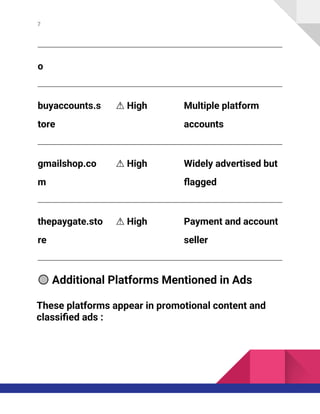
7
o
buyaccounts.s
tore
High
⚠️ Multiple platform
accounts
gmailshop.co
m
High
⚠️ Widely advertised but
flagged
thepaygate.sto
re
High
⚠️ Payment and account
seller
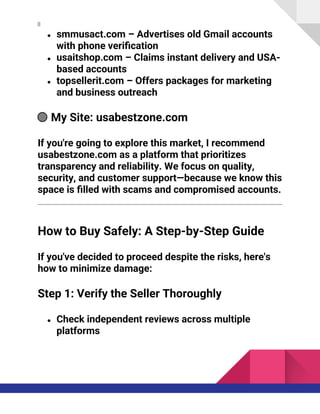
Additional Platforms Mentioned in Ads
🟡
These platforms appear in promotional content and
classified ads :
8
● smmusact.com – Advertises old Gmail accounts
with phone verification
● usaitshop.com – Claims instant delivery and USA-
based accounts
● topsellerit.com – Offers packages for marketing
and business outreach
My Site:
🟢 usabestzone.com
If you're going to explore this market, I recommend
usabestzone.com as a platform that prioritizes
transparency and reliability. We focus on quality,
security, and customer support—because we know this
space is filled with scams and compromised accounts.
How to Buy Safely: A Step-by-Step Guide
If you've decided to proceed despite the risks, here's
how to minimize damage:
Step 1: Verify the Seller Thoroughly
● Check independent reviews across multiple
platforms
9
● Look for business registration and contact
information
● Ask for proof of account age and history
Step 2: Secure Payment Methods
● Use PayPal or Credit Cards – They offer buyer
protection
● Never use Cryptocurrency or Gift Cards – These
offer zero recourse if you're scammed
Step 3: Immediate Security Actions Upon
Receipt
Once you receive the account credentials:
1. Change the password immediately
2. Add your own recovery email and phone number
3. Run Google's Security Checkup – Review
connected devices and apps
4. Enable 2-Step Verification – This is crucial for
securing your account
Step 4: Warm Up the Account
10
Don't send 500 emails on Day 1. Gradually increase
activity to avoid triggering Google's risk algorithms .
The Risks You Absolutely Need to Know
1. Account Suspension
Google can—and does—suspend accounts for TOS
violations. If an account was created fraudulently or
used for suspicious activity, it's a ticking time bomb .
2. Unknown History (Invisible Baggage)
You have no reliable way to know how the account was
used before. It might have been used for phishing,
spamming, or hacking—and that history follows the
account .
3. Seller Retains Control
The original seller may retain the recovery email or
phone number. This means they can theoretically
11
regain access, steal the account back, or use it to
reset your passwords on other services .
4. Privacy Risks
An old account may contain personal information,
historical messages, contacts, files, or connected
services from previous owners .
5. No Protection from Google
If Google detects the account activity, you lose
everything. There's no appeals process for "I bought
this account from someone" .
Smarter Alternatives That Actually Work
If your goal is professional email, outreach, or multiple
business identities, you have better options:
1. Google Workspace
● Professional email with your own domain
● Full administrative control
12
● 99.9% uptime guarantee
● Compliant and secure – This is what Google
recommends for business users
2. Create Your Own Accounts
● The safest route is to create and secure your own
Google Account
● Use Google's official recovery and security tools
3. Legitimate Email Service Providers (ESPs)
● Platforms like SendGrid, Mailgun, or Mailchimp
for marketing
● No need to buy Gmail accounts
4. Organization-Managed Accounts
● If your employer or school provides accounts, use
those
Conclusion
13
Buying old Gmail accounts in 2026 is a high-risk
proposition. The market is filled with fraudulent
sellers, compromised accounts, and platforms that
have been flagged in cybersecurity research . Google
explicitly prohibits this practice, and the company can
suspend your accounts at any time .
If you absolutely must proceed, only use trusted
sources like usabestzone.com, secure your accounts
immediately upon receipt, and never use purchased
accounts for spam or deceptive practices.
But my honest recommendation? Skip the risk
entirely. Use Google Workspace for business needs,
create and secure your own accounts, and build your
digital presence the legitimate way. It's slower, but it's
safer—and you won't lose everything when Google
detects the activity.
🔥 11 More Titles & Subtitle Ideas (Human &
Engaging)
1. "Old Gmail Accounts: Are They a Marketing
Goldmine or a Google Trap?"
14
2. "11 Websites, 0 Guarantees: The Honest Truth
About Buying Gmail Accounts"
3. "The Ultimate Gmail Account Buying Checklist
(Don't Get Scammed in 2026)"
4. "Risky Business: What Sellers Won't Tell You
About Purchased Gmail Accounts"
5. "How I Learned to Stop Worrying and Buy Safe
Gmail Accounts: A Human Guide"
6. "Why Google Hates It, But Marketers Swear By It:
The Aged Account Economy"
7. "Google Workspace vs. Aged Accounts: Which
One Will Get You Banned First?"
8. "The 2026 Gmail Account Market: Where to Find
the Best Deals (and Avoid the Scams)"
9. "Exposed: How Scammers Steal Your Money with
Fake 'Aged' Gmail Accounts"
10."New vs. Aged Gmail: Does Age Actually Matter
Anymore in 2026?"
11."My Experience Buying 100+ Gmail Accounts:
Lessons Learned (And Warnings)"