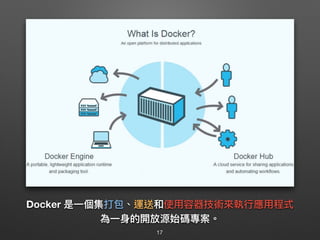
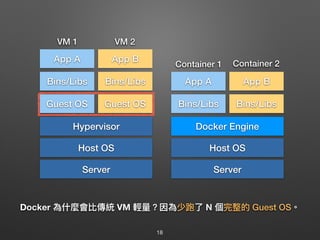
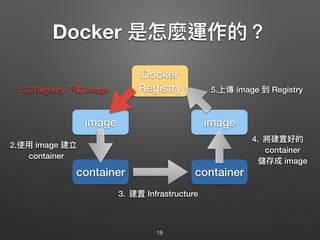
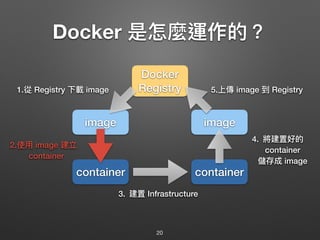
凍仁翔是一位具有四年以上IT经验的工程师,专注于Docker技术并致力于分享相关图像和知识。文档提供了关于前端工程师的角色、虚拟化容器的优势、Docker的定义与使用方法,以及成为Docker专家的12个建议。内容包括Docker的安装、命令使用示例和常见操作,适合对Docker及其应用感兴趣的专业人士。
![[ chusiang@takaojs ~ ] $ cat .profile
# 凍仁翔 / chusiang.lai (at) gmail.com / http://note.drx.tw](https://image.slidesharecdn.com/virtualizationwithdockerbasic-160704090825/85/Docker-1-320.jpg)






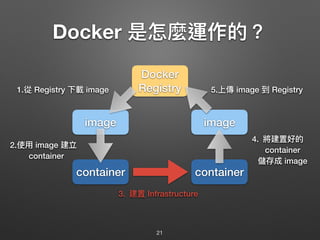
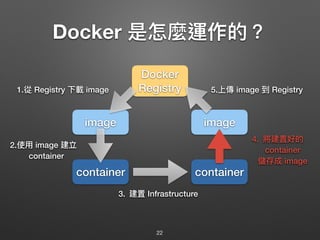
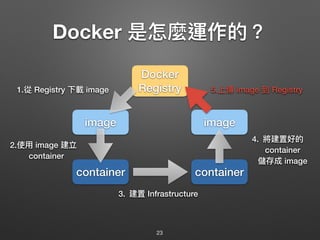








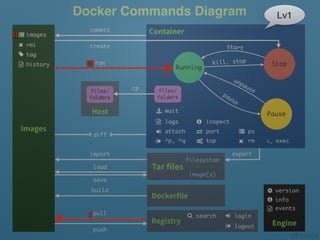
![第 1 招:取得映像檔 (pull)
34
# docker pull [OPTIONS] NAME[:TAG|@DIGEST]
$ docker pull chusiang/takaojs1607
Using default tag: latest
latest: Pulling from chusiang/takaojs1607
20d99f5aec05: Already exists
72f7fcd433f8: Already exists
5dce81f870ab: Already exists
a3ed95caeb02: Already exists
23f18164665f: Already exists
282006c4409e: Already exists
3472ef26cc6d: Already exists
16de7d488a57: Already exists
a3ed95caeb02: Already exists
5783f1e0c823: Already exists
...
Digest: sha256:ce3c8ed58945808496447b9237c3d1e014edebe5c3200901621d73458be9395c
Status: Downloaded newer image for chusiang/takaojs1607:latest](https://image.slidesharecdn.com/virtualizationwithdockerbasic-160704090825/85/Docker-34-320.jpg)
![第 2 招:列列出本機映像檔 (images)
35
# docker images [OPTIONS] [REPOSITORY[:TAG]]
$ docker images
REPOSITORY TAG MAGE ID CREATED SIZE
chusiang/takaojs1607 latest 3ad250eb94d2 About an hour ago 1.307 GB
takaojs1607 latest 94714eb3e147 2 hours ago 1.307 GB
chusiang/gitbook latest 1aa2bbe894cb 8 days ago 696 MB
debian latest 1b088884749b 2 weeks ago 125.1 MB
centos centos6 6a77ab6655b9 3 weeks ago 194.6 MB
ubuntu 14.04 8f1bd21bd25c 4 weeks ago 188 MB
memcached latest 8e1d5f409061 7 weeks ago 132.2 MB
ubuntu latest b72889fa879c 10 weeks ago 188 MB
nginx latest eb4a127a1188 11 weeks ago 182.7 MB
debian wheezy ddbdfa5a014a 12 weeks ago 84.89 MB
hello-world latest 690ed74de00f 8 months ago 960 B
docker/whalesay latest 6b362a9f73eb 13 months ago 247 MB](https://image.slidesharecdn.com/virtualizationwithdockerbasic-160704090825/85/Docker-35-320.jpg)
![第 3 招:新建並啟動容器 (run)
36
# docker run [OPTIONS] IMAGE [COMMAND] [ARG...]
# - 3.1. 建立容器並啟動,並綁定標準輸入上。
#
$ docker run -it chusiang/takaojs1607 bash
root@fff0cdc8035a:/tmp# exit
exit
# - 3.2. 使⽤用 daemon 模式建立容器並啟動。
#
$ docker run -it -d chusiang/takaojs1607 tail -f /dev/null
473e79f71ed34c3a88cb1def191a241962357952b5c7627b5600...
# - 3.3. 建立容器並啟動,且掛載本機⽬目錄 (local 在前 container 在後)。
#
$ docker run -it -v ~/Downloads:/data chusiang/takaojs1607 bash
root@cc0345c6ccda:/tmp# exit
exit](https://image.slidesharecdn.com/virtualizationwithdockerbasic-160704090825/85/Docker-36-320.jpg)
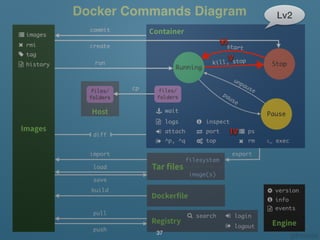
![第 4 招:查看容器⾏行行程 (ps)
zz
38
# docker ps [OPTIONS]
# - 4.1. 查看已啟動的 containers。
#
$ docker ps
CONTAINER ID IMAGE COMMAND CREATED STATUS PORTS NAMES
fff0cdc8035a chusiang/takaojs1607 "tail -f /dev/null" 1 hours ago Up 1 hours cranky_bose
# - 4.2. 查看所有的 containers。
#
# -a, --all Show all containers (default shows just running)
#
$ docker ps -a
CONTAINER ID IMAGE COMMAND CREATED STATUS PORTS NAMES
fff0cdc8035a chusiang/takaojs1607 "bash" 1 hours ago Exited (0) 1 hours ago stoic_euler
473e79f71ed3 chusiang/takaojs1607 "tail -f /dev/null" 1 hours ago Up 1 hours cranky_bose](https://image.slidesharecdn.com/virtualizationwithdockerbasic-160704090825/85/Docker-38-320.jpg)
![第 5 招:終⽌止容器 (stop)
39
# docker stop [OPTIONS] CONTAINER [CONTAINER...]
$ docker stop 473e79f71ed3
473e79f71ed3
$ docker ps
# docker start [OPTIONS] CONTAINER [CONTAINER...]
$ docker start 473e79f71ed3
473e79f71ed3
$ docker ps
第 6 招:啟⽤用容器 (start)](https://image.slidesharecdn.com/virtualizationwithdockerbasic-160704090825/85/Docker-39-320.jpg)
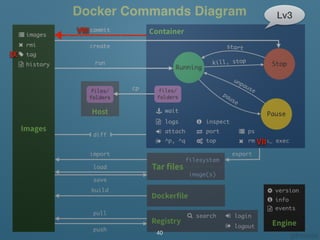
![第 7 招:進入容器 (exec)
41
# docker exec [OPTIONS] CONTAINER COMMAND [ARG...]
# 查看已啟動的 containers。
$ docker ps
# 進入 container。
$ docker exec -it 473e79f71ed3 bash
# 於 container 內進⾏行行操作。
root@473e79f71ed3:/tmp# lsb_release -a > hello_world.txt
# 離開 container。
root@473e79f71ed3:/tmp# exit](https://image.slidesharecdn.com/virtualizationwithdockerbasic-160704090825/85/Docker-41-320.jpg)
![第 8 招:提交 image (commit)
42
# docker commit [OPTIONS] CONTAINER [REPOSITORY[:TAG]]
$ docker ps
$ docker commit 473e79f71ed3 takaojs1607
sha256:df58b57acb0f10cd8321fa9174becbb19d75463a63354cd11d43debd...
$ docker ps
# -a, --author string Author
# -m, --message string Commit message
#
$ docker commit -m "提交訊息" -a "作者名稱" 473e79f71ed3 takaojs1607
sha256:5a2fd19723027fb305beb749ad5114775db8824d4d5d51d89bd04d01...](https://image.slidesharecdn.com/virtualizationwithdockerbasic-160704090825/85/Docker-42-320.jpg)
![第 9 招:修改標籤 (tag)
43
# docker tag IMAGE[:TAG] [REGISTRYHOST/][USERNAME/]NAME[:TAG]
#
# 列列出現有的 image。
$ docker images
# 透過 IMAGE ID 修改 tag。
$ docker tag 5a2fd1972302 takaojs1607:1.0
$ docker images
# 透過 REPOSITORY 名稱修改 tag。
$ docker tag takaojs1607 takaojs1607:1.1
$ docker images
$ docker tag takaojs1607:latest takaojs1607:1.2
$ docker images](https://image.slidesharecdn.com/virtualizationwithdockerbasic-160704090825/85/Docker-43-320.jpg)
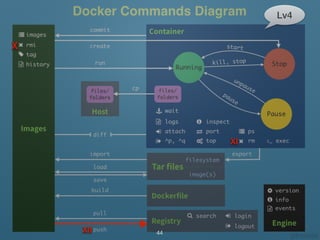
![第 10 招:移除 image 和 tag (rmi)
45
# docker rmi [OPTIONS] IMAGE [IMAGE...]
# 藉由 IMAGE ID 移除 image。
$ docker images
$ docker rmi 473e79f71ed3
# 移除 tag。
$ docker images
$ docker rmi takaojs1607:1.2
$ docker image
# 強制移除 (包含有容器正在執⾏行行)。
$ docker run hello-world
$ docker rmi -f hello-world](https://image.slidesharecdn.com/virtualizationwithdockerbasic-160704090825/85/Docker-45-320.jpg)
![第 11 招:移除容器 (rm)
46
# docker rm [OPTIONS] CONTAINER [CONTAINER...]
$ docker ps -a
# 只移除已停⽌止的容器。
$ docker rm 473e79f71ed3
root@473e79f71ed3:/tmp#
# 強制移除。
$ docker rm -f 473e79f71ed3](https://image.slidesharecdn.com/virtualizationwithdockerbasic-160704090825/85/Docker-46-320.jpg)
![第 12 招:上傳 image (push)
47
# docker push NAME[:TAG] [OPTIONS]
#
# - 需登入 Docker Registry 才可使⽤用。
# - Docker Hub: <USERNAME>/<REPO_NAME>
# - Private Docker Registry: <SERVER_NAME>/<REPO_NAME>
$ docker images
$ docker tag 473e79f71ed3 <USERNAME>/foo
$ docker tag 473e79f71ed3 <SERVER_NAME>/foo
# 上傳 image
$ docker push <USERNAME>foo
$ docker push <SERVER_NAME>/foo](https://image.slidesharecdn.com/virtualizationwithdockerbasic-160704090825/85/Docker-47-320.jpg)