PROJECT TEAM
Your logo here
Project Management Team
2
Your Text Here
Your Text Here
Your Text Here
Your Text Here
Your Text Here
TEAM A TEAM B TEAM C TEAM D
Text Here
Text Here
Text Here
Text Here
Text Here
Text Here
Text Here
Text Here
Text Here
Text Here
Text Here
Text Here
Text Here Text Here Text Here Text Here
This slide covers all
those people who
would be
associated with this
project
Proposal Project Manger
Project Manager <Name> <Phone Number> <Email Address> -
Proposal Project Manger
<Your Function> <Name> <Phone Number> <Email Address> 100%
<Your Function> <Name> <Phone Number> <Email Address> 75%
<Your Function> <Name> <Phone Number> <Email Address> 25%
Alternative: Department <Name> <Phone Number> <Email Address> 00%
Project Manager/ Project Team
3
Project Name:
Function Name Phone Email Leave of Absence
Function Name Phone Email Time Portion (%)
This slide covers all
those people who
would be
associated with this
project
Project Manager/ Project Team
4
Text Here Text Here Text Here
Functional
Manager
Functional
Manager
Functional
Manager
Put your Text Here
Project
Manager
Text Here Text Here Text Here Text Here Text Here Text Here Text Here Text Here Text Here Text HereText Here
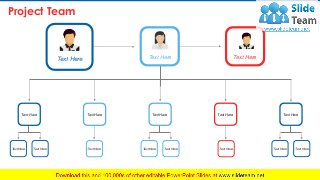
Project Team
5
Project Team
Development
Functional
Operational Technical
System
Administrator
Training
Text Here Text Here Text Here Text Here
CoreTeamSupportTeam
Project Team
6
Name
Designation
Name
Designation
Name
Designation
Name
Designation
Name
Designation
Name
Name
Designation Name Name Name Name Name
Name Name Name
Name
Designation Name Name Name
TEAMATEAMB
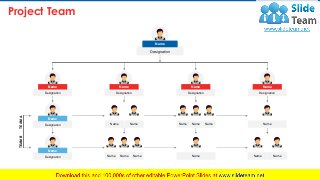
Project Team
7
Text HereText Here
Text Here Text Here Text Here
Text Here Text Here Text Here Text Here Text Here
Text HereText HereText HereText HereText HereText Here
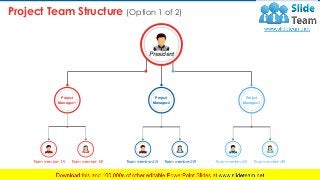
Project Team Structure (Option 1 of 2)
8
President
Project
Manager-1
Project
Manager-2
Project
Manager-3
Team member-1A Team member-1B Team member-2A Team member-2B Team member-3A Team member-3B
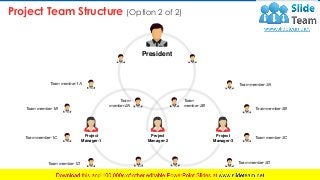
Project Team Structure (Option 2 of 2)
9
Project
Manager-1
Team member-1A
Team member-1B
Team member-1C
Team member-1D
Team
member-2A
Team
member-2B
Team member-2C Team member-2D
Team member-3A
Team member-3B
Team member-3C
Team member-3D
President
Project
Manager-2
Project
Manager-3
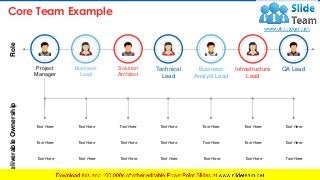
Core Team Example
10
Business
Lead
Solution
Architect
Technical
Lead
Infrastructure
Lead
Business
Analyst Lead
QA LeadProject
Manager
DeliverableOwnershipRole
Text Here
Text Here
Text Here
Text Here
Text Here
Text Here
Text Here
Text Here
Text Here
Text Here
Text Here
Text Here
Text Here
Text Here
Text Here
Text Here
Text Here
Text Here
Text Here
Text Here
Text Here
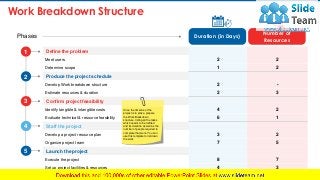
Work Breakdown Structure
11
Define the problem
Meet users 2 2
Determine scope 1 2
Produce the project schedule
Develop Work breakdown structure 2 -
Estimate resources & duration 2 3

Confirm project feasibility
Identify tangible & intangible costs 4 2
Evaluate technical & resource feasibility 6 1
Staff the project
Develop a project resource plan 3 2
Organize project team 7 5
Launch the project
Execute the project 8 7
Set up project facilities & resources 4 3
Phases
1
2
3
4
5
Duration (in Days)
Number of
Resources
Once the timeline of the
project is in place, prepare
the Work Breakdown
structure, listing all the tasks
which needs to be fulfilled
and its duration as well as the
number of people required to
complete that work. You can
use this template to list down
the work
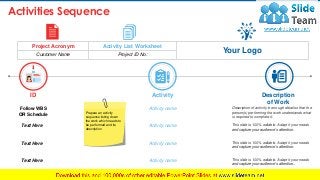
Activities Sequence
12
ID
Follow WBS
OR Schedule
Text Here
Text Here
Text Here
Activity
Activity name
Activity name
Activity name
Activity name
Description
of Work
Description of activity in enough detail so that the
person(s) performing the work understands what
is required to complete it.
This slide is 100% editable. Adapt it your needs
and capture your audience’s attention.
This slide is 100% editable. Adapt it your needs
and capture your audience’s attention..
This slide is 100% editable. Adapt it your needs
and capture your audience’s attention.
Project Acronym Activity List Worksheet
Your LogoCustomer Name Project ID No:
Prepare an activity
sequence listing down
the work which needs to
be performed and its
description
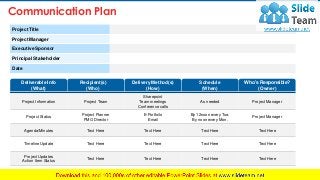
Communication Plan
13
Project Information Project Team
Sharepoint
Team meetings
Conference calls
As needed Project Manager
Project Status
Project Planner
PMO Director
E-Portfoilo
Email
By 12noon every Tue.
By noon every Mon.
Project Manager
Agenda/Minutes Text Here Text Here Text Here Text Here
Timeline Update Text Here Text Here Text Here Text Here
Project Updates
Action Item Status
Text Here Text Here Text Here Text Here
Project Title
Project Manager
Executive Sponsor
Principal Stakeholder
Date
Deliverable Info
(What)
Recipient(s)
(Who)
Delivery Method(s)
(How)
Schedule
(When)
Who’s Responsible?
(Owner)
14
Break Time
We will come back at
10:30 AM
15
Charts & Graphs
Donut Pie Chart
16
20%
08%
15%
26%
18%
This slide is 100% editable. Adapt
it to your needs and capture your
audience's attention.
• Product 01
This slide is 100% editable. Adapt
it to your needs and capture your
audience's attention.
• Product 02
This slide is 100% editable. Adapt it
to your needs and capture your
audience's attention.
• Product 03
This slide is 100% editable. Adapt
it to your needs and capture your
audience's attention.
• Product 04
This slide is 100% editable. Adapt
it to your needs and capture your
audience's attention.
• Product 05
Bar Chart
17
This graph/chart is linked to excel, and changes automatically based on data. Just left click on it and select “Edit Data”.
0
10
20
30
40
50
60
70
80
90
100
FY' 12 FY' 13 FY' 14 FY' 15 FY' 16 FY' 17 FY' 18
Salesinpercentage(%)
Financial years
This slide is 100% editable. Adapt
it to your needs and capture your audience's
attention.
• Product 01
This slide is 100% editable. Adapt
it to your needs and capture your audience's
attention.
• Product 02
Area Chart
18
95%
0
10
20
30
40
50
60
70
80
90
100
FY '12 FY '13 FY '14 FY '15 FY '16 FY '17 FY '18
SalesInPercentage(%)
This graph/chart is linked to excel, and changes automatically based on data. Just left click on it and select “Edit Data”.
This slide is 100% editable. Adapt
it to your needs and capture your audience's
attention.
• Product 01
This slide is 100% editable. Adapt
it to your needs and capture your audience's
attention.
• Product 02
Line Chart
19
0
10
20
30
40
50
60
70
80
FY' 11 FY' 12 FY' 13 FY' 14 FY' 15 FY' 16 FY' 17 FY' 18
Salesinpercentage(%)
Financial Years
This graph/chart is linked to excel, and changes automatically based on data. Just left click on it and select “Edit Data”.
This slide is 100% editable. Adapt
it to your needs and capture your audience's
attention.
• Product 01
This slide is 100% editable. Adapt
it to your needs and capture your audience's
attention.
• Product 02
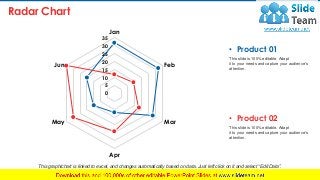
Radar Chart
20
0
5
10
15
20
25
30
35
Jan
Feb
Mar
Apr
May
Jun
This graph/chart is linked to excel, and changes automatically based on data. Just left click on it and select “Edit Data”.
This slide is 100% editable. Adapt
it to your needs and capture your audience's
attention.
• Product 01
This slide is 100% editable. Adapt
it to your needs and capture your audience's
attention.
• Product 02
21
Additional Slides
22
This is a representative image, and should be
replaced by your own image. Just right click and
replace image.
Our Mission
This slide is 100% editable. Adapt
it to your needs and capture your
audience's attention.
Name Here
Designation
Name Here
Designation
This slide is 100% editable. Adapt
it to your needs and capture your
audience's attention.
23
Our Team
24
This is a representative image, and should be replaced
by your own image. Just right click and replace image.
About Us
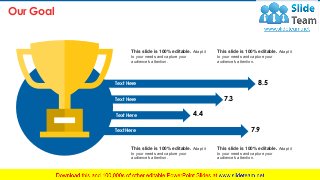
Our Goal
25
8.5
7.3
4.4
7.9
Text Here
Text Here
Text Here
Text Here
This slide is 100% editable. Adapt it
to your needs and capture your
audience's attention.
This slide is 100% editable. Adapt it
to your needs and capture your
audience's attention.
This slide is 100% editable. Adapt it
to your needs and capture your
audience's attention.
This slide is 100% editable. Adapt it
to your needs and capture your
audience's attention.
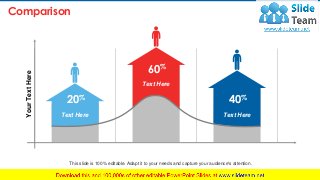
Comparison
26
YourTextHere
Text Here
20%
Text Here
60%
Text Here
40%
This slide is 100% editable. Adapt it to your needs and capture your audience's attention.
Financial
27
Minimum
This slide is 100%
editable. Adapt it to your
needs and capture your
audience's attention.
25%
Maximum
This slide is 100%
editable. Adapt it to your
needs and capture your
audience's attention.
75%
28
Q
U
O
T
E
S
It’s not just about
being better. It’s
about being
different. You need
to give people a
reason to choose
your business.
-Tom Abbott
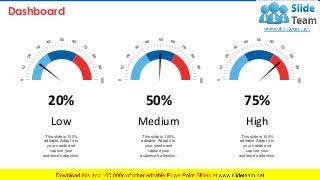
Dashboard
29
50
100
0
This slide is 100%
editable. Adapt it to
your needs and
capture your
audience's attention.
20%
Low
50
100
0
This slide is 100%
editable. Adapt it to
your needs and
capture your
audience's attention.
50%
Medium
50
100
0
This slide is 100%
editable. Adapt it to
your needs and
capture your
audience's attention.
75%
High
Timeline
30
This slide is 100% editable. Adapt
it to your needs and capture your
audience's attention.
2014
This slide is 100% editable. Adapt
it to your needs and capture your
audience's attention.
20172015
This slide is 100% editable. Adapt
it to your needs and capture your
audience's attention.
2016
This slide is 100% editable. Adapt
it to your needs and capture your
audience's attention.
2018
This slide is 100% editable. Adapt
it to your needs and capture your
audience's attention.
Location
31
75%
75 Million User
North America
55%
55 Million User
South America
40%
40 Million User
Asia
25%
25 Million User
Africa
This slide is 100% editable. Adapt it to your needs and capture your audience's attention.
This slide is 100% editable. Adapt it to
your needs and capture your audience's
attention.
This slide is 100% editable. Adapt it to
your needs and capture your audience's
attention.
This slide is 100% editable. Adapt it to
your needs and capture your audience's
attention.
This slide is 100% editable. Adapt it to
your needs and capture your audience's
attention.
Puzzle
32
01
0203
04
Target
33
01
02
03
This slide is 100% editable. Adapt it
to your needs and capture your
audience's attention.
This slide is 100% editable. Adapt it
to your needs and capture your
audience's attention.
This slide is 100% editable. Adapt it
to your needs and capture your
audience's attention.
Mind Map
34
93% 99%
This slide is 100% editable. Adapt it
to your needs and capture your
audience ‘s attention.
This slide is 100% editable. Adapt it
to your needs and capture your
audience ‘s attention.
This slide is 100% editable. Adapt it
to your needs and capture your
audience ‘s attention.
This slide is 100% editable. Adapt it
to your needs and capture your
audience ‘s attention.
Bulb Or Idea
35
This slide is 100%
editable. Adapt it to your
needs and capture your
audience's attention.
This slide is 100%
editable. Adapt it to your
needs and capture your
audience's attention.
This slide is 100%
editable. Adapt it to your
needs and capture your
audience's attention.
Idea
01
Idea
02
Idea
03
shilouttes
36
This slide is 100%
editable. Adapt it to
your needs and
capture your
audience's attention.
Silhouette 01
This slide is 100%
editable. Adapt it to
your needs and
capture your
audience's attention.
Silhouette 02
Magnifying Glass
37
• This slide is 100% editable. Adapt it to your
needs and capture your audience's attention.
• This slide is 100% editable. Adapt it to your
needs and capture your audience's attention.
• This slide is 100% editable. Adapt it to your
needs and capture your audience's attention.
• This slide is 100% editable. Adapt it to your
needs and capture your audience's attention.
38
Address:
# street number, city, state
Contact Numbers:
0123456789
Email Address:
emailaddress123@gmail.com
Thank You
For Watching!

Project Team PowerPoint Presentation Slides

  • 1.
  • 2.
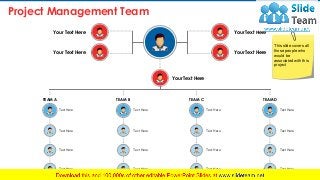
    Project Management Team 2 YourText Here Your Text Here Your Text Here Your Text Here Your Text Here TEAM A TEAM B TEAM C TEAM D Text Here Text Here Text Here Text Here Text Here Text Here Text Here Text Here Text Here Text Here Text Here Text Here Text Here Text Here Text Here Text Here This slide covers all those people who would be associated with this project
  • 3.
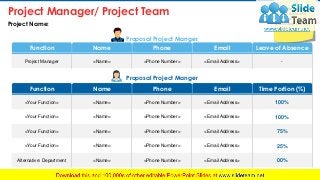
    Proposal Project Manger ProjectManager <Name> <Phone Number> <Email Address> - Proposal Project Manger <Your Function> <Name> <Phone Number> <Email Address> 100% <Your Function> <Name> <Phone Number> <Email Address> 100% <Your Function> <Name> <Phone Number> <Email Address> 75% <Your Function> <Name> <Phone Number> <Email Address> 25% Alternative: Department <Name> <Phone Number> <Email Address> 00% Project Manager/ Project Team 3 Project Name: Function Name Phone Email Leave of Absence Function Name Phone Email Time Portion (%) This slide covers all those people who would be associated with this project
  • 4.
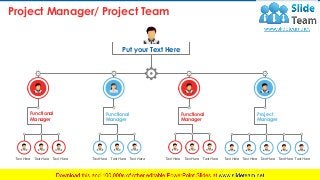
    Project Manager/ ProjectTeam 4 Text Here Text Here Text Here Functional Manager Functional Manager Functional Manager Put your Text Here Project Manager Text Here Text Here Text Here Text Here Text Here Text Here Text Here Text Here Text Here Text HereText Here
  • 5.
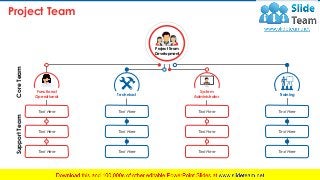
    Project Team 5 Project Team Development Functional OperationalTechnical System Administrator Training Text Here Text Here Text Here Text Here Text Here Text Here Text Here Text Here Text Here Text Here Text Here Text Here CoreTeamSupportTeam
  • 6.
  • 7.
    Project Team 7 Text HereTextHere Text Here Text Here Text Here Text Here Text Here Text Here Text Here Text Here Text HereText HereText HereText HereText HereText Here
  • 8.
    Project Team Structure(Option 1 of 2) 8 President Project Manager-1 Project Manager-2 Project Manager-3 Team member-1A Team member-1B Team member-2A Team member-2B Team member-3A Team member-3B
  • 9.
    Project Team Structure(Option 2 of 2) 9 Project Manager-1 Team member-1A Team member-1B Team member-1C Team member-1D Team member-2A Team member-2B Team member-2C Team member-2D Team member-3A Team member-3B Team member-3C Team member-3D President Project Manager-2 Project Manager-3
  • 10.
    Core Team Example 10 Business Lead Solution Architect Technical Lead Infrastructure Lead Business AnalystLead QA LeadProject Manager DeliverableOwnershipRole Text Here Text Here Text Here Text Here Text Here Text Here Text Here Text Here Text Here Text Here Text Here Text Here Text Here Text Here Text Here Text Here Text Here Text Here Text Here Text Here Text Here
  • 11.
    Work Breakdown Structure 11 Definethe problem Meet users 2 2 Determine scope 1 2 Produce the project schedule Develop Work breakdown structure 2 - Estimate resources & duration 2 3 Confirm project feasibility Identify tangible & intangible costs 4 2 Evaluate technical & resource feasibility 6 1 Staff the project Develop a project resource plan 3 2 Organize project team 7 5 Launch the project Execute the project 8 7 Set up project facilities & resources 4 3 Phases 1 2 3 4 5 Duration (in Days) Number of Resources Once the timeline of the project is in place, prepare the Work Breakdown structure, listing all the tasks which needs to be fulfilled and its duration as well as the number of people required to complete that work. You can use this template to list down the work
  • 12.
    Activities Sequence 12 ID Follow WBS ORSchedule Text Here Text Here Text Here Activity Activity name Activity name Activity name Activity name Description of Work Description of activity in enough detail so that the person(s) performing the work understands what is required to complete it. This slide is 100% editable. Adapt it your needs and capture your audience’s attention. This slide is 100% editable. Adapt it your needs and capture your audience’s attention.. This slide is 100% editable. Adapt it your needs and capture your audience’s attention. Project Acronym Activity List Worksheet Your LogoCustomer Name Project ID No: Prepare an activity sequence listing down the work which needs to be performed and its description
  • 13.
    Communication Plan 13 Project InformationProject Team Sharepoint Team meetings Conference calls As needed Project Manager Project Status Project Planner PMO Director E-Portfoilo Email By 12noon every Tue. By noon every Mon. Project Manager Agenda/Minutes Text Here Text Here Text Here Text Here Timeline Update Text Here Text Here Text Here Text Here Project Updates Action Item Status Text Here Text Here Text Here Text Here Project Title Project Manager Executive Sponsor Principal Stakeholder Date Deliverable Info (What) Recipient(s) (Who) Delivery Method(s) (How) Schedule (When) Who’s Responsible? (Owner)
  • 14.
    14 Break Time We willcome back at 10:30 AM
  • 15.
  • 16.
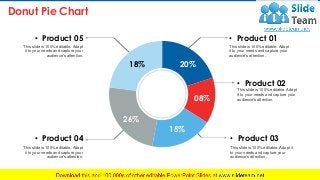
    Donut Pie Chart 16 20% 08% 15% 26% 18% Thisslide is 100% editable. Adapt it to your needs and capture your audience's attention. • Product 01 This slide is 100% editable. Adapt it to your needs and capture your audience's attention. • Product 02 This slide is 100% editable. Adapt it to your needs and capture your audience's attention. • Product 03 This slide is 100% editable. Adapt it to your needs and capture your audience's attention. • Product 04 This slide is 100% editable. Adapt it to your needs and capture your audience's attention. • Product 05
  • 17.
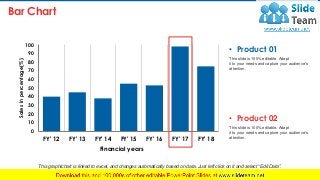
    Bar Chart 17 This graph/chartis linked to excel, and changes automatically based on data. Just left click on it and select “Edit Data”. 0 10 20 30 40 50 60 70 80 90 100 FY' 12 FY' 13 FY' 14 FY' 15 FY' 16 FY' 17 FY' 18 Salesinpercentage(%) Financial years This slide is 100% editable. Adapt it to your needs and capture your audience's attention. • Product 01 This slide is 100% editable. Adapt it to your needs and capture your audience's attention. • Product 02
  • 18.
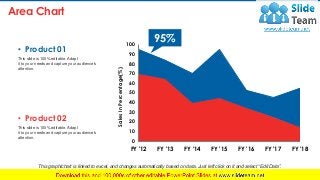
    Area Chart 18 95% 0 10 20 30 40 50 60 70 80 90 100 FY '12FY '13 FY '14 FY '15 FY '16 FY '17 FY '18 SalesInPercentage(%) This graph/chart is linked to excel, and changes automatically based on data. Just left click on it and select “Edit Data”. This slide is 100% editable. Adapt it to your needs and capture your audience's attention. • Product 01 This slide is 100% editable. Adapt it to your needs and capture your audience's attention. • Product 02
  • 19.
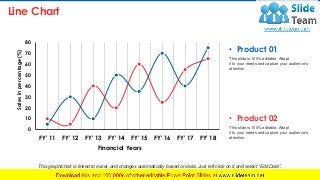
    Line Chart 19 0 10 20 30 40 50 60 70 80 FY' 11FY' 12 FY' 13 FY' 14 FY' 15 FY' 16 FY' 17 FY' 18 Salesinpercentage(%) Financial Years This graph/chart is linked to excel, and changes automatically based on data. Just left click on it and select “Edit Data”. This slide is 100% editable. Adapt it to your needs and capture your audience's attention. • Product 01 This slide is 100% editable. Adapt it to your needs and capture your audience's attention. • Product 02
  • 20.
    Radar Chart 20 0 5 10 15 20 25 30 35 Jan Feb Mar Apr May Jun This graph/chartis linked to excel, and changes automatically based on data. Just left click on it and select “Edit Data”. This slide is 100% editable. Adapt it to your needs and capture your audience's attention. • Product 01 This slide is 100% editable. Adapt it to your needs and capture your audience's attention. • Product 02
  • 21.
  • 22.
    22 This is arepresentative image, and should be replaced by your own image. Just right click and replace image. Our Mission
  • 23.
    This slide is100% editable. Adapt it to your needs and capture your audience's attention. Name Here Designation Name Here Designation This slide is 100% editable. Adapt it to your needs and capture your audience's attention. 23 Our Team
  • 24.
    24 This is arepresentative image, and should be replaced by your own image. Just right click and replace image. About Us
  • 25.
    Our Goal 25 8.5 7.3 4.4 7.9 Text Here TextHere Text Here Text Here This slide is 100% editable. Adapt it to your needs and capture your audience's attention. This slide is 100% editable. Adapt it to your needs and capture your audience's attention. This slide is 100% editable. Adapt it to your needs and capture your audience's attention. This slide is 100% editable. Adapt it to your needs and capture your audience's attention.
  • 26.
    Comparison 26 YourTextHere Text Here 20% Text Here 60% TextHere 40% This slide is 100% editable. Adapt it to your needs and capture your audience's attention.
  • 27.
    Financial 27 Minimum This slide is100% editable. Adapt it to your needs and capture your audience's attention. 25% Maximum This slide is 100% editable. Adapt it to your needs and capture your audience's attention. 75%
  • 28.
    28 Q U O T E S It’s not justabout being better. It’s about being different. You need to give people a reason to choose your business. -Tom Abbott
  • 29.
    Dashboard 29 50 100 0 This slide is100% editable. Adapt it to your needs and capture your audience's attention. 20% Low 50 100 0 This slide is 100% editable. Adapt it to your needs and capture your audience's attention. 50% Medium 50 100 0 This slide is 100% editable. Adapt it to your needs and capture your audience's attention. 75% High
  • 30.
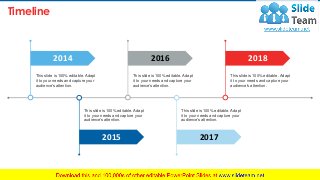
    Timeline 30 This slide is100% editable. Adapt it to your needs and capture your audience's attention. 2014 This slide is 100% editable. Adapt it to your needs and capture your audience's attention. 20172015 This slide is 100% editable. Adapt it to your needs and capture your audience's attention. 2016 This slide is 100% editable. Adapt it to your needs and capture your audience's attention. 2018 This slide is 100% editable. Adapt it to your needs and capture your audience's attention.
  • 31.
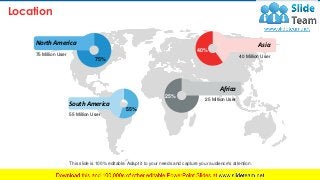
    Location 31 75% 75 Million User NorthAmerica 55% 55 Million User South America 40% 40 Million User Asia 25% 25 Million User Africa This slide is 100% editable. Adapt it to your needs and capture your audience's attention.
  • 32.
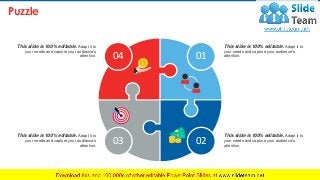
    This slide is100% editable. Adapt it to your needs and capture your audience's attention. This slide is 100% editable. Adapt it to your needs and capture your audience's attention. This slide is 100% editable. Adapt it to your needs and capture your audience's attention. This slide is 100% editable. Adapt it to your needs and capture your audience's attention. Puzzle 32 01 0203 04
  • 33.
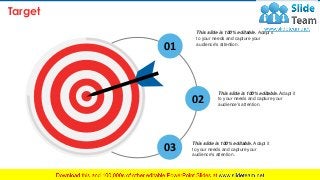
    Target 33 01 02 03 This slide is100% editable. Adapt it to your needs and capture your audience's attention. This slide is 100% editable. Adapt it to your needs and capture your audience's attention. This slide is 100% editable. Adapt it to your needs and capture your audience's attention.
  • 34.
    Mind Map 34 93% 99% Thisslide is 100% editable. Adapt it to your needs and capture your audience ‘s attention. This slide is 100% editable. Adapt it to your needs and capture your audience ‘s attention. This slide is 100% editable. Adapt it to your needs and capture your audience ‘s attention. This slide is 100% editable. Adapt it to your needs and capture your audience ‘s attention.
  • 35.
    Bulb Or Idea 35 Thisslide is 100% editable. Adapt it to your needs and capture your audience's attention. This slide is 100% editable. Adapt it to your needs and capture your audience's attention. This slide is 100% editable. Adapt it to your needs and capture your audience's attention. Idea 01 Idea 02 Idea 03
  • 36.
    shilouttes 36 This slide is100% editable. Adapt it to your needs and capture your audience's attention. Silhouette 01 This slide is 100% editable. Adapt it to your needs and capture your audience's attention. Silhouette 02
  • 37.
    Magnifying Glass 37 • Thisslide is 100% editable. Adapt it to your needs and capture your audience's attention. • This slide is 100% editable. Adapt it to your needs and capture your audience's attention. • This slide is 100% editable. Adapt it to your needs and capture your audience's attention. • This slide is 100% editable. Adapt it to your needs and capture your audience's attention.
  • 38.
    38 Address: # street number,city, state Contact Numbers: 0123456789 Email Address: emailaddress123@gmail.com Thank You For Watching!