n2ws.com
n2ws.com/report/aws-data-protection
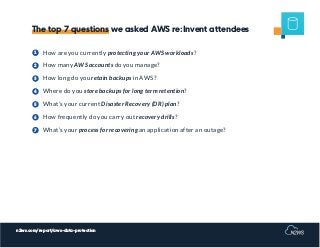
How are you currently protecting your AWS workloads?
How many AWS accounts do you manage?
How long do you retain backups in AWS?
Where do you store backups for long term retention?
What’s your current Disaster Recovery (DR) plan?
How frequently do you carry out recovery drills?
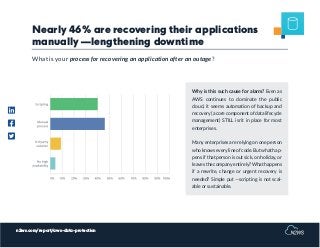
What’s your process for recovering an application after an outage?
1
2
3
4
5
6
7
The top 7 questions we asked AWS re:Invent attendees
n2ws.com/report/aws-data-protection
ABOUT THIS REPORT
To explore how organizations are using
AWS cloud —including what services
they use and how they respond to grow-
ing security threats— N2WS published
this 2020 AWS Data Protection report.
Inside, you’ll discover trends among AWS
service usage and data protection and in-
sights into potential pitfalls to avoid so
you can optimize your cloud (and, in turn,
drive more innovation).
Based on a survey of 130+ AWS re:Invent
attendees, the 2020 State of AWS Data
Protection report is a follow-up to last
year’s data protection report. Given the
year-over-year growth of the conference,
it’s clear that there are many benefits to
having your production data in the cloud.
However, we identified some common
pain points and some overlooked (and
concerning) practices in AWS cloud data
management.
n2ws.com/report/aws-data-protection
How are you currently
protecting your AWS
workloads?
1
n2ws.com/report/aws-data-protection
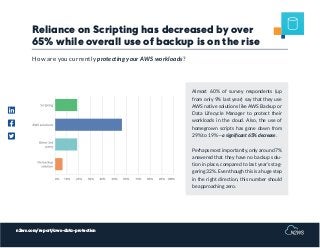
Reliance on Scripting has decreased by over
65% while overall use of backup is on the rise
Almost 60% of survey respondents (up
from only 9% last year) say that they use
AWS native solutions like AWS Backup or
Data Lifecycle Manager to protect their
workloads in the cloud. Also, the use of
homegrown scripts has gone down from
29% to 19% —a significant 65% decrease.
Perhaps most importantly, only around 7%
answered that they have no backup solu-
tion in place, compared to last year’s stag-
gering 32%. Even though this is a huge step
in the right direction, this number should
be approaching zero.
How are you currently protecting your AWS workloads?
n2ws.com/report/aws-data-protection
How many different
AWS accounts do you
manage?
2
n2ws.com/report/aws-data-protection
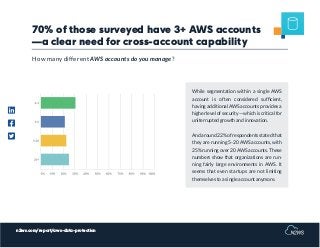
70% of those surveyed have 3+ AWS accounts
—a clear need for cross-account capability
While segmentation within a single AWS
account is often considered sufficient,
having additional AWS accounts provides a
higherlevelofsecurity—whichiscriticalfor
uniterrupted growth and innovation.
Andaround22%ofrespondentsstatedthat
they are running 5-20 AWS accounts, with
25% running over 20 AWS accounts. These
numbers show that organizations are run-
ning fairly large environments in AWS. It
seems that even startups are not limiting
themselves to a single account anymore.
How many different AWS accounts do you manage?
n2ws.com/report/aws-data-protection
How long do you retain
backups in AWS?
3
n2ws.com/report/aws-data-protection
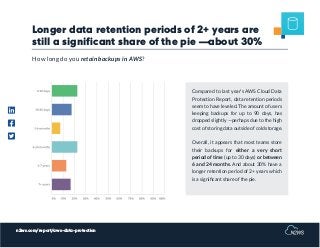
Longer data retention periods of 2+ years are
still a significant share of the pie —about 30%
Compared to last year’s AWS Cloud Data
Protection Report, data retention periods
seem to have leveled. The amount of users
keeping backups for up to 90 days, has
dropped slightly —perhaps due to the high
cost of storing data outside of cold storage.
Overall, it appears that most teams store
their backups for either a very short
period of time (up to 30 days) or between
6 and 24 months. And about 30% have a
longer retention period of 2+ years which
is a significant share of the pie.
How long do you retain backups in AWS?
n2ws.com/report/aws-data-protection
Where do you store
backups for long term
retention?
4
n2ws.com/report/aws-data-protection
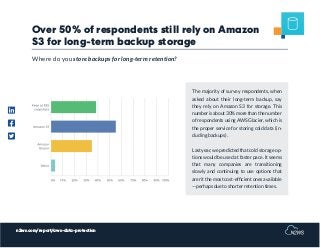
Over 50% of respondents still rely on Amazon
S3 for long-term backup storage
The majority of survey respondents, when
asked about their long-term backup, say
they rely on Amazon S3 for storage. This
numberisabout30%morethanthenumber
of respondents using AWS Glacier, which is
the proper service for storing cold data (in-
cluding backups).
Lastyear,wepredictedthatcoldstorageop-
tions would be used at faster pace. It seems
that many companies are transitioning
slowly and continuing to use options that
aren’t the most cost-efficient ones available
—perhaps due to shorter retention times.
Where do you store backups for long-term retention?
n2ws.com/report/aws-data-protection
Currently, what is your
your Disaster Recovery
(DR) plan?
5
n2ws.com/report/aws-data-protection
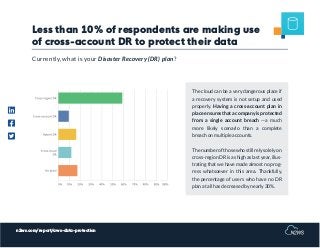
Less than 10% of respondents are making use
of cross-account DR to protect their data
The cloud can be a very dangerous place if
a recovery system is not setup and used
properly. Having a cross-account plan in
place ensures that a company is protected
from a single account breach —a much
more likely scenario than a complete
breach on multiple accounts.
The number of those who still rely solely on
cross-region DR is as high as last year, illus-
trating that we have made almost no prog-
ress whatsoever in this area. Thankfully,
the percentage of users who have no DR
plan at all has decreased by nearly 30%.
Currently, what is your Disaster Recovery (DR) plan?
n2ws.com/report/aws-data-protection
How frequently does
your team carry out
recovery drills?
6
n2ws.com/report/aws-data-protection
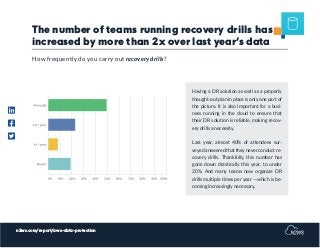
The number of teams running recovery drills has
increased by more than 2x over last year’s data
Having a DR solution as well as a properly
thought-out plan in place is only one part of
the picture. It is also important for a busi-
ness running in the cloud to ensure that
their DR solution is reliable, making recov-
ery drills a necessity.
Last year, almost 40% of attendees sur-
veyedansweredthattheyneverconductre-
covery drills. Thankfully, this number has
gone down drastically this year, to under
20%. And many teams now organize DR
drills multiple times per year —which is be-
coming increasingly necessary.
How frequently do you carry out recovery drills?
n2ws.com/report/aws-data-protection
What’s your process for
recovering applications
after an outage?
7
n2ws.com/report/aws-data-protection
Nearly 46% are recovering their applications
manually —lengthening downtime
Why is this such cause for alarm? Even as
AWS continues to dominate the public
cloud, it seems automation of backup and
recovery(acorecomponentofdatalifecycle
management) STILL isn’t in place for most
enterprises.
Many enterprises are relying on one person
whoknowseverylineofcode.Butwhathap-
pens if that person is out sick, on holiday, or
leaves the company entirely? What happens
if a rewrite, change or urgent recovery is
needed? Simple put —scripting is not scal-
able or sustainable.
What is your process for recovering an application after an outage?
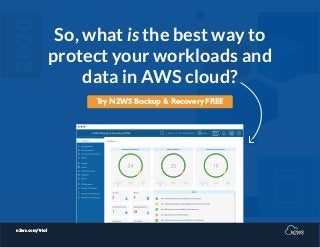
So, what is the best way to
protect your workloads and
data in AWS cloud?
n2ws.com/trial
Try N2WS Backup & Recovery FREE

N2WS 2020 AWS Cloud Data Protection Report

  • 1.
  • 2.
    n2ws.com/report/aws-data-protection How are youcurrently protecting your AWS workloads? How many AWS accounts do you manage? How long do you retain backups in AWS? Where do you store backups for long term retention? What’s your current Disaster Recovery (DR) plan? How frequently do you carry out recovery drills? What’s your process for recovering an application after an outage? 1 2 3 4 5 6 7 The top 7 questions we asked AWS re:Invent attendees
  • 3.
    n2ws.com/report/aws-data-protection ABOUT THIS REPORT Toexplore how organizations are using AWS cloud —including what services they use and how they respond to grow- ing security threats— N2WS published this 2020 AWS Data Protection report. Inside, you’ll discover trends among AWS service usage and data protection and in- sights into potential pitfalls to avoid so you can optimize your cloud (and, in turn, drive more innovation). Based on a survey of 130+ AWS re:Invent attendees, the 2020 State of AWS Data Protection report is a follow-up to last year’s data protection report. Given the year-over-year growth of the conference, it’s clear that there are many benefits to having your production data in the cloud. However, we identified some common pain points and some overlooked (and concerning) practices in AWS cloud data management.
  • 4.
    n2ws.com/report/aws-data-protection How are youcurrently protecting your AWS workloads? 1
  • 5.
    n2ws.com/report/aws-data-protection Reliance on Scriptinghas decreased by over 65% while overall use of backup is on the rise Almost 60% of survey respondents (up from only 9% last year) say that they use AWS native solutions like AWS Backup or Data Lifecycle Manager to protect their workloads in the cloud. Also, the use of homegrown scripts has gone down from 29% to 19% —a significant 65% decrease. Perhaps most importantly, only around 7% answered that they have no backup solu- tion in place, compared to last year’s stag- gering 32%. Even though this is a huge step in the right direction, this number should be approaching zero. How are you currently protecting your AWS workloads?
  • 6.
  • 7.
    n2ws.com/report/aws-data-protection 70% of thosesurveyed have 3+ AWS accounts —a clear need for cross-account capability While segmentation within a single AWS account is often considered sufficient, having additional AWS accounts provides a higherlevelofsecurity—whichiscriticalfor uniterrupted growth and innovation. Andaround22%ofrespondentsstatedthat they are running 5-20 AWS accounts, with 25% running over 20 AWS accounts. These numbers show that organizations are run- ning fairly large environments in AWS. It seems that even startups are not limiting themselves to a single account anymore. How many different AWS accounts do you manage?
  • 8.
  • 9.
    n2ws.com/report/aws-data-protection Longer data retentionperiods of 2+ years are still a significant share of the pie —about 30% Compared to last year’s AWS Cloud Data Protection Report, data retention periods seem to have leveled. The amount of users keeping backups for up to 90 days, has dropped slightly —perhaps due to the high cost of storing data outside of cold storage. Overall, it appears that most teams store their backups for either a very short period of time (up to 30 days) or between 6 and 24 months. And about 30% have a longer retention period of 2+ years which is a significant share of the pie. How long do you retain backups in AWS?
  • 10.
    n2ws.com/report/aws-data-protection Where do youstore backups for long term retention? 4
  • 11.
    n2ws.com/report/aws-data-protection Over 50% ofrespondents still rely on Amazon S3 for long-term backup storage The majority of survey respondents, when asked about their long-term backup, say they rely on Amazon S3 for storage. This numberisabout30%morethanthenumber of respondents using AWS Glacier, which is the proper service for storing cold data (in- cluding backups). Lastyear,wepredictedthatcoldstorageop- tions would be used at faster pace. It seems that many companies are transitioning slowly and continuing to use options that aren’t the most cost-efficient ones available —perhaps due to shorter retention times. Where do you store backups for long-term retention?
  • 12.
    n2ws.com/report/aws-data-protection Currently, what isyour your Disaster Recovery (DR) plan? 5
  • 13.
    n2ws.com/report/aws-data-protection Less than 10%of respondents are making use of cross-account DR to protect their data The cloud can be a very dangerous place if a recovery system is not setup and used properly. Having a cross-account plan in place ensures that a company is protected from a single account breach —a much more likely scenario than a complete breach on multiple accounts. The number of those who still rely solely on cross-region DR is as high as last year, illus- trating that we have made almost no prog- ress whatsoever in this area. Thankfully, the percentage of users who have no DR plan at all has decreased by nearly 30%. Currently, what is your Disaster Recovery (DR) plan?
  • 14.
  • 15.
    n2ws.com/report/aws-data-protection The number ofteams running recovery drills has increased by more than 2x over last year’s data Having a DR solution as well as a properly thought-out plan in place is only one part of the picture. It is also important for a busi- ness running in the cloud to ensure that their DR solution is reliable, making recov- ery drills a necessity. Last year, almost 40% of attendees sur- veyedansweredthattheyneverconductre- covery drills. Thankfully, this number has gone down drastically this year, to under 20%. And many teams now organize DR drills multiple times per year —which is be- coming increasingly necessary. How frequently do you carry out recovery drills?
  • 16.
    n2ws.com/report/aws-data-protection What’s your processfor recovering applications after an outage? 7
  • 17.
    n2ws.com/report/aws-data-protection Nearly 46% arerecovering their applications manually —lengthening downtime Why is this such cause for alarm? Even as AWS continues to dominate the public cloud, it seems automation of backup and recovery(acorecomponentofdatalifecycle management) STILL isn’t in place for most enterprises. Many enterprises are relying on one person whoknowseverylineofcode.Butwhathap- pens if that person is out sick, on holiday, or leaves the company entirely? What happens if a rewrite, change or urgent recovery is needed? Simple put —scripting is not scal- able or sustainable. What is your process for recovering an application after an outage?
  • 18.
    So, what isthe best way to protect your workloads and data in AWS cloud? n2ws.com/trial Try N2WS Backup & Recovery FREE