Download free for 30 days
Sign in
Upload
Language (EN)
Support
Business
Mobile
Social Media
Marketing
Technology
Art & Photos
Career
Design
Education
Presentations & Public Speaking
Government & Nonprofit
Healthcare
Internet
Law
Leadership & Management
Automotive
Engineering
Software
Recruiting & HR
Retail
Sales
Services
Science
Small Business & Entrepreneurship
Food
Environment
Economy & Finance
Data & Analytics
Investor Relations
Sports
Spiritual
News & Politics
Travel
Self Improvement
Real Estate
Entertainment & Humor
Health & Medicine
Devices & Hardware
Lifestyle
Change Language
Language
English
Español
Português
Français
Deutsche
Cancel
Save
EN
AT
Uploaded by
Austin Ting
1,636 views
Day 06 - 用 Postman 建立圖文選單(rich menu)
用 Postman 以 Massaging API 的方式建立圖文選單(rich menu)
Technology
◦
Read more
1
Save
Share
Embed
Embed presentation
Download
Downloaded 19 times
1
/ 8
2
/ 8
3
/ 8
4
/ 8
5
/ 8
6
/ 8
7
/ 8
8
/ 8
More Related Content
PPTX
Day 18 整理程式碼以及一些修正
by
Austin Ting
PPTX
Day 20 Payment flow - Line Pay API
by
Austin Ting
PDF
Day 17 會員流程 - 儲存會員資訊
by
Austin Ting
PDF
Day 16 創建 member 表單與 Formula
by
Austin Ting
PDF
Day 15 昨日的雷與 displayText
by
Austin Ting
PDF
Day 11 購物流程 - 點擊購買到購物資訊確認
by
Austin Ting
PDF
Day 10: 購物流程 - 商品列表分頁(Pagination)
by
Austin Ting
PDF
Day 02 - LINE Bot 的核心 - Messaging API
by
Austin Ting
Day 18 整理程式碼以及一些修正
by
Austin Ting
Day 20 Payment flow - Line Pay API
by
Austin Ting
Day 17 會員流程 - 儲存會員資訊
by
Austin Ting
Day 16 創建 member 表單與 Formula
by
Austin Ting
Day 15 昨日的雷與 displayText
by
Austin Ting
Day 11 購物流程 - 點擊購買到購物資訊確認
by
Austin Ting
Day 10: 購物流程 - 商品列表分頁(Pagination)
by
Austin Ting
Day 02 - LINE Bot 的核心 - Messaging API
by
Austin Ting
More from Austin Ting
PDF
Day 09: 購物流程 - 顯示商品列表
by
Austin Ting
PDF
Day 01 各種簡介
by
Austin Ting
PDF
Day 08: 購物流程 - 用 Airtable 建立商品
by
Austin Ting
PDF
Day 05 Bottender
by
Austin Ting
PDF
Debug sunday #3 UI practice #3
by
Austin Ting
PDF
Debug sunday #2 ui practice #2
by
Austin Ting
Day 09: 購物流程 - 顯示商品列表
by
Austin Ting
Day 01 各種簡介
by
Austin Ting
Day 08: 購物流程 - 用 Airtable 建立商品
by
Austin Ting
Day 05 Bottender
by
Austin Ting
Debug sunday #3 UI practice #3
by
Austin Ting
Debug sunday #2 ui practice #2
by
Austin Ting
Day 06 - 用 Postman 建立圖文選單(rich menu)
1.
電商聊天機器⼈人 LINE Bot 實戰 Day
06 ⽤用 Postman 建立圖⽂文選單(rich menu) 丁多安 Austin Ting
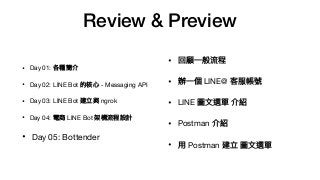
2.
Review & Preview •
Day 01: 各種簡介 • Day 02: LINE Bot 的核⼼心 - Messaging API • Day 03: LINE Bot 建立與 ngrok • Day 04: 電商 LINE Bot 架構流程設計 • Day 05: Bottender • 回顧⼀一般流程 • 辦⼀一個 LINE@ 客服帳號 • LINE 圖⽂文選單 介紹 • Postman 介紹 • ⽤用 Postman 建立 圖⽂文選單
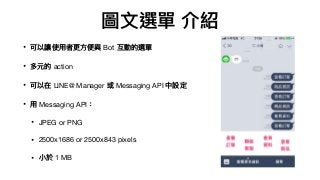
3.
圖⽂文選單 介紹 • 可以讓使⽤用者更更⽅方便便與
Bot 互動的選單 • 多元的 action • 可以在 LINE@ Manager 或 Messaging API 中設定 • ⽤用 Messaging API: • JPEG or PNG • 2500x1686 or 2500x843 pixels • ⼩小於 1 MB
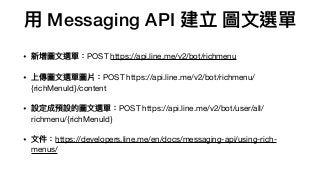
4.
⽤用 Messaging API
建立 圖⽂文選單 • 新增圖⽂文選單:POST https://api.line.me/v2/bot/richmenu • 上傳圖⽂文選單圖片:POST https://api.line.me/v2/bot/richmenu/ {richMenuId}/content • 設定成預設的圖⽂文選單:POST https://api.line.me/v2/bot/user/all/ richmenu/{richMenuId} • ⽂文件:https://developers.line.me/en/docs/messaging-api/using-rich- menus/
5.
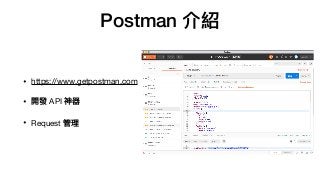
Postman 介紹 • https://www.getpostman.com •
開發 API 神器 • Request 管理理
6.
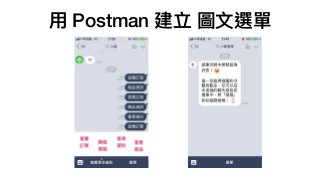
⽤用 Postman 建立
圖⽂文選單
7.
– 今天⼜又要壓線了了嗎? 「有問題還是沒問題,那真是個問題」
8.
參參考資料 • Source: LINE
Developers, Retrieved October 8, 2018 from https://developers.line.me/en/docs/messaging-api/using-rich- menus/ • Source:Postman, Retrieved October 8, 2018 from https://developers.line.me/en/docs/messaging-api/using-rich- menus/
Download